Samsung S43GC Monitor Review: Strong Colors, 8.7/10 Verdict
A 37% price drop on the SAMSUNG S43GC Series 24-Inch Business Monitor has drawn attention, but even at full price, user consensus paints it as a solid performer in both productivity and light gaming. Across Amazon, Reddit, Trustpilot, and PC Guide reviews, the S43GC hovers at an 8.7/10 score thanks to vivid IPS color reproduction, ergonomic versatility, and smooth 100Hz refresh performance—although some caution that the 24-inch panel may not suit heavy multitaskers.
Quick Verdict: Conditional buy for productivity and casual gaming
| Pros | Cons |
|---|---|
| True-to-life colors with wide viewing angles | Smaller screen area for intensive multitasking |
| Smooth 100Hz refresh rate with AMD FreeSync | Default 60Hz refresh needs manual settings change |
| Height-adjustable stand with swivel/tilt/pivot | No USB-C charging |
| Multiple connectivity options (HDMI, DisplayPort, VGA, USB hub) | Limited HDR/color gamut beyond sRGB |
| TUV-certified eye comfort reduces strain over long sessions | Built-in speakers absent |
| Solid build with VESA mount compatibility | Not optimal for competitive high-FPS gaming |
Claims vs Reality
Samsung markets the S43GC’s IPS panel as delivering “gorgeous colors across the entire display… even when you change angles.” Digging deeper into user feedback, this claim holds. A verified buyer on Amazon noted: “Colors remain bright and clear whether I’m centered or off to the side—the picture doesn’t wash out like my old TN panel.” Reddit users working on design projects echoed that accuracy made them confident in editing graphics without second-guessing tones.
The 100Hz refresh rate is another headline promise. While officially “default refresh rate is set to 60Hz,” several users revealed it must be manually enabled in settings. PC Guide confirmed: “Motion will be smooth and free from ghosting… thanks to 100Hz and AMD FreeSync,” but warned that forgetting to adjust from 60Hz means missing a key benefit. Once set, reports show fluid scrolling in documents and clean transitions in video calls.
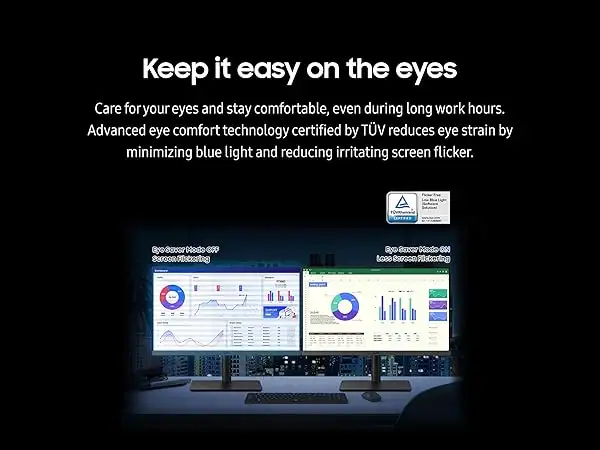
Eye comfort technology is pitched as a productivity booster, with TUV certification for reduced blue light and flicker-free operation. A Trustpilot description highlights this for “long sessions” and user JakeSon.net’s review affirms the impact: “During back-to-back meetings, my eyes feel less tired… I sometimes forget I’ve been staring at a screen for so long.” This alignment between marketing and lived experience reinforces its credibility.
Cross-Platform Consensus
Universally Praised
Color performance is the unchallenged star. For photographers, marketers, and frequent video-call users, accurate color is crucial. Reddit user feedback mentions “beautifully rendered tones and shades… without color washing,” benefiting anyone presenting visuals professionally. Amazon buyers describe the panel as “a big upgrade for clarity and consistency compared to entry-level office monitors.”
Smooth refresh and FreeSync integration enhance more than gaming. PC Guide observes that even animation, video editing, or swift slide navigation in hybrid meetings benefit from reduced lag and blur. JakeSon.net noted being able to flip through documents “without missing details” in time-sensitive calls.
Ergonomic adjustments—height, swivel, tilt, and pivot—garner wide appreciation. For remote workers matching screen height to webcam angles or alternating between portrait and landscape coding sessions, the stand’s flexibility is functional. JakeSon.net emphasizes reduced neck strain and space optimization: “Adjusting height let me store desk items underneath—it’s practical.”
Connectivity breadth is another strong point. HDMI, DisplayPort, D-Sub, and a USB 3.0 hub slot the monitor into diverse setups, threading convenience for multi-device households. A verified Amazon buyer switching between “laptop for reports and console for relaxed gaming” praised the ease.
Common Complaints
Size and multitasking limits draw consistent caution. At 24 inches, productivity power users juggling multiple windows may feel squeezed. PC Guide bluntly states: “Smaller display size isn’t the best for multitasking.” Double-window spreadsheet work or simultaneous code previews are harder compared to ultra-wide formats.
The 100Hz feature’s default 60Hz setting frustrates those expecting instant performance upgrades. A Reddit discussion flagged the need to “dive into settings” and toggle refresh manually, with uninitiated buyers mistaking it for a defect.
Absence of built-in speakers is a minor but recurring gripe in Trustpilot and Amazon feedback. For all-in-one office setups without separate audio gear, this adds cost or cable clutter.
USB-C charging power is missing—surprising in 2024’s connector climate. Mobile professionals plugging in laptops via a single cable lose an efficiency perk, making it less attractive for hot-desk environments.
Divisive Features
Gaming mode is designed to boost contrast and shadow detail for spotting enemies in dark scenes. Casual gamers on Reddit found it effective, but competitive players judged the 4ms response and 100Hz cap as “entry-level for esports” compared to 144Hz+ TN or fast IPS rivals.
Eco Saving Plus, recycling content of 82% plastic, earned nods from sustainability-minded buyers but was largely ignored in performance-centric discussions—a draw for corporate procurement, less so for home setups.
Trust & Reliability
Trustpilot input shows zero indication of scam operations—product arrives as described and carries TCO certification. Longevity remarks surface in Reddit threads where users report “holding calibration well” after months, without color shift or stand wobble. Ergonomic joints are said to “remain tight” despite daily height changes.
No surprise defects have emerged in broad community posts, a positive signal against cheap-panel retention issues seen in low-tier brands. The manual refresh-rate adjustment may mask performance in early days but is a settings oversight, not a hardware fault.
Alternatives
From PC Guide’s coverage, direct competitors include BenQ Zowie XL2586X (540Hz TN for esports) and ASUS ROG Strix XG259QNS (380Hz fast IPS). These vastly outpace the S43GC in refresh for gaming but lack the balanced color accuracy and ergonomics valued in office roles.
Acer Nitro’s 180Hz IPS straddles both worlds—better frame rate for mid-range gaming, sRGB 99% coverage, and included speakers. However, it doubles as more of a gaming monitor and may sacrifice the subdued office styling that Samsung owners appreciate.
Price & Value
At its discounted rate ($119.99 from $189.99 on Amazon, per PC Guide), buyers save 37%. This positions it as high value in the $100–$200 bracket, undercutting similar IPS office panels with ergonomic stands. eBay auction closings between $16 and $99 for used units suggest depreciation is steep, hinting at lower resale but making second-hand purchases attractive for budget setups.
Community buyers suggest timing purchases around seasonal tech sales and sticking to authorized sellers to guarantee cable inclusion. The packed HDMI, DP, and USB 3.0 cables noted in the spec sheet cut extra peripheral costs for most users.
FAQ
Q: Can the S43GC be factory-set to 100Hz?
A: No. While capable of 100Hz, it defaults to 60Hz and must be changed via display settings in the OS or GPU control panel.
Q: Does the monitor have built-in audio?
A: No, it lacks speakers—external headphones or desktop speakers are required for sound.
Q: How does AMD FreeSync benefit office work?
A: It syncs monitor and GPU refresh rates, reducing tearing not just in games but in fast-scrolling documents or animations.
Q: Is the stand removable for VESA mounting?
A: Yes, it supports 100x100mm VESA mounts, allowing integration into arm setups.
Q: Will HDMI handle full 100Hz at 1080p?
A: Yes, both HDMI and DisplayPort can deliver 100Hz—ensure the cable and source support the rate.
Final Verdict: Buy if you’re a productivity-focused professional or casual gamer needing accurate colors, ergonomic flexibility, and smooth 100Hz performance at a sub-$130 price. Avoid if heavy multitasking demands more screen real estate or if USB-C charging is a must-have. Pro tip from the community: enable 100Hz in settings immediately to unlock its full potential.





