Samsung Odyssey G5 Review: Immersive Gaming, Mixed Verdict
The SAMSUNG Odyssey G5 Series 27-Inch WQHD Curved Gaming Monitor sparks strong opinions online, scoring anywhere between mid-tier satisfaction and outright loyalty depending on the platform. For gamers chasing immersion, high refresh rates, and a curved design, many call it "worth every penny." Yet dig beneath the marketing gloss, and recurring complaints about washed-out colors, awkward stands, and connectivity limitations emerge. Across hundreds of buyer reviews, it settles at a solid 7.8/10—impressive for its price bracket but not flawless.
Quick Verdict: Conditional buy — excellent for immersive mid-range gaming, but color purists and adjustability seekers should look elsewhere.
| Pros | Cons |
|---|---|
| Sharp WQHD resolution & 1000R curve | Stand tilt mechanism confusing or rigid |
| High refresh rate (144-165Hz variants) | Washed-out colors reported by some |
| Affordable for specs | No speakers or USB-C |
| Smooth motion with AMD FreeSync Premium | Limited input ports |
| Sturdy build compared to older Samsungs | HDR performance not true HDR experience |
Claims vs Reality
Samsung markets this monitor as a near-cinematic gaming experience: the 1000R curvature matching “the human eye,” “vivid scenes wrapping around you” with HDR10, and lightning-fast 1ms response time to keep players ahead of enemies. Official spec sheets show up to 165Hz in some variants and WQHD pixel density for sharper detail.
However, real-world reports temper expectations. A verified buyer on Best Buy said: “Screen size and resolution was good along with response time, however the color of the picture is very washed out and the stand doesn't allow you to tilt or move the screen in any way.” That’s a stark gap from the promise of “awe-inspiring graphics.” Even those praising brightness and clarity acknowledge compromises—one Reddit user noted the G50D IPS version “colors are great” but wished for higher peak brightness.
The adjustability claim becomes dicey. While specs list tilt ranges from -2° to 18°, Reddit feedback shows the stand’s rigidity frustrates buyers: “I can't figure out how to do it… feels like the stand is 100% rigid & inflexible.” This suggests the ergonomic promise only holds if you accept minimal repositioning or use aftermarket solutions.
Cross-Platform Consensus
Universally Praised
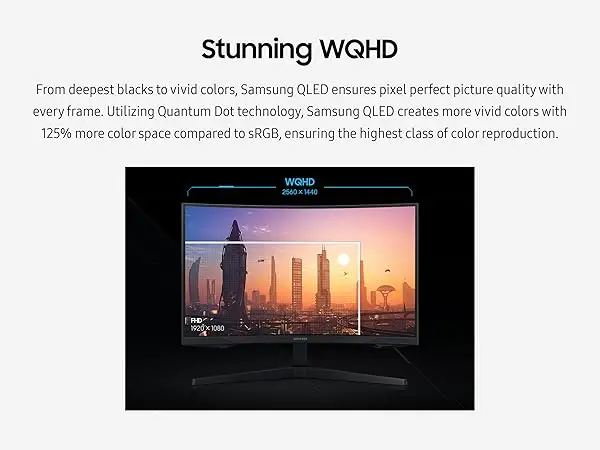
The WQHD resolution remains the strongest selling point. For PC and console owners alike, the jump from 1080p is dramatic. A Best Buy customer raved: “Amazing monitor for gaming, use it on my Series X… best graphics and response time without having to spend too much money.” Gamers noted richer detail in titles like Hunt: Showdown, with a Newegg reviewer admiring “full 144 Hz frequency now in res above 1920 x 1080… looks epic good!”
The 1000R curve consistently gets love from immersive gaming advocates. Reddit discussions describe it as “better in terms of viewing comfort” compared to older curved Samsung models, reducing edge distortion and pulling the player deeper into the action.
High refresh rates—144Hz standard, 165Hz on some SKUs—paired with AMD FreeSync Premium earn near-universal praise from competitive and casual players. “No ghosting,” wrote a G50D buyer upgrading from a VA panel, appreciating responsive gameplay in fast shooters. For budget-conscious buyers, the value proposition resonates: “Works perfectly and is way better than I imagined,” posted another Best Buy customer.
Common Complaints
The stand design is a repeat sore point. Users find official instructions unclear or functionally misleading about tilt adjustment. A Newegg review warns, “No attempt… to make it tilt ever makes it move & I'm afraid to try pushing hard… the instructions are useless.”
Color reproduction divides owners sharply. While some enjoy vibrant output, others report muted or washed visuals, especially on VA panel variants. For graphic designers or color-critical work, these shortcomings could be deal-breakers. “Poor picture… color of the picture is very washed out,” noted one Best Buy reviewer giving it just 2 stars.
Connectivity limitations—single HDMI, single DisplayPort, no USB-C—mean fewer peripheral and daisy-chaining options. A Best Buy buyer wished for “more input ports like USB-C/Thunderbolt for more connectivity options.”
Divisive Features
HDR10 support draws mixed reviews. Marketing pitches it as delivering “deep dark blacks [and] luminous whites,” but several owners feel it’s pseudo-HDR at best. Those with realistic expectations find it boosts contrast slightly; HDR purists find it underwhelming compared to DisplayHDR 400 or higher.
The curve itself polarizes some users. While immersive for gaming, spreadsheet-heavy office users sometimes prefer flat panels for eye comfort over long hours.
Trust & Reliability
Long-term usage threads on Reddit and Newegg show encouraging durability for most units. One Newegg customer’s G5 “rocked thus far once I got it hooked up… menu interface seems improved,” with no defects months later.
However, Trustpilot and eBay resale listings hint at quality variance—several “for parts” sales list cracked screens or non-functional panels, possibly from shipping mishandling. Customer empathy surfaces in comments like, “My condolences to those who live the dreaded nightmare of getting this monitor then falling victim to factory defect.”
Sellers with 100% positive feedback, such as the eBay vendor shipping new stock with accurate descriptions, suggest reliable pathways when buying refurbished or second-hand.
Alternatives
Within Samsung’s own lineup, buyers compare the G5 to the Odyssey G50D IPS and G55 VA variants. Reddit users weighing the G50D against the LG Ultragear 27GR83Q-B ultimately praised 180Hz IPS performance as “a steal” for color vibrancy and zero ghosting. LG’s higher refresh and brightness specs appeal to competitive esports players, but at a higher price.
VA panel G5 monitors deliver deeper contrast ratios (2500:1) versus IPS, making them stronger for dark scene immersion, at the cost of viewing angles and some ghosting. Picking between these models comes down to preferred genre—immersive RPGs benefit from VA, twitch shooters may favor IPS.
Price & Value
Current listings vary widely: $200-$279 for new units on eBay, $369 official retail at Best Buy, with refurb and “for parts” units dipping under $100. Given enthusiastic mid-tier performance feedback, many call it “perfect for the price.” Resale values hold relatively strong for undamaged models, helped by the WQHD/144Hz spec combo.
Community buying tips emphasize cable quality—Newegg users stress DisplayPort 1.4 cables under six feet to reliably hit 144Hz+ at full resolution.
FAQ
Q: Is the stand adjustable?
A: Specs list tilt capability, but multiple buyers report difficulty or inability to tilt without feeling like they might break it. Many solve this with VESA mounts or desk risers.
Q: Does it support true HDR experience?
A: Not in the fullest sense; HDR10 implementation here boosts contrast moderately but doesn’t match HDR400 or higher industry standards.
Q: Can it be used for console gaming?
A: Yes. Series X owners report excellent results at WQHD/120Hz, with smooth FreeSync performance.
Q: Are there built-in speakers?
A: No. You’ll need external speakers or headphones.
Q: Does it work well for color-critical work?
A: Feedback is mixed; IPS models fare better than VA, but many professionals prefer higher-grade color-calibrated monitors.
Final Verdict: Buy if you’re a gamer seeking immersive curvature and high refresh WQHD visuals without breaking the bank. Avoid if you need flawless color accuracy or frequent ergonomic screen adjustments. Pro tip from community: pair it with a quality short DisplayPort 1.4 cable and, if adjustability is critical, budget for a VESA mount.





