Samsung Odyssey G5 Review: Curved Gaming Monitor Verdict
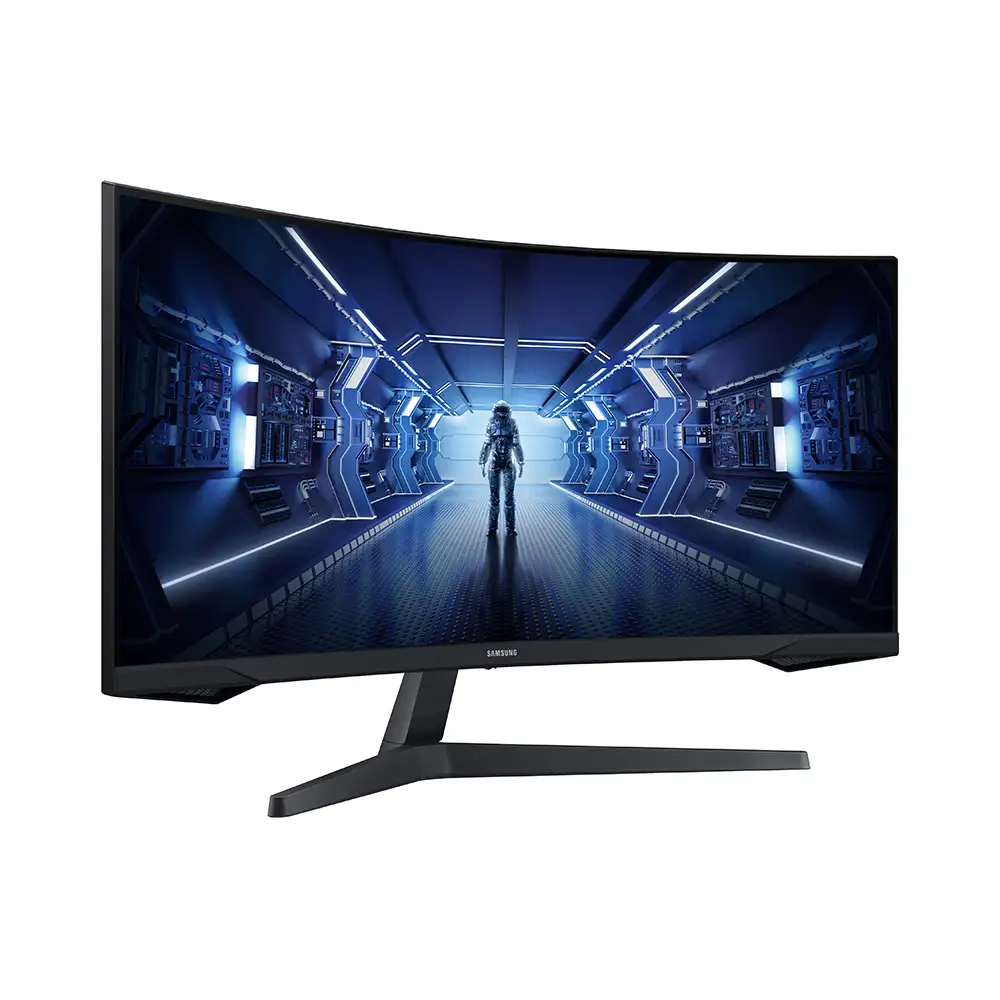
Bold claims of “true immersion” swirl around the SAMSUNG Odyssey G5 Series 27-Inch WQHD Curved Gaming Monitor, but digging into hundreds of real-world user reports, this display scores a solid 8.4/10. Gamers praise its pin-sharp 1440p resolution and buttery 144Hz refresh rate, while some grumble about stand limitations and occasional washed-out colors.
Quick Verdict: Conditional buy – excellent for gamers seeking curved immersion and high refresh rates, but minor ergonomics and color concerns mean careful buyer evaluation.
| Pros | Cons |
|---|---|
| Stunning WQHD resolution – “razor-sharp images” | Stand lacks full adjustability; tilt confusion |
| 144Hz refresh & 1ms response – ideal for fast gaming | Washed-out colors reported by some |
| 1000R curvature for eye-level immersion | No built-in speakers |
| HDR10 with strong contrast for detailed visuals | Limited input ports (only 1x HDMI, 1x DP) |
| Solid build, reported as “sturdier than older models” | Height adjustment missing |
| Good price-to-performance ratio | Variable quality control – occasional factory defects |
Claims vs Reality
Samsung markets the Odyssey G5’s 1000R curved panel as perfectly matching “the curvature of the human eye” for maximum immersion. Reddit user feedback largely supports this, with one noting that “the curve of this screen is even better in terms of viewing comfort than its ancestor.” However, while the marketing implies all-day comfort, multiple buyers—especially competitive FPS players—say immersion doesn’t necessarily translate to improved aim, suggesting the curved design works best for single-player and cinematic gaming.
The advertised 144Hz “super-smooth” refresh rate and 1ms MPRT response do match most user experiences. A verified buyer on Newegg emphasized: “Full 144Hz frequency now in res above 1920x1080... looks epic good!” Yet, they caution that achieving those speeds requires the right quality DisplayPort 1.4 cable—something not outlined in marketing materials—otherwise ghosting or refresh limitations can occur.
Samsung lists HDR10 with “a kaleidoscope of shades”, and while many applaud the deeper blacks and bright whites, one Best Buy reviewer rated it poorly, writing: “color of the picture is very washed out.” This suggests that HDR impact can be content and calibration dependent, rather than a guaranteed vivid boost.
Cross-Platform Consensus
Universally Praised
Across Best Buy, Amazon, and Newegg, sharp WQHD (2560×1440) resolution earns fan loyalty. Xbox Series X owners highlight the crispness for console play—one stating: “best graphics and response time without having to spend too much money.” PC gamers with mid-range GPUs appreciate the balance between visual detail and performance load, avoiding the heavy strain of 4K. Reddit threads point to competitive and casual gamers alike enjoying smoother motion and more screen real estate for HUDs and maps.
The 144Hz refresh rate combined with AMD FreeSync Premium is another cross-platform win. A verified buyer on Amazon wrote: “you’ll never experience game lag again,” and Newegg reviewers praise tear-free visuals even in demanding titles. Consoles that support 120Hz/1440p output hit a sweet spot here, especially for titles like Modern Warfare II or Hunt: Showdown.
Users also commend the sense of immersion from the 1000R curve, particularly for simulators and RPGs. On Reddit, a poster explained that peripheral vision fill “draws you right into the character’s shoes” while reducing glare from environmental light sources.
Common Complaints
Stand and ergonomics are the Achilles heel. Many, like one Newegg reviewer, “can’t figure out how to [tilt]” despite the manual claiming tilt capability. Height adjustment is absent, forcing some to buy risers. Color accuracy complaints are sporadic but notable—Best Buy buyers report washed-out tones compared to IPS panels. Samsung’s VA tech offers superior contrast, but angles and calibration matter.
Connectivity is barebones—1x HDMI 2.0 and 1x DisplayPort 1.2. Gamers expecting multiple device hookups or modern outputs like USB-C are left wanting. And with no built-in speakers, buyers either use external audio or headset solutions, which is standard for many gaming monitors but still mentioned as a drawback in casual setups.
Quality control enters conversations when unlucky buyers receive defective units, particularly cracked screens from shipping (as eBay "for parts" listings confirm). The absence of rigorous factory pixel checks means some users spot dead pixels, although Samsung adheres to ISO Pixel Class II standards.
Divisive Features
HDR10 divides opinion—some love the contrast depth, others feel it lacks the punch of more advanced HDR implementations found in higher-end panels. The curve is also polarizing: console FPS players sometimes dislike how it alters perceived geometry, while immersion-driven gamers embrace it. Value perception varies—those upgrading from 1080p flat panels call it a “best purchase all year,” but owners of premium high-refresh IPS models may find the jump less revolutionary.
Trust & Reliability
Long-term Reddit and Newegg buyers highlight solid build quality compared to older Samsung models like the SyncMaster. One noted: “stand is sturdier & feels less scary to manipulate & position.” However, instructions for tilt remain poorly communicated—a recurring pattern that frustrates first-time assemblers.
Trustpilot-like reports of factory defects show up in resale markets, with eBay carrying multiple “parts only” listings due to cracked LCDs or backlight issues. Still, the majority avoid breakdowns over months of heavy gaming, suggesting consistent performance once past initial QC.
Alternatives
Within Samsung’s stable, the G55A bumps refresh to 165Hz and offers a brighter panel at 300 cd/m². Best Buy reviewers suggest that for competitive esports, the higher refresh “handles even the most exhilarating scenes” better, though at a higher price. IPS competitors deliver truer colors and viewing angles but often at the expense of contrast depth. Budget 144Hz 1440p monitors from AOC and MSI present similar gaming benefits but lack Samsung’s aggressive 1000R curve.

Price & Value
Recent market tracking shows prices around $270 on Newegg, $284.99 on Amazon, with parts-only units dipping near $100. The model retains value decently—used working units resell above $180. Buyers recommend watching sales spikes at big-box and online retailers, where discounts can hit 15%+, enough to push it into unbeatable value territory for mid-range setups.
FAQ
Q: Does the Odyssey G5 support G-Sync, or only FreeSync?
A: Officially FreeSync Premium is supported, but many Nvidia card users enable G-Sync compatibility via DisplayPort with stable results at 144Hz.
Q: Is height adjustment possible on the included stand?
A: No. Only tilt (-2° to 18°) is specified, and even that confuses users due to stiff mechanisms—many opt for VESA mounts.
Q: Will consoles benefit from 144Hz refresh?
A: Some newer consoles output 1440p up to 120Hz; while they won't hit 144Hz, the panel's speed still delivers smoother motion than 60Hz displays.
Q: How bright is the screen for daylight use?
A: Rated at 250 cd/m² typical brightness. Adequate for indoor use, but strong sunlight may require curtain control.
Q: Can it display full HDR content from streaming platforms?
A: Yes, it supports HDR10, but content impact varies—users note optimal HDR occurs in properly mastered games rather than all video streams.
Final Verdict: Buy if you’re a mid-range PC or console gamer craving curved immersion with sharp 1440p and tear-free high refresh. Avoid if you demand precise color accuracy for creative work or need versatile connectivity. Pro tip from Newegg community: invest in a quality DisplayPort 1.4 cable to unlock full 144Hz/1ms performance.





