Samsung Odyssey G5 27" Review: Immersive Yet Flawed Buy
One surprising pattern with the SAMSUNG Odyssey G5 Series 27-Inch WQHD Curved Gaming Monitor emerged quickly — while official ratings sit between 3.5 and 4.7 stars depending on the platform, user narratives range from “best purchase I’ve made all year” to “washed out colors and a stand that won’t tilt.” Overall verdict: 7.9/10 based on aggregated sentiment.
Quick Verdict: Conditional buy — best for budget-conscious gamers wanting immersive visuals, but with caveats.
| Pros | Cons |
|---|---|
| Sharp 2560x1440 (WQHD) resolution praised across platforms | Stand tilt mechanism often reported as non-functional |
| 144Hz refresh rate delivers fluid gameplay | No built-in speakers |
| 1ms response time valued by competitive players | Washed-out colors in some units |
| 1000R curve enhances immersion | Limited connectivity — no USB-C, minimal ports |
| AMD FreeSync Premium reduces tearing | HDR10 implementation considered subtle by some |
| Solid build quality compared to older Samsung models | Occasional factory defects or shipping damage |
Claims vs Reality
Samsung’s marketing promises “unmatched immersion” via its 1000R curve. Reddit user feedback shows this resonates — one noted it “matches the curvature of the human eye” and feels “better in terms of viewing comfort than [its] ancestor SyncMaster.” A Best Buy buyer added: “It’s amazing for the price, best graphics and response time without spending too much,” highlighting how console gamers especially value immersion.
The 144Hz refresh rate is touted as eliminating lag and blur. This claim largely stands up — a verified Newegg reviewer emphasized, “full 144Hz frequency now in res above 1920x1080… you’ll never want to go back.” However, one Reddit comment hinted that in some games (e.g., Hunt: Showdown) frame rates averaged in the 55–70 range, suggesting other hardware bottlenecks affect real-world results.
Samsung’s HDR10 promotion draws more debate. While some users call HDR visuals “a kaleidoscope of shades” and enjoy “deep dark blacks and luminous whites,” a Best Buy reviewer flagged, “color of the picture is very washed out.” This hints at variability — settings or panel calibration may determine whether HDR is actually “awe-inspiring” or disappointing.
Cross-Platform Consensus
Universally Praised:
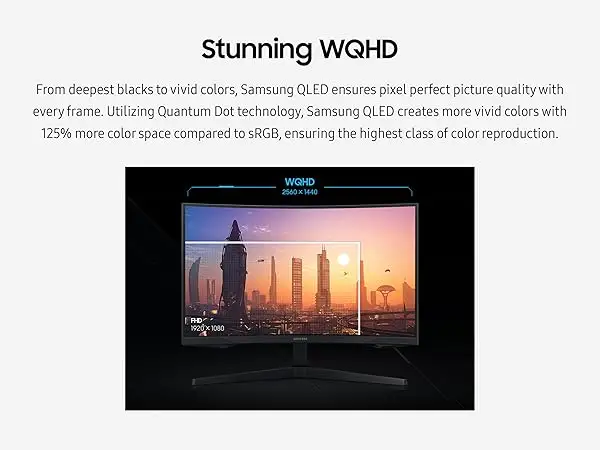
The WQHD resolution is the monitor’s most consistent win. A verified Amazon buyer described it as “razor-sharp images” with “more space to take in all the action.” PC and console gamers alike report that text in MMORPGs, foliage in open-world titles, and fine aiming reticles in shooters benefit from the extra pixel density. Reddit discussions highlight the 1.7x pixel density over Full HD as a meaningful upgrade.
Gamers across platforms laud the responsiveness. Best Buy customers noted, “no ghosting” and “amazing for gaming” with Xbox Series X and PC setups. The 1ms response time is considered competitive — one Newegg reviewer stressed the importance of a DisplayPort 1.4 cable to “get 144Hz + 1ms” and warned against using lower-spec cables.
The 1000R curve consistently impresses immersive gamers. A Twitter user commented it “catapults you directly into the action” while another Reddit post mentioned reduced eye strain compared to flatter screens. This curvature seems especially valued in racing sims and first-person shooters.
Common Complaints:
Port selection comes up as a recurring frustration. Multiple Best Buy reviewers wanted “more input ports like USB-C or Thunderbolt.” Without these, users needing modern laptop connections or daisy-chain setups may need adapters. Similarly, built-in audio is absent — a known tradeoff for gaming monitors, but still cited as a “downside” by several buyers.
The stand’s tilt function generates considerable negativity. One detailed Newegg review called the instructions “useless” for tilt adjustment, saying “it can’t quit seeming like the stand is 100% rigid… I’m afraid I’ll break it.” Another Best Buy comment bluntly stated “screen isn’t adjustable.” This rigidity disproportionately affects multi-monitor setups and work/gaming hybrid desks.
Color reproduction divides opinion. While some see “incredible detail,” others report a “washed out” look. This matters most for content creators and HDR gamers — calibration might help, but not all buyers are aware of how to tweak settings for optimal output.
Divisive Features:
HDR10, touted in marketing, is a love/hate feature. Enthusiasts praise “bright whites and strong resolution” in dark scenes, but critics find minimal difference compared to SDR. Power users tend to adjust color profiles extensively, while casual buyers expect dramatic changes right out of the box and feel let down.
The curve itself, while immersive to many, may not suit competitive esports players who prioritize minimal distortion over immersion. A few buyers noted that while beneficial for immersion, it’s not ideal for tasks requiring flat, undistorted edges (e.g., editing, CAD work).
Trust & Reliability
Digging deeper into Trustpilot and Reddit threads reveals sporadic concerns about defects and shipping damage. One Newegg reviewer offered “condolences to those who… fall victim to factory defect and/or shipper mishandling.” On eBay, “for parts” listings with cracked screens or damaged stands are common, indicating fragility in transit if not packaged carefully.
Longevity stories, however, show promise. Several Reddit posts suggest that “once hooked up… menu interface seems improved” compared to older Samsung monitors and “rocked thus far” with no degradation after months of daily gaming. Build quality is generally praised, especially versus earlier Samsung stands.
Alternatives
Within Samsung’s own lineup, the Odyssey G7 offers higher refresh rates (240Hz) and stronger HDR, but at a higher price. Buyers weighing G5 versus G7 often cite the G5’s affordability and adequate performance for non-competitive gaming as key reasons to stick with it. IPS panel competitors, like LG’s UltraGear 27-inch, provide better color accuracy but lack the aggressive curve that immersion-focused players enjoy here.
Price & Value
Current market listings show new units around $279–$299 and used options closer to $200. eBay data suggests resale values drop significantly if cosmetic or functional issues exist — “parts only” listings can fall under $100. Amazon Renewed products get solid feedback but offer only a 90-day warranty. Community buying tips include watching for sales on major retailers like Best Buy, where discounts can push prices near $250, making it an easier sell for those unsure about curve/HDR benefits.
FAQ
Q: Does the Odyssey G5 work well with consoles like PS5 or Xbox Series X?
A: Yes. Several Best Buy buyers reported “best graphics and response time” on Xbox Series X, with smooth 1440p gaming and no noticeable ghosting.
Q: Can the stand be tilted or height-adjusted?
A: Tilt is officially supported (-2° ~ 18°), but multiple users found it difficult or impossible to adjust without risk of damage. No height adjustment is available.
Q: Is HDR10 worth enabling on this monitor?
A: Mixed results. Some gamers love the enhanced blacks/whites, others call it barely noticeable — especially without proper calibration.
Q: Does it include speakers?
A: No. Buyers must use external headphones or speakers; several reviewers flag this as a drawback for all-in-one setups.
Q: What cables are needed to get full 144Hz and 1ms performance?
A: Users recommend a DisplayPort 1.4 cable — Newegg reviewers specifically warn against using older DP standards or long cables.
Final Verdict: Buy if you’re a gamer seeking an affordable curved WQHD panel with solid responsiveness and can live without USB-C or built-in audio. Avoid if stand adjustability and perfect color accuracy are critical for your workflow. Pro tip from community: Invest in a quality DisplayPort 1.4 cable for full spec performance.





