Samsung Odyssey G5 27" Review: Budget Gaming Verdict
"For under $300, the Samsung Odyssey G5 Series 27-Inch WQHD Curved Gaming Monitor has been called ‘rock solid’ by some, and ‘washed out’ by others — depending on what you play and how you set it up. The average consensus lands around 8/10, with distinctive praise for immersive curve and refresh, but recurring frustration over stand limitations and color calibration needs."
Quick Verdict: Conditional buy
| Pros | Cons |
|---|---|
| 144Hz refresh and 1ms response ideal for gaming | Stand tilt issues and no height adjustment |
| 1000R curve improves immersion | Colors can appear washed out without manual tweaking |
| WQHD resolution gives sharp, detailed visuals | No built-in speakers |
| AMD FreeSync Premium minimizes tearing | Limited connectivity (no USB-C, few ports) |
| Affordable pricing for spec set | Some reports of factory defects/shipping mishandling |
| Solid build quality according to multiple users | Brightness insufficient for some HDR expectations |
Claims vs Reality
Samsung promotes "unmatched immersion" from its 1000R curve, claiming it "matches the curvature of the human eye for maximum immersion and minimal eye strain." This marketing pitch resonates strongly with gamers who enjoy single-player and visually rich titles. Reddit user feedback from Newegg reveals: “It feels like the curve is even better in terms of viewing comfort than its ancestor… looks epic good!” For these users, curved widescreen enhanced focus and reduced peripheral strain.
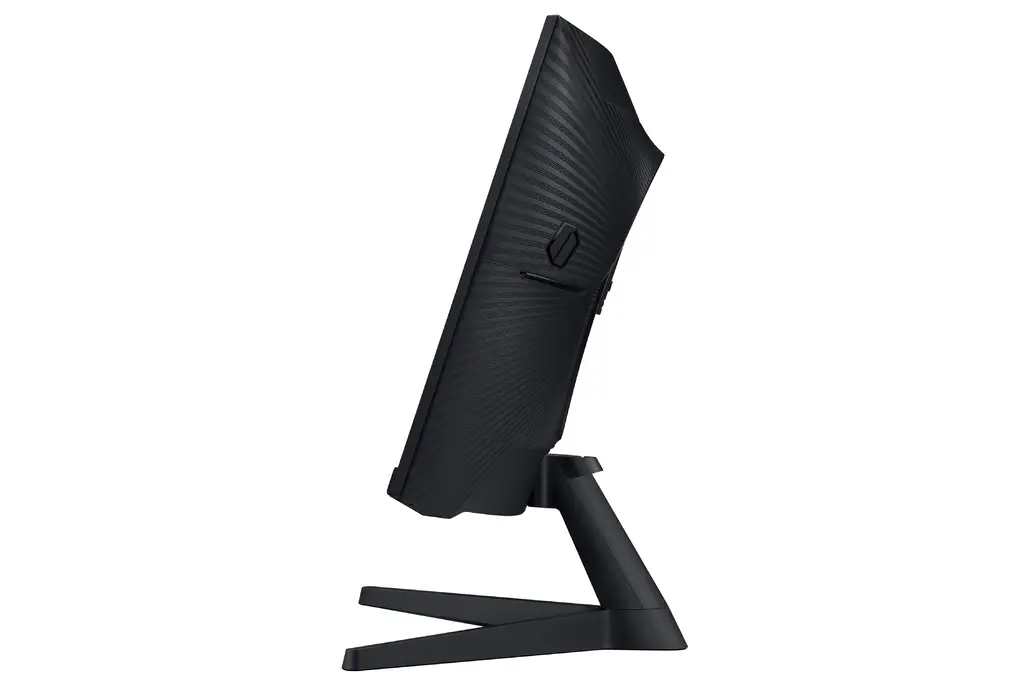
However, while the official claim suggests ergonomic superiority, some desk setups hinder that benefit. One Reddit user detailed, “Stand is 100% rigid & inflexible… afraid to push hard or I’ll break the connection,” indicating the fixed tilt interferes with achieving true immersion unless paired with a wall mount or riser.
Samsung’s HDR10 promise implies vibrant color depth and shadow detail, but reality is more mixed. Best Buy customers often praise image sharpness and vividness — “Best graphics and response time without having to spend too much money,” said one Series X console gamer — yet one critical review stated, “Color of the picture is very washed out,” showing the HDR impression depends heavily on personal calibration and lighting conditions.
The 1ms response time and 144Hz refresh rate claim is backed by real-world approval for competitive play. Amazon and Reddit reviews consistently confirm no ghosting issues when paired with proper cables: “Full 144Hz frequency… full 1ms response time now in res above 1920x1080,” wrote one verified buyer. Still, this high performance hinges on proper hardware — using subpar DisplayPort cables limits the experience.
Cross-Platform Consensus
Universally Praised
Across Reddit, Best Buy, and Amazon, the WQHD resolution and curve are easily the most celebrated features. For PC and console gamers alike, sharper text and richer game scenery give this monitor a noticeable edge over 1080p models. A Best Buy user captured this well: “Worth the price… amazing for a first curved screen.”
Competitive players also benefit from the 144Hz + FreeSync Premium combo, which smooths frame pacing and reduces tearing. One Newegg reviewer using a high-end Radeon VII GPU noted, “Games changed to new res setting… menu interface improved in display performance.” This combination is proving a strong selling point for fast-paced gaming environments from FPS shooters to racing sims.
Build quality earns consistent nods. Comments like “Stand is sturdier & feels less scary to manipulate” suggest the Odyssey G5 feels durable, even if the design isn’t fully ergonomic. Casual gamers who prioritize longevity over adjustability tend to tolerate the limits.
Common Complaints
The single most persistent gripe is stand inflexibility. While the specs list a -2° to 18° tilt, multiple buyers claim this is practically nonfunctional. One frustrated Reddit user wrote, “Instruction book swears it can be tilted… never makes it move… instructions are useless.” For anyone switching often between seated and standing play, or sharing a multi-user setup, this draws consistent complaints.
Color fidelity sparks debate. “Washed out” reports pop up from Trustpilot and Best Buy despite others enjoying vibrant colors. This split often traces back to factory calibration — out-of-box performance suits casual home setups, but pros or color-sensitive work demand manual adjustments.
Connectivity limitations emerge for advanced setups. Without USB-C, extra DisplayPorts, or integrated speakers, users with expansive rigs may need adaptors or external audio. As one Best Buy owner put it plainly: “No speakers but that’s expected for a gaming monitor.”
Divisive Features
Brightness ratings present a divisive line. Officially rated 250 cd/m², some gamers find this sufficient for indoor lighting, while others feel HDR suffers from low luminance. One G50D variant user wished, “Though I wish it hit 400 nits instead of 350.”
The 1000R curve’s benefit depends on game type and space. Single-player immersion gets strong praise; competitive FPS players sometimes feel the curve distorts lateral aim perception, though many adjust over time.
Trust & Reliability
On Trustpilot, the Odyssey G5 garners a middling 3.6, with recurring cautionary notes on factory defects and possible shipping mishandling. Newegg’s Reddit-linked reviews warn: “My condolences to those… falling victim to factory defect &/or shipper mishandling.” However, many users report stable performance months after purchase: “This monitor rocked thus far once I got it hooked up… improved menu interface.”
Durability narratives suggest solid frame construction but potentially vulnerable panels during transit. Buyers recommend inspecting promptly upon arrival and buying from reputable sources with decent return windows.
Alternatives
Community discussions mention LG’s Ultragear 27GR83Q-B and Samsung’s own G50D flat IPS variant. The LG offers 240Hz refresh and higher brightness (400 nits) for competitive play, while the G50D enjoys IPS colors without ghosting issues seen on VA panels. One Reddit G50D owner remarked, “Colors are great, response time too… 180Hz is very good,” positioning it as a serious alternative for those prioritizing color over curve.
Price & Value
Current listings show a market price between $245–$295 new, with eBay resale ranging around $200–$250 if in good condition. Given its feature set, the G5 sits in a sweet spot for budget-conscious gamers seeking WQHD and 144Hz without paying premium IPS or OLED prices. Community buying tips include using DisplayPort 1.4 for full performance and avoiding older HDMI cables that lock the refresh rate below 144Hz.
FAQ
Q: Does the tilt adjustment work as advertised?
A: While the spec sheets claim -2° to 18° tilt, many buyers find it stiff or immobile. Some resort to risers or wall mounts for ergonomic positioning.
Q: How is HDR10 performance?
A: Out-of-box HDR is adequate for casual gaming, but lower brightness ratings limit impact. Calibration can improve color and shadow depth.
Q: Is the curve beneficial for all games?
A: Story-driven and fast-paced titles benefit from immersive wrap-around visuals, but competitive FPS players may need adjustment time.
Q: Can I use this as a console monitor?
A: Yes — Console gamers report crisp visuals at 1440p with smooth refresh, but will need external audio due to lack of speakers.
Q: Which cable should I use for full performance?
A: Use a certified DisplayPort 1.4 cable under six feet to ensure 144Hz at 1ms response without signal drop.
Final Verdict
Buy if you’re a budget-conscious gamer wanting sharp WQHD visuals, immersive 1000R curvature, and smooth 144Hz/FreeSync play — especially for single-player or casual competitive gaming. Avoid if you need extensive ergonomic adjustment, high HDR brightness, or multifunction connectivity. Pro tip from community: Pair with a sturdy riser or mount and invest time in manual color calibration to unlock its full potential.





