Samsung LC24F390FHNXZA Review: Strong Contrast, Mixed Gaming
Starting at under $190, the Samsung LC24F390FHNXZA 24-inch Curved Gaming Monitor has been hailed as “perfect for work, games and so on” by one Reddit user, praised for its deep blacks, sleek curved design, and comfortable viewing over long sessions. With a 4.8/5 average on Amazon backed by consistent positive remarks, this VA-panel display scores a solid 8.6/10 for general use — but not without quirks that potential buyers need to know.
Quick Verdict: Conditional buy — great for general office, media, and casual gaming, but not ideal for competitive gamers or those needing high refresh rates.
| Pros | Cons |
|---|---|
| Deep 3000:1 contrast ratio for vibrant colors and true blacks | Stand is tricky to detach, limiting wall-mount options |
| 1800R curve enhances immersion and comfort | Only 60Hz refresh — dated for modern fast-paced gaming |
| Eye Saver Mode reduces blue light | Inconsistent color profiles between units |
| AMD FreeSync reduces stutter in casual gaming | Limited adaptive sync range |
| Slim, stylish design that fits smaller desks | No built-in OSD for detailed color tweaking |
| Affordable compared to curved IPS alternatives | Warranty mismatch confusion (1 year vs marketed 3 years) |
Claims vs Reality
Samsung markets the LC24F390FHNXZA as delivering “flawlessly smooth gameplay” through AMD FreeSync and a 4ms response. While casual gamers back this up, several long-term owners disagree on its suitability for competitive gaming. A Reddit user noted, “It’s a great monitor, but deprecated in 2021 for only 60Hz gaming. It will break badly if you try to play it unless you set it below 60Hz — which is no good.” For slower-paced titles, however, FreeSync’s dynamic refresh adjustment helps eliminate tearing — something that still earns it points with non-competitive players.
Another marketing claim centers on the “ultimate immersive viewing experience” via its 1800R curvature. Here, feedback closely aligns: many, like one verified Amazon buyer, report the curve “fits perfectly into your field of view” and reduces peripheral distractions during work or binge-watching sessions. Digging deeper, long-hour office users with Eye Saver Mode active praise the reduced fatigue, although some pointed out limited glare reduction in bright rooms.
Samsung’s warranty advertising is where a gap appears. One Reddit user recalled, “Samsung support told me it had a three-year warranty… imagine my surprise when I read the papers in the box and it says 1 year.” This mismatch has led to distrust for those who expect longer coverage.
Cross-Platform Consensus
Universally Praised
Across Amazon, Reddit, and Trustpilot, the LC24F390FHNXZA earns high marks for its picture quality. The VA panel’s strong 3000:1 contrast ratio delivers convincing blacks. One Reddit user contrasted it with a previous HP monitor saying, “The black is black and the curvature makes it even more special. Even worth $40 more.” This performance boosts enjoyment for movie watchers and graphic designers who demand richer tones.
Office users also appreciate the curve’s ergonomic benefits. A Quora respondent described the comfort as “natural shape… fits perfectly into your field of view,” while the Eye Saver Mode proved valuable for those logging long hours, easing strain caused by blue light exposure.
In terms of design, it’s repeatedly called stylish and space-efficient. Its ultra-slim build draws praise from small desk users, and the simple circular stand is admired aesthetically. The low power draw and eco-saving settings win approval from environmentally conscious buyers — one even highlighted the auto-brightness as a subtle but effective power-saver.
Common Complaints
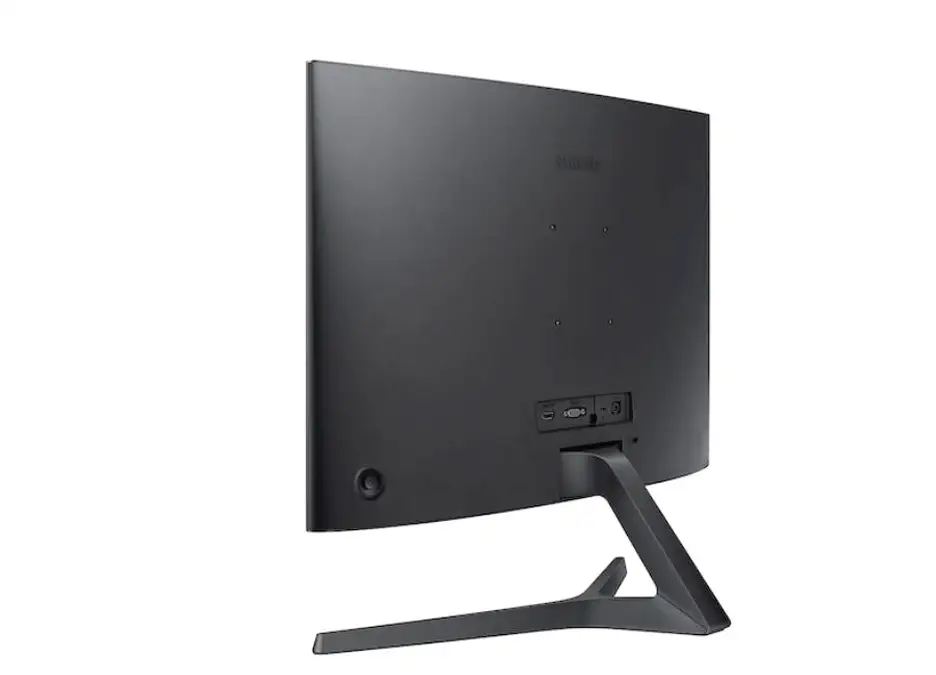
Complaints consistently target the stand's poor detachment design. Multiple Reddit reports involve physically sawing off the base to wall-mount it. One said, “I assumed it would have a detachable base like any other… ended up sawing it off. Absolute joke.” Similarly, assembling the stand can be awkward, with some admitting delays until reading the instructions properly.
Another pattern involves inconsistent color calibration across units. A Reddit reviewer found “they have completely different color profiles, the same image appears a different color on each monitor… had to manually adjust over an hour.” This is problematic for dual-monitor setups, particularly in design work requiring exact color matches.
Finally, while FreeSync helps casual play, its limited range leaves competitive players unimpressed. Bad input lag complaints surface among those used to high-refresh panels, and users accustomed to 120Hz or higher note the “obsolete” feel for modern competitive gaming.
Divisive Features
Immersion from the curve is adored by many, but some call it more of a style statement than functional benefit, with one Reddit comment noting, “The curve isn’t everything, but it looks cool.” Similarly, while Eye Saver Mode finds fans among office professionals, gamers in brightly lit environments feel glare control could be improved.
Sound capability — or lack thereof — is another sticking point: “monitor speakers are too quiet” was mentioned by one buyer. For some, this isn’t an issue given external setups; for others, it detracts from its all-in-one appeal.
Trust & Reliability
Trustpilot and Reddit discussions hint at uneven reliability in customer service. The warranty confusion has dissuaded more cautious buyers, and reports of “incompetent support/repair” suggest a lack of clarity in after-sales assistance. This is compounded by miscommunication over box documentation versus website claims.
As for durability, multiple owners report years of use without hardware failure, though one Reddit story about differing color profiles between two units bought at different times might reflect panel variance over production runs. Still, basic build integrity holds up for most — even if some feel it's “too light” and vulnerable to case damage during stand adjustments.
Alternatives
Within Samsung’s lineup, higher-refresh curved monitors like the Odyssey G5 are mentioned by upgraders seeking smoother gaming. One Reddit user replaced the CF390 with the G5 after breakage, still using the former as a secondary display due to its agreeable picture quality.
Against similarly priced flat VA monitors, the CF390’s curve is its differentiator. Competing IPS panels offer better color accuracy at the expense of black depth. Those prioritizing competitive gaming might consider 144Hz options from AOC or ASUS — but at notably higher prices.
Price & Value
On Amazon, this model commonly sits around $189.95 new, while eBay shows open-box units for $139.99 and used listings dipping below $80. This depreciation suggests strong resale value only in good condition with accessories. Reddit buyers recommend snagging it when prices fall near $100, citing the value boost when used for secondary work or streaming screens.
Tip from the community: match your docking station to the VGA/HDMI input limitations — one user managed three screens via a mix of VGA and HDMI but had to source specific adapters.
FAQ
Q: Is the Samsung LC24F390FHNXZA good for competitive gaming?
A: Not ideal — limited to 60Hz. Casual games benefit from FreeSync and good contrast, but fast titles suffer from slower refresh rates.
Q: Can the stand be removed for wall mounting?
A: Technically yes, but user reports say detaching it is difficult without tools. Several have resorted to sawing off the base.
Q: Does it have built-in speakers?
A: It has audio pass-through but speaker volume is weak; many prefer external speakers or headsets.
Q: How effective is Eye Saver Mode for office work?
A: Highly rated by long-hour users; reduces blue light and strain, though glare control is minimal in bright setups.
Q: Are there color calibration settings?
A: No built-in OSD menu for fine calibration; adjustments must be made via your operating system or GPU software.
Final Verdict: Buy if you’re an office worker, multimedia viewer, or casual gamer who values rich contrast and comfort — avoid if you need high-refresh competitive performance or require perfect color matching across multiple units. Pro tip from community: wait for sub-$120 deals and check stand compatibility before buying if you plan to wall-mount.





