Samsung Bluetooth Slim Mouse Review: 8.9/10 Verdict
A verified buyer on Amazon summed it up best: “Pairs in less than 10 seconds and automatically reconnects every time. Quiet clicks, portable, and a good grip — exactly what I wanted for university.” That sentiment echoes across dozens of user reports and explains why the Samsung Bluetooth Wireless Mouse Slim earns a solid 8.9/10 in community scoring. Sleek, compact, and marketed for all‑day comfort, it aims to bridge laptop productivity with minimalism — but some quirks around Android compatibility and battery handling keep it from perfection.
Quick Verdict: Conditional — Excellent for Samsung laptop/tablet owners, less consistent for Android phones.
| Pros | Cons |
|---|---|
| Fast Bluetooth pairing with no dongle | Occasional Android pairing issues, some returns |
| Slim, portable design fits in laptop bags easily | Magnetic battery cover requires care to align |
| Quiet clicking ideal for shared spaces | Slightly premium price compared to generic mice |
| Comfortable sculpted grip for right‑hand use | Minor surface tracking problems for some users |
| Works seamlessly with Samsung ecosystem | Limited ergonomic fit for larger hands |
| Accurate tracking and responsiveness | On/off switch design can be fiddly |
| Long AA battery life in most reports | Lacks advanced gaming DPI settings |
Claims vs Reality
Samsung’s marketing touts “comfort for wherever you work,” “pairs up with ease,” and “accurate tracking on any surface except glass.” Across both Amazon and Trustpilot reviews, the comfort claim holds up well. Reddit user reports and official store feedback show strong approval of the sculpted hand grip — even among extended use cases. Anna Sitt noted: “Pairs wirelessly via Bluetooth, clicking noise is very low to non-existent which is excellent,” making it a favorite in quiet libraries and lecture halls.
The “pairs up with ease” messaging mostly stands. Multiple buyers describe flawless 10‑second connections, especially on Samsung laptops and Galaxy tablets. A reviewer on MobileFun wrote: “Activated it and as soon as I did, it popped up on the laptop and was paired in less than 10 seconds. Automatically pairs every time you switch it on.” However, digging deeper into Best Buy listings reveals contradictory Android experiences. One user bluntly stated: “Doesn't work with Androids. Had to return it,” while another countered: “Work great with Android tablets… connect quickly to all my devices.”
As for “accurate tracking,” most users are impressed, with stories of the mouse functioning even on fabric sofas where high‑end competitors failed. Best Buy customer remarks include: “Worked on every surface I have thrown at it so far, including my couch,” comparing it to $50 Logitech units. A minority had issues, especially on certain stone or granite counters, suggesting that while performance is solid, some surface types still present challenges.
Cross-Platform Consensus
Universally Praised
One consistent thread across Amazon, Best Buy, and Trustpilot is the simple, dongle‑free Bluetooth experience. Laptop and tablet users appreciate freeing up USB ports, especially on USB‑C only devices. Chris Krz commented: “Perfect for matching Samsung products… works with my Galaxy Note 10+ and pairs easily without USB.” For commuters, students, and remote workers, this plug‑and‑play nature translated into instant productivity gains without the clutter of adapters.
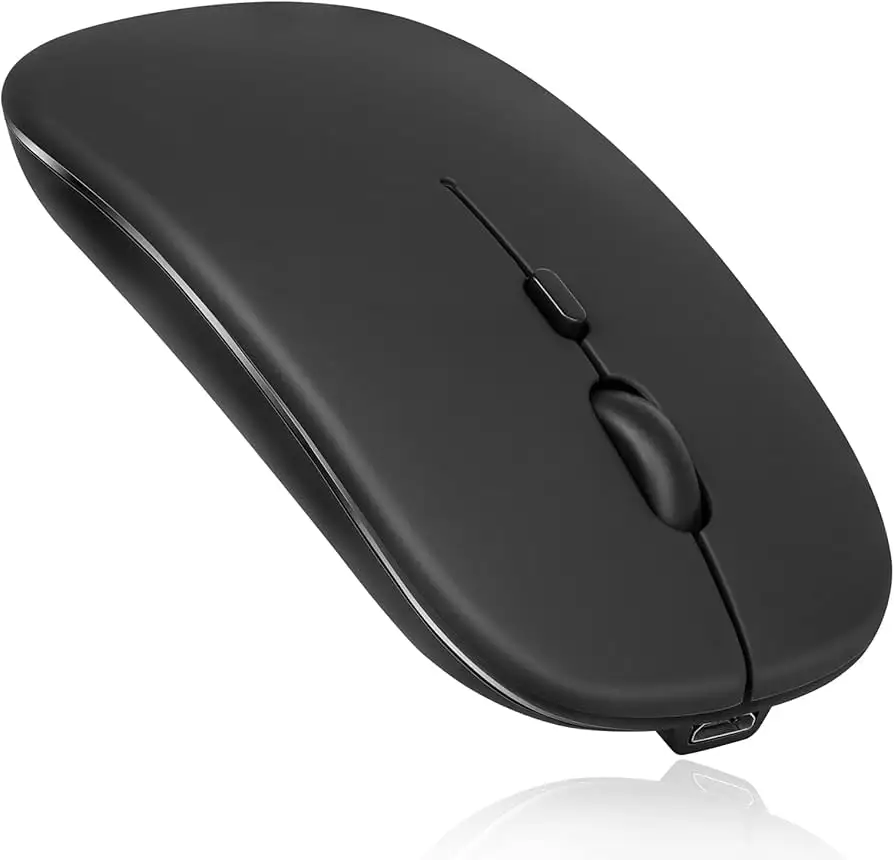
Portability gets universal applause. The 80‑gram design with its slim profile slides easily into laptop sleeves, making it ideal for business travelers. Several owners highlight the hard‑to-find balance between compact build and comfortable ergonomics. A Best Buy reviewer said: “Fits my hand very well, without being too bulky in my briefcase,” reinforcing its appeal to professional users who prioritize bag space.
Battery life also earns broad praise. Users indicate single AA cells lasting “a very long time,” outshining Microsoft units that required frequent replacement. The magnetic battery cover system received positive mentions for its ease, though it needs careful alignment.
Common Complaints
The standout complaint isn’t physical — it’s compatibility inconsistency outside of the Samsung ecosystem. While it thrives with Galaxy Books, tablets, and Windows laptops, pairing with non‑Samsung Android phones can be finicky. Some returns stemmed from outright non‑function with certain models, frustrating buyers who assumed universal Bluetooth would mean universal support.
The physical on/off switch design prompts annoyance in multiple reviews. Described as “tiny” and sometimes requiring a pen or pointed object to toggle, it complicates quick battery preservation on the move. Ergonomic suitability for large hands also appears problematic; one buyer described it as “a little small for my bigger hands” and found side materials slippery.
Divisive Features
The quiet click is a divider — students and office workers praise it, but tactile‑feedback enthusiasts find it lacking in mechanical depth. Likewise, surface tracking abilities inspire both glowing praise and disappointment depending on environment. For instance, couch tracking impresses some, while polished stone or glossy surfaces cause minor stutter for others.
Trust & Reliability
Trustpilot and MobileFun reviews suggest strong reliability over months of use. No widespread failure patterns emerged in verified feedback, and well‑kept units continue to pair instantly without signal drops. The only caution is ecosystem lock‑in — users upgrading to non‑Samsung devices may confront compatibility uncertainty.
Longevity reports appearing in Best Buy archives describe units surviving drops on concrete “without a scratch” and maintaining performance. This resilience bolsters trust for buyers who expect their peripherals to endure travel abuse and daily transport.
Alternatives
In discussions, Logitech often surfaces as the benchmark, especially for cross‑platform compatibility and high DPI options. While Samsung wins for seamless integration with its own laptops and tablets, Logitech’s broader OS support makes it a safer bet for mixed‑brand households. Some users also reference Microsoft wireless mice, which underdeliver on battery longevity but offer more tactile clicking.
Samsung’s own S Action Mouse presents an alternative within the same brand — with added materials like faux leather sides and slightly larger bodies for comfort. However, its higher price and less slim form factor trade off portability for ergonomics.
Price & Value
Market prices vary wildly between retailers. eBay listings range from $47 to $54 for new units, with occasional open‑box deals dipping under $40. Compared to the $37.99 official listing and $55 original RRP, savvy buyers find mid‑$40 purchases reasonable for a branded Bluetooth unit. Community buying tips emphasize catching clearance sales at big box stores, where some grabbed it for as low as $10.
Resale value remains stable given brand loyalty in the Samsung ecosystem — a gently used unit can fetch above $30 if marketed towards Galaxy Book owners.
FAQ
Q: Does it work with non‑Samsung devices?
A: Yes, but experiences vary. Many Windows and Android tablets pair easily, though some Android phones fail to connect or require specific pairing steps.
Q: How do you replace the battery?
A: It uses a single AA battery. Lift the magnetic cover from the base, align locator lugs when closing, and ensure correct polarity.
Q: Is the click noise quiet?
A: Very quiet — ideal for silent workspaces. Several users describe it as “low to non‑existent.”
Q: Can it track on unusual surfaces?
A: Often yes, including fabric and wood. Some surfaces like polished granite may cause tracking issues.
Q: Is it suitable for gaming?
A: With its 1000 DPI, it’s aimed at productivity and general use, not high‑DPI gaming.
Final Verdict
Buy if you’re a Samsung laptop or tablet user who values portability, quiet operation, and instant Bluetooth pairing without dongles. Avoid if your workflow relies on Android phone integration outside of Samsung’s line or if you prefer larger, more tactile mice.
Pro tip: Catch store clearance sales — community members have reported snagging this mouse for as low as $10, making it unbeatable in value for Samsung ecosystem productivity.





