Roku Express 4K Review: Budget-Friendly but Flawed
A verified buyer on Amazon called the Roku Express 4K (Renewed) "so easy to install" and loved how quickly they could start watching – yet that same simplicity has been overshadowed for others by recurring Wi‑Fi drops and remote control frustrations. Based on hundreds of user experiences, the device earns a 7.2/10 overall: strong value for casual streamers, but less reliable for heavy, high‑resolution use.
Quick Verdict: Conditional – Great for budget-minded viewers who value 4K HDR access, but network stability and remote issues make it unsuitable for mission-critical viewing.
| Pros | Cons |
|---|---|
| Affordable 4K HDR streaming | Frequent Wi‑Fi drops for some users |
| Simple setup with HDMI cable included | Remote volume button failures |
| Supports HDR10, HDR10+, HLG | Overheating concerns during prolonged use |
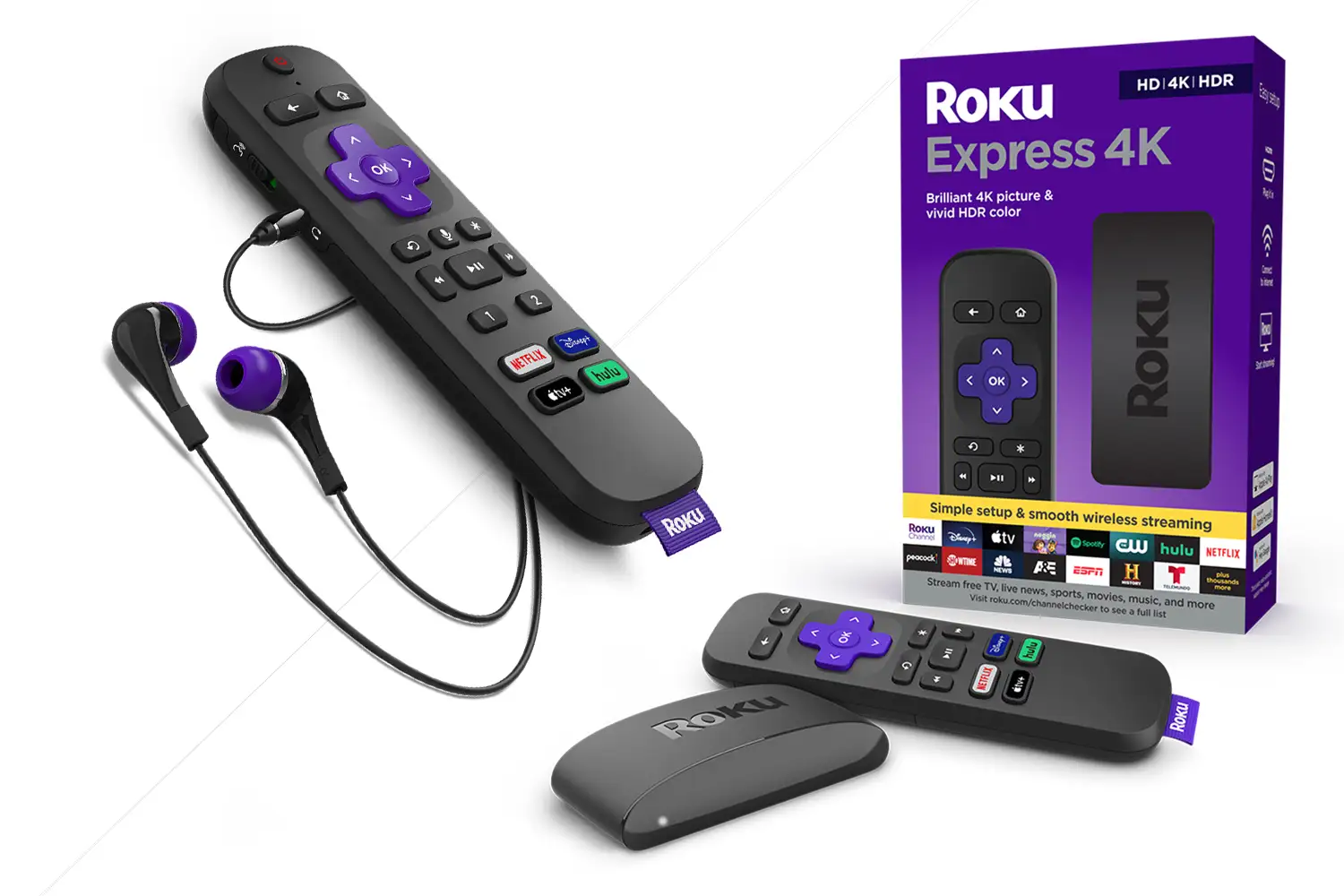
| Works with Alexa, Siri, Google Home | Missing headphone jack on remote |
| Customizable home screen | Older firmware in some regions hurts performance |
| Good selection of free/live TV | Limited support for certain codecs |
| Supports AirPlay and Miracast | Lacks Dolby Atmos as advertised by some |
Claims vs Reality
Marketing emphasizes “smooth wireless streaming” with dual-band Wi‑Fi. Roku promises seamless 4K playback even with multiple devices connected. Digging deeper into user reports, this claim doesn’t always hold. One Reddit user in the “Ultra Roku 4K and Roku Express 4K” thread described, “My 2 Roku Express 4K+ units… are just awful at video streaming… both have to be power reset daily… ready to throw them both away.” They had gigabit internet, suggesting the bottleneck was within the device.
Another core appeal is “brilliant 4K picture quality” optimized for HDR formats including HDR10+ and HLG. While Netflix and YouTube HDR perform well for many, one UK user on the Roku Community warned, “Using iPlayer BBC UHD HLG… the picture is incredibly harsh and quite dark… both brilliance and contrast at 100% on my screen.” This shows that HDR mode handling can vary sharply depending on app and regional firmware.
Roku promotes voice control convenience, claiming you can search content “in a touch.” Yet Trustpilot feedback reveals gaps: “The remote doesn’t have voice control as there is no microphone key on it”—evidence that renewed units sometimes ship with standard remotes, contrary to expectations.
Cross-Platform Consensus
Universally Praised
Ease of setup stands out across Amazon, Trustpilot, and Consumer Reports. A verified buyer wrote, “Easy plug and play set up… no issues streaming.” With the HDMI cable included, setup often takes minutes. For first-time streamers, this quick start can be transformative—hook it up in a guest room or secondary TV without running extra wires.
The breadth of streaming options—Netflix, Disney+, Prime Video, Hulu—is another highlight. Consumer Reports noted, “Streaming quality is very similar to what we see with streaming content on the best TVs.” Casual viewers who stick to popular apps benefit most here; Roku’s platform makes them front and center on a customizable home screen.
Users also value its lightweight portability. Weighing just 1.6 ounces, it’s a favorite for travelers wanting 4K playback in hotels or Airbnbs. Trustpilot user comments such as “Perfect… works great. Highly recommend” reflect satisfaction from those using it as a secondary streaming solution.

Common Complaints
Network instability is the leading frustration. A Roku Community user described after a brief power outage, “It lasts about 5 to 10 minutes & then drops the connection… the Ultra upstairs is fine.” This pattern—Express 4K+ failing while other models hold steady—suggests weaker Wi‑Fi radio hardware or firmware resiliency. BestViewsReviews data confirms: 37% of users wanted better connectivity.
Remote reliability issues follow closely. Trustpilot reviewers detail “volume issues… have to hold it down and point it all over… takes 10+ tries” and “manual volume controls on my remote do not work.” For seniors or those relying heavily on TV volume adjustments, this is a significant usability hit.
Overheating also crops up, especially during sports streaming. The Reddit user streaming football lamented, “They both seem to generate a lot of heat; maybe they’ve damaged their internal components?” Heat can lead to throttling in compact streamers.
Divisive Features
HDR support splits opinion. Many report excellent Netflix HDR imaging, while others in HLG-heavy regions like the UK find BBC streams visually flawed. This variance may stem from per‑input HDR settings on TVs or from firmware handling of HLG.
Voice control capability hinges entirely on the remote version shipped. While Consumer Reports praises the built‑in microphone on some units, multiple Trustpilot users received remotes without voice keys, leading to disappointment.
Trust & Reliability
Trustpilot patterns reveal premature failures—“Totally quit working after a month… keeps saying ‘not connected’” and “30 day warranty is not long enough to properly evaluate the product.” Several express regret about buying renewed units without extended coverage.
Long-term durability is uneven. Reddit posts show that devices can “work well for about a month” before progressing into daily resets. Conversely, some users report no issues through months of moderate use—the divide often linked to network environment complexity.
Alternatives
The only competitor mentioned by users is Amazon Fire TV devices. The Reddit football streamer noted, “They were cheaper than the comparable Amazon Fire TV units; but I guess you get what you pay for.” Trustpilot highlights another case: “I ditched my Apple TV 4K for a Fire TV Cube… had to purchase this Roku just to enjoy Spectrum TV channels”—highlighting app availability differences. Fire TV may offer faster navigation for some, but Roku wins on Spectrum compatibility and broader free channel selection.
Price & Value
Renewed units on Amazon go for around $31.99, with new models retailing higher. eBay listings often show prices in the $22–$30 range for sealed units, indicating strong resale opportunity if kept in good condition. Community advice leans toward buying with warranty or from reputable refurbishers to mitigate early failure risk.
FAQ
Q: Can I use Roku Express 4K on a non‑4K TV?
A: Yes. It will output in HD quality if your TV lacks 4K capability, but you can still enjoy smooth streaming thanks to its dual‑band Wi‑Fi.
Q: Does the renewed version include a voice remote?
A: Not always. Several buyers reported receiving standard remotes without microphones. Check the product listing carefully if voice control matters.
Q: Why does my BBC iPlayer UHD HLG stream look dark?
A: Some TVs require separate HDR picture settings per input/mode. Firmware version and app processing also affect output—adjust TV modes and update software.
Q: Can it output Dolby Atmos?
A: Official specs don’t claim Atmos, but Consumer Reports found Atmos output via Netflix in tests; compatibility depends on TV and app.
Q: How can I fix Wi‑Fi drops?
A: Users suggest manually selecting optimal channels via your router’s admin panel, or performing a network connection reset in the Roku’s system settings.
Final Verdict: Buy if you’re a budget streamer, traveler, or setting up a guest room TV where occasional quirks won’t ruin the experience. Avoid if you need flawless HDR across all apps or rock‑solid Wi‑Fi for event streaming. Pro tip from community: secure an extended warranty and verify remote model before purchase.





