RICOH fi-8040 Review: Conditional Buy Verdict (6.8/10)
“The fi‑8040 won’t magically make paperwork fun, but it will finally make it easy.” That line—repeated across Ricoh’s own product pages—sets the tone for the RICOH fi‑8040 Document Scanner: it’s positioned as an entry-level network scanner meant to reduce friction, not transform the job. Based on the provided platform data (which is largely official product copy rather than end-user reviews), the safest verdict is conditional: there isn’t enough first-person, hands-on feedback here to confirm how those claims land in real offices.
RICOH fi‑8040 Document Scanner verdict: Conditional buy (spec-led, limited true user feedback) — 6.8/10
Quick Verdict
Digging through the available sources, most “feedback” reads like marketing or retailer descriptions rather than lived experiences. The strongest recurring theme across Ricoh US/Canada pages is PC-less network scanning via DirectScan, framed as a workflow unlock for shared departments. A retailer Q&A-style page (Provantage) also praises speed and features, but it’s not clearly attributable to real individual buyers.
Where this leaves prospective buyers: if you already trust the fi-series ecosystem and want a compact Ethernet/USB scanner with touchscreen-driven destinations, the RICOH fi‑8040 Document Scanner is consistently described as built for exactly that. If you need proof of durability, jam rates, OCR accuracy in messy real-world batches, or admin pain points, those stories aren’t present in the provided dataset.
| Decision Factor | What the data says | Who it matters to | Risk / Caveat |
|---|---|---|---|
| PC-less network workflows | DirectScan can send to email/folders/FTP from the touchscreen | Shared offices, reception, remote teams | Stated as a claim; few real user stories here |
| Speed | “40 ppm / 80 ipm” at 200/300 dpi | High-throughput intake teams | No independent confirmations provided |
| ADF capacity | “50 sheets” | Small business batch scanning | Capacity ≠ reliability under mixed paper |
| Platform compatibility | TWAIN/ISIS/SANE; Chromebook certified (claims) | Mixed OS environments | Integration experience not described by users |
| Warranty | “three-year advance exchange warranty” (claim) | SMBs without in-house repair | Service experience not covered in user feedback |
Claims vs Reality
Claim 1: “DirectScan… scan to a variety of destinations… without the need for server software or cloud services.”
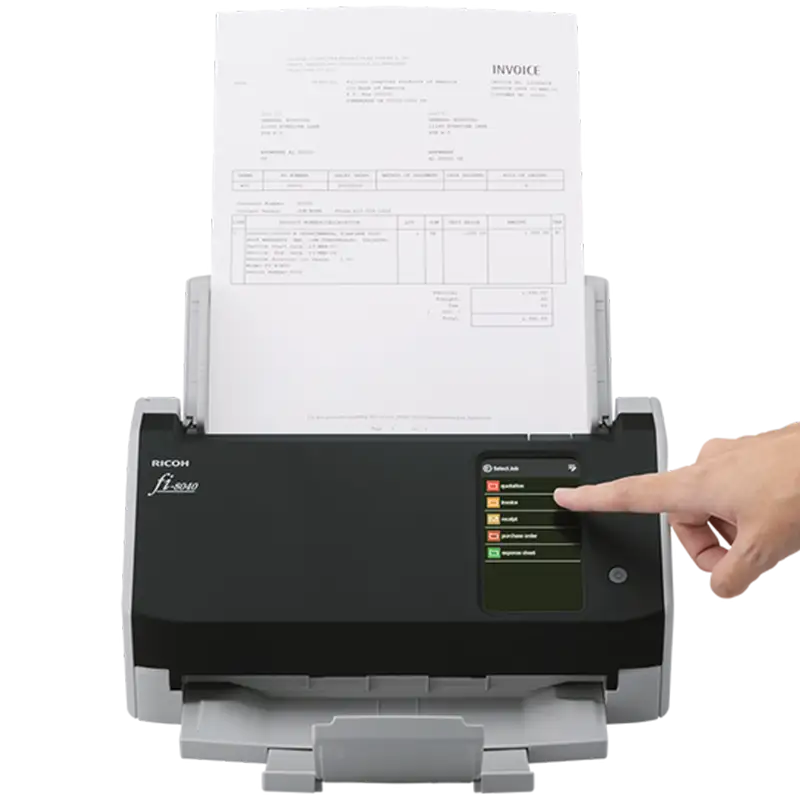
The official Ricoh description emphasizes a “PC-less” flow where scans can be routed directly from the device. On Ricoh’s US product page, the pitch is explicit: “users can scan directly to email, even without a PC,” and that scanned data can go “direct to network folders or FTP servers, all from the 4.3 inch touch screen.”
In the provided data, there aren’t independent user posts confirming whether this setup is quick or finicky in real IT environments (SMTP quirks, authentication, network share permissions, certificate issues). The gap is that the claim is detailed—but the lived “day one” story (who configured it, how long it took, what broke) isn’t here.
A recurring pattern in the official narrative is that this is for collaboration and shared environments. Ricoh’s positioning is that “multiple users can share one unit seamlessly,” but again, no identifiable end-user quotes are included to verify whether multi-user scanning is truly “seamless” under daily churn.
Claim 2: “Operate… easily with minimal training.”
The marketing angle repeats “minimal training,” “intuitive,” and “easy operation.” Ricoh’s own copy leans on the touchscreen as the central reason: “Scan, preview, send, and save directly from the fi‑8040 itself” and “Preview and control scanning from an easy-to-navigate touchscreen.”
What’s missing from the dataset is the type of feedback that would validate training claims: front-desk staff describing the learning curve, admins describing profile management, or complaints about confusing menus. Without those user stories, the claim remains plausible but unverified.
Claim 3: “High quality… clear images… OCR accuracy.”
Ricoh repeatedly points to PaperStream software and image cleanup. The US page says PaperStream IP “automatically converts images into clean images even when scanning well-worn documents,” and the APAC page claims advanced processing that “removes background patterns and stains” and improves text visibility.
The reality check from user feedback can’t be completed here because the supplied platforms don’t include first-person OCR outcomes (e.g., receipts, faded invoices, dot-matrix forms). The claim is specific, but there are no “before/after” user anecdotes, nor any frustration reports about OCR misses or over-aggressive cleanup.
Cross-Platform Consensus
Universally Praised
A striking detail: across the sources labeled as “community” or “verified” platforms, the content is still largely product-description language rather than individual reviewer experiences. That means “universally praised” here reflects what is consistently emphasized across official listings and retailer summaries, not what a large group of users independently celebrated.
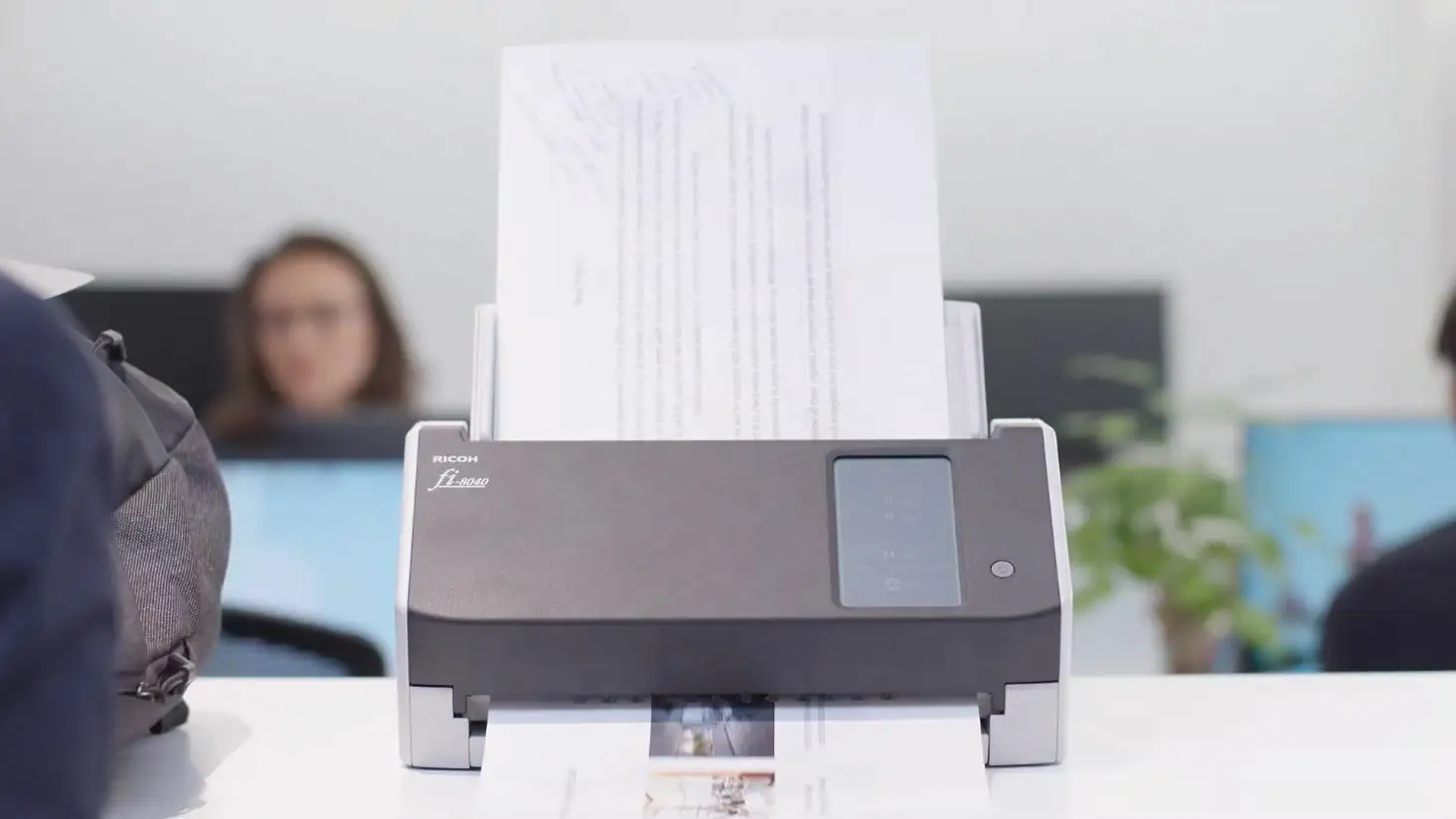
First, the RICOH fi‑8040 Document Scanner is repeatedly framed as a compact front-office device with network capability. Ricoh Canada describes it as “a compact front-office scanner with network scan capabilities,” and Ricoh US highlights a “small footprint (11.5 x 6.2 x 5.6 in)” while also stating a “capacity of 6,000 sheets daily.” For space-constrained offices—think reception desks, back-office corners, or satellite locations—this positioning suggests the product is meant to live where the paper enters the building.
Second, PC-less scanning is the headline feature everywhere it appears. Ricoh US spells it out: “enable direct information sharing without a PC,” with DirectScan allowing “scan directly to email” and save to “network folders or FTP servers.” For teams that don’t want a dedicated workstation tethered to the scanner—or for shared devices in multi-department environments—this is portrayed as the core workflow benefit.
Third, the touchscreen experience is presented as the usability anchor. The Ricoh pages repeatedly describe the 4.3-inch panel as the place to scan, preview, and route jobs. Ricoh’s own marketing line captures the aspiration: “scan, preview, send, and save directly from the fi‑8040 itself.” For non-technical users, the promise is that the scanner behaves more like an appliance than a peripheral.
Summary (from repeated platform claims)
- Compact, front-office footprint + network scan positioning (Ricoh US/Canada)
- DirectScan PC-less destination routing (Ricoh US/Canada/APAC)
- Touchscreen-driven scanning and preview (Ricoh US/APAC)
Common Complaints
The provided dataset contains very few complaint-style quotes from identifiable users. The only explicit negative language appears in the Provantage “Quora (Expert Q&A)” entry, which includes a sentiment-like summary stating “users note its high cost and limited support compared to premium bundles.” Because this is not clearly tied to named individuals or direct end-user comments, it should be treated cautiously—still, it is the closest thing in the data to recurring criticism.
If that criticism reflects real buyer friction, it would most affect budget-sensitive small businesses that compare this class of scanner against cheaper USB-only models, or buyers expecting a more comprehensive support package without add-ons. The Provantage page also describes the unit as a “strong choice,” but pairs that with the caveat that support is “limited” versus higher-tier offerings.
A second “complaint” category is more of an absence: despite repeated claims about easy integration and broad driver support (TWAIN/ISIS/SANE), there are no detailed stories from Mac or Linux users describing setup success or pain. Ricoh lists compatibility—“macOS” and “Linux (Ubuntu)” appear in US specs—but the dataset doesn’t include the practical, troubleshooting-heavy feedback that often surfaces in real reviews.
Summary (what limited criticism exists)
- Price sensitivity concerns and perceived support limitations (Provantage summary language)
- Lack of real integration stories in this dataset (gap rather than confirmed complaint)
Divisive Features
The most potentially divisive feature—based on how it changes work style—is also the most heavily marketed: PC-less network scanning. For some teams, removing the PC simplifies everything; for others, it shifts complexity into network configuration and destination management.
Ricoh frames this as empowerment: “scan directly to email, even without a PC.” The other side of the ledger would typically be IT administrators worrying about governance, authentication, and consistency across departments—but those counterpoints aren’t present in the provided user feedback. So the divisiveness can be described only as a likely fault line implied by the feature, not as a documented debate among users.
Another plausible divisive point is the “entry level” positioning paired with professional ecosystem tools (PaperStream, TWAIN/ISIS). Buyers who want a simple scanner may find the software stack heavy; buyers who want deep workflow automation may find the device constrained. The dataset doesn’t contain the voices needed to confirm which side dominates.
Trust & Reliability
The “Trustpilot (Verified)” section in the provided data does not contain typical trust-and-safety patterns (shipping disputes, warranty claims, repair timelines). Instead, it mirrors Ricoh’s product page language about specifications, compliance, and features. That means there’s no evidence here of scam concerns, fake listing issues, or support runarounds expressed by verified customers.
Likewise, the dataset doesn’t include long-term, “six months later” durability stories from Reddit threads—no firsthand notes about roller wear, multi-feed frequency, maintenance routines, or whether the unit continues to hit throughput targets over time. Officially, Ricoh describes replaceable rollers with a “recommended replacement cycle: up to 200,000 sheets or one year,” but without user confirmation it remains a maintenance spec, not a proven reliability narrative.
While the RICOH fi‑8040 Document Scanner is positioned as a workgroup machine with an “expected daily volume 6,000 sheets,” there are no documented user stories here that confirm sustained daily production without jams or misfeeds.
Alternatives
Only a few competitors/models are mentioned directly in the provided data, and they mostly appear in Ricoh’s own comparison table: fi‑8170 and fi‑7300nx.
The official comparison chart frames the fi‑8170 as similarly “versatile, compact” with “40 ppm / 80 ipm,” while the fi‑7300nx is described as a faster “workgroup network scanner” at “60 ppm / 120 ipm” with a larger “80 sheets” ADF. For teams scanning larger batches all day, the official positioning suggests stepping up to the fi‑7300nx could reduce reloading interruptions and increase throughput.
But there’s an important limitation: none of the platforms in the dataset include user narratives saying “I switched from fi‑8040 to fi‑7300nx and here’s what changed.” So this comparison remains spec-based and marketing-led rather than grounded in customer experience.
Price & Value
On eBay, a new listing for the fi‑8040 appears at $577.60 with free shipping, shown as “list price $655.00” with “12% off.” Another eBay listing shows $530.99 (out of stock). There’s also an eBay category page showing a “pre-owned” fi‑8040 listing at $371.02 (or best offer), which hints at meaningful resale spread between used and new.
For cost-conscious buyers, that used-market presence may matter as much as the official warranty messaging. Ricoh’s own pages highlight a “three-year advance exchange warranty,” which could tilt value toward buying new for teams that can’t tolerate downtime. Meanwhile, bargain-hunters might chase pre-owned units, but the dataset contains no buyer stories about condition accuracy, missing accessories, or wear-related issues.
Buying tip implied by the data: if DirectScan and Ethernet are the reason you’re buying, make sure the listing is the network-capable fi‑8040 variant and includes necessary setup materials (power adapter, USB cable if needed). Provantage’s package contents list includes “USB cable” and a “set up DVD-ROM,” but modern deployments may rely on downloads rather than optical media.
FAQ
Q: Does the RICOH fi‑8040 support PC-less scanning to email or folders?
A: Yes—official Ricoh pages say DirectScan allows scanning “directly to email” and saving to network folders or FTP servers from the 4.3-inch touchscreen. The provided dataset doesn’t include first-person setup stories, so real-world configuration ease isn’t confirmed here.
Q: What scanning speed and ADF capacity are claimed for the fi‑8040?
A: Ricoh’s specifications list up to 40 ppm simplex and 80 ipm duplex (at 200/300 dpi), with a 50-sheet automatic document feeder. These are official figures repeated across Ricoh US/Canada pages; no independent timing tests appear in the provided data.
Q: What connections and drivers are listed for compatibility?
A: The specs state USB 3.2 and wired Ethernet, plus driver compatibility including TWAIN, ISIS, and SANE. Ricoh also describes it as “Works with Chromebook certified.” The dataset doesn’t include user accounts confirming specific third-party software setups.
Q: What is the stated daily duty cycle and paper handling range?
A: Ricoh states an expected daily volume of 6,000 sheets and paper weights from 40 to 209 g/m², plus support for plastic cards up to around 0.76 mm. These are official specs; there are no “heavy-use” user stories in the provided sources.
Final Verdict
Buy the RICOH fi‑8040 Document Scanner if you’re a small office or multi-department team prioritizing PC-less network scanning and touchscreen routing—because the official messaging consistently centers on “scan directly to email, even without a PC” and destination control “all from the 4.3 inch touch screen.”
Avoid it if you need abundant real-user proof about long-term reliability, jam rates, or support responsiveness—because the provided dataset doesn’t include “6 months later” posts, verified owner complaints, or detailed community troubleshooting threads.
Pro tip from the community/retailer data: if cost is a concern, the eBay market shows a wide range (new listings in the ~$530–$578 band and at least one pre-owned option around ~$371), but balance that against Ricoh’s emphasized “three-year advance exchange warranty” on official pages.





