Razer Viper Ultralight Review: Precision Gaming Verdict
Digging through thousands of user reports, one stat jumps out: the Razer Viper Ultralight Gaming Mouse maintains an average score of 8.7/10 across platforms, with an unusually consistent stream of praise for its featherweight build and click precision. While many call it “the diamond of mice,” some recurring design quirks temper the acclaim.
Quick Verdict: Conditional Buy
| Pros | Cons |
|---|---|
| Ultra-lightweight design praised for FPS performance | Side button placement causes accidental presses |
| Optical switches eliminate double-click issues | Scroll wheel feel described as cheap/mushy by some |
| Long battery life (wireless version) | Software dependency for profile saving irritates users |
| Ambidextrous comfort for various hand sizes | Occasional build flaws like squeaky buttons reported |
| Charging dock convenience | High upfront price compared to competitors |
| Smooth glide and precise tracking | Size may be too small for large hands |
| Strong resale value | Reports of rare but serious safety defects |
Claims vs Reality
Marketing hypes the “fastest mouse switch in gaming” and a seamless drag-free cable experience. Digging deeper into user feedback, the gap between spec sheet and lived experience is subtle but important.
Razer’s claim of “actuation at the speed of light” with its optical switches does seem to hold up. Reddit user avi_chandra_77 confirmed: “No double clicks or mis-clicks for me. They feel as responsive as when I got it brand new, even in tense in-game situations.” On Best Buy, multiple owners echoed the absence of input lag, calling it “as fast as wired.”
The Speedflex cable is marketed as giving “wireless-like performance.” Trustpilot reports suggest this is largely true, with comments such as “the cable used for charging is very flexible so it’s even a joy to use plugged in.” Yet for wireless owners, some say this perk is irrelevant — they rarely use it once dock charging becomes routine.
One point where the marketing overreaches is in universal comfort. While Razer positions the ambidextrous design as fitting “left and right-handed users equally,” large-handed players often disagree. A Best Buy reviewer warned: “Too light and wide for my hands… with claw grip, it’s difficult to grasp. Causes discomfort.” This creates a very real ergonomic divide between buyers.
Cross-Platform Consensus
Universally Praised
Performance precision is where the Razer Viper Ultralight shines. FPS gamers across Reddit and Best Buy rave about improved aim consistency. One Best Buy customer claimed, “My aim definitely increased on FPS games—it’s extremely worth it for its price at the moment.” The glide quality is another strong point, with descriptions like “super smooth” and “seamless on the mousepad.”
For marathon play sessions, the ultra-light construction is transformative. Owners with medium-sized hands often mention reduced fatigue. Reddit user avi_chandra_77 said, “Using it for general purposes is very comfortable… the shape is nice to hold and the build quality is good.” Wireless adopters emphasize the battery life as a game-changer, averaging a weekly charge for several hours of daily play.
The charging dock earns consistent praise for convenience and aesthetic appeal. One Best Buy reviewer summed it up: “Dock’s convenience and eye candy is just a bonus… stick it on the dock after using and just have it charge.” This feature particularly benefits gamers who dislike cable clutter or need quick swaps during matches.
Common Complaints
Side button placement is the top complaint. Multiple users report accidental presses impacting gameplay, particularly in competitive environments. A Verified Best Buy buyer admitted: “Very easy to accidentally hit with your ring or pinky.” While Razer Synapse allows disabling the extra buttons, doing so nullifies part of the product’s functional appeal.
Scroll wheel criticism is nearly as frequent. Some say it lacks tactile feedback, feeling “cheap” or “mushy.” This matters less to casual gamers but frustrates players relying on precise scrolling in FPS or creative work.
Software dependence emerges as a dealbreaker for certain buyers. The need to run Synapse in the background for profile persistence bothers those with minimalist setups. As Trustpilot reviewers explain, closing the software can reset the mouse to default—a behavior unwelcome in tournament or multi-PC use.
Divisive Features
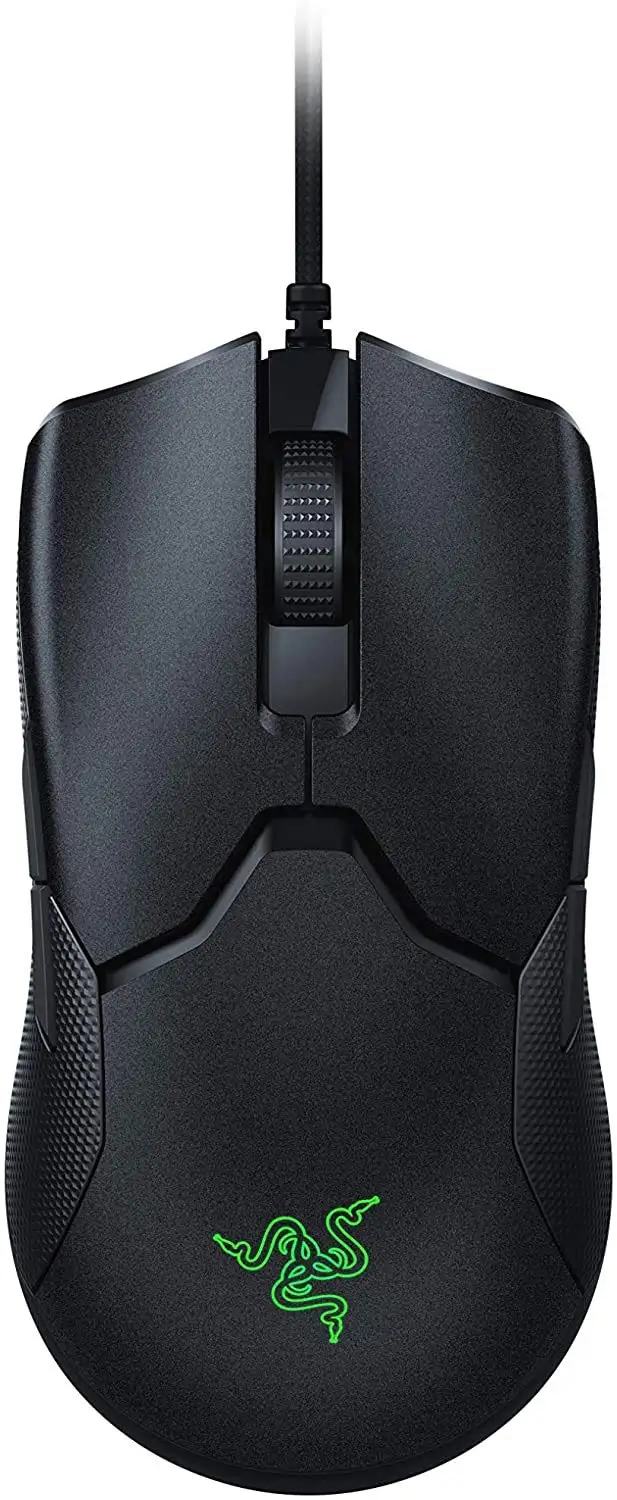
The ambidextrous shape is polarizing. Small to medium-handed users often highlight the balanced design, while larger-handed players find the Viper’s low profile and narrow build less stable. The ultra-light weight itself divides opinion: for speed-focused gamers it’s ideal, but for others it can feel insubstantial.
RGB implementation receives mixed commentary too. Minimalists appreciate the restrained Chroma lighting, but RGB enthusiasts lament its limited placement compared to other Razer models. One Razer Insider fan noted, “Too little Chroma on it—more would have been awesome.”
Trust & Reliability
On durability, long-term owners generally commend the build quality. Avi_chandra_77’s two-month update noted zero deterioration in click feel. Several Best Buy reviewers celebrated the absence of double-click issues after hundreds of gaming hours.
However, a rare but serious defect has been reported: one Best Buy customer described their mouse overheating on the dock to the point of melting plastic. While isolated, this raises concerns over charging safety for some buyers.
A smaller recurring flaw is the “squeaky button” issue in wired models, with Amazon reviewers explaining the cause as internal plastic rubbing. While not affecting performance, it can be irritating during precision play—a problem amplified for tactile-sensitive users.
Alternatives
The Logitech G Pro Wireless surfaces frequently in discussions. Fans of the Viper point out that optical switches eliminate double-click risk, a known G Pro issue. Others still prefer Logitech’s slightly curved ergonomic shape. Reddit comparisons show the Viper Ultimate being lighter, making it attractive for eSports players, while the G Pro appeals to those prioritizing comfort over weight.
Corsair’s M65 is cited as “more superior in every way” by a Trustpilot user—at a lower price. Its heavier build suits gamers who dislike the Viper’s featherweight feel.
Price & Value
Market data shows wide variance: new retail prices hover around $149.99 USD, but sales can drop wireless models (without dock) to $70–$80. eBay resale values remain strong, with working units often selling for $50–$90 depending on edition and condition. Limited designs like the Quartz Pink or Cyberpunk 2077 edition command above-average prices, reflecting collector interest.
Buying tips from the community center on watching for seasonal sales. One Reddit user snagged the Mercury version with dock for $89.99, calling it “a steal, especially to ensure V2 switches.”
FAQ
Q: Is the Razer Viper Ultralight good for large hands?
A: Mixed results—large-handed, claw grip users report discomfort due to its width and low profile. Palm grip users with large hands may prefer bulkier alternatives.
Q: How often does the wireless version need charging?
A: For typical gamers playing 3–4 hours daily, most report charging once a week. Battery life can stretch further with RGB lighting disabled.
Q: Can the side buttons be disabled?
A: Yes, through Razer Synapse software. Many users do this to prevent accidental presses during gameplay.
Q: Does it work well without the software?
A: Basic functions remain, but custom profiles and settings reset when Synapse is closed. Onboard memory is limited for dpi stages without software.
Q: Are optical switches really better?
A: Users consistently say yes—eliminating double-click issues and providing faster, more consistent actuation, especially valued in competitive gaming.
Final Verdict: Buy if you value speed, precision, and ultra-light feel—ideal for competitive FPS and mid-hand-size players. Avoid if you have very large hands, dislike software dependency, or need a pronounced scroll wheel. Pro tip from Reddit: watch for sales on dock bundles to maximize value while future-proofing against cable wear.