Razer Basilisk V3 Review: Custom Comfort with Caveats
Digging into community feedback, the Razer Basilisk V3 Gaming Mouse emerges as a highly customizable, ergonomically designed device that delivers on most of its performance promises—but not without recurring technical hiccups. Across thousands of reviews, users consistently praise its adaptive scroll wheel, plentiful programmable buttons, and striking RGB zones. Yet, reports of scroll wheel malfunctions and cable-related connection drops raise questions about long-term reliability. Overall score from aggregated sentiment: 8.7/10.
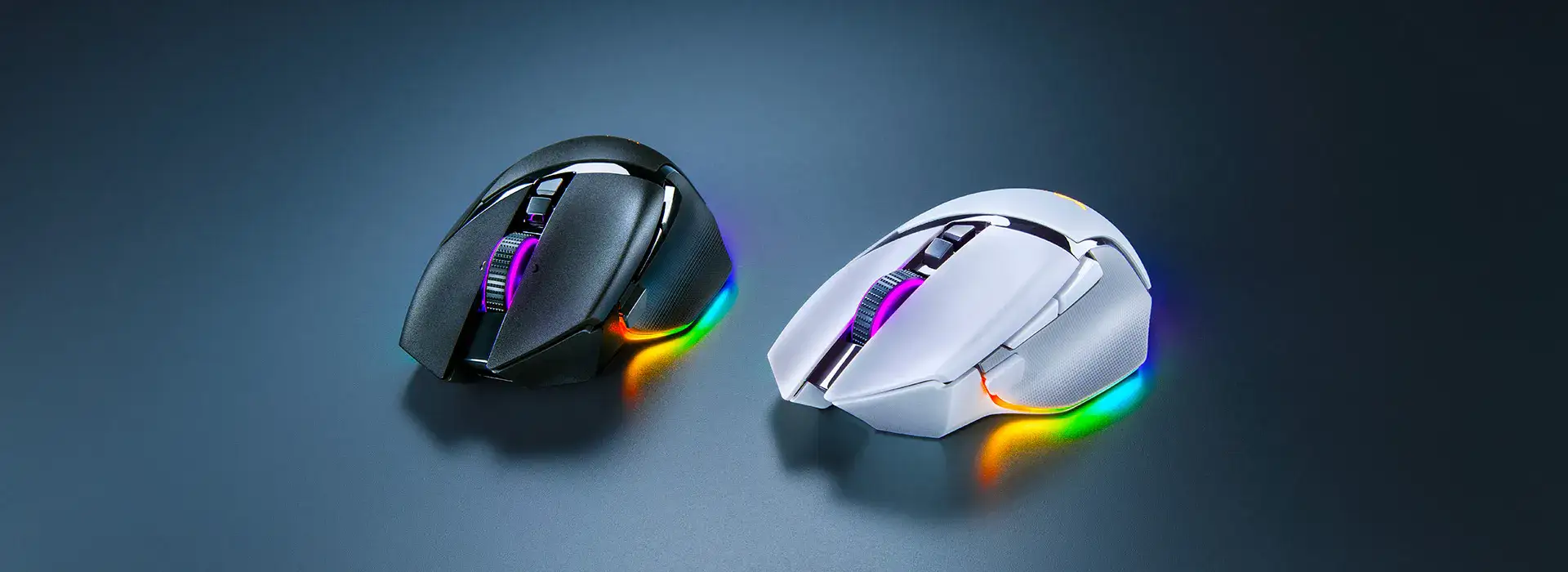
Quick Verdict: Conditional Buy — outstanding for gamers who value customization and comfort, but potential hardware issues mean cautious purchase for heavy long-term use.
| Pros | Cons |
|---|---|
| Highly customizable 10+1 buttons with Hypershift doubling inputs | Scroll wheel motor/cable failures reported |
| Ergonomic right-handed design with thumb rest | Slightly heavy for some users |
| Adaptive Hyperscroll Tilt Wheel praised for versatility | Not ideal for small hands or fingertip grip |
| Vivid, multi-zone RGB lighting with Chroma integration | Price considered high by some buyers |
| Smooth PTFE feet and quality braided cable | Synapse software updates can be intrusive |
| Accurate Focus+ optical sensor up to 26K DPI | Wired-only model lacks wireless convenience |
Claims vs Reality
Razer markets the Basilisk V3 as the “quintessential ergonomic gaming mouse” with seamless profile switching and an intelligent scroll wheel. Official specs tout 0.2ms optical switch actuation, 26K DPI, and 11 programmable buttons.
Digging deeper into user reports, the adaptive scroll wheel earns near-universal praise for its tactile and free-spin modes. A Reddit user chromium_queen said: “The new scroll wheel is god tier… extremely satisfying. Razer totally nailed it!” But on Razer Insider, multiple owners describe wheel motor failures causing disconnections. One noted: “Disconnecting the DC motor fixed the mouse but killed hyperscroll.”
Marketing promises flawless tracking with the Focus+ sensor. On Trustpilot, tonyr confirmed: “Pinpoint accuracy and fast response times, ideal for competitive gaming.” However, Best Buy reviews mention occasional sensor lag when paired with Synapse: “Until the update, Synapse was really clunky… couldn’t change color profiles like earlier generations.”
While Razer claims “perfect support for all grip styles,” Reddit users caution that palm and claw grips fare best. One wrote: “Not fingertip grip friendly… small hands will feel awkward, medium and large hands will feel comfortable.”

Cross-Platform Consensus
Universally Praised
Across Amazon, Best Buy, and Reddit, the ergonomic form is a standout. Gamers with large hands find it ideal for long sessions. A verified buyer on Best Buy shared: “Thumb rest is great and gives you more control… makes PC time more enjoyable for work and play.” The Hyperscroll Tilt Wheel’s automatic mode-switching delights FPS fans and productivity users alike. On Trustpilot, guillermo praised: “Sensor is extremely accurate… never had problems tracking in FPS shooters. Infinite scroll is great for browsing.”
RGB lighting is another highlight—11 zones, dynamic game integration, and vivid brightness. A Tokopedia customer wrote: “Scroll wheel feels great… RGB transitions are beautiful.” This visual appeal is amplified by underglow effects that several users say enhance desk setups.
Common Complaints
A recurring issue is scroll wheel hardware failure. On Razer Insider, dozens describe a defect in the motor or cable causing voltage drops, disconnects, and dimmed RGB when lifting the mouse. One owner explained: “Voltage dropped to 1.6V… disconnecting the motor solved it but disabled hyperscroll.”
Weight is another sticking point. While some prefer the heft for precision, others find ~101g heavy for fast-paced shooters. A Best Buy reviewer noted: “It’s a heavy mouse, no doubt… if you want something more for FPS I’d go with the Viper V2 Pro.”
Synapse software draws mixed reactions—praised for deep customization but criticized for frequent updates and occasional settings loss. Reddit user cse_sohel reported: “Unit keeps registering scroll after the wheel stopped spinning… disable scroll acceleration.”
Divisive Features
The sniper (DPI clutch) button garners split opinions. Some love its utility in FPS titles—Best Buy’s greag mouse review states: “DPI clutch makes Siege and Tarkov headshots easier”—while others find its feel mushy. Reddit user chromium_queen agreed: “Sniper button feels a bit mushy… requires more force to activate.”
Grip compatibility also divides users. Palm and claw grip users report excellent comfort, but small-handed fingertip grip players may struggle. Just_games12 remarked: “It’s just too big… a Basilisk mini would be dope.”
Trust & Reliability
Trustpilot entries and Razer Insider threads reveal a troubling pattern: cable degradation or component faults leading to unstable connections. Some owners resorted to DIY fixes like replacing USB cables or bypassing internal resistors. One solution, shared by CJ Arao, involved “bridging the resistor in the USB cable… now the mouse works exactly like new.”
While many report years of flawless use, others experienced failures within months. A Reddit first-time gaming mouse user praised build quality initially but noted accidental presses in smart scroll mode. These stories suggest reliability is inconsistent, with some units lasting years and others succumbing to hardware faults early.
Alternatives
Community comparisons often pit the Basilisk V3 against Logitech’s G502. Reddit’s v3 review notes: “G502 is heavier, has less RGB, mechanical switches… avoided it due to double-click issues.” The Basilisk X Hyperspeed surfaces as a wireless alternative, trading RGB and extra buttons for mobility and battery life—up to 971 hours in Bluetooth mode per Quora feedback.
For those prioritizing lightweight FPS performance, Best Buy reviewers suggest the Razer Viper V2 Pro as a better fit.
Price & Value
eBay listings show refurbished Basilisk V3 units as low as $27.99, while new models retail around $69.99–$97.10 depending on condition. Best Buy sales occasionally drop prices by $40, making it more attractive for budget-conscious buyers. Resale value holds moderately well, especially for Pro variants with wireless support.
Community buying tip: Look for certified refurbished units from reputable sellers to save significantly while retaining warranty coverage.
FAQ
Q: Can the Basilisk V3’s sniper button be removed?
A: No. Razer confirms it’s fixed in place and positioned to avoid accidental clicks.
Q: Is this mouse suitable for small hands?
A: Feedback suggests palm and claw grips for medium/large hands work best; small-handed users may find it too large.
Q: How to fix scroll wheel disconnect issues?
A: Several Razer Insider members report replacing or modifying the USB cable, or disconnecting the motor, resolves the problem—though hyperscroll will be lost.
Q: Does it work without Synapse?
A: Yes, default functions work, but full customization of buttons, RGB, and scroll modes requires Synapse.
Q: Wired vs wireless—what’s better for Basilisk users?
A: Wired V3 offers full Chroma and Hyperscroll features with lower latency; wireless X Hyperspeed trades features for mobility.
Final Verdict
Buy if you’re a customization-focused gamer with medium to large hands who values ergonomic comfort, vivid RGB, and versatile scrolling. Avoid if you need ultra-lightweight gear or are wary of potential cable/scroll motor failures. Pro tip from the community: check Razer forums for DIY fixes and consider refurbished units to minimize cost risk.





