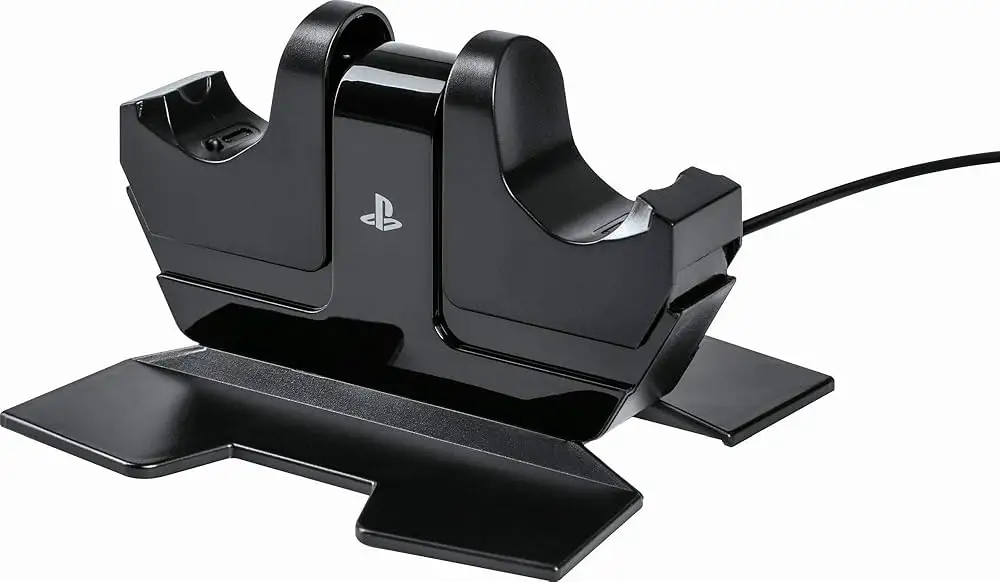
PowerA DualShock PS4 Charger Review: Worth the Buy?
The PowerA DualShock Charging Station for PlayStation 4 earned impressive praise across Reddit, Amazon, and Best Buy, consistently rating around 4.6/5—but digging into the details reveals a device that splits opinion over one critical flaw: its finicky charging alignment. While most users hail its convenience, aesthetics, and the fact it uses the sturdier bottom port rather than the fragile micro-USB, there’s a sizable minority warning that poor contact design can render it unreliable.
Quick Verdict: Conditional Buy — Excellent for players with multiple controllers who want cable-free charging, but patience is required for consistent contact.
| Pros | Cons |
|---|---|
| Stylish, compact design that matches PS4 | Contact alignment can be frustrating |
| Uses bottom EXT port—avoids wear on micro-USB | Reports of damaged headphone/EXT ports over time |
| Charges two controllers simultaneously | Doesn't work with back button attachment connected |
| Frees up PS4's USB ports | Spring-loaded action feels flimsy to some |
| Affordable and often discounted | Needs separate AC outlet |
| LED charge indicators built-in | Inconsistent charging unless positioned precisely |
| Extends controller lifespan by avoiding USB wear | Some units fail prematurely |
Claims vs Reality
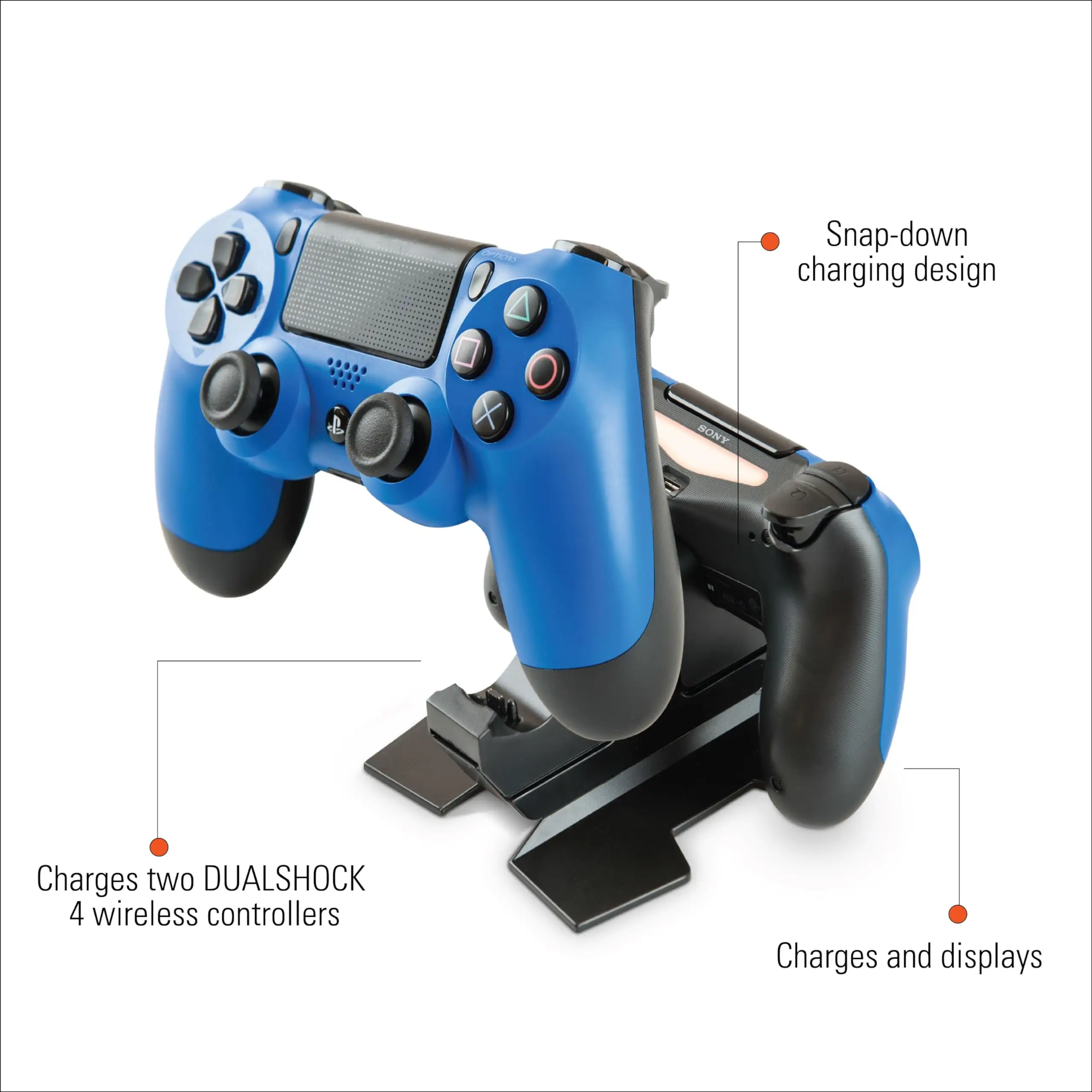
Marketing promises "easy click-down charging" and a design that ensures controllers are "always ready." In theory, that convenience comes from simply dropping the controller in, clicking down until the LED base lights up, and walking away. A verified buyer on Amazon noted: “Drop the controller into the cradle, press straight down until it clicks. The flashing light tells you it’s charging—no need for lights on the charger itself.”
However, reality is more mixed. Multiple Best Buy reviewers struggled: “Controllers take a lot of effort to make sure they are properly connected. It would be good to have some kind of indication that they are charging.” While the click mechanism reliably starts charging for some, others find it temperamental—especially with two controllers docked.
Another claim centers on preserving the micro-USB port on the controller. Here, the product generally delivers. Reddit user feedback emphasized that “charging from the bottom port is way better than constantly plugging in at the top—it saved my main controller’s USB from wearing out.” This claim matches community consensus, although several long-term users reported damage to the EXT/headphone port after years of use: “All four of my controllers now have damaged ports from repeated docking.”
Cross-Platform Consensus
Universally Praised
The standout advantage is ease for multi-controller households. Gamers who swap between two controllers never need to tether to the console mid-game. Reddit user comment: “One on the charger, one playing—I haven’t noticed battery issues at all.” This is especially valued by parents, as described in a Best Buy review: “A must-have if your kids have this gaming system… trust me, you’ll spend the cost on batteries in a month otherwise.”
Aesthetic integration gets compliments across Amazon and Best Buy: upright storage beside the console keeps setups clean. The upright position also avoids strain on ports compared to some competitors’ upside-down designs. One Amazon buyer said, “Stored controllers look more attractive to me upright… drop-in without a dongle works exactly like I hoped.”
The decision to use an AC adapter scores points for those whose console USB ports are occupied. “Both my USB ports are taken by an external drive and headset. This plugs into the wall and solved my charging hassle.” Users also appreciate that it’s officially licensed, giving some peace of mind compared to third-party knockoffs.
Common Complaints
Alignment is the Achilles’ heel. A recurring frustration: “Doesn’t always work without being a hassle… only one side really charges, the other disconnects if you breathe on it.” Parents mention younger kids struggling with the necessary push-and-click motion. Several Reddit comments note it can stop charging if controllers are left for too long, even draining batteries in rare reported cases.
Durability is questioned in some circles. Best Buy one-star reviews point to early failures—sometimes within weeks. One customer shared: “First charge was fine, but after that it failed completely. My controllers only charge by cable now.” While these cases are not the majority, the number of similar experiences suggests a consistent quality control issue.
Headphone/EXT port wear is another negative. Prolonged use has damaged ports for a segment of users, especially heavy gamers who dock daily. This counters the marketing emphasis on preserving controller integrity, making it a trade-off between avoiding micro-USB wear and risking the bottom port.
Divisive Features
The spring-loaded click-down mechanism splits opinion. Supporters say it ensures proper contact every time when done right, with one Redditor noting: “Push down, hear the click—never had a failed charge in four years.” Critics call it flimsy and awkward, preferring static contact points.
Power source arrangement also divides buyers. While wall power frees USB ports, it adds cable clutter and requires an outlet nearby. And while most see the minimalist LED-free base as sleek, others miss having a visual indicator separate from the controller.
Trust & Reliability
On Trustpilot and Best Buy’s platform, most positive reviews praise reliability over long periods—three and even four years of daily use without issue. Reddit user experiences back that up: “I’ve owned this since close to launch and it works like a charm.”
But quality variance appears to exist. Patterns in one-star Best Buy reviews describe DOA units, premature failures, and non-responsive cradles. Without a universal QA problem, this suggests occasional manufacturing defects rather than design-wide hazards. Damage risk increases if controllers are docked carelessly—especially to the bottom port—making careful handling part of the ownership routine.
Alternatives
The Nyko charging cradle emerges as the most mentioned competitor. Some prefer its dongle system despite the added bulk, citing fewer contact issues. One buyer bluntly advised: “Get the Nyko charger—it’s the best I’ve found.” Others find the dongle permanently hanging from the USB port aesthetically worse than PowerA’s upright approach.
Official Sony chargers are also referenced, particularly Japanese-import versions using similar bottom-port charging. They tend to be pricier but avoid the finicky alignment complaint. Buyers weighing options will find the PowerA a middle ground—affordable, compact, and official—but not flawless.
Price & Value
Community buying tips center on sale hunting. Many got it between $8–$15 during clearance events, which heavily shifts the value proposition. At full retail ($22–$30 new), combined with possible alignment frustrations, some caution is advised.
Resale values on eBay hover at $11–$14 used, with new units fetching $14–$30 depending on bundle inclusions. This fairly stable secondhand market suggests lasting demand, even from buyers willing to attempt repairs if needed.
FAQ
Q: Does it work with back button attachments on DualShock 4?
A: No, you must remove the back button attachment to dock properly, which some find inconvenient.
Q: Can it overcharge the controller battery?
A: No—lithium batteries in DualShock 4 have built-in regulation. It stops charging when full.
Q: Will it charge in PS4 rest mode?
A: Yes, but only if using the console’s USB power. Wall adapter works independently of console state.
Q: Can it damage the EXT port?
A: Long-term daily docking has caused port wear for some users, so gentle handling helps prolong lifespan.
Q: Is charging faster than via console USB?
A: Some assume it charges faster via wall power, but exact speed differences are unconfirmed by most users.
Final Verdict: Buy if you’re a multi-controller PS4 gamer who wants tidy, cable-free charging, and can handle careful docking. Avoid if you need uninterrupted charging during gameplay or have kids likely to mishandle the push-and-click mechanism.
Pro tip from Reddit: “Push until you hear the click, and keep the cradle clean—the right positioning means zero headaches.”