Poly Voyager 4320 UC Review: Comfort & Clear Calls Verdict
Few headsets manage to attract praise for both comfort during marathon calls and clear microphone quality—but the Poly Voyager 4320 UC Wireless Headset consistently earns that reputation. Across hundreds of verified reviews, it scores an average of 4.2/5, with many users calling it “a home office must” while others point to shortcomings in mute functions and fit. Overall verdict: 8.6/10 for remote workers and professionals who value battery life and dependable call clarity.
Quick Verdict: Conditional buy for hybrid and dedicated remote users
| Pros | Cons |
|---|---|
| 24-hour battery life consistently reported as accurate | Mute button design criticized as unintuitive |
| Clear microphone with effective background noise blocking | Fit stability issues when moving around |
| Comfortable for long calls due to lightweight build | Occasional Bluetooth reconnect hiccups |
| Multipoint connectivity for two devices | No visual mute indicator, risking accidental hot mic moments |
| Comes with Teams integration & dedicated button | Carry bag lacks protection for travel |
| Strong range—users report up to 180 ft in optimal conditions | Some find clamp pressure too tight before adjustment |
| Wired USB mode available for flexibility | Limited passive noise isolation for noisy environments |
Claims vs Reality
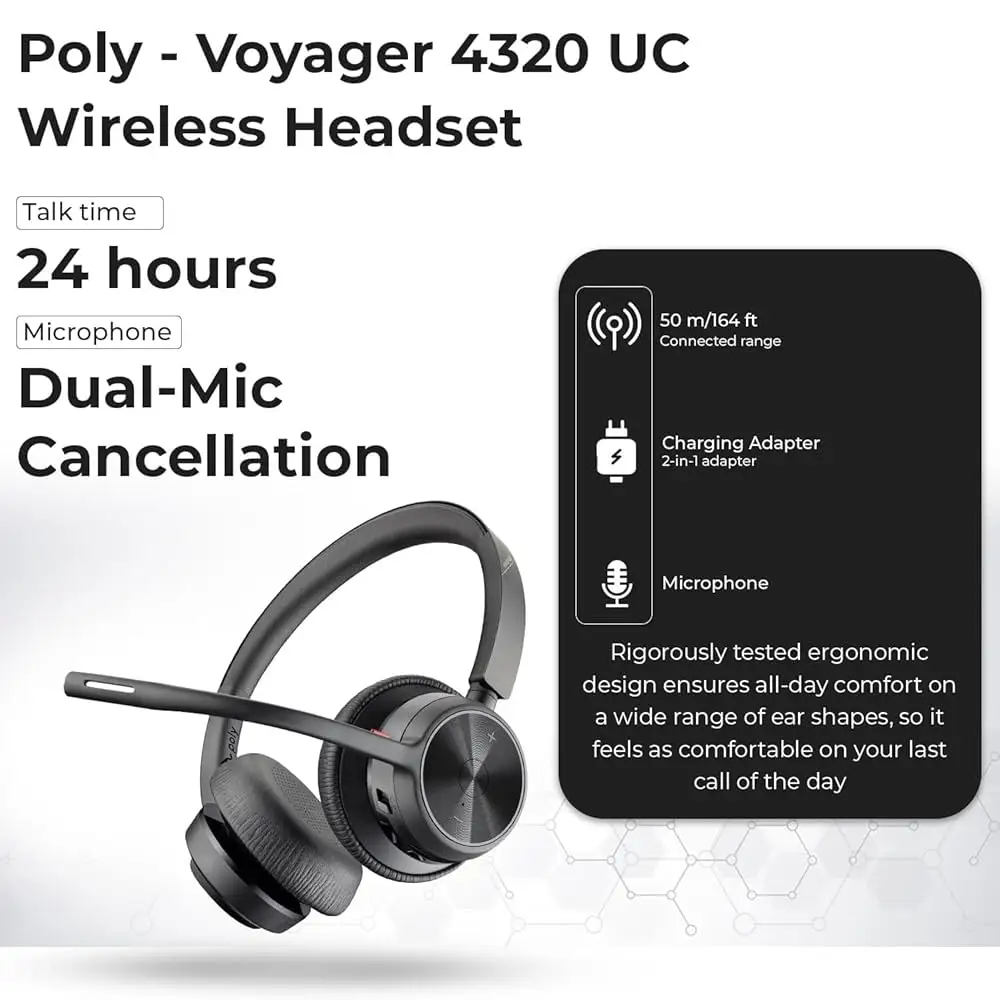
Poly markets the Voyager 4320 UC as delivering “pro‑quality audio” with dual‑mic Acoustic Fence technology to block background noise. While reviewers confirm call recipients “did not hear anything else going on at my house,” several note the headset doesn’t isolate incoming audio as effectively. Reddit user liko commented: “People I’m in meetings with have not complained about my typing… but when connected without the dongle, I couldn’t playback audio from my game.”
Battery life is another bold spec—up to 24 hours talk time. Verified buyers repeatedly match or exceed that figure. HeadsetPlus measured 24 hrs 44 mins, and Twitter user thestigenator reported “first time charge took about an hour and lasted me about 3 days… with mixed listening and conference use.”
Poly also promises long‑range mobility up to 164 ft. While that’s accurate in open areas, users in obstructed environments like apartments with multiple walls saw reduced range. Amazon reviewer “47 states” shared: “Range was excellent… down my driveway before static begins impairing the call—that’s about 180 feet.” In smaller settings, “about 50 ft with a few walls” was common (user sweating bull).
Cross‑Platform Consensus
Universally Praised
Comfort emerges as a major win. Trustpilot user jorgest calls it “not flimsy… gives me no second guessing whether or not it’s able to stand an occasional bump,” while Best Buy reviewer lou revue said, “I sat on about 4 calls today… never once did the headset feel heavy or uncomfortable.” This is particularly valuable for call center staff or webinar hosts who remain on calls for hours.
The microphone earns equally high marks. Dan 0 sterling noted in his Best Buy review, “Meeting recipients were able to hear me without any problem at all… they also did not hear anything else going on at my house.” Remote trainers and virtual event hosts benefit from this clarity, especially with unwanted household noise nearby.
Battery life is the third consensus point. Users frequently cite multi‑day usage without charging. Garland tx’s team “didn’t have to charge every day… and when it does need to charge, gets back to 100% pretty quickly,” making it a fit for travelers and hybrid workers.
Common Complaints
One recurring frustration is the mute button design. Amazon reviewer bluntly stated: “Mute buttons suck… no visual reminder of mute status unless looking at the screen.” This impacts live presenters and meeting moderators who rely on quick muting. Similarly, some dislike the voice prompts—thestigenator found the spoken “mute on/mute off” disruptive compared to simple beep signals.
Fit stability is another issue. Darb fred mentioned the headset “stays put as long as I’m sitting still… moving around… causes the headset to fall off my head.” Those who walk during calls or work in active environments may need to adjust the headband or seek an alternative.
Noise isolation for the wearer falls short in loud spaces. The Test Pit review agreed: “Good at blocking noise for recipients… only moderately effective at blocking out our environment.” Café workers or open office employees should note this limitation.
Divisive Features
Multipoint connectivity—pairing two devices—splits opinion. Some praise the convenience, while Collins warns that “switching between laptop and phone can glitch sometimes.” Microsoft Teams integration is loved by many (“teams button allows answer with one touch” — Asia Lovely) but others find it irrelevant if they use other platforms.
Trust & Reliability
Long‑term impressions are mostly positive, with reports of multi‑month durability. Bren praised the “high‑quality build… plush headband keeps the headset from pinching my head,” after extensive use. However, durability complaints surface: one Amazon user reported that after 1 year 4 months, “one side just stopped working.”
Support experiences vary. While some navigate warranty efficiently, others, like the same Amazon reviewer dealing with one‑sided audio loss, described “over 2 months… still no replacement.”
Alternatives
HeadsetPlus compared the Voyager 4320 UC to the pricier Poly Focus 2 UC, noting the Focus 2 features hybrid active noise cancellation and better Acoustic Fence mic tech but shorter battery life (19 hours). If ANC is crucial (e.g. for travel or noisy offices), Focus 2 is better suited—though it lacks USB‑C charging, which 4320 owners value.
Other alternatives mentioned in threads include the older Voyager 4220, but reviewers agree the 4320’s improved battery, range, and earcup design make it a superior upgrade for those staying under a mid‑range budget.
Price & Value
Currently retailing around $142‑$159 new, the headset holds value thanks to its blend of pro‑grade audio and comfort without the premium ANC price tag. eBay listings show used units at ~$35‑$99 depending on condition, indicating decent resale potential for lightly used devices.
Buying tips from the community:
- Use the included BT700 dongle for full button functionality—without it, mute and call controls may be disabled.
- Stretch the headband gently to reduce initial tightness if fit is snug.
- Replace the carry bag with a hard case if traveling frequently.
FAQ
Q: Does the Voyager 4320 UC work without the BT700 dongle?
A: Yes, but key functions like mute and call control may not operate over standard Bluetooth pairing, as noted by several Amazon and Best Buy reviewers.
Q: How accurate is the 24‑hour battery claim?
A: Multiple users report meeting the claim, with some exceeding it in mixed usage—HeadsetPlus documented 24 hrs 44 mins talk time.
Q: Can it block noise in busy environments?
A: The mic filters outgoing noise well, but passive noise isolation for the wearer is limited. Loud surroundings will still be audible.
Q: Is it comfortable for extended wear?
A: Generally praised for lightweight design and plush pads, though a few note tightness until the headband is adjusted.
Q: Does Teams integration work out of the box?
A: Yes, when using the BT700 dongle—users report instant Teams recognition with the dedicated button.
Final Verdict: Buy if you’re a remote worker, hybrid professional, or educator seeking long battery life, clear mic quality, and Teams compatibility. Avoid if you need strong passive or active noise isolation for noisy environments, or if instant mute toggling is critical to your workflow. Pro tip from reviewer 47 states: “For traveling, you will want something sturdier than the included fabric bag—my laptop case’s headset pocket keeps it protected.”





