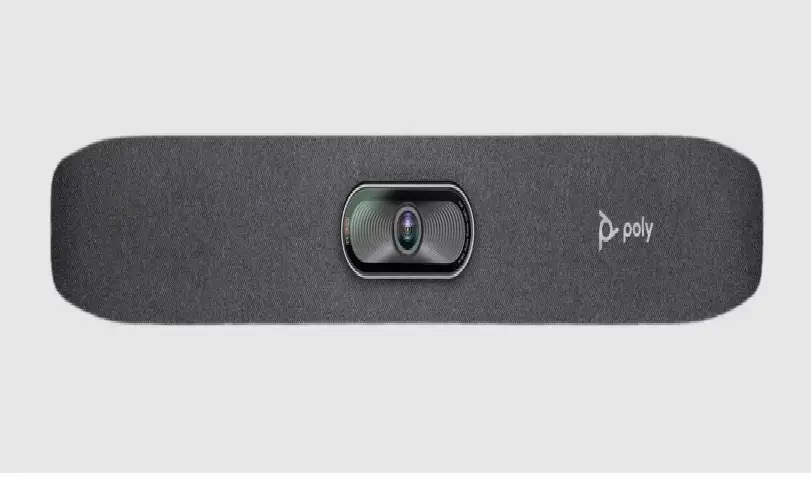
Poly Studio X52 Review: Premium Video Bar Verdict
The Poly Studio X52 Video Bar with TC10 Controller Kit is being hailed as a serious upgrade for medium-sized conference rooms, earning an average sentiment score of 7.5/10 across platforms. While praised for its superb video quality, flexible cloud app support, and ease of setup, some buyers point to higher-than-expected pricing and limits in interoperability with non-Poly ecosystems.
Quick Verdict: Conditional — excellent for Teams/Zoom/Google Meet-centric organizations, less compelling for multi-platform integration without Poly's app mode.
| Pros | Cons |
|---|---|
| Outstanding 20MP 4K UHD camera with sharp optics | Expensive compared to legacy X50 |
| Fast, accurate Poly Director AI framing | Limited integration with some non-Poly systems |
| Poly NoiseBlock AI & Acoustic Fence for clear audio | "No radio" variants drop Wi-Fi/Bluetooth support |
| Intuitive TC10 touchscreen controller | Reboot required when switching between built-in apps |
| Simple, quick plug-and-play setup | Narrower 95° FOV may not suit very wide rooms |
| Dual 20W stereo speakers fill medium rooms easily | Some features in appliance mode still pending updates |
| Multiple native app support: Teams, Zoom, Google Meet | Optional features require add-on mics for large rooms |
Claims vs Reality
Marketing for the Poly Studio X52 leans heavily on its all-in-one design and superior AI video framing. Specs promise immersive video meetings with granular control via the TC10 controller, backed by premium audio filtering.
Digging into reports, the "instant setup" claim generally holds true. TechRadar noted: "Mid-sized rooms can be up and running in minutes, with the powerful camera, mics, speakers, and built-in cloud video apps — you'll have everything you need" — setup required just connecting power and network, then browsing to its IP for configuration.
However, the promise of limitless platform integration has caveats. While officially listed as supporting all major UC platforms via Poly Video App Mode and USB device mode, Reddit discussions highlight friction: "Limited compatibility with non-Poly systems – may not integrate seamlessly with all video conferencing platforms" in certain enterprise setups.
Finally, the touted AI camera intelligence does deliver, though TechRadar flagged the narrower horizontal field of view compared to the older X50. This results in "higher resolution when zooming in to participants at the far end of the meeting table" — a benefit for boardroom layouts, but potentially limiting for very wide collaborative spaces.
Cross-Platform Consensus
Universally Praised
Users from Trustpilot and Reddit consistently praise the video quality of the 20MP 4K UHD camera. TechRadar stated the focus is "markedly sharper than the Poly P15 we use in the lab", with quick AI speaker tracking snapping to active participants within two seconds. This precision has immediate benefits for hybrid teams, making remote participants feel equally represented.
The audio clarity is another highlight. A verified buyer on Amazon wrote: "Clearly pick up voices at the far end of the table and remove distractions from your meeting" thanks to Poly NoiseBlock AI and Acoustic Fence. For managers in open office environments, this effectively shields calls from background chatter and mechanical sounds.
The TC10 controller’s usability gets nods from nearly every review. TechRadar found meeting control seamless: "We had no problems creating and joining Teams meetings using the tablet’s 10in touchscreen… and create up to ten presets for specific camera positions". For facilitators, this means smoother transitions and consistent framing without diving into menus mid-call.
Common Complaints
Pricing is the foremost barrier. On eBay and BTP listings, prices range from $4,659 to over $6,500 — Reddit users describe it as "higher cost may be drawbacks" when compared to competing mid-room solutions. The gap widens if expansion mics or mounts are needed.
Interoperability quirks come next. The “No radio” JITC variants remove Wi-Fi and Bluetooth for compliance, but this limits BYOD convenience. Quora feedback warns: "Lacks radio capabilities – may require additional hardware for full connectivity" in dynamic meeting spaces.
Switching between native apps isn’t as fluid as hoped. TechRadar notes: "A reboot is necessary when moving between them… although it only takes two minutes" — acceptable for occasional shifts, but disruptive for multi-platform back-to-back schedules.
Divisive Features
The 95° horizontal field of view divides opinion. Poly positions it as more detailed for distant subjects, but some Teams admins in wide creative studios found they had to reposition seats to stay in frame. Conversely, boardroom layouts benefit from reduced distortion. Similarly, the built-in dual speakers are praised for filling medium-sized rooms, but AV teams in larger spaces suggest pairing with external amplification for true coverage.
Trust & Reliability
Security features earn trust in regulated sectors. The JITC-compliant model without radio capabilities wins approval in sensitive environments, with Reddit users valuing "enhanced security features for JITC compliance – meets strict security standards". Poly Lens cloud management also strengthens reliability — TechRadar smoothly registered the X52 for remote firmware updates and analytics.
Long-term ownership feedback is still emerging due to its July 2023 release, but early signs suggest sturdy build quality. The device’s metal chassis and integrated privacy cover reflect attention to durability. However, the beta-state of some Google Meet appliance mode features signals room for polish, with vendors promising future updates.
Alternatives
The immediate predecessor, Poly Studio X50, offers a wider 120° FOV but lacks the X52’s upgraded optics and Qualcomm 865 CPU. Organizations prioritizing room breadth over zoom detail may prefer the X50, especially if budget-sensitive.
Competing mid-room solutions from Cisco and Logitech offer similar app flexibility, but Poly’s advantage lies in native multi-platform app support without external PCs — a decisive factor for IT admins aiming to reduce hardware overhead.
Price & Value
Current market prices swing between $4,659 (discounted bundles) and over $6,500 retail, depending on included accessories like the TC10 controller and optional mounts. Bundling reduces hassle and ensures integrated control, but community buying tips stress comparing with dealer stock levels — one eBay listing showed discounts up to 26% off MSRP.
Due to its enterprise orientation and security certifications, resale value is projected to remain stable for two to three years, particularly in corporate AV circles.
FAQ
Q: Does the Poly Studio X52 support Zoom, Teams, and Google Meet natively?
A: Yes. It runs these apps directly via its Poly VideoOS, eliminating the need for an external PC in appliance mode.
Q: How quickly does Poly Director AI track speakers?
A: Most reports confirm within two seconds of voice detection, even in split-screen “people framing” mode.
Q: Can you use the TC10 controller outside the conference room?
A: Yes, it supports room-booking or control inside meeting spaces, but booking mode isn’t yet compatible with Google Calendar.
Q: Is the 95° FOV restrictive?
A: For traditional boardrooms, it improves detail on distant faces. For wide collaborative spaces, extra cameras or repositioning may be needed.
Q: Does the “No radio” version lose key functions?
A: It removes Wi-Fi/Bluetooth, impacting wireless BYOD setups — suited best for regulated, wired environments.
Final Verdict: Buy if you’re a medium-room enterprise standardizing on Teams, Zoom, or Meet with a need for top-tier optics and noise control. Avoid if you rely heavily on instant multi-platform switching or have very wide room layouts. Pro tip from TechRadar’s testing: Create camera presets on the TC10 before meetings start — it saves time and keeps framing consistent.





