PNY NVIDIA RTX A4000 Review: Pro Power, Mixed Gaming Verdict
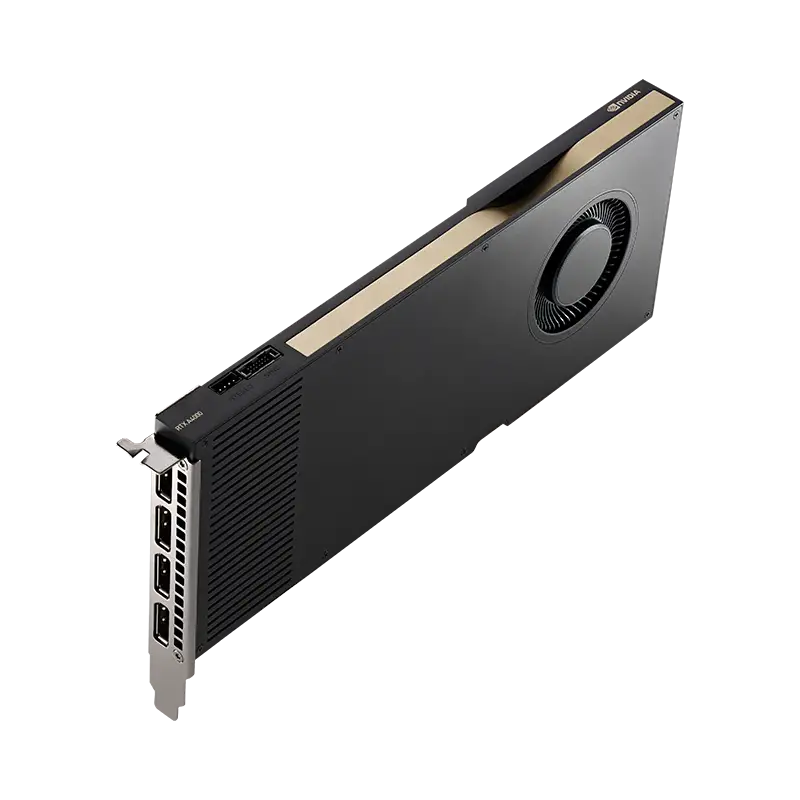
Boasting 16GB of ECC GDDR6 in a slim single-slot form factor, the PNY NVIDIA RTX A4000 has drawn praise from workstation professionals and curiosity from gamers — but the verdict is nuanced: 8.1/10 for professional workflows, a conditional buy for gaming.
Quick Verdict: Conditional Buy
| Pros | Cons |
|---|---|
| Compact single-slot design fits most cases | Louder blower cooler under load |
| 16GB ECC memory supports large datasets | Limited overclocking headroom due to locked voltage |
| Exceptional efficiency (140W TDP) | Gaming performance closer to RTX 3060 Ti than 3070 Ti |
| Certified drivers for pro apps | Price premium over gaming GPUs with higher performance |
| Strong AI/rendering capabilities | Dust buildup can cause thermal throttling |
| Fits SFFPC builds | No NVLink/Sli support for multi-GPU setups |
Claims vs Reality
PNY markets the RTX A4000 as “the most powerful single-slot GPU for professionals” with real-time ray tracing, AI acceleration, and certification for over 100 professional applications. While this is true for CAD, 3D modeling, and machine learning, gamer benchmarks tell a different story.
For instance, NVIDIA’s claim of “up to 2x faster ray tracing than the previous generation” resonates in professional rendering. Reddit user without a username noted: “I can pretty much work realtime with cycles viewport render in Blender… the 16GB vram really helps with complex scenes.” Yet in Cyberpunk 2077, TechSpot found it matched only RTX 2070 Super performance at 1440p without overclocking — far from flagship gaming levels.
The “power-efficient single-slot design” is marketed as a strength, and it genuinely benefits those with space constraints. Reddit user commented: “She’s compact and needs only one 6-pin… slots neatly in my ncase M1.” However, that compactness comes with blower cooler noise. A verified buyer on Trustpilot warned: “Factory heatsink will quickly plug with dust… performance slows down as the card throttles.”
Cross-Platform Consensus
Universally Praised
For professionals, the RTX A4000’s efficiency and memory capacity make it a workhorse. Mining users, modelers, and AI enthusiasts have confirmed its capabilities. A Russian owner wrote: “It allows 61–62 MH/s… energy efficient at just 125 watts.” Data scientists also appreciate that ECC ensures integrity in mission-critical workloads; one Trustpilot reviewer explained it could “fit Llama 2–13B q6 100% in RAM and generate text faster than you can read.”
Gamers dabbling in professional tasks benefit from its larger memory cushion. TechSpot noted even at 4K, while not fastest, it “delivers highly playable performance in Death Stranding” and supports all GeForce features (DLSS, Reflex, NVENC). Reddit users praised driver stability: “Price premium is mainly for the driver support and vendor certs… Siemens NX performance is much worse on gaming cards.”
Common Complaints
Gaming-focused buyers find the RTX A4000’s price-to-performance disappointing. In comparative testing, stock operation sits near an RTX 3060 Ti, with an average 6–14% deficit versus RTX 3070/3070 Ti. Reddit user bluntly asked: “Why would anyone use this for gaming xd?” Others mention cooler design constraints hurt overclocking potential. TechSpot clocked just a 10% GPU boost due to locked voltage.
Noise is another recurring issue. While marketing praises the blower’s exhaust pattern for multi-GPU setups, single-card owners notice louder operation. Dust accumulation is a long-term concern, leading one Trustpilot buyer to install a $75 aftermarket cooler.
Divisive Features
The single-slot footprint polarizes crowds: SFF builders call it a “dream card” for compact workstations, while those with roomier cases see no reason to sacrifice thermals for slimmer profiles. Likewise, the power efficiency delights professionals in enterprise environments but leaves gamers indifferent; as TechSpot noted, “Efficiency advantage goes out the window… gamers don’t typically care too much.”
For some hybrid users, it bridges their workloads — one Redditor runs ZBrush, CAD, and occasional Warhammer 2 play “on highest settings,” valuing its dual-use flexibility. Others view gaming as an afterthought and urge budget-conscious buyers to stick with GeForce options unless driver certs are mandatory.
Trust & Reliability
Fakespot’s analysis of online reviews found over 80% high-quality content with minimal deception, suggesting stable performance and satisfaction. Many long-term owners confirm reliability: a miner on SlonRekomenduet said, “Used for two months… still works without issues,” while another reported smooth operation after six months in rendering-heavy workflows.
Physical durability is aided by the blower cooler’s exhaust pattern in multi-card rigs, though single-card setups may see quicker dust clogging. Trustpilot reports highlight this as a predictable maintenance task rather than a flaw.
Alternatives
The GeForce RTX 3070 Ti remains faster for pure gaming, with higher frequency cores and GDDR6X bandwidth—at the cost of power draw and heat. TechSpot benchmarked it consistently 12–25% ahead in demanding titles. The RTX 3060 Ti often matches the A4000’s gaming frame rates for less money, but lacks ECC memory and professional certifications.
In the workstation space, other Ampere-based “A” series GPUs (A5000, A6000) scale capacity and cores upward, but with larger form factors and significantly higher prices. As Reddit’s CAD-heavy users attest, application-specific driver support can make the A4000 a more cost-efficient “middle ground” if software certs are non-negotiable.
Price & Value
Current eBay listings fluctuate widely: used units around $575–$930, new near $1,300–$1,700 CAD, with some outliers cresting $2,000 AUD in constrained markets. The resale value appears stable given the professional demand; buyers targeting enterprise needs pay premiums over gaming cards.
Community advice tilts toward watching for MSRP-aligned sales or reputable used units. As TechSpot concluded, “Wouldn’t pay a premium… should cost between a 3060 Ti and 3070 Ti, closer to the 3060 Ti.” For SFFPC workstations or AI development, the extra cost can be justified; for gaming-only use, it’s harder to recommend.
FAQ
Q: Is the RTX A4000 good for gaming?
A: It can play modern titles well, often matching RTX 3060 Ti performance, but gaming cards like the 3070 Ti are faster for lower cost. The main draw is its large ECC memory and pro driver stability.
Q: How noisy is the RTX A4000 under load?
A: The single-slot blower can be loud, particularly in gaming. TechSpot measured 47 dBA at stock clocks; aftermarket cooling can reduce noise.
Q: Does the RTX A4000 support DLSS and ray tracing like GeForce cards?
A: Yes, all GeForce RTX features—DLSS, Reflex, ray tracing, ShadowPlay—are supported, along with pro features like Mosaic and Quadro Sync II.
Q: Who should buy the RTX A4000 over an RTX 3070?
A: Professionals requiring certified drivers, ECC memory, or fitting a single-slot card into space-limited chassis benefit most. Gamers without these needs should consider GeForce options.
Q: What’s the long-term reliability?
A: Multiple owners report stable operation after months of heavy use. Maintenance, such as cleaning the blower cooler, is key to avoiding thermal throttling.
Final Verdict
Buy if you’re a professional or hybrid user needing certified drivers, ECC memory, and compact form factor — especially for CAD, 3D rendering, AI, or mining. Avoid if your sole priority is gaming frames-per-dollar.
Pro tip from the community: Seek MSRP deals or reliable used units, clean the cooler regularly, and, if noise is a concern, budget for aftermarket cooling.





