OtterBox Defender iPad Pro 11 (M4) Case Review: 7.5/10
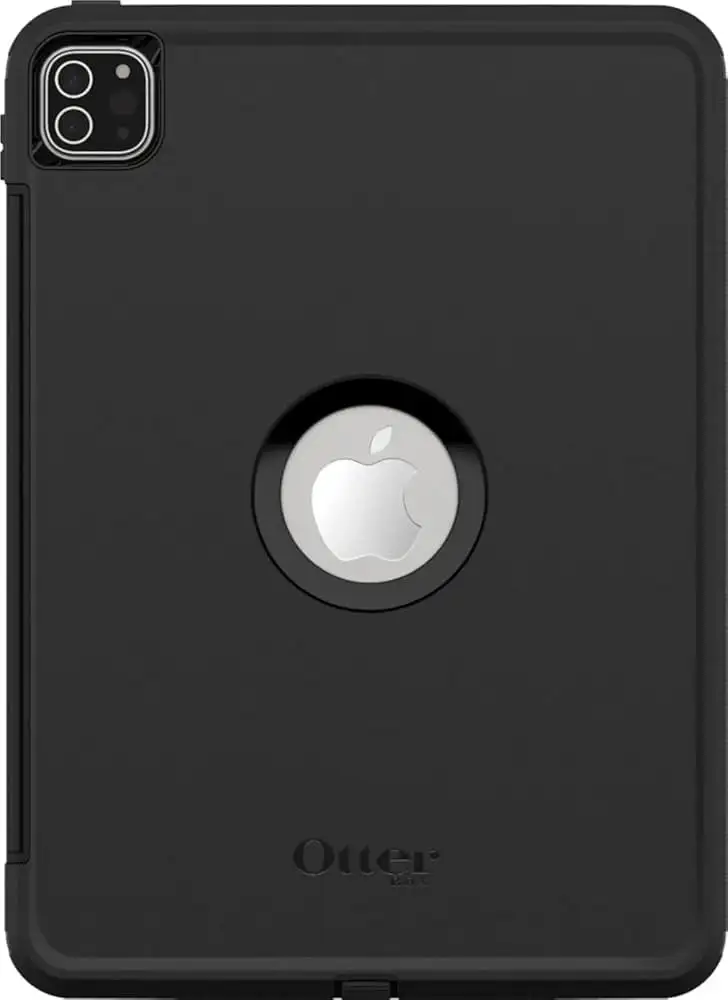
“Protects like a tank, but fights you every time you try to use it.” That tension defines the OtterBox Defender Series Case for iPad Pro 11-inch (M4) in the eyes of buyers. Across Best Buy, Staples, and Revain, people repeatedly describe near‑bulletproof confidence paired with day‑to‑day friction. Overall verdict from the feedback: strong protection with meaningful usability tradeoffs — 7.5/10.
Quick Verdict
Conditional yes — excellent for heavy‑duty protection, questionable for everyday comfort.
| What users love | What users dislike |
|---|---|
| Rugged protection and peace of mind | Bulky and heavy feel |
| Generally snug fit on the M4 iPad Pro | Kickstand/cover hard to open or close |
| Built‑in screen protector can save buying a separate one | Screen protector can look hazy or reduce touch feel |
| Grip and durability for kids or rough use | Apple Pencil Pro storage/charging flap issues |
| Raised edges help with drops | Camera lens sometimes blocked by rear cover |
Claims vs Reality
OtterBox markets the OtterBox Defender Series Case for iPad Pro 11-inch (M4) as “legendary protection” with a multi‑layer shell, built‑in screen protection, and a four‑position stand. Digging deeper into user reports, that first claim largely holds up. Protection is the most consistent win across platforms. A verified buyer on Best Buy wrote that it’s an “armoured tablet” and said it’s a “sturdy cover” that “gives you the confidence to carry your ipad around in your bag.” On Staples, one reviewer called it “the bomb” and said it “has protected my ipad as advertised.” Another Staples customer, speaking from a kids‑use scenario, said: “my 4yr and 5yr had them on their tablets… not a scratch yet.”
The stand claim is where marketing and reality diverge. While the product pages describe a versatile four‑position setup, multiple owners describe the stand as clunky or even risky to operate. A verified buyer on Best Buy said the “stand is hard to open fully and even harder to close,” calling use “awful” despite the protection. Another Best Buy reviewer described the kickstand attachment as “a pain to close up after it’s open.” Staples users echo the same frustration: one wrote “slide‑out stand sucks!!!!” because it “sticks and is very difficult to open and close.” Another Staples buyer summarized their experience as “good for defense, but has trade offs,” pointing out the stand’s difficulty returning to place and a tendency to slide.
OtterBox also promotes a built‑in screen protector as a key feature. Feedback shows a split: some see it as cost‑saving security, others remove it immediately. A verified buyer on Best Buy praised it, saying they liked that “it has a building screen protector… it does save you about $30.” Yet another Best Buy reviewer called the “plastic cover on the screen… too much” because it “takes away from the user experience.” On Revain, one customer said there was “a small gap between them” (case protector and screen) they didn’t like, so they “had to remove it and add another one.” Several users complained that touch responsiveness felt worse with the film, describing having to “touch harder than i would like” (Revain). While officially listed as built‑in screen protection, multiple users report that it can be a liability for clarity or feel.
Cross-Platform Consensus
Universally Praised
“Protection, hands down.” That phrase, or close to it, appears repeatedly. A recurring pattern emerged: buyers who prioritize drop defense for rough environments or children almost always feel satisfied. A verified buyer on Best Buy said the case offers “great protection” and is “rugged and protective.” Another Best Buy customer framed it for family use: “best protection out of all of the cases sold at best buy hands down… great case to have on if you are giving the ipad to a child or anyone else who is not careful.” Staples reviewers also lean into this persona; one described OtterBox as “the best protection” in 2025, crediting it with saving their children’s tablets.
Fit is the next consistent strength, especially among those who successfully installed it. Several Best Buy users described it as fitting “like a glove” or “perfect for the ipad m4 pro 11.” A verified buyer on Best Buy wrote that the case “fits perferct, great protection,” while another said “better fit… much better than the older model.” Even on Revain, a reviewer noted it “fits my ipad pro perfectly.” For commuters or field workers who want a case that won’t shift in a backpack, this snugness is reassuring.
People also like the grip and sturdiness once the case is on. One Staples buyer called it a “sturdy case” with a back that has “good grip.” A Best Buy user summed up the feeling of security: “sturdy cover… confidence to carry your ipad around in your bag.” This confidence matters most to users carrying an iPad into variable environments — students tossing it into a tote, videographers running around with it, or parents passing it to kids.
Common Complaints
Bulk and weight are the first thing many critics mention. For everyday reading or couch use, the OtterBox Defender Series Case for iPad Pro 11-inch (M4) often feels like overkill. A verified buyer on Best Buy said it’s “very protective” but they switch to another case for general use because “this case is bulky.” Another Best Buy reviewer returned it because of the “abulky one” tradeoff. Staples echoed the same: “it is just too bulky.” The implication is clear — for casual tablet users, the added heft can be more disruptive than reassuring.
The stand/kickstand system is the most consistent pain point. Buyers complain not just that it’s stiff, but that it feels fragile or inconvenient. A verified buyer on Best Buy warned the “kickstand flap is very difficult to open… risk breaking the hinge.” Another called the new cover design “flimsy” and said closing it makes them think “it’s going to break every time.” Staples reviewers again align: one said the stand “sticks and is very difficult to open and close,” another said it “needs rubberized feet to prevent sliding.” For artists, note‑takers, or anyone who constantly adjusts viewing angles, these struggles turn a marketed feature into a daily annoyance.
Apple Pencil Pro compatibility is another repeated sore spot. Multiple users say the Pencil Pro doesn’t fit well, the charging flap doesn’t close, or it falls off. A verified buyer on Best Buy said “the pencil pro will not fit into the space allotted… too short to accommodate.” Another Best Buy reviewer complained the pencil holder “is too small for the new pencil pro, so it destroys the tip.” On Revain, a customer said the pen flap doesn’t close and their “pen fell out a few times.” Staples users describe the same weak link: “the flap that covers the pencil charging space has broken off,” and another called that separate piece “not very secure and frequently falls off.” For heavy Pencil Pro users (students, designers), this is not a minor quibble — it’s a functional mismatch.
The built‑in screen protector is also a regular target. Several buyers say it adds haze or worsens touch. Staples feedback mentions the screen cover getting a “hazy effect from uneven contact,” and Revain users say the protective film uses “cheap glue” and feels poor enough to peel off. A verified buyer on Best Buy called it “just too much,” saying it “takes away from the user experience.” These comments suggest a recurring tradeoff: protection versus display feel.
Camera obstruction is another surprise complaint. While marketing highlights raised edges for protection, some owners say the rear cover blocks the lens in certain modes. A verified buyer on Best Buy said “the cover blocks the camera on the back.” Staples users were blunter: “camera lens blocked… preventing use of the camera,” and another requested the case “needs camera opening.” For people who use the iPad camera for scanning documents or filming, that’s a deal‑breaker.
Divisive Features
The built‑in screen protector is the clearest split. Some buyers actively prefer it because it’s included and protective. A verified buyer on Best Buy said they appreciated it and argued it “save[s] you about $30.” Another Staples reviewer liked that it has a “built in screen protector” and called that part of the toughness they want. But others remove it immediately or resent it for feel and clarity, like the Best Buy user who wanted “a glass one,” or the Revain reviewer who ripped it off to keep their own protector. The feature is a win for users who want “one‑box” protection, and a frustration for those picky about touch or glare.
Similarly, the stand is loved by a minority and disliked by many. A verified buyer on Best Buy said, “i do like the stand… seems like they updated it,” though they wished for more angles. Another Staples reviewer said “stand is definitely better than previous designs.” Yet most say it’s limited, stiff, or slippery. The split seems tied to expectations: if you want occasional propping, it’s tolerable; if you want frequent angle changes, it’s maddening.
Trust & Reliability
Scam concerns don’t surface strongly in the available feedback; instead, trust issues show up as quality‑decline narratives. A recurring pattern emerged in both Best Buy and Revain: longtime OtterBox buyers feel the newest Defender is not as refined. A verified buyer on Best Buy said “used to be a better product!” and believed “quality had fallen off since my purchases for prior ipads.” On Revain, one reviewer said recent OtterBox cases feel “rushed” and “not worth $80.” These complaints don’t suggest counterfeit risk, but rather a perception of slipping design standards.
Long‑term durability stories are mixed but informative. Several users describe Defender as something they keep buying because it survives harsh treatment. A Staples customer called it “my favorite case” and said they’ve used it on “various ipads and iphones… i’ll keep buying.” Another Staples parent described multi‑year kid use with no scratches. But durability weak points cluster around the Pencil flap and stand hinges. One Staples buyer said the Pencil flap “always breaks,” noting it happened across two cases. Another described the charging cover as frequently falling off. The case body seems durable; attached moving parts get questioned over time.
Alternatives
Only a couple competitors appear in the data, but they’re named with conviction. Zugu is the most common exit ramp. A verified buyer on Best Buy returned the Defender because of the flimsy stand and Pencil issues, saying they bought a “zugu case… so much easier to use and well thought out.” Another Best Buy reviewer switched to a Zagg rugged keyboard case, noting Defender was “extremely difficult to take out of the outer shell” and “not worth the money.” These alternatives are framed less around protection (which Defender wins) and more around usability — easier stands, smoother Pencil integration, or keyboard support.
For users balancing protection with daily ergonomics, those comparisons matter: Defender is chosen for maximum defense, while Zugu/Zagg are chosen when stands and Pencil access need to feel effortless.
Price & Value
At official retail, the OtterBox Defender Series Case for iPad Pro 11-inch (M4) sits around $90–$100. Community feedback frequently flags that as steep. A verified buyer on Best Buy joked about the price, saying “holy geez these things aren’t getting any cheaper,” and another Revain reviewer called it “110% not worth $80” unless on sale. Several users explicitly recommend waiting for discounts: Revain buyers mentioned buying around $40–$50 and feeling better about it. Best Buy listings show sale pricing (around $55), which aligns with the “worth it on sale” sentiment.
Resale and secondary‑market trends also reinforce the discount strategy. eBay pricing for Defender cases is far below MSRP, with used and even new listings hovering roughly $23–$60 depending on generation. While not a direct user quote platform, these market numbers mirror the community’s view that full retail is hard to justify unless you need top‑tier protection immediately.
FAQ
Q: Does the case include a built-in screen protector?
A: Yes, buyers confirm a plastic built‑in screen protector is included. Some like it for saving money, but several remove it because it can feel hazy or reduce touch sensitivity. A verified buyer on Best Buy said the plastic cover “takes away from the user experience.”
Q: Is the kickstand easy to use?
A: Many users say no. Multiple Best Buy and Staples reviewers describe the stand as stiff, awkward, or hard to close. A verified buyer on Best Buy noted the stand is “hard to open fully and even harder to close,” while a Staples customer said it “sticks.”
Q: Does it work well with Apple Pencil Pro?
A: Mixed, leaning negative for Pencil Pro. Several users report the Pencil Pro doesn’t fit properly, and the charging flap can fall off or break. A verified buyer on Best Buy said the Pencil Pro “will not fit into the space allotted,” and Staples users complained the flap “always breaks.”
Q: Is the case too bulky for everyday use?
A: Many owners think so. People praise the protection but often call it bulky or heavy. A verified buyer on Best Buy said they use it for safety when running around, but switch cases for daily reading because “this case is bulky.”
Q: Does it block the iPad camera?
A: Some users say it can. A verified buyer on Best Buy said the rear cover “blocks the camera on the back,” and Staples reviewers reported the camera lens being covered. This seems to depend on how the stand/cover is attached.
Final Verdict
Buy the OtterBox Defender Series Case for iPad Pro 11-inch (M4) if you’re a parent handing the iPad to kids, a field worker, or anyone who values drop protection above all else. Avoid it if you rely on the kickstand daily, want a sleek reading setup, or use Apple Pencil Pro constantly. Pro tip from the community: wait for a sale — several buyers feel it becomes a much fairer deal around the $50 range.





