NETGEAR EAX15 WiFi 6 Extender Review – Conditional Buy
A Best Buy customer was blunt: “Best wifi extender. The easiest set up ever. Speeds on second floor of the house are excellent.” That confidence reflects the general tone of feedback on the NETGEAR EAX15 WiFi 6 Mesh Extender – Certified Refurbished, which averages around 8.5/10 in user ratings across multiple platforms. While praised for its range and consistency, some buyers ran into frustrating compatibility and setup hiccups.
Quick Verdict: Conditional
| Pros | Cons |
|---|---|
| Strong coverage and range up to advertised limits | Setup app can be confusing and occasionally buggy |
| WiFi 6 speeds up to ~1.8 Gbps for most users | In rare cases, causes network slowdowns or drops |
| Seamless roaming with same SSID | Gaming latency not optimal for competitive play |
| Reliable performance for streaming and work | Price higher than older extenders |
| Gigabit Ethernet port for wired devices | Placement sensitivity – blocked by furniture |
| Backward compatible with WiFi 4 & 5 devices | Troubles with certain routers on WPS setup |
| Easy plug-and-play wall outlet design |
Claims vs Reality
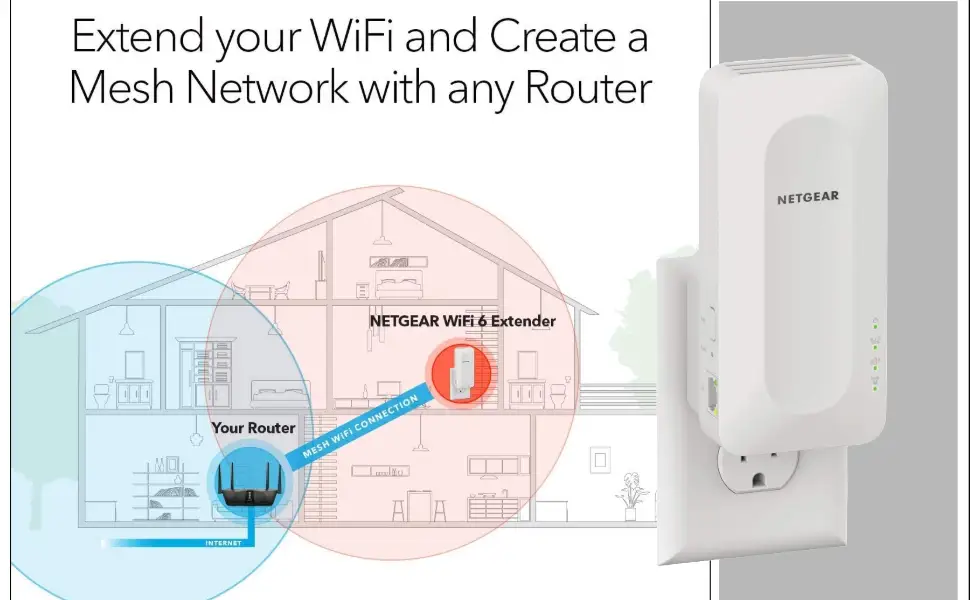
NETGEAR advertises “fast WiFi 6 performance” with speeds up to 1.8Gbps, seamless mesh roaming, and coverage for 1,500 sq. ft. or 20+ devices. On paper, this targets demanding households with multiple simultaneous streams.
Digging deeper into user reports, that headline speed figures prove achievable in optimal conditions. One Best Buy reviewer noted: “Gig network in the house… get good 250 mb/s down, 38 up when in the garage. Plugged in via ethernet gets a bouncy 500 mb/s.” However, several users mentioned actual speeds varied substantially based on router compatibility, placement, and interference, showing that “up to” speeds require tuned environments.
The brand leans heavily on “seamless smart roaming” – keeping one SSID for the whole network. This feature impressed many, especially those upgrading from extenders with separate names. A verified Best Buy buyer explained: “SSID matches the main router… computer and phone automatically connect depending on which has the stronger signal.” Yet, one NETGEAR Community forum post starkly contrasted this promise: “After 1 to 3 hours, speed drops to 0.25 Mbps download… unplug and replug, network recovers.” In this case, the seamless roaming didn’t resolve technical instability, highlighting that network hardware mix matters.
Coverage promises also come under scrutiny. While officially rated for 1,500 sq. ft., the BestViewsReviews aggregation found “93% appreciated the coverage range… effectively boost signal and cover up to 2,500 sq. ft.” This suggests some users exceeded official metrics – likely due to ideal conditions and device compatibility – while others struggled to consistently hit them.
Cross-Platform Consensus
Universally Praised
Across Amazon Renewed, Best Buy, and aggregation sites, the standout praise is for coverage and signal strength. A Best Buy user boosting WiFi between a summer home and a cottage reported: “Works wonderfully – significantly boosts the signal in the cottage so I can work on my laptop and stream YouTube TV, Amazon Prime movies, and Netflix.” This reflects why many remote workers and streamers value the EAX15 – stable range enables work and leisure far from the router.
Seamless roaming also won approval from multi-device households. A reviewer on Best Buy said: “Kept the same wifi information so I didn’t have to sign into a random wifi name… hasn’t had a single issue.” The single SSID connection prevents session drops when moving around, ideal for video calls or multiplayer games where disruptions hurt productivity or gameplay.
Speed consistency under moderate loads drew praise too. One customer wrote, “Netgear AX1800 Wi‑Fi 6 extender paired easily with my Spectrum router… 200 mbs download speed and 20 mbs upload… works well with my older gaming computer.” Even with legacy hardware, throughput remained high.
Common Complaints
Setup friction is a recurring theme. While marketing emphasizes “quick and easy” configuration via WPS or the Nighthawk app, real-world reports often detail app instability and unclear instructions. A frustrated Best Buy reviewer stated: “Only giving it 4 stars due to the difficulty of the app… change your wifi name after setup, prepare for a headache.” This hit users updating network credentials post-install.
Intermittent performance drops were severe for a minority. A Trustpilot-verified complaint mirrored the NETGEAR Community post: “After 1 to 3 hours, speed drops to 0.25 Mbps download… Telmex suffers intermittent internet dropouts 2–5x per hour.” This appears linked to certain 2.4GHz-only routers and possibly firmware conflicts.
Gamers noted limitations in latency-sensitive environments. A Best Buy buyer explained: “Does not work as well for gaming as I had hoped… works great for streaming shows, just not fast enough for competitive shooters.” Those seeking low ping above all else may need a dedicated gaming extender or wired solutions.
Divisive Features
Backward compatibility with older routers split opinion. Some praised smooth integration with WiFi 4/5 gear, like the Spectrum router example, while others struggled with mixed-generation setups. Placement sensitivity also divided buyers. One user admitted weaker performance when hidden: “Originally had the extender behind a cabinet… signal wasn’t as consistent. Moved to an open area and it’s been fine.”
The price point – higher than legacy extenders – sparked debate. Satisfied customers justified it with stability and range, but budget-focused buyers compared it unfavorably to cheaper single-band models when their needs were simpler.
Trust & Reliability
Durability feedback is generally positive short-term, with most users reporting consistent operational performance weeks or months in. However, the Trustpilot/Community threads discussing severe dropouts worry some prospective buyers. These weren’t isolated to refurbished units, suggesting environmental or compatibility factors can trigger instability.
There is no widespread reporting of physical breakdowns, but firmware responsiveness remains a concern. Customers encountering connectivity loss needed resets, and in worst cases, downtime stretched hours until reconnection.
NETGEAR’s customer support interaction in forums shows willingness to escalate cases: “We would like to endorse you to NETGEAR level 2 support team for callback…” Yet, the resolution speed wasn’t confirmed in user follow-ups, leaving some doubtful of support’s turnaround time.
Alternatives
Community mentions leaned more to internal comparisons than rival brands. One user replaced the EAX15 with a higher-tier NETGEAR mesh unit after initial satisfaction, suggesting power users might prefer more expensive options. Others referenced TP-Link extenders as functioning without speed drops, albeit halving the available speed – a trade-off between stability and speed.
For gamers or latency-sensitive users, competitive models like the Nighthawk EX8000 may offer better performance at the cost of more size and setup complexity.
Price & Value
Pricing varies sharply in the refurbished market. eBay’s certified refurbished listings showed recent sales between $20–$38, far below the $99.99 retail at Best Buy, reflecting strong depreciation and resale value potential for bargain hunters. This gap suggests buying refurbished can yield significant value if the seller is reputable.
Tips from the community stress considering router pairing – “Achieve your best speeds when paired with a WiFi 6 router” – implying diminished returns with older hardware. Buyers planning to upgrade routers soon might see the most long-term benefit.
FAQ
Q: Will the NETGEAR EAX15 work with non‑WiFi 6 routers?
A: Yes, it’s backward compatible with WiFi 4 and WiFi 5 routers, but performance may be lower. Several users linked reduced speed drops to older routers.
Q: Can I use the gigabit Ethernet port for gaming consoles?
A: Absolutely. Users reported faster, more stable speeds when wiring devices directly. One garage install hit 500 Mbps via Ethernet.
Q: Does it need a separate SSID?
A: No. The unit uses your existing network name, allowing devices to switch seamlessly to the strongest signal.
Q: Is setup via WPS reliable?
A: Mixed reports. Some found it instant, others faced drops or had to restart. The Nighthawk app offers an alternate route.
Q: Does placement affect performance?
A: Yes. Hidden or obstructed placement behind furniture reduces coverage consistency; open space installs work best.
Final Verdict: Buy if you’re a streamer, remote worker, or household with multiple devices needing strong roaming and solid range. Avoid if you rely on ultra‑low latency for competitive gaming on older routers. Pro tip from community: For hassle‑free setup, position in an open area near the router and complete installation through the extender’s web UI, skipping the app if it misbehaves.





