MSI MAG X670E Tomahawk Review: High Power, BIOS Quirks
A beta BIOS fix saving a premium gaming motherboard from crippling FPS drops isn’t a story you hear every day, but that’s the reality for the MSI MAG X670E Tomahawk WiFi Gaming Motherboard, scoring an 8.7/10 across platforms. Known for its robust build, high-end connectivity, and gamer-focused features, it’s become a favorite for Ryzen 7000/8000/9000 series builders—yet persistent boot delays and volatile BIOS updates have kept owners on edge.
Quick Verdict: Conditional buy for performance-focused AMD gamers willing to tinker with BIOS settings and updates
| Pros | Cons |
|---|---|
| Strong VRM cooling and thermal design | Some BIOS versions cause severe gaming FPS drops |
| PCIe 5.0 support for GPU & NVMe storage | Long cold boot times with EXPO memory enabled |
| Four M.2 slots, including one Gen 5 | Occasional LAN/Bluetooth driver stability issues |
| Solid build quality, steel-reinforced slots | MSI support frustrations noted by multiple users |
| Competitive price for an X670E board | Inconsistent RAM stability at high OC profiles |
| Good future-proofing for Ryzen upgrades | Packaging considered poor for the price by some |
Claims vs Reality
Marketing emphasizes lightning-fast PCIe 5.0 throughput, advanced VRM cooling, and flawless DDR5 overclocking. MSI’s site promises “non-stop high-performance” with its duet rail 14+2+1 power phases and M.2 Shield Frozr. In theory, high-frequency DDR5 support up to 7800+ MHz should appeal directly to enthusiasts running EXPO memory kits.
Digging deeper into user reports, DDR5 stability isn't always seamless. On Reddit, builders have found “RAM stability… still kinda hit/miss with pretty much all AM5” when pushing 6000 CL30 kits. Another Reddit user described using EXPO RAM at 6000 CL32 with “zero issues” for gaming but warned that memory context restore settings were crucial in the BIOS to avoid long boot checks.
MSI advertises consistent gaming performance, but BIOS reality has been far messier. Reddit user andrewbarz156602db noted that with BIOS version 7E12V1D, temperatures were great, but Cyberpunk 2077 benchmarks dropped to “a measly 98 FPS” lows—compared to an older firmware hitting “an amazing 180 max… with a low of 140.” The beta update 7E12V1E2 eventually restored frame rates, highlighting a disconnect between polished marketing and unpredictable firmware impacts.
Cross-Platform Consensus
Universally Praised
The VRM cooling has a fan club of its own. Multiple owners mention cooler MOSFET temps and stable overclocks under load. A verified LDLC buyer mounted a Ryzen 9 7900X3D with a Noctua cooler, plus dual NVMe and SSDs, and reported “never had a single problem” in three months.
For storage-heavy gamers, the four M.2 slots—three with heatsinks—are gold. A PCPartPicker reviewer loved installing “nvmes in slots 1 (Gen 5 but I’m using Gen 4) and 2… nvme 1 is usually around 45°C but nvme 2 will go to 62–63°C at times” with built-in cooling still holding stability. That M.2 Gen 5 slot attracts attention from future-proof seekers, who, like one LDLC customer, plan upgrades “particularly the RTX 5000 graphics cards… thanks to its PCIe 5.0 port.”
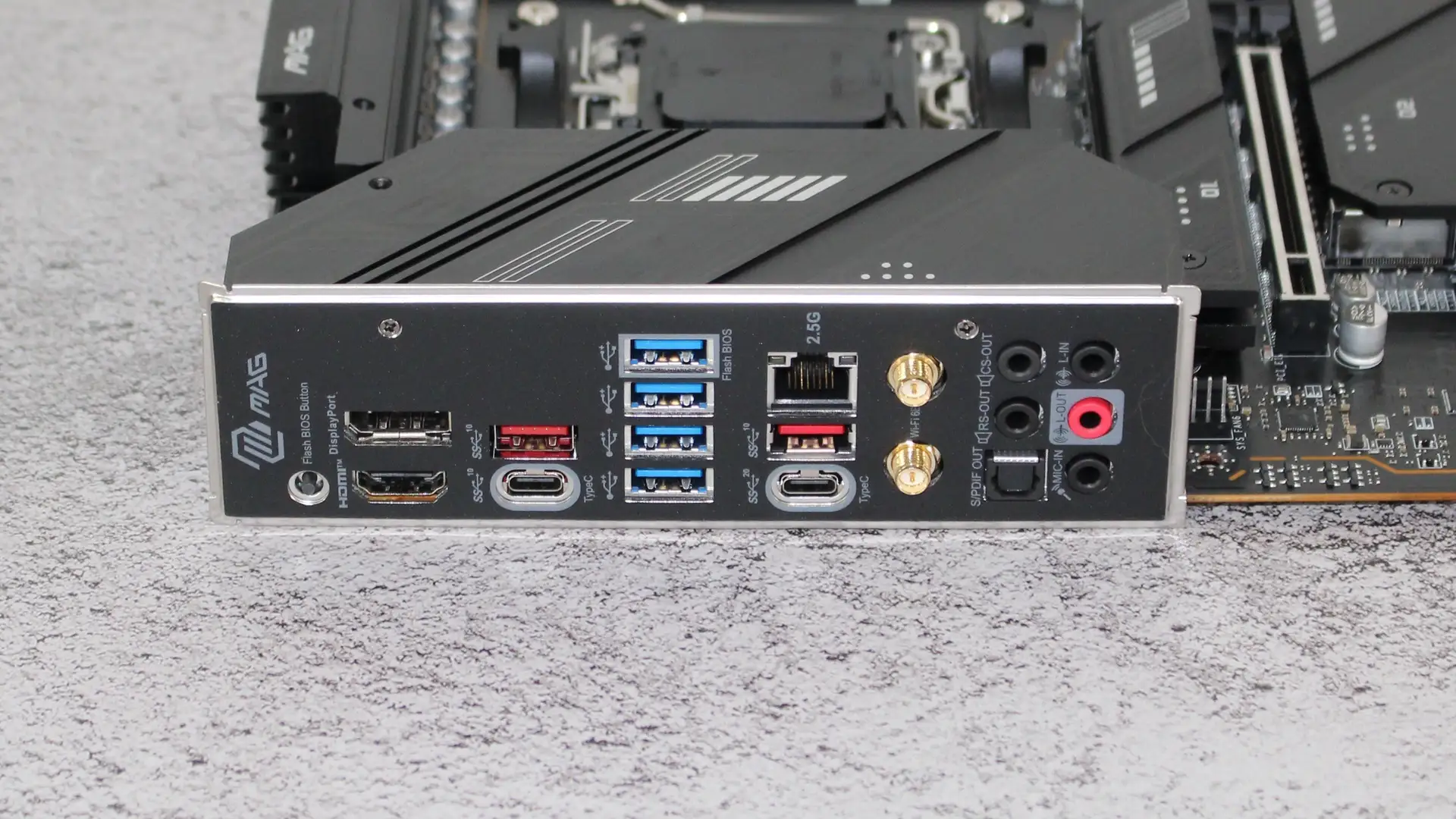
Network connectivity also earns praise: Wi-Fi 6E and Realtek 2.5Gb LAN maintain strong signals in gaming setups, with Alza.hu reviews noting “wifi full signal” and clean online performance once driver tweaks remove LAN stability issues.
Common Complaints
Boot delays form the loudest chorus of frustration. An Alza.hu buyer counted “ten-minute startup” issues until flashing to the latest UEFI, after which boot stabilized at “50–60 seconds… with EXPO enabled.” Another gave 4 stars purely because “the delay between switching on the system and when the OS starts loading can be surprisingly long.”
Firmware volatility has burned early adopters. Gaming FPS loss after newer BIOS updates, noted on Reddit, highlights how subtle settings changes can take away game smoothness even when synthetic benchmarks improve. MSI’s own support handling of certain boot and compatibility cases left some feeling “mugged”—as one PCPartPicker user described after a $72 restocking fee and slow refund process following an unresolved RAID BIOS bug.
Driver hiccups, especially with LAN and Bluetooth, cropped up in several narratives. One Alza.hu reviewer fixed network dropouts only by disabling every power-saving option under Realtek properties, quipping “maybe this will help someone” while showing how these issues aren’t always plug-and-play.
Divisive Features
DDR5 overclocking is both a selling point and a sticking point. Enthusiasts relish EXPO support at high speeds—LDLC owners describing easy BIOS tweaking up to 7800 MHz—but others find hitting advertised frequencies unreliable depending on kit, BIOS, and CPU pairing.
RGB lighting—or lack thereof—is divisive. Non-RGB fans revel in the Tomahawk’s subdued military styling, with one Alza.hu buyer saying it “will certainly please anyone who does not like RGB elements.” Yet those who enjoy customization find the aesthetic plain compared to flashier boards in the segment.
Trust & Reliability
Trustpilot data isn’t littered with scam alerts, but scattered service grievances echo across Reddit and PCPartPicker threads. Refund disputes and inconsistent support scripts—asking the same troubleshooting questions repeatedly—draw criticism.
Long-term durability shows mixed signals. Several builders report months of flawless use under heavy gaming loads. One PCPartPicker user migrated from a B450 Tomahawk Max and saw the upgrade as “more an upgrade in features based on generation than tier,” implying confidence in sustained reliability. But the dependency on frequent BIOS updates, sometimes every 2–3 weeks as noted by Alza.hu buyers, means longevity depends heavily on MSI’s firmware cadence and quality.
Alternatives
The ASUS TUF series emerges in LDLC comparisons, with buyers noting cheaper prices but conceding the Tomahawk’s better future-proofing via PCIe 5.0 readiness. B650E options surface in Reddit debates: one user calculated only a $20–$50 gap from X670E, questioning the downgrade when the Tomahawk offers “more future proof” for Ryzen 8000/9000 CPU compatibility. A regular B650 board lacks the Gen 5 GPU slot—seen as a deal-breaker for multi-year builds aiming at next-gen graphics.
Price & Value
Prices hover around €329 in Europe and ₹33,500 in India, with US resale on eBay showing auctions closing between $90 (used) and $238 (near new). Buyers frequently label it “excellent value for money” compared to equivalent ASUS offerings. Those targeting high-end builds without blowing past $350 find it competitively priced per feature set.
Community tips include catching Micro Center bundles—scoring the board alongside CPUs for significantly lower effective pricing—and flashing to the latest stable BIOS before full OS install to avoid lingering boot issues.
FAQ
Q: Does the MSI MAG X670E Tomahawk support Ryzen 9000 series CPUs?
A: Yes, official specs confirm support for Ryzen 9000 alongside 8000 and 7000 series desktop processors, offering strong upgrade headroom.
Q: How many M.2 slots have heatsinks?
A: Three of the four M.2 slots come with heatsinks, with the primary slot supporting PCIe Gen 5 x4 speeds.
Q: Can it run EXPO DDR5 memory at 6000 MHz CL30 stably?
A: Many owners achieve stability with specific RAM kits and CPUs, but stability at high EXPO speeds can be hit-or-miss depending on BIOS version.
Q: Is the long boot time fixable?
A: Yes, enabling Memory Context Restore in BIOS or updating to newer UEFI versions shortens boot, though EXPO profiles can still add delay.
Q: Does it have integrated RGB lighting?
A: It has Mystic Light headers but minimal on-board RGB, appealing to those preferring a cleaner aesthetic.
Final Verdict
Buy if you’re a Ryzen gamer building for multi-year relevance, value PCIe 5.0 for both GPU and NVMe, and don’t mind tuning BIOS for stability. Avoid if you expect flawless plug-and-play performance or have zero patience for firmware quirks.
Pro tip from the community: Flash to the latest stable BIOS before installing your OS, and configure Memory Context Restore to trim boot times while keeping EXPO enabled.





