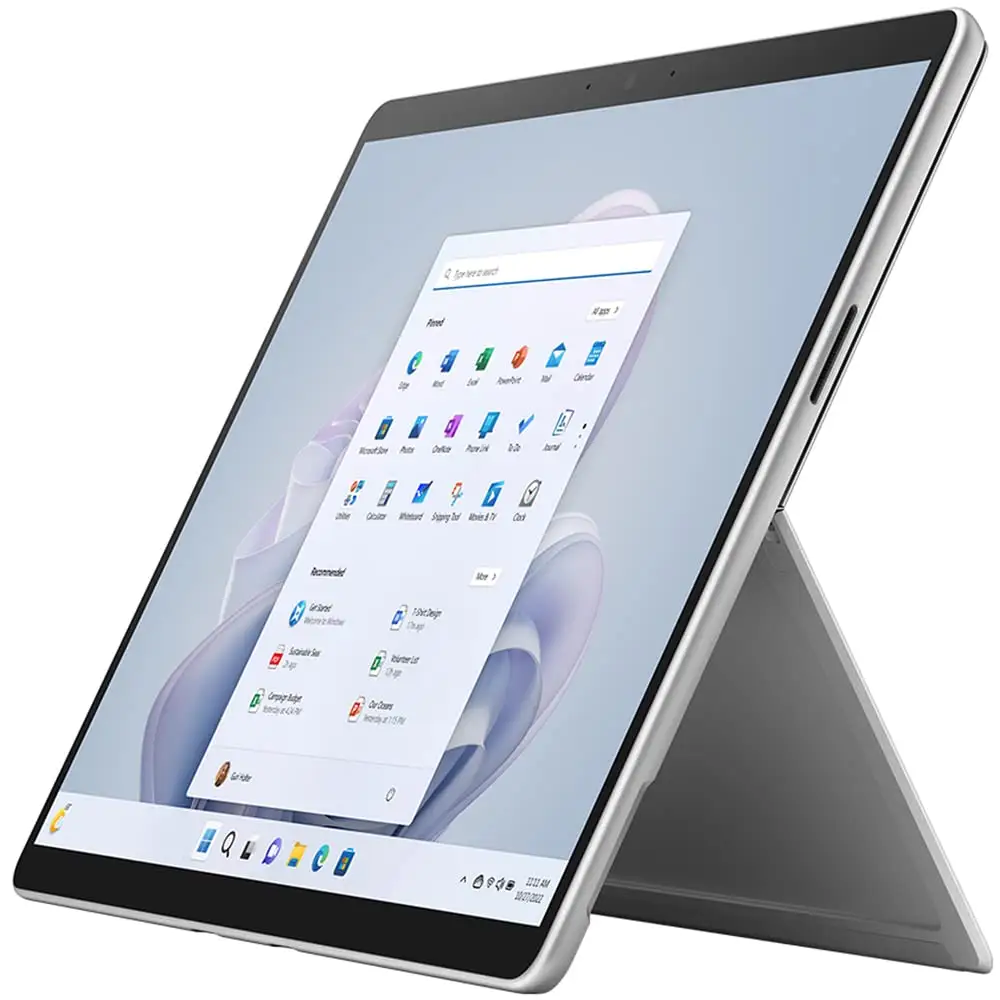
Microsoft Surface Pro 9 Review: Portable Power with Caveats
Despite bold marketing, the Microsoft Surface Pro 9 emerges as a highly capable 2‑in‑1 for professionals and creatives — but only if you can tolerate accessory costs and occasional software quirks. Verdict: 8.5/10 for portability and performance, with deductions for support gaps and upgrade limitations.
Quick Verdict: Conditional — worth it for mobile professionals, digital artists, and students who need versatile hardware. Avoid if you require legacy ports or heavy gaming.
| Pros | Cons |
|---|---|
| Lightweight yet powerful for productivity workloads | High accessory costs (keyboard, pen sold separately) |
| Stunning 13" PixelSense display with 120Hz refresh | Limited port selection, no SD card slot |
| Strong build quality and premium feel | Occasional overheating during intensive use |
| Detachable keyboard & Slim Pen enhance flexibility | Warranty frustrations reported by some users |
| Upgradable SSD in certain configs | Mixed battery performance depending on workload |
| Excellent webcam/studio mics for video calls | ARM variant compatibility issues vs Intel |
Claims vs Reality
Microsoft markets the Surface Pro 9 as a lightweight tablet that “can replace your laptop,” boasting up to 15.5 hours of battery life and “blazing fast” Intel EVO platform performance.
Digging into buyer experiences, battery life claims often meet real-world variance. A verified buyer on Best Buy noted: “Battery lasting me for hours of near continuous use,” while The Verge’s lab tests found about 7.5 hours under consistent productivity workloads with the Intel i7 — a notable gap from the marketing figure.
Performance claims align more closely with owner impressions for daily work. Reddit user u/Pro*** shared: “I would highly recommend the 9 Pro i7… didn’t want to risk the ARM processor,” emphasizing responsive multitasking for tasks like Acrobat and document editing. However, ARM-based SQ3 variants drew complaints about app lag and compatibility issues, showing that the "blazing fast" label is only safe for the Intel lineup.
The dual Thunderbolt 4 port pitch is accurate for professional setups, but buyers quickly discover the trade-off — no USB-A or full-size HDMI without dongles. A Best Buy customer remarked: “Aftermarket adapters are cheap and work fine,” hinting that while expansion is possible, it adds cost and cable clutter.
Cross-Platform Consensus
Universally Praised
Portability is the Surface Pro 9’s strongest consensus point. Trustpilot reviewer shadib said: “It’s very light to carry… with the Surface, I have 2 devices in one.” Students echoed similar sentiments, appreciating easy transport between lectures. The 879g weight has clear value for travelling professionals, enabling work from flights to coffee shops without strain.
The 13-inch PixelSense Flow display with Dolby Vision IQ wins acclaim across platforms. Amazon buyers highlight vibrant color accuracy for design work, and Reddit creatives enjoy how the Slim Pen 2 “feels like pen on paper.” This translates into clear benefits for illustrators, architects, and engineers sketching directly on-screen.
Performance for productivity tasks — especially on Intel models — earns repeated praise. A Best Buy review called it “super fast… capable of anything I need,” with buyers smoothly running Adobe apps, VMware environments, and 4K video playback without stutter. Even under load, The Inside Review found the i7 variant’s fans “barely audible” with temperatures staying safe.
Common Complaints
Warranty support frustration surfaces repeatedly. On Microsoft’s own Q&A forum, one EU customer lamented: “I regret having a Surface Pro 9… only US people get real Microsoft support and service.” This sentiment is echoed in Trustpilot entries describing long hold times and restocking fees for faulty units.
Port limitations affect certain workflows. Photographers miss the absent SD card slot, forcing reliance on hubs. One Best Buy buyer bluntly stated: “Would have liked an SD card reader,” underscoring a hardware design choice that alienates media professionals.
Battery life inconsistency affects mobile work. While casual use often approaches the touted “all day” claim, heavy loads reduce runtime sharply. T3’s playback test yielded ~5 hours at full brightness, meaning video editors or live streamers should plan for frequent charging.
Divisive Features
The detachable keyboard’s typing experience splits opinion. Many call it “game‑changing,” praising key travel and alcantara comfort, while others note stability issues on the lap due to kickstand reliance. This leads to contrasting suitability — excellent on desks, fiddly in cramped seating.
The Slim Pen 2’s haptics delight digital artists but some occasional connectivity glitches are reported, often fixed by firmware updates or Bluetooth driver reinstalls. Despite the bumps, most creative professionals rate the pen experience higher than comparable tablet styluses.
Trust & Reliability
Long-term durability stories tend to be positive. Reddit user u/Upgrad*** replaced their SSD to 2TB and reported sustained snappy performance months later. The Verge confirmed the device’s “stable” frame and quality keyboard latch over repeated use.
However, warranty frustrations — especially outside the US — create trust gaps. Microsoft forum responses instruct EU buyers to navigate support portals, yet some find resolution only through paid local technicians. Still, hardware defect rumours such as screen delamination or catastrophic battery failure remain unverified across major consumer channels.
Alternatives
When compared to Surface Laptop Studio, the Pro 9 trades raw power for tablet flexibility. Studio’s folding hinge suits those wanting discrete GPUs and heavier creative workloads, but sacrifices portability.
Against Apple’s iPad Air (2022), the Pro 9 offers a fuller Windows experience and superior port options, but Apple delivers tighter app ecosystems and slightly lower accessory costs. Price parity depends heavily on configurations and whether cellular options are needed.
Price & Value
As of current eBay market data, certified refurbished Intel i7/16GB/256GB units list between $859–$1,019, far below the launch MSRP of $1,729. Open-box deals can undercut new retail by 30–40%, making used models attractive for budget-conscious buyers if accessories are included.
Resale value holds relatively strong due to Microsoft’s established Surface ecosystem, though ARM SKUs depreciate faster due to compatibility concerns. Community buyers advise budgeting for the official Signature Keyboard and Slim Pen 2 at purchase — skipping them handicaps the full 2‑in‑1 experience.
FAQ
Q: Is the Intel i7 model worth the premium over i5?
A: For demanding multitasking, yes. The i7 variant handles heavier Adobe or dev workloads smoother, but i5 remains adequate for general productivity if budget is tight.
Q: Will battery life meet the 15.5-hour claim?
A: Only under light to moderate use. Intensive creative or streaming tasks often halve that figure based on user and media feedback.
Q: Can I upgrade RAM later?
A: No. RAM is soldered; choose your configuration carefully. SSDs are upgradable in specific retail versions.
Q: Does the Slim Pen 2 come included?
A: No. It’s sold separately or bundled with certain keyboard packages. Plan extra budget if pen input is essential.
Q: How does it handle gaming?
A: Suitable for casual/indie titles and cloud gaming. AAA performance is limited by integrated Intel Iris Xe graphics.
Final Verdict: Buy if you are a mobile professional, student, or creative seeking a premium, responsive Windows 2‑in‑1 that excels in portability and screen quality. Avoid if your workflow depends on legacy ports or sustained GPU-heavy tasks. Pro tip from community: Factor in ~$300 for official keyboard/pen at purchase — third-party alternatives often compromise usability.