Microsoft Surface Ergonomic Keyboard Review & Verdict
A verified buyer on Amazon summed it up bluntly: “This may be the best keyboard I’ve used... except for a few nearly deal-breaking issues.” The Microsoft Surface Ergonomic Wireless Keyboard, Gray earns a solid 8.1/10 from aggregate feedback — praised for comfort, build, and typing feel, but tagged with persistent Bluetooth quirks and eyebrow-raising omissions for its $129+ price point.
Quick Verdict: Conditional buy
| Pros | Cons |
|---|---|
| Comfortable ergonomic arc and slope, reduces wrist strain | Noticeable Bluetooth wake lag after idle |
| High build quality with Alcantara palm rest | No wired option, single-device pairing only |
| Satisfying, stable key feel — “almost mechanical” | Alcantara stains and wears quickly |
| Integrated number pad | No backlighting or advanced customization |
| Works across Windows, macOS, Android | Misses keystrokes on some setups, esp. macOS |
| Long battery life (up to 12 months) | Not BIOS-compatible, pre-boot limitations |
| Quiet typing, low-profile chiclet keys | Price tag considered high for feature set |
Claims vs Reality
Marketing promises "advanced comfort" through the double‑cushioned Alcantara palm rest and a "stable, quiet typing experience." Those claims resonate with many. A Trustpilot user raved: “Key stroke travel and weight are perfect... the Alcantara wrist rest just oozes luxury.” For tall users, the height and arc help — “I don’t feel any strain in my wrists... I simply cannot use normal keyboards for extended time due to wrist pain,” noted one Amazon reviewer.
But digging deeper into user reports, that comfort comes at a maintenance cost. Several buyers described Alcantara as quick to show grime and permanent discoloration: “I have to wipe it down every day... eventually, there’s nothing you can do and it will never look good again,” admitted a long-term owner. This isn’t addressed in marketing material.
Microsoft also touts “smooth, consistent action” from optimized grip and feedback. Reddit user feedback backs the tactile quality: “They have some of the best chiclet-style keys I’ve ever come across, and they’re super quiet... I really enjoyed using mine.” Yet the advertised wireless convenience via Bluetooth 4.0 conflicts with multiple accounts of connectivity lag, especially on macOS, with some units flatly refusing to wake from sleep without re-pairing.
Cross-Platform Consensus
Universally Praised
Comfort is the lead story. Office professionals and developers with long hours at the keyboard find the split-space-bar arc eases strain. A developer on Trustpilot explained, “Within 30 days [of switching to an ergonomic MS keyboard] my fingers went back to normal and I was saved.” The integrated numpad is a productivity win: “It’s nice to have the numeric pad built into the keyboard... I use it quite often,” reported another Amazon buyer.
Build quality consistently earns high marks. Even skeptics concede the chassis feels solid, with a sturdy heft not found in cheaper ergo boards. An eBay seller remarked after daily use, “Other than wrist pads showing wear, still works like new.” Many macOS users — despite OS-specific quirks — appreciate how quickly it paired and that media keys mapped correctly out of the box.
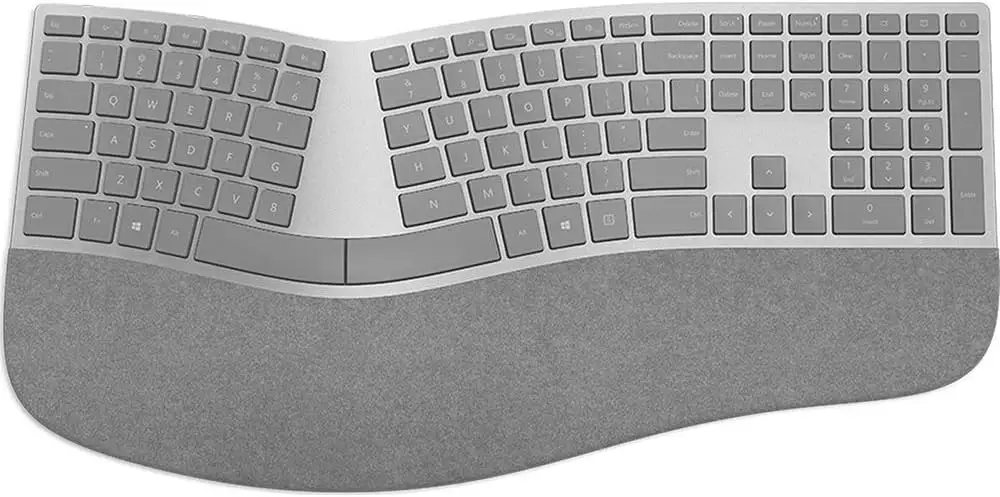
The typing feel wins over both chiclet fans and those coming from mechanical boards. A Reddit user compared it favorably: “Keys feel very crisp… they are also very stable — you can press on the corner of a key and it will actuate fully.”
Common Complaints
Bluetooth behavior is the most repeated sore spot. Idle wake lag ranges from 3–5 seconds, a minor annoyance if used casually, but maddening for developers bouncing between keystrokes and screen reading. One Reddit software engineer vented: “After not using them for a few minutes... there is a 5+ second delay... it is extremely aggravating.”
Single-device pairing limitation compounds the pain for multi-PC setups. Trustpilot reviewers described having to re-pair when switching between laptops — an issue absent in many modern Bluetooth peripherals. On macOS devices, some Apple-specific pairing oddities and missing shortcut mappings drive frustration.
Alcantara palm rest wear is cosmetic but widely noted. Long-term daily users found no practical fix for staining beyond daily wiping. Key layout changes from older Microsoft ergo models also polarize: developers lament relocated Ctrl/Windows keys causing shortcut misfires.
Divisive Features
The sleep-mode power savings split opinion. Some appreciate the battery longevity — “Still using the same batteries as day one” — while others see it as a productivity tax for reconnect lag and missed initial keystrokes. Bluetooth-only design draws praise from travelers avoiding proprietary dongles, but criticism from performance-focused users who want wired reliability.
Trust & Reliability
On durability, the majority report solid long-term performance. Amazon veterans speak of multi-year use without mechanical failure, with some buying multiple units for different workstations. Inside six months, stability is almost universal — issues tend to be connection-based, not physical wear.
Bluetooth trust varies by platform. Reports from macOS corners consistently cite wake/reconnect inconsistencies, suggesting OS-level compatibility challenges rather than pure hardware fault. For Windows, especially on native Surface hardware, performance is predictably better. No widespread scam or counterfeit alerts surfaced across Trustpilot, eBay, or Reddit; most dissatisfaction is functional, not fraudulent.
Alternatives
Mentions of Microsoft’s own Sculpt Ergonomic Keyboard appear often — cheaper, bundled with a mouse, and wired dongle-based, but plagued by dongle loss fatality and mushier keys. Reddit users who disliked Sculpt’s “tiny F keys” found the Surface Ergo a superior typing experience. Logitech wireless or illuminated keyboards are occasionally referenced, offering backlighting and more features at lower cost, though without the same ergonomic arc or integrated numpad in a split design.
Price & Value
MSRP sits at $129.99, but community-sourced eBay listings show used units selling between $49–$83, often with cosmetic wear. The price premium is controversial: “Way overpriced for what you get... stylish, comfortable, yes, but... no backlighting, no extra ports,” critiqued a Trustpilot reviewer. Resale holds decently given the niche — buying used can slash cost while retaining full functionality if cosmetic wear is acceptable.
Buying tips from the community: surface devices integrate most seamlessly; beware macOS pairing; check that your PC supports Bluetooth 4.0+; and when buying used, inspect Alcantara condition, as heavily stained rest areas affect resale and comfort.
FAQ
Q: Does the Surface Ergonomic Keyboard work with macOS?
A: Yes, pairing is straightforward, and most media keys work, but macOS users report occasional wake/reconnect issues and missing shortcut mappings.
Q: Can it connect to multiple devices at once?
A: No, it lacks multi-host pairing; switching between devices requires re-pairing each time.
Q: Is the keyboard backlit?
A: No, there is no key backlighting — a point of contention for some buyers at this price.
Q: How long do the batteries last?
A: Microsoft claims up to 12 months; several long-term users confirm near-year life even on rechargeables.
Q: Does it work in BIOS or pre-boot environments?
A: Generally no; unless your motherboard supports Bluetooth input pre-OS, you can’t access BIOS with it.
Final Verdict: Buy if you’re a Windows-centric user prioritizing ergonomic comfort, integrated numpad, and premium build over feature frills. Avoid if multi-device connectivity, wired reliability, or pristine upholstery are critical. Pro tip from Reddit: pair with a quality Bluetooth dongle and keep Alcantara clean daily to extend the premium feel.