Microsoft Sculpt Ergonomic Keyboard Review: Comfort vs Flaws
For a product hailed as a lifesaver for repetitive strain injury (RSI) sufferers, the Microsoft Sculpt Ergonomic Keyboard delivers both undeniable ergonomic wins and some maddening flaws — earning it a 7.9/10 from cross-platform user sentiment.
Quick Verdict: Conditional buy — excellent for those prioritizing wrist comfort and modular design, but buyers should brace for function key frustrations and potential durability issues.
| Pros | Cons |
|---|---|
| Comfortable split layout reduces wrist strain | Small, poorly designed function keys prone to sticking |
| Detachable number pad improves mouse reach | Dongle pairing means lost receivers kill the keyboard |
| Cushioned palm rest for long typing sessions | Reports of keycaps and scissor mechanisms breaking |
| Lightweight, quiet chiclet-style keys | No Bluetooth option, only proprietary wireless |
| Natural arc layout aids posture | Cleaning the wrist rest is nearly impossible |
| Easy setup, instant connection | Dongle interference and dropped keystrokes in some setups |
Claims vs Reality
Marketing materials promise “advanced ergonomic principles” and “refreshment after a day at your desk without soreness or injury.” While users widely confirm pain relief benefits, they also reveal ergonomic blind spots. Reddit user u/Dev*** recounted: “Almost instantly all my hand and wrist pain went away… never to come back for 3 years now.” But for others, the domed and tented shape increased strain — one Twitter reviewer noted: “Opposite of ergonomic for me… my hands were in a very inclined position from the tenting.”
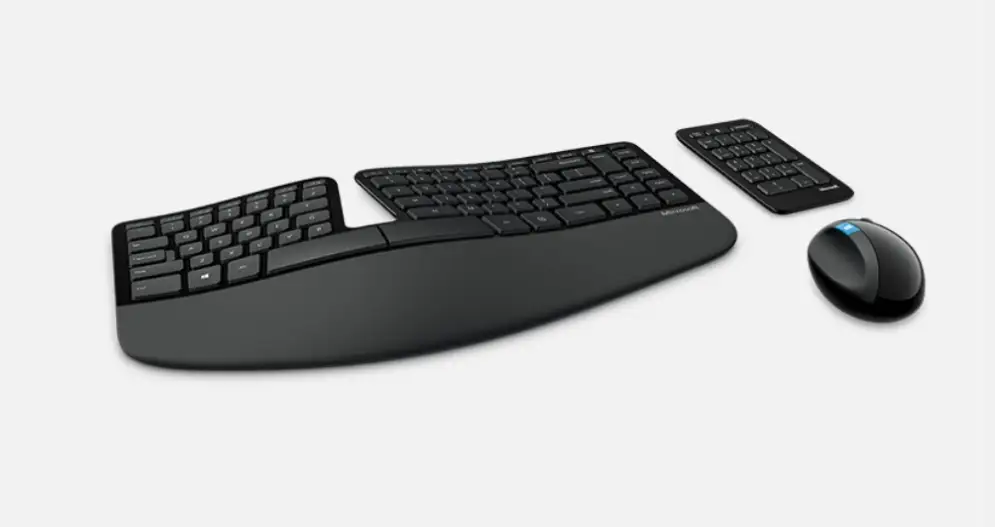
The detachable number pad is pitched as “greater flexibility for workspace setup.” This does pay off for many programmers and trackpad users who want tighter mouse placement. A verified buyer from Amazon explained: “I don't use the extra numpad section and instead have a magic trackpad in that spot… the angle is perfect.” Yet the Surface Ergonomic successor’s fixed numpad was a dealbreaker for several longtime fans.
AES 128-bit encryption for keystrokes sounds reassuring, but in practice, more users complained about the proprietary dongle design. As one Hacker News commenter put it bluntly: “If you lose the dongle, you’re screwed. They’re paired in the factory and can’t be reconfigured.”
Cross-Platform Consensus
Universally Praised
Comfort emerges as the Sculpt’s defining strength. Writers, coders, and RSI sufferers report noticeable relief. A full-time novelist shared on Twitter: “Best of all, it’s so comfortable… alleviated much of my pain.” The cushioned palm rest complements the low-profile chiclet keys, creating less finger fatigue during high-volume typing.
Professional environments benefit from the slim footprint. Reddit user u/Hold*** wrote: “Allows you to keep your arms close in to your body… less movement in your shoulder from mousing.” This is enhanced when combined with ergonomic mice or trackballs, often mentioned alongside the keyboard.
The split layout combined with negative tilt changes typing posture in ways mechanical keyboards seldom achieve. Reddit user u/SysAdmin*** observed: “Took me <5 minutes to adjust… can’t recommend it enough.” The detachable number pad is more than a gimmick; on crowded desks, it’s a real spatial advantage.
Common Complaints
Nearly every platform mentions quality control issues in the function key row. The F5 and Escape keys stick or fail to register — particularly disastrous for programmers. One Microsoft Q&A poster lamented: “F5 gets stuck down and has to be manually popped back up… I’m a programmer and use the function keys often.”
Durability is uneven. Keycaps can detach, and the scissor mechanisms under keys are fragile. A frustrated Twitter user noted: “Within 11 months… had five broken keys. Great design, bad manufacturing.” Another added: “The soft cover on the palm rest gets flappy edges… rubber pads on bottom fall off easily.”
Wireless connectivity is proprietary, requiring its paired dongle. If that dongle is lost or damaged — which happened repeatedly in offices — the keyboard becomes useless. Several users pushed for Bluetooth support to eliminate this vulnerability, with one Reddit comment summing it up: “Seems like a wasteful design… you’d think they’d switch to Bluetooth.”
Cleaning the wrist rest material is another practical issue. It attracts skin flakes and oil, and washes poorly. Reddit user u/Office*** admitted: “After only a month or two of usage, I am ashamed when people look at it… it’s not possible to keep it clean.”
Divisive Features
The chiclet-style key switches are loved by laptop converts but disliked by mechanical purists. Hacker News contributor noted: “MacBook-esque low profile keys… ergonomic tilt both inward and upward… incredible for $100.” Yet another buyer countered: “Keys too widely separated… struggled to use it for 45 minutes.”
The domed design’s tenting angle offers strong wrist alignment for some, but others prefer flat or minimal lift. Users with specific finger impairments found the key layout unmanageable over time and returned the product.
Trust & Reliability
Trustpilot-style patterns suggest strong initial satisfaction but recurring component failures within 1–2 years. Reports mention consistent issues around the F-row keys, palm rest wear, and dongle dependency. Reddit threads include multiple “third purchase in 7 years” stories, reflecting both loyalty and resignation to hardware mortality.
Long-term reliability hinges on careful use and clean environments. Users in high-dust or shared spaces saw faster degradation. Support experiences vary — some successfully obtained warranty replacements, others found Microsoft difficult to reach.
Alternatives
Two competitors recur in user discussions: the Microsoft Surface Ergonomic Keyboard and Logitech Ergo K860. The Surface Ergonomic adds Bluetooth but forces a fixed numpad, alienating those who prize the Sculpt’s slim main board. Multiple reports cite inferior ergonomics compared to Sculpt’s split.
Logitech’s Ergo K860 offers similar wrist tenting and split design but sacrifices the detachable numpad feature; Reddit user u/Egro*** wished for a “K860 tenkeyless” variant to solve desk space issues.
In mechanical territory, options like the Kinesis Freestyle2 with VIP3 tenting kit deliver split adjustability but lack the Sculpt’s low-profile key feel. DIY mechanical, split layouts (e.g., Ergodox EZ) appeal to enthusiasts willing to invest time and money.
Price & Value
Models range from $75–$97 in new retail listings, with eBay resale value heavily dependent on dongle presence. Units “missing dongle” drop below $25, while complete sets can fetch $90+. Users advise buying new or tested-used to avoid paired-receiver headaches.
Several fans “stockpile” units fearing discontinuation. Hacker News contributor joked: “Almost want to stockpile them in case they ever do stop making them.” Price is widely considered fair for its ergonomic benefits despite hardware shortcomings.
FAQ
Q: What happens if I lose the wireless dongle?
A: The keyboard becomes unusable. Dongles are factory-paired and cannot be replaced or re-paired, a frequent pain point in user reports.
Q: Can I use this with macOS?
A: Yes, but remapping modifier keys in system preferences improves the experience. Many Mac users also swap Alt and Windows keys for familiarity.
Q: How long do batteries last?
A: Several users reported multi-year battery life in typical office use after disabling power-saving for the dongle in Device Manager.
Q: Is there a wired version?
A: No official wired version exists. Some enthusiasts have created custom wired mods to eliminate wireless latency and dongle issues.
Q: How does this compare to mechanical ergonomic keyboards?
A: The Sculpt offers low-profile comfort and a detachable numpad, but lacks mechanical switch tactile feedback. Mechanical ergo boards are pricier and often have steeper learning curves.
Final Verdict
Buy if you’re an office professional, RSI sufferer, or laptop-key fan seeking a split, low-profile keyboard with a detachable numpad. Avoid if you rely heavily on function keys, can’t risk losing a proprietary dongle, or need heavy-duty durability. Community pro tip: pair the Sculpt with an ergonomic mouse or trackball to maximize posture benefits and desk efficiency.





