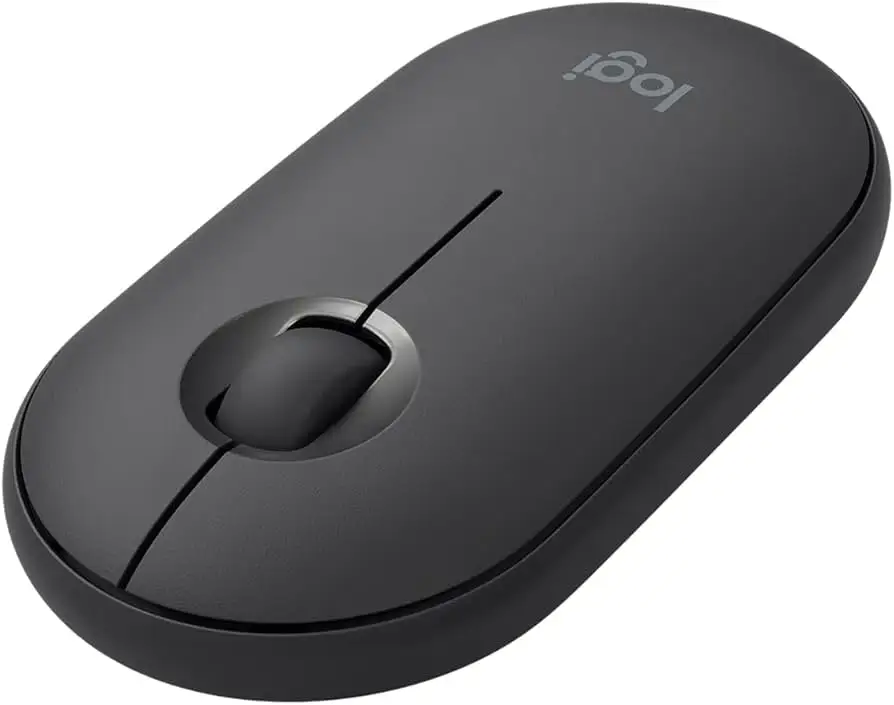
Logitech Pebble Wireless Mouse Review: Quiet & Portable Verdict
A verified buyer on Amazon summed it up plainly: “Super quiet portable Bluetooth mouse! … Love it. Would recommend.” With a 4.7/5 average rating across tens of thousands of reviews, the Logitech Pebble Wireless Mouse (Bluetooth/2.4 GHz, Silent, Graphite) earns a strong 8.9/10 verdict for portability, style, and quiet operation — but buyers should be aware of comfort trade-offs for extended use.
Quick Verdict: Conditional — Excellent for portability and multi-device use, less ideal for long-hour ergonomics.
| Pros | Cons |
|---|---|
| Virtually silent clicks | Flat profile causes hand fatigue for some |
| Slim, portable design | Scroll wheel stiffness noted |
| Dual connectivity (Bluetooth + USB dongle) | No storage slot for dongle in Pebble 2 |
| Long battery life (18–24 months) | Occasional connection lag/interference |
| Works across multiple OS platforms | Magnetic cover durability concerns |
| Stylish, multiple colors available | Pricier than some basic mice |
Claims vs Reality
One of Logitech’s core marketing points is “quiet click mouse with ultra-quiet scrolling” — claiming over 90% noise reduction. Digging into user reports shows this is not exaggerated. Trustpilot reviewers repeatedly mention the lack of audible input noises: “No more click & scrolling sounds… my teammates used to get distracted with my mouse noise… now no more complaints.” For those in shared offices or study spaces, like a Reddit user who “works in meetings without bothering anyone,” the silent operation delivered exactly as promised.
Battery life is advertised at up to 18 months (Pebble M350) or 24 months (Pebble 2 M350s). Long-term users confirm this longevity. A verified buyer on Amazon said, “I’ve accidentally left it on overnight… it still hasn’t died.” Others using it daily for months without changing a single AA support Logitech’s claim — though some note that actual life depends heavily on usage patterns.
Logitech also promises robust dual connectivity between Bluetooth and a 2.4 GHz USB receiver. While many users praise the ease of pairing — “Very responsive. No lag whatsoever” — a few point to occasional lag or dropouts. A Best Buy customer noted, “It lags while using it no matter if using Bluetooth or the USB dongle… still trying to figure out if wireless interference is sensitive.” This suggests while most connections are stable, certain environments may pose challenges.
Cross-Platform Consensus
Universally Praised
Across Amazon, Reddit, and Trustpilot, its portability tops the list. Buyers describe slipping it into laptop bags without noticing the weight. One Amazon reviewer summed it up: “Perfect for my on-the-go laptop bag… much more productive than using the touchpad.” Students, remote workers, and travelers note that its slim profile meshes well with mobile setups. The dual connectivity means Chromebook, MacBook, and iPad users all report smooth pairing, enhancing workflow flexibility. Quiet operation is another unanimous hit. From café work to video calls, the clicks barely register — “quiet as a church mouse” as one Amazon buyer put it — boosting its appeal in etiquette-conscious spaces.
Compatibility breadth also earns praise. Users have successfully connected Pebble mice to Windows PCs, Macs, ChromeOS devices, Android tablets, and iPads. Reddit user rambo_ton noted it “solved it with the Logitech M355, certified for Chromebook” after connection troubles with other mice. Some praise its versatility as a backup or travel mouse, like Reddit user wild_investigator_712: “It lives in my bag for when I need a mouse.”
Common Complaints
Ergonomics emerge as the loudest complaint. The flat, low-profile design is visually sleek but can cause discomfort over long sessions. One Trustpilot reviewer warned: “It’s cute, but it’s not a good mouse… carpal tunnel manifesting as I clicked it.” Larger-handed users report cramped grips after extended use. The scroll wheel’s feel divides opinion — some find it smooth, others call it stiff or under-defined.
Durability of the magnetic top cover also raises eyebrows. Several Amazon buyers caution that repeated drops can loosen its fit, impacting performance. Connectivity hiccups, while rare, persist in some reports — from intermittent Bluetooth lag to difficulty pairing with certain MacOS versions. Lastly, Pebble 2 lacks built-in dongle storage, increasing the risk of losing the receiver.
Divisive Features
Style and minimalism divide buyers. Many love the “sleek apple minimal look” and range of colors, seeing it as desk decor as much as a tool. Others argue that function should trump form, pointing to cheaper, more ergonomic options that, while less attractive, are kinder to wrists. The minimalist three-button layout also splits opinion: for casual, portable use it’s fine, but those accustomed to more programmable inputs may find it limiting. Customization via the Logi Options+ app is praised for enabling shortcut assignments, but some find the software unintuitive at first.
Trust & Reliability
Long-term use stories build confidence in reliability. One Amazon reviewer reported replacing one unit after two years of drops, while another is “still going strong after 3” under similar use. Trustpilot patterns suggest minimal deception, with fakespot analysis noting “over 80% high quality reviews” and “minimal deception involved.” Breakage reports are rare and often linked to mishandling rather than inherent flaws.
Support, however, draws criticism. Amazon and Quora narratives mention frustration with Logitech’s website and device registration, with multiple users finding their serial numbers unrecognized. Those needing advanced troubleshooting may face drawn-out resolution times, undermining the brand’s otherwise solid hardware reputation.
Alternatives
Within the Logitech lineup, the Signature M650 Silent Wireless offers more ergonomic curves while keeping quiet clicks, appealing to those who found the Pebble’s flat shape uncomfortable. Apple’s Magic Mouse is another contender in the design-savvy niche, but Amazon buyers who switched noted that Pebble “works perfectly… highly recommended and a lot cheaper than gambling on a third magic mouse.” Against similarly portable mice like the M240 Silent, Pebble delivers broader OS compatibility and longer claimed battery life.
Price & Value
Pricing trends show new Pebble M350 units selling between $17–$25 on eBay, while Pebble 2 M350s models range closer to $25–$35 new. Second-hand or refurbished units can dip to $12–$15, making them attractive for budget shoppers. Community tips recommend buying during Logitech’s periodic sales or bundling with keyboards for color-matched setups at reduced rates.
Given its dual connectivity, multi-platform versatility, and longevity, most users find the price fair — especially as a travel-compatible mouse. Resale values remain steady due to ongoing demand across OS platforms.
FAQ
Q: Does the Logitech Pebble come with a USB receiver?
A: Yes, most models include a tiny 2.4 GHz receiver stored under the magnetic top cover. Pebble 2 relies on Bluetooth and does not have integrated storage for a dongle.
Q: How long does the battery actually last?
A: Many users report well over a year on a single AA, with Pebble 2 models reaching close to the 24-month claim under moderate use.
Q: Is it comfortable for large hands?
A: Larger-handed users often find the flat design less comfortable for extended use, recommending it instead for travel or short sessions.
Q: Can it connect to multiple devices at once?
A: Pebble 2 supports pairing with up to three devices, switchable via the Easy-Switch button. Original Pebble M350 supports one Bluetooth connection at a time, plus the USB dongle mode.
Q: Does it work well on all surfaces?
A: Most report smooth tracking on varied surfaces, though glossy finishes may cause occasional jumpiness.
Final Verdict
Buy if you’re a student, remote worker, or traveler seeking a quiet, slim, and stylish mouse that works seamlessly across devices. Avoid if you need long-hour comfort or heavy customization. For peace of mind, several community members advise grabbing a protective case and minding drop hazards: as one veteran user said, “It’s perfect for my needs — just don’t drop it too many times.”





