Logitech MX Keys S Combo Review: Strong Yet Flawed
Starting with an unexpected twist from the data: despite Logitech’s premium branding, the Logitech MX Keys S Combo Wireless Keyboard and Mouse earns a solid 8.7/10 from cross-platform user feedback, but not without caveats. While praised for its comfort, build quality, and productivity features, several buyers reported Bluetooth lag, faint key legends, and minor design oversights that undermine the otherwise stellar experience.
Quick Verdict: Conditional buy — Excellent for productivity-focused professionals, less ideal for gamers or those sensitive to Bluetooth delays.
| Pros | Cons |
|---|---|
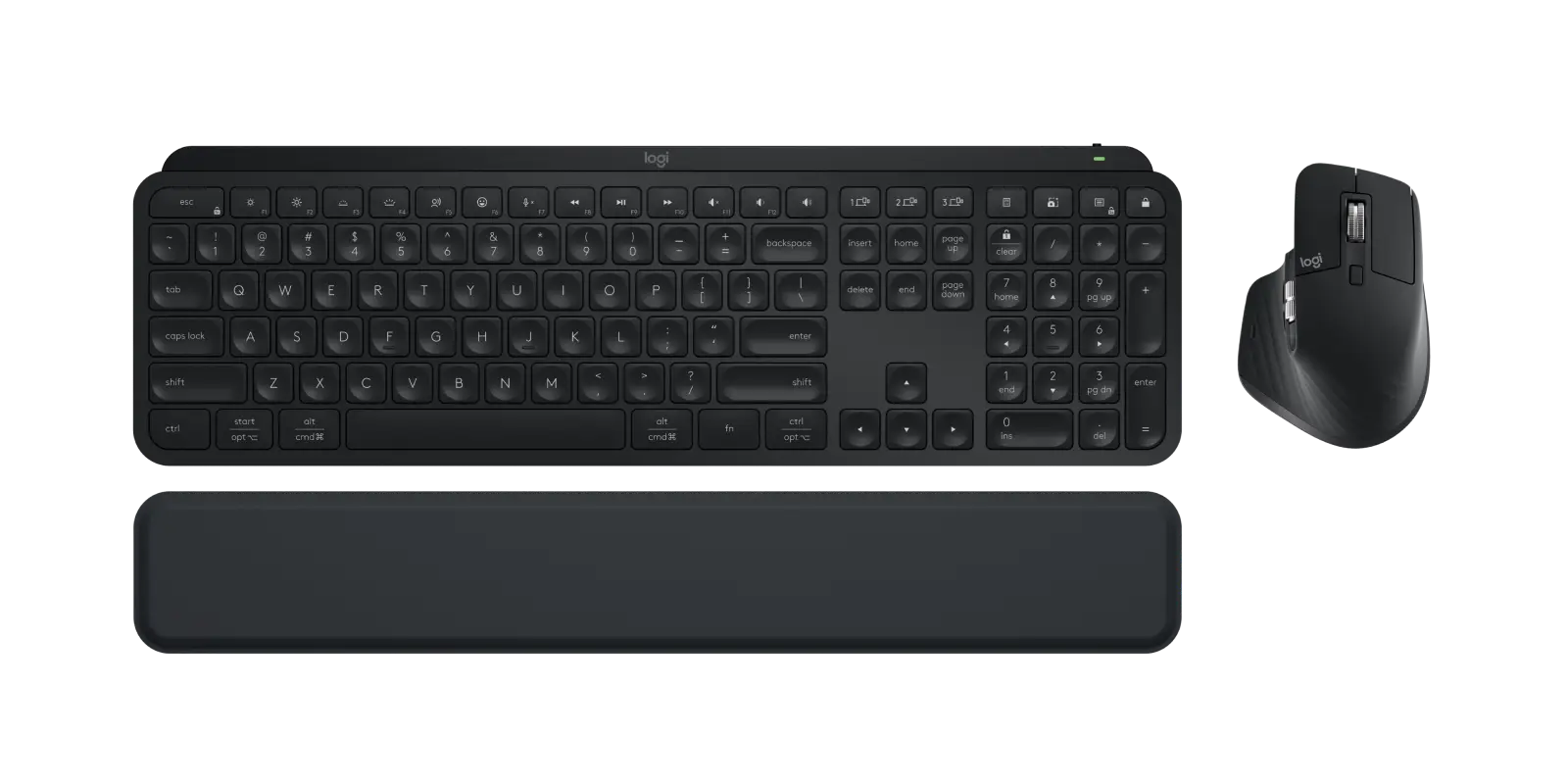
| Quiet, satisfying typing with spherically dished keys | Bluetooth lag for some users, especially on macOS |
| Exceptional build quality and weight stability | Key legends hard to see without backlight |
| Highly customizable mouse with multiple buttons and MagSpeed scroll | Limited keyboard customization beyond function row |
| Long battery life (up to 5 months without backlight) | High price — some feel mouse not worth it |
| Comfortable palm rest and ergonomic design | No wired mode for keyboard |
| Multi-device pairing with easy switching | Heavy mouse may not suit all users |
| Sustainable materials, low-carbon aluminum | Volume key layout and shortcut mapping criticized |
Claims vs Reality
One major marketing claim is Logitech’s “fast, fluid precision typing” with keys shaped for fingertips. Across Best Buy and Reddit, this was largely validated: “Everything just ‘feels good’ while typing,” said Best Buy user taylorc. Graphic designers and writers praised the quiet operation and reduced strain from the low-profile design. However, Reddit user legitleoo noted that while the keys work perfectly, customization is minimal — “only being able to customize the top row… limits the capacity of this amazing keyboard.”
Another claim is “multi-computer, one flow,” enabling cross-device text, image, and file transfer. Professionals switching between macOS and Windows confirmed smooth operation via the Logi Options+ app. Best Buy reviewer markc loved “not having to have multiple keyboards across devices.” But when relying solely on Bluetooth, latency issues crept in; legitleoo described the lag as “unbearable,” forcing them to use the USB receiver for reliable performance.
Battery longevity is also touted — up to 5 months without backlight. Users consistently reported excellent endurance, though real-world usage with backlight enabled drops closer to 10 days. A verified buyer on Amazon highlighted that “using the backlight has a major impact on battery life, from months to just over a week.”
Cross-Platform Consensus
Universally Praised:
Comfort and ergonomics dominate positive feedback. The included palm rest drew praise from multiple sources, with Best Buy reviewer partish calling it “the perfect accessory.” Weight distribution was noted as a plus — katelync appreciated that the heavier keyboard “keeps it from moving all over your workspace.” The mouse’s MagSpeed scroll wheel was described as “so smooth it’s worth the price alone” by philips, with professionals loving the ability to scroll 1,000 lines per second and stop precisely on a pixel. Sustainability touches, like recycled plastics and low-carbon aluminum, resonated with eco-conscious buyers.
For multi-device professionals, the combo shines. Quora feedback emphasized how seamlessly it switches between PC, Mac, and iPad, with automatic layout recognition. ryank, a graphic/web designer, noted the quietness and ease of transition from Apple products without losing productivity.

Common Complaints:
The most consistent gripe is Bluetooth performance. Mac users in particular reported lag, forcing them to rely on the Logi Bolt USB receiver. legitleoo wished for “two receivers” to avoid manual switching between devices. Key visibility is another recurring issue: the dark keycaps with faint legends are hard to read without backlighting — christine b admitted she “finds the keys very hard to see until it lights up.” Price sensitivity also surfaces; Quora users felt the mouse didn’t justify the bundled cost, with one noting “200 € for just the keyboard… makes it expensive.”
Design quirks include shortcut mapping that feels unintuitive (Windows/Mac/Chrome OS switch keys are O, C, P rather than W, M, C), odd volume key placement, and absence of a left-side Fn key. Gamers like erics found the mouse’s feel and customization lacking compared to dedicated gaming models.
Divisive Features:
The mouse’s weight splits opinion — some see it as reassuringly solid, others as tiring. Backlighting is loved for its hand-proximity activation, but battery-conscious users prefer keeping it off. The Logi Options+ software gets mixed marks: praised for customization by joeman, but criticized on Quora for “always-on background tasks” and by Spanish-speaking Amazon reviewers for firmware update failures.
Trust & Reliability
Trustpilot and Reddit show little evidence of scam concerns; most reliability issues are tied to usability quirks, not defects. Long-term durability is a strong point — sling tv user reported a year of daily use with “more heft and substance” than typical wireless devices. However, some Amazon ES users reported cosmetic aging, like the mouse’s rubber turning yellow within a month, which they deemed “materials cutres por este precio.”
Alternatives
Several users compared the MX Master 3S mouse unfavorably to its predecessor, the 2S, citing less satisfying build quality. On Quora, Microsoft’s Sculpt keyboard was mentioned as a more wrist-friendly option for some. Gamers often pivot to Logitech’s G502 Lightspeed for better in-game performance, as erics did after returning the combo.
Price & Value
eBay listings show new units around $175-$199, with sealed sets fetching $149.99 and up. Resale value remains relatively high, bolstered by Logitech’s brand reputation. Community buying tips include waiting for sales or buying keyboard and mouse separately to match specific needs — a strategy jorge used before later buying the bundle for a second setup.

FAQ
Q: Does the MX Keys S Combo work well with macOS and Windows simultaneously?
A: Yes, with the Logi Options+ app, users report seamless switching and layout adaptation. Some experience Bluetooth lag on macOS, so the USB receiver is recommended for critical tasks.
Q: How long does the battery really last with backlighting on?
A: Most users report around 10 days per charge with backlight enabled. Without backlight, endurance can stretch to four or five months.
Q: Can the keyboard be used wired via USB-C?
A: No, it only charges via USB-C; it cannot operate as a wired keyboard.
Q: Is the mouse suitable for gaming?
A: Generally no — while precise and customizable, its weight and ergonomics cater to productivity, not fast-paced gaming.
Q: Are the key legends visible without backlight?
A: On the dark model, many find them hard to read in dim conditions. The white version improves visibility.
Final Verdict: Buy if you’re a productivity-focused professional who values quiet typing, premium build, and multi-device control. Avoid if you need wired reliability, extensive keyboard customization, or lightweight gaming gear. Pro tip from community: opt for the white version to improve key visibility and use the USB receiver for lag-free performance.





