Logitech MX Keys S Combo Review: Comfort Wins, Backlight Lags
When buyers call the Logitech MX Keys S Combo Wireless Keyboard and Mouse “life-changing” and rate it near-perfect on multiple platforms, it’s easy to dismiss it as hyperbole—until you dig into the consistent praise for its comfort, cross-device control, and typing feel. Based on aggregated feedback, the combo earns a solid 8.7/10, tempered only by complaints about dim backlighting, Bluetooth lag, and premium pricing.
Quick Verdict: Conditional buy—highly recommended for productivity-focused users, less so for gamers or those needing ultra-bright backlighting.
| Pros | Cons |
|---|---|
| Smooth, quiet typing with spherically dished keys | Backlighting too dim for many users |
| Ergonomic mouse design fits naturally in the hand | Bluetooth lag reported, especially on macOS |
| Long battery life (keyboard up to 5 months without backlight) | Premium cost compared to some capable rivals |
| Logi Options+ software offers powerful customization | Limited key/button customization |
| Seamless multi-device switching | No on-device dongle storage |
| Premium build with recycled materials | Mouse weight feels heavy to some users |
Claims vs Reality
Logitech markets the MX Keys S Combo as a “combo for speed and precision” with effortless multi-device control and “smart illumination made smarter.” On paper, the backlit keys should auto-adjust beautifully to ambient light. In practice, Reddit user feedback often undercuts this: “The backlight is very bad—light just shines through all the keys and you will have trouble orienting.” Best Buy customers echo this, with Christine B noting, “Keys are very hard to see until it lights up… if you are in a well-lighted location this shouldn’t be a problem.”
Another big claim is multi-computer, cross-OS text and file transfer with Logitech Flow. While many buyers say this works flawlessly—one PcComponentes.fr reviewer praised switching between Linux, Windows, macOS, iPadOS, and Android “without any adapters”—others point to friction in real-world use. On Reddit, one MX Keys S owner explained that Bluetooth lag made it “difficult to grab the mouse and keyboard and go,” preferring the Logi Bolt receiver.
Battery life is another marquee promise: up to 10 days with backlight or 5 months without. Here, reality matches marketing. One Quora reviewer claimed their battery “hasn’t even dropped 1%” after over a week of daily use without backlighting. Best Buy reviewers routinely note weeks if not months between charges, calling it “battery smart” and “perfect—recharge lasts over 30 days.”
Cross-Platform Consensus
Universally Praised
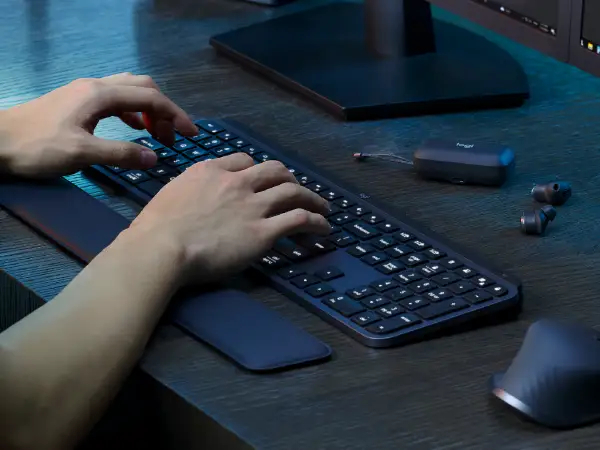
Typing feel consistently tops the list of accolades. The concave, spherically dished keys are credited with reducing typos and providing a laptop-like smoothness. Best Buy reviewer TaylorC enthused, “Everything just feels good while typing… battery lasts throughout the week’s work and weekend gaming.” Graphic designer Ryank highlighted the quietness, saying, “It doesn’t have a loud clicky noise like some mice and the keyboard is quiet and low-profile too.”
The MX Master 3S mouse also garners high praise for ergonomics and its MagSpeed scroll wheel. A Quora respondent called it “the best I’ve ever tried… wonderfully silent click, lightweight for its size.” From office work to creative applications, users value the horizontal and vertical scrolling, plus the thumb button placement that feels natural. A Reddit poster summed it up: “Better grip, more natural tilt, buttons now well separated—infinitely more comfortable.”
Versatility in pairing and switching between devices is frequently mentioned. Best Buy reviewer MarkC loves “not having to have multiple keyboards across devices,” using the easy-switch buttons daily. One Trustpilot-sourced user called Flow “a marvel” for automating work between Windows and macOS without breaking stride.
Common Complaints
Backlighting is the most repeated sore point. Tom’s Guide bluntly called it “dim and lackluster,” with brightness nowhere near a MacBook Pro’s. Several Reddit users also resent its auto-off behavior, especially for those who hunt-and-peck. One noted, “If you can touch type, it’s a total non-issue,” underscoring how this flaw disproportionately affects non-touch typists.
Bluetooth performance divides opinion. Lag, particularly on macOS with FileVault enabled, frustrates some. Best Buy reviewer Legitleoo described the experience as “unbearable,” suggesting two receivers would help productivity instead of relying on slow Bluetooth switching.
Some mention the mouse’s weight as tiring over long sessions, though others prefer the heft as a sign of quality. For mobile workers, the combo’s physical bulk—keyboard weighing 810g—makes it less portable.
Divisive Features
Customization through Logi Options+ is a mixed bag. Many love programming Smart Actions to open apps or run macros with one keystroke. Quora reviewers detail specialized mappings for 3D animation and video editing. Still, Best Buy reviewer Legitleoo found keyboard customization “minimalistic… only top row and few other things,” viewing the mouse as the more feature-rich half of the duo.
Price perception varies widely. Some see it as fair for the quality; others call it “excessive for a keyboard and mouse.” Multiple Quora and Reddit voices point to cheaper options like HP 975 or Keychron boards that meet many of the same needs.
Trust & Reliability
No widespread “scam” flags appear, but durability gets cautious praise. Redditors mention multi-year satisfaction, with one noting their MX Keys survived 5-6 years of daily use until an accidental spill. Breakage after several years is rare but noted (“Mine broke after 3 years, can’t repair”).
Long-term mouse performance receives strong endorsements. PcComponentes.fr reviewers report the MX Master 3S clicks staying silent and scroll wheels maintaining precision after months of heavy use. That said, occasional Bluetooth instability suggests pairing via the Logi Bolt receiver for mission-critical workflows.
Alternatives
Former K800 users often weigh MX Keys S against its predecessor, with mixed opinions on whether the upgrade is worth it if your old model still works. Mechanical keyboard fans—such as Reddit user who reverted to a G915—miss tactile feedback. For similar productivity features at lower cost, community picks include Keychron V6 ($89) for hot-swappable keys and better value, or HP 975 for a typing feel some say competes at half the price.
Price & Value
At retail, the combo often sits around $200, with consistent sales dropping it to $150-$165 on eBay for new units. Used or refurbished keyboards alone can go for $65-$85. High resale value reflects demand—sealed combos sold briskly at $149.99 online. Community buying tips include waiting for seasonal discounts or bundling with Creative Cloud offers to maximize value.
FAQ
Q: Does the MX Keys S Combo work well with macOS and Windows at the same time?
A: Yes. Dual-labeled keys and OS auto-detection make cross-platform use smooth. Users praise the Flow feature for effortless transfers between systems.
Q: How bad is the Bluetooth lag?
A: It varies. Some report no issues, while others—especially on macOS—find it sluggish compared to using the Logi Bolt receiver.
Q: Can the keyboard backlight brightness be increased?
A: You can manually adjust it via Logi Options+, but many users feel even the highest setting is too dim for dark environments.
Q: Is the mouse too heavy for prolonged use?
A: Some find the weight solid and reassuring; others note fatigue after hours. Ergonomic grip generally offsets the heft for most users.
Q: Will it work without installing Logi Options+ software?
A: Basic functions work fine, but advanced customization, Smart Actions, and Flow require the app.
Final Verdict: Buy if you’re a productivity-focused professional who values comfort, quiet operation, and multi-device management over portability or gaming features. Avoid if you need ultra-bright backlighting or travel frequently with your peripherals. Pro tip from community: Pair via Logi Bolt for faster, more reliable switching, and wait for promotional bundles to soften the premium price.





