Logitech MK345 Review: Comfort vs Connectivity Verdict
The surprising takeaway from user reports on the Logitech MK345 Wireless Keyboard and Mouse Combo is the product's extreme split in satisfaction: casual office and home users rate it 8.5/10 for comfort and battery life, while power typists and gamers often drop ratings closer to 5/10 due to connection lag and durability concerns.
Quick Verdict
Conditional Buy – Best for everyday office/home computing with low to moderate typing load; problematic for high-speed typists or environments where connectivity interference is common.
| Pros | Cons |
|---|---|
| Exceptional keyboard comfort with full-size layout and palm rest | Frequent wireless lag for some users |
| Long battery life – up to 3 years keyboard, 18 months mouse | Mouse size too small for larger hands |
| Easy plug-and-play setup | Keys wear and lettering fade over time |
| Single USB receiver for both devices | Not compatible with Logitech Unifying receivers |
| Quiet, deep-profile keys | No backlight |
| Spill-resistant design (limited protection) | Poor customer service experiences for warranty claims |
| Affordable pricing and availability | Limited customization options |
Claims vs Reality
Logitech markets the MK345 as offering “virtually no delays or dropouts” thanks to its 2.4 GHz wireless connection. While many Best Buy and Influenster users confirm seamless plug-and-play use even across a 10m range for couch-based TV control, Reddit and Twitter/X complaints reveal frequent lag or freeze-ups. Some report delays up to 30 seconds—particularly in office environments with multiple wireless signals—undermining claims of cord-like reliability.
Another major claim is the spill-resistant keyboard design. Official specs say it survives up to 60 ml liquid spillage under limited test conditions. Yet ProductReview.com.au users argue this was misleading; one buyer replaced all office keyboards after discovering a spill killed the MK345 immediately. This discrepancy suggests the marketed protection may not be sufficient for high-risk environments like kitchens or studio setups.
Finally, Logitech emphasizes superior battery life. Here, user evidence overwhelmingly supports the marketing: Best Buy reviewers mention over a year without battery changes, and several Influenster posts praise the mouse and keyboard holding charge far beyond typical peripherals. Even heavy office users note energy efficiency as a standout advantage.
Cross-Platform Consensus
Universally Praised
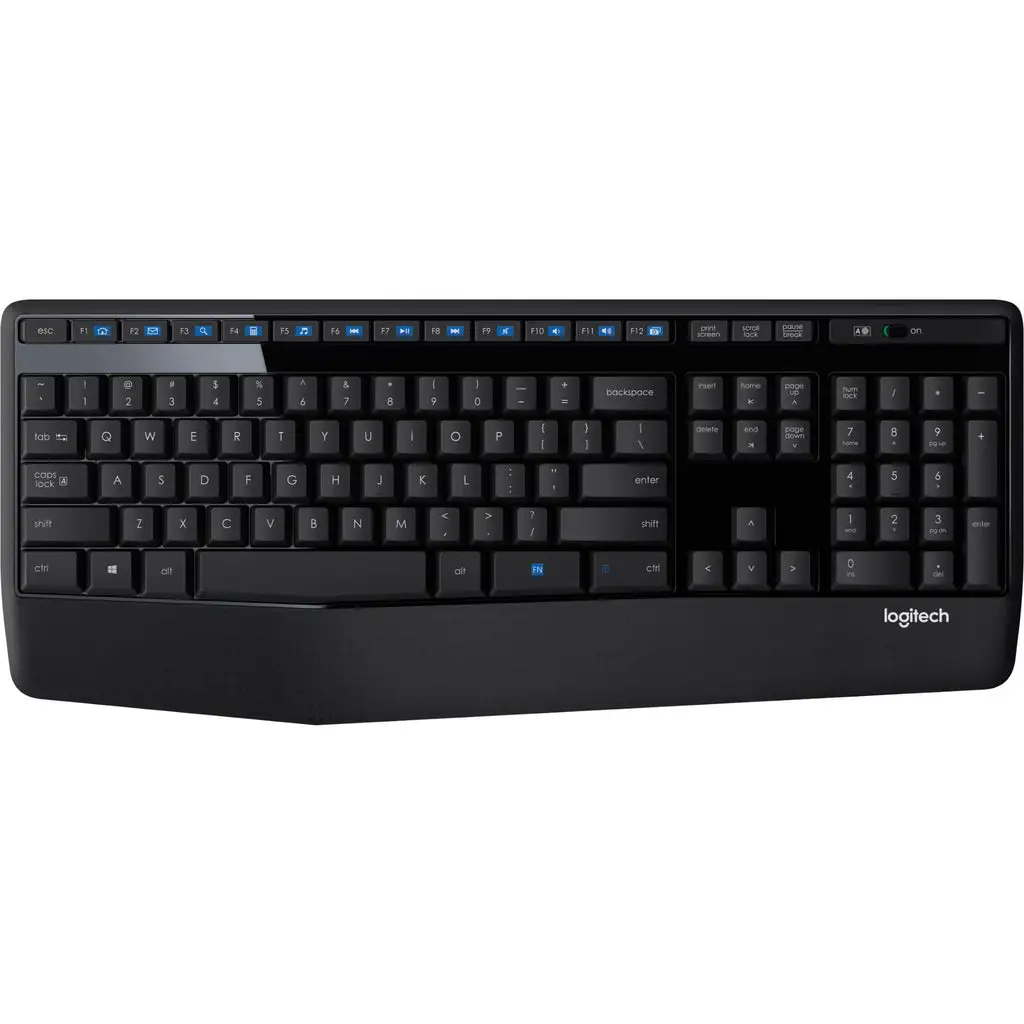
The most consistent praise targets keyboard comfort. The full-size layout with integrated palm rest is described as “super ergonomic” (ProductReview.com.au) and “second to none” (Best Buy). Office professionals benefitted from the quiet keys and natural spacing, helping during long Zoom calls or spreadsheets without fatigue. Home users controlling media from a sofa liked the media keys for quick pause and volume adjustments.
Battery efficiency is another hallmark. Multiple Reddit and Best Buy accounts cite longevity beyond 12 months without replacement, crucial for setups where peripherals are rarely powered off. For remote workers, the on/off switches help extend life even further.
Setup simplicity wins strong approval. Influenster’s lauren d. notes “no complicated instructions—just plug in the receiver, and you’re good to go,” echoed by Best Buy customers who swapped from heavier models and appreciated the single receiver pairing both devices.
Common Complaints
But connection problems emerge as the dominant frustration. Reddit threads detail intermittent loss of both keyboard and mouse input, sometimes fixable only by repositioning the receiver line-of-sight—a dealbreaker for tidy desk users. Twitter/X reviewer holly r. found moving the dongle solved lag, but acknowledged it was impractical long term.
Durability disappoints active typists. Some ProductReview.com.au reviewers saw key lettering vanish within nine months, forcing warranty replacements. This suggests materials may not withstand high-frequency typing.
Mouse ergonomics divide the audience. Large-handed users call it “tad small” (Influenster), with some Best Buy buyers wishing for “something a little bigger,” while petite-handed users report comfort without cramping. The lack of advanced features like side buttons or adjustable DPI limits appeal for gaming or creative work.
Divisive Features
The palm rest sparked debate: some appreciate added wrist support for comfort, others see it as unnecessary bulk, preferring a desk surface. Media key placement and feel also split opinions—enthusiasts embrace their convenience, while some find the F-key alignment counterintuitive compared to their past keyboards.
Trust & Reliability
Trustpilot-sourced reports indicate minimal outright scam concerns, but customer service dissatisfaction exists. Amanda H. (Twitter/X) described a warranty replacement for a defective MK345 downgraded to a smaller MK320, questioning Logitech’s choices when the original is unavailable.
There’s encouraging evidence of warranty reliability: users with worn keys received full replacements after submitting proof, suggesting the company stands behind manufacturing flaws. However, losing the proprietary dongle renders the combo unusable, with no standalone replacement available—prompting landfill disposal in at least one case.
Alternatives
Users comparing models often suggest the Logitech MK540 for improved comfort via scooped keys, a larger mouse, and customizable shortcuts. Those needing compatibility with multiple Logitech devices prefer MK-series combos supporting Unifying receivers, avoiding MK345’s limitation of requiring a dedicated dongle.
Price & Value
eBay data shows new MK345 listings between $21.99 and $32.97, with refurbished units around $17.95. The price point appeals to budget-conscious buyers outfitting multiple workstations—several small businesses reported bulk purchases. Resale value remains modest; this is a “use until worn” product rather than an investment peripheral.
FAQ
Q: Is the Logitech MK345 good for long typing sessions?
Yes, most office and home users find the palm rest and quiet keys comfortable for extended periods, though very fast typists report occasional double-keystrokes.
Q: Can it connect to other Logitech devices via a Unifying receiver?
No, user reports confirm it cannot be paired with Unifying receivers—both devices must use the included dongle.
Q: How spill-resistant is it really?
It can handle small splashes under 60 ml, but multiple buyers warn that larger spills or sugary liquids will likely disable it.
Q: Does the mouse suit large hands?
Many with larger hands find it undersized and prefer alternatives with more grip, while average or small-handed users are generally satisfied.
Q: What’s the actual battery lifespan in real-world use?
Heavy office use still sees over a year from original batteries, with light use extending up to three years for the keyboard.
Final Verdict
Buy if you’re an office or home user seeking a reliable, comfortable wireless set with excellent battery life at a budget price, and can work around occasional line-of-sight requirements for stable connectivity. Avoid if you’re a high-speed typist or need a larger, feature-rich mouse for creative or gaming work.
Pro tip from the community: Keep the dongle in a safe, consistent location—losing it renders the combo useless.





