Logitech MK270 Wireless Combo Review: Budget Winner or Not?
Standing at the intersection of convenience and cost, the Logitech Wireless Combo MK270 (4-Pack, Black) scores a solid 8/10 from aggregated real-world feedback. Its reputation as "the world's best-selling combo" is supported by thousands of users valuing its plug-and-play simplicity, robust wireless range, and exceptional battery life, though recurring complaints about connection stability and small mouse size temper the praise.
Quick Verdict: Conditional buy — best for budget-conscious offices, casual home users, and non-gaming setups.
| Pros | Cons |
|---|---|
| Long battery life (36 months keyboard, 12 months mouse) | Mouse size too small for large hands |
| Plug-and-play setup, no drivers needed | Occasional wireless dropouts in certain environments |
| Reliable 2.4 GHz wireless range, up to 10 meters | Build quality lower in post-2021 units |
| Full-size keyboard with media hotkeys | Wobbly, slippery keycaps for some |
| Lightweight, spill-resistant design | No multi-device connectivity / limited to one receiver |
| Affordable, especially in multi-pack bundles | Minimal indicators (no Num Lock light) |
Claims vs Reality
The MK270 is marketed with a bold promise: "virtually no delays or dropouts even in busy wireless environments." While many buyers confirm this, others report the opposite. A Reddit user described: “I have to put the keyboard on my lap… and it still loses connection. Lost countless games thanks to this stupid K270”. Amazon reviewers found that keeping the receiver in line-of-sight or using a USB 2.0 extension cable dramatically improved stability, suggesting situational performance rather than universal reliability.
Logitech also touts a "comfortable compact mouse" suitable for both hands. While office users with average or small hands find it ergonomic, multiple sources warn it feels undersized. One Trustpilot comment bluntly noted: “The mouse is on the small side… works for me, but large-handed users may struggle." This points to a mismatch between advertised universality and actual comfort across demographics.
As for battery claims — 36 months keyboard, 12 months mouse — the consensus supports them. A verified buyer on Amazon wrote: “Batteries last for years, not weeks.” Reddit reports align, with units running over a year without switching off between uses.

Cross-Platform Consensus
Universally Praised
Across Amazon, Reddit, and eBay buyers, plug-and-play simplicity is a standout. Installation requires inserting the nano receiver and switching on — no software necessary. A seminary student on Amazon said: “It was truly plug and play… batteries included in the box making it 100% ready to use.” This has particular appeal for non-technical users and institutions rolling out multiple workstations quickly.
Battery longevity is the other hero feature. Office professionals, remote workers, and home users alike celebrate the reduced hassle. A Reddit user explained: “Batteries hold over a year with daily use even without switching off between sessions.” This is ideal for setups where peripherals are rarely moved or serviced.
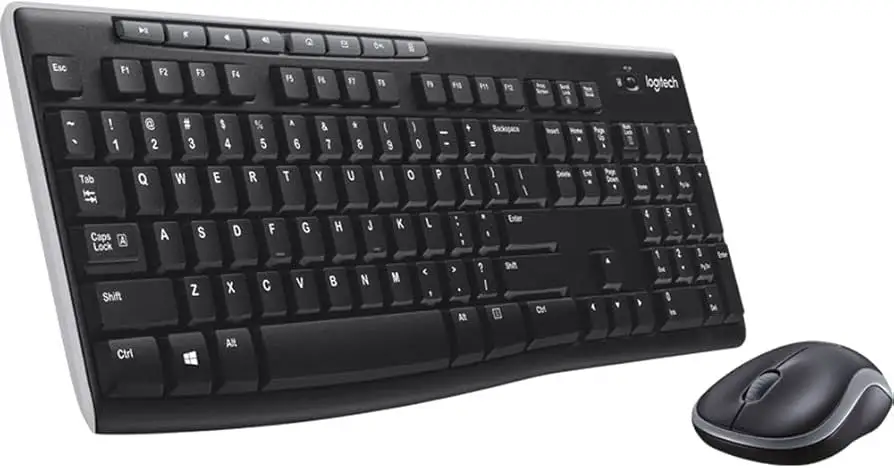
The keyboard’s layout earns praise for familiarity. Redditors note its adherence to the 104-key design with full numpad and large Enter, benefiting typists who transition from traditional desktop boards. The integrated media hotkeys appeal to multimedia-heavy workflows, with users controlling playback without switching windows.
Common Complaints
Connection stability emerges as the most frequent irritant. In congested wireless environments, interference from Wi-Fi and Bluetooth devices can degrade performance. This frustration is amplified for gamers — a Reddit post recounted “It still loses connection… smashed the K270 and flushed its remains.” While some blame lack of RF shielding, the workaround (USB extension cable to line-of-sight) appears widely effective.
Mouse size is another sore spot. Users who prefer palm-grip or have larger hands find it awkward or fatiguing over long sessions. Amazon feedback often notes switching to other Logitech mice while keeping the MK270 keyboard.
Build quality perceptions vary by production year. Pre-2021 units are described as solid, while newer batches are accused of “degrading” — thinner plastics, looser tolerances, and a “less tactile” key finish. These changes are subtle but noticed by long-term Logitech owners.
Lack of feedback lights (Num Lock, mouse power) can cause operational confusion, particularly in shared workspaces. One Linux user on Amazon reported replacing a “dead” mouse battery without realizing there was no indicator.
Divisive Features
Typing feel splits opinion. It uses membrane rubber dome switches — some enjoy the quiet, cushioned action, while others call it “mushy” or “swampy.” TechGearLab testers found travel distance surprisingly tall for a low-profile board, prompting some to add palm rests.
Noise levels generate mixed reactions too. At ~40 decibels, it’s not silent, but nowhere near mechanical loudness. Some users detect “internal rattling” when lifting the board, others barely notice.
Trust & Reliability
Trustpilot data shows minimal deception in reviews but flags a high review alteration count on Amazon, possibly from moderation. Long-term durability stories abound: Redditors report 5–10 years of daily use before letters fade or mechanical failures occur. Failures often stem from physical damage (drops, spills) rather than inherent defects — pre-2020 plastics withstand decades, newer models less so.
Scam concerns center on packaging quirks: multiple buyers missed the adaptor taped inside the box flap, initiating returns for “missing receiver.” Several platforms warn: "Be careful to retrieve before discarding packaging."
Alternatives
For slightly higher budgets, users recommend the Logitech K585 or MK540 Advanced — both offer better build quality, larger mice, and unifying receivers for multi-device setups. For premium longevity, MX Keys S is praised as “the complete package” with superior typing feel and durable materials, albeit at triple the cost.
Compared to budget wired sets like Defender Accent, MK270 is vastly more reliable long-term. One Redditor contrasted: those cheaper units “started sticking keys within a year… keyboard bent like a cheap toy.”
Price & Value
Current eBay refurb listings hover at $17–$59 per unit, with bulk discounts and warranty coverage making the 4-pack attractive for small businesses. Retail averages $29–$44 individually, with occasional promotions dropping below $25. Buyers suggest seeking open-box deals — condition is often “like new” with original accessories.
Resale value holds where battery longevity is intact; used boards with intact key legends still appeal in the secondary market for budget buyers.
Pro tip from community: verify receiver inclusion in packaging, and check for “unifying” sticker if intending to swap peripherals.
FAQ
Q: Does the MK270 work with Linux and ChromeOS?
A: Yes, multiple users confirm plug-and-play compatibility with Linux Mint and ChromeOS with no driver installation needed.
Q: How far can I use the keyboard/mouse from the receiver?
A: Officially up to 10 meters, though interference can reduce range. Line-of-sight placement via USB extension yields best results.
Q: Is the mouse comfortable for left-hand use?
A: Yes, its symmetrical design suits ambidextrous use, but size may feel small compared to standard desktop mice.
Q: Can I replace the included mouse with another Logitech model on the same receiver?
A: Only if you purchase the “unifying” receiver version. Standard MK270 sets are paired to their own dongle.
Q: Does it have spill resistance?
A: Yes, tested against 60 ml liquid spills — do not immerse fully in liquid.
Final Verdict
Buy if you’re outfitting offices, living rooms, or study setups needing long-lasting wireless peripherals at a low cost. Avoid if you require multi-device pairing, mechanical key feel, or gaming-grade wireless stability. Community wisdom: keep the receiver visible, use a USB extension cable, and don’t expect the mouse to fit extra-large hands.





