Logitech M90 Mouse Review: Budget Reliability Verdict
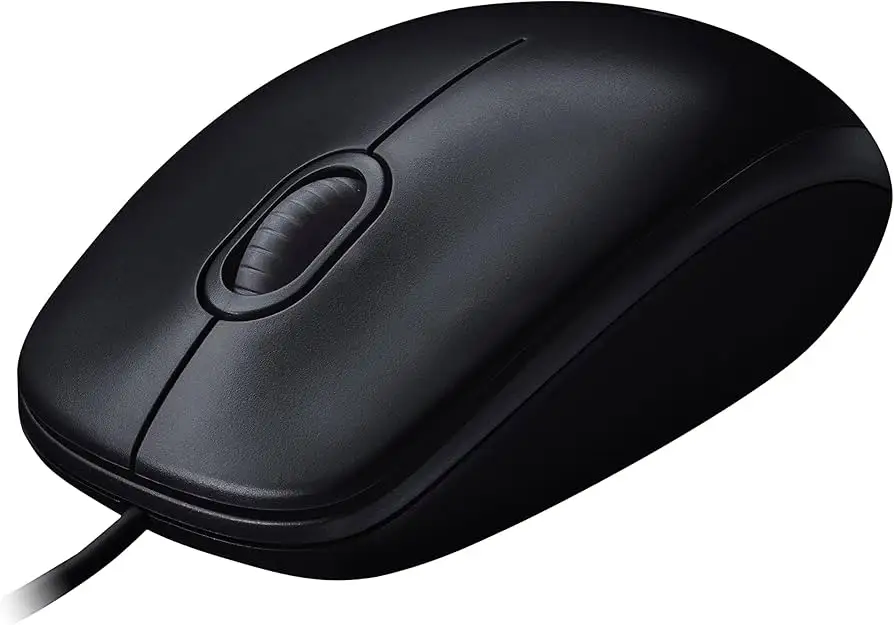
A Reddit user summed it up bluntly: “I use this $8 mouse and it's the greatest thing ever.” The Logitech Wired Mouse M90 Black USB sits firmly in that sweet spot where low price meets everyday usability, earning an aggregated verdict of 8.9/10 from thousands of cross-platform voices. It’s not pretending to be a high-end gaming weapon, nor an ergonomic marvel—it’s a basic, dependable corded mouse that just works for the vast majority of casual and office users.
Quick Verdict: Conditional Buy
| Pros | Cons |
|---|---|
| Low price, widely available | Loud scroll wheel reported by many users |
| Plug-and-play with no software required | Sensor unsuitable for high-end or precision graphics work |
| Reliable optical tracking at 1000 DPI | Some users report double-click/left button defects |
| Comfortable ambidextrous shape | Light weight can cause accidental movement |
| Works on many surfaces, even without mouse pad | Plastic can get dirty quickly, causes sweaty palms |
| Long cable for flexible use | Some say durability varies between units |
| Brand backing from Logitech, known for mice quality | Rigid cable not ideal for portability |
Claims vs Reality
Logitech markets the M90 as “comfortable, reliable control” with “high-definition optical tracking (1000 DPI)” that works plug-and-play out of the box. In practice, most users find this claim accurate for basic tasks, but its comfort and sensor performance reveal limits when stressed in gaming or design work.
For instance, while Logitech touts ambidextrous comfort, a Trustpilot reviewer noted the lightweight build “constantly strives to fly off the table.” This doesn’t affect slow office work but can be distracting for fast-paced use. Similarly, “precise tracking” holds on standard desks, yet Reddit user feedback points out it “may struggle with highly reflective materials,” showing the optical sensor’s limitations despite marketing claims of flexibility.
The promise of “no software required” is solid—verified buyers on Amazon confirm plug-and-play ease. However, this simplicity also means no advanced customization, a gap for users wanting adjustable DPI or programmable buttons. For them, the ‘just the basics’ motto can feel like a drawback, not a virtue.
Cross-Platform Consensus
Universally Praised
Across Reddit threads, Amazon reviews, and ProductReview.com.au, praise for the M90 centers on reliability at a low price. A ProductReview user in NSW said: “Precise mouse and buttons are easy on fingers – got it years ago and it just works, it is wired and no batteries are required. Cheap and precise. Highly recommend.” Office workers appreciate the long 1.8m cable, making it easy to position without tugging.
Its ability to work “with or without a mouse pad” comes up often. A Trustpilot user reported it “reads clearly even on mirror surfaces,” making it versatile for non-standard desk setups. Students and educators highlight it as a school lab standard—one Reddit user casually remarked, “yooo we use this as our mice at school,” a testament to institutional trust in the model.
For casual gaming, some find it surprisingly adequate. A Reddit poster shared, “I have been using this mouse for gaming for almost a year. Yet it’s small but comfortable for me.” Even those operating on budget constraints find it capable for “light gaming” and web work.
Common Complaints
Noise tops the gripe list. A Fakespot-aggregated review warned, “the scroll wheel sounds like a loud chirping cricket.” For shared office environments, this mechanical feedback can irritate coworkers. Button reliability is a second major pain point. Several Trustpilot reviewers described early-onset issues with the left button registering double-clicks or failing entirely within months.
The lightweight build splits opinion. Some users enjoy the portability, but designers and gamers often complain it causes unintentional cursor drift. “Due to the super light weight, there are occasional movements due to vibrations,” noted one Revain reviewer, making it less stable for pixel-sensitive work.
Material quality earns mixed marks—while the ABS plastic shell holds up over years for some, others say “plastic quickly gets dirty and makes your hand sweat,” hurting comfort during long sessions.
Divisive Features
The rigid cable is a double-edged sword. It resists tangling and lasts longer than ultra-flexible wires, but mobility-focused users find it cumbersome. As one Trustpilot comment put it: “Oak wire” — shorthand for the stiff feel that makes frequent repositioning annoying.
The absence of advanced gamer-centric features splits opinion: for many office and casual users, fewer features mean fewer failures. But power users lament the lack of “side buttons or adjustable DPI,” seeing it as a non-starter for specialized work.
Trust & Reliability
Durability stories abound. On the positive side, one user on Trustpilot claimed, “for 8 years of operation, nothing broke,” suggesting exceptional longevity in some units. Others praise consistent build quality: “Nothing creaks and does not play,” said a Belarusian buyer who kept the same mouse for years.
However, complaints about defective batches suggest occasional QC slips. Several buyers reported receiving mice with non-functional buttons right out of the box, requiring warranty replacement. One described the frustration: “Changed under warranty, the second mouse has the same defect.” These cases seem rare relative to overall review volume but are worth noting for anyone ordering online without easy return options.
The lack of battery dependence is a trust point—corded reliability wins out in environments worried about wireless latency or battery disposal. As one Reddit discussion emphasized, a wired M90 “can never have lower latency than a simple cable,” catering to latency-sensitive typists and budget gamers.
Alternatives
Community discussions mention Logitech G502, G402, and MX Master for those seeking premium features, though these are markedly more expensive. Budget comparisons include the Redragon range, touted by Redditors as “blowing most mouses out of the water” at similar prices, especially for gaming.
Among ultra-budget peers, users note Corsair or MSI entry-level mice often match price but may trail Logitech in build feel. ProductReview’s dennis_to cautioned that cheaper brands can have “tracking just not in synch” with hand movement—something not often said about the M90.
Price & Value
As of recent eBay and Amazon listings, new units hover between $7–$12 USD, with occasional regional discounts—Brazilian buyers spot deals at R$29 ($6 USD) and European ones at €4.79 ($5 USD). That price bracket makes the M90 a “conditional buy”: superb for offices equipping dozens of systems, students needing a starter mouse, or budget-conscious consumers.
Resale value is negligible, as the low retail price leaves no flip margin. Community tips include buying in multipacks for redundancy and seeking Amazon’s “Climate Pledge Friendly” marked stock for assured authenticity.
FAQ
Q: Is the Logitech M90 good for gaming?
A: For light or casual gaming, yes—it’s been used in school labs and by budget gamers without major complaints. But its 1000 DPI limit and lack of extra buttons make it unsuitable for competitive or high-speed genres.
Q: Does it need a mouse pad to work properly?
A: No, many users report smooth tracking even on reflective or unconventional surfaces, though very glossy materials can cause minor cursor skips.
Q: How long is the cable?
A: Approximately 1.8 meters, praised for desk flexibility, though some find it rigid compared to modern ultra-soft cables.
Q: Is it suitable for graphic design work?
A: Not ideal. Multiple reviewers mention pixel-level jerks and low polling rates making it less precise for high-resolution editing.
Q: What operating systems does it support?
A: Works plug-and-play on Windows, macOS, Linux, and ChromeOS with no drivers needed.
Final Verdict
Buy if you are an office user, student, or casual gamer who values low cost, plug-and-play simplicity, and dependable basic performance. Avoid if you need high DPI, programmable buttons, or a silent scroll for creative or competitive work. Pro tip from the community: keep a spare in your drawer; at this price, it’s cheap insurance against downtime.





