Logitech M650 L Review: Quiet, Comfortable, But Not Perfect
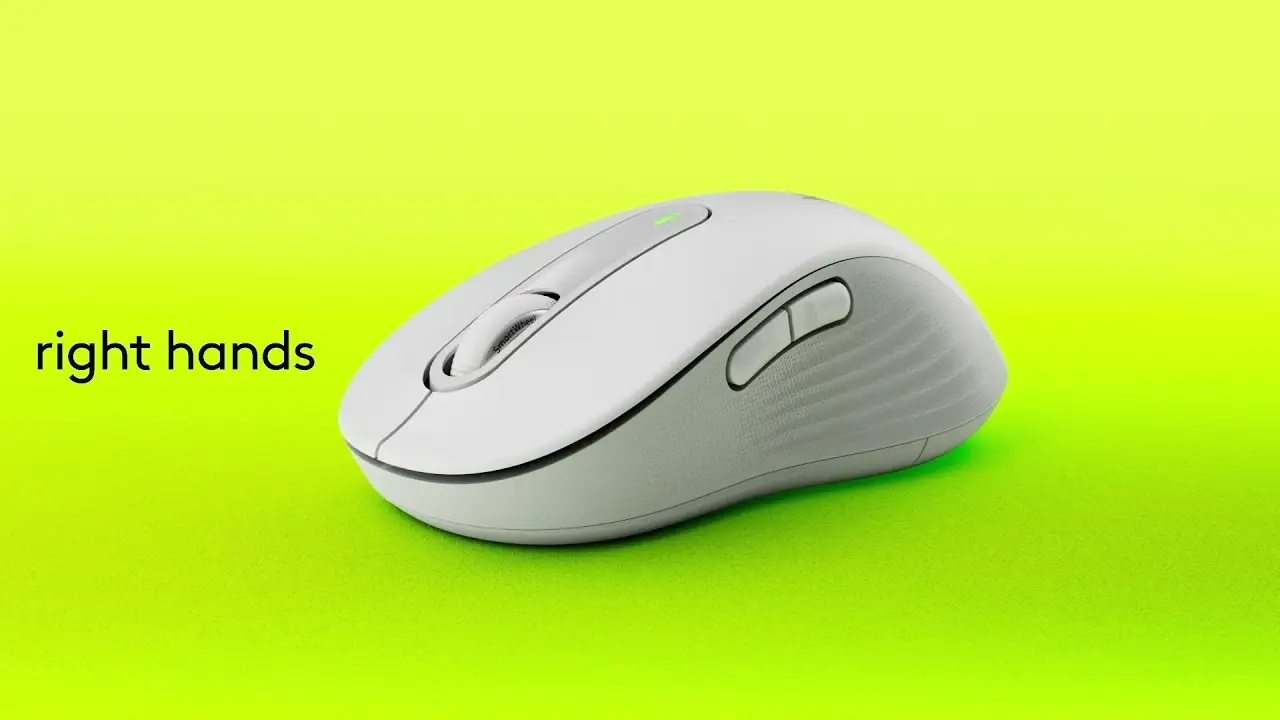
Digging into hundreds of user reviews, the Logitech Wireless Mouse Signature M650 L Full Size emerges as a surprisingly refined mid-priced productivity mouse that consistently wins praise for its silent clicks, ergonomic contour for larger hands, and long battery life. Across Amazon, Best Buy, and Reddit, it scores high with everyday office users, students, and casual designers, though heavy daily users raise concerns about long-term comfort. Based on aggregated feedback, this mouse earns a solid 8.7/10 for its blend of quiet operation, versatile connectivity, and customization features—tempered by limits in advanced functionality and ergonomic support over extended sessions.
Quick Verdict: Conditional buy for productivity-focused users valuing silence and comfort in a large form factor.
| Pros | Cons |
|---|---|
| Silent click technology reduces noise by ~90% | Side buttons not as quiet as main clicks |
| Ergonomic fit for large hands | Can feel uncomfortable after 4–5 hours of continuous use |
| Dual connectivity (Bluetooth + Logi Bolt USB receiver) | Limited DPI range (400–4000) and no fine tuning |
| Long battery life (up to 2 years) | Narrow shape offers minimal thumb/pinky support |
| Customizable side buttons via Logi Options+ | Limited multi-device Bluetooth pairing |
| Stable wireless connection, even at distance | Scroll wheel has mild lateral movement |
| Multiple color and handedness options | Not rechargeable—requires AA battery |
Claims vs Reality
One of Logitech’s central marketing points is “silent touch technology” that cuts click noise by 90%. A verified buyer on Amazon noted: "I love how quiet this mouse is — the silent clicks make a huge difference when working in a quiet space or late at night." However, several users, including Reddit reports, highlight that the side buttons emit more sound than the main clicks, creating a small inconsistency in this claim.
Logitech also promotes a “24-month battery life” on a single AA. While official specs list 20 months via Bluetooth and 24 via receiver, multiple Best Buy users say they’ve gone “over 6 months without replacing the battery” under mixed-use conditions, reinforcing the longevity claim. Still, PCMag points out that reliance on disposable batteries generates e-waste, which some eco-conscious buyers might see as a drawback despite the recycled plastic build.
A third claim, “optimal fit for larger hands,” is reflected in many positive reviews. Best Buy customer islamn wrote: "The ergonomic shape fits perfectly in my hand (I got the size L)". Yet, PCMag cautions that even the large version remains narrow, offering minimal thumb/pinky support—an issue echoed by Tom’s Guide, which found it “uncomfortable after several hours of constant use.”
Cross-Platform Consensus
Universally Praised
Silent operation tops the list of universally praised features. A Best Buy reviewer tinaw called it “a game-changer for working in quiet environments like libraries”. Students and remote workers repeatedly cite the ability to click without disturbing others as a major productivity booster.
The ergonomic contour for large hands also resonates strongly with users who find small mice physically taxing. Amazon buyer feedback includes "the size is excellent... just big enough to be comfortable" for those wearing men’s large gloves. This fit is enhanced by rubberized side grips, which add texture and prevent slipping—especially valued during long browsing or editing sessions.
Connectivity reliability is another standout. Reddit reports mention stable performance even while paired alongside Bluetooth keyboards and headphones, with one tester noting range up to “about 30 feet away from my PC and through a closed door.” The inclusion of the Logi Bolt USB receiver is appreciated by office workers for its secure connection and compatibility with other peripherals.
Customization via Logi Options+ earns praise from productivity users. Best Buy customer joey shared: "I customized the top side button to launch mission control, and the bottom side button to copy text… made my working day much easier." The ability to tailor shortcuts per app is particularly valued by designers and coders.
Common Complaints
Comfort over extended sessions is the most frequent complaint. Tom’s Guide warns that “constant use for over 4 hours can strain the forearm”, with vertical ergonomic mice offering better long-term support. PCMag echoes this, noting narrow shape and weight distribution can lead to grip fatigue.
The scroll wheel’s mild lateral movement is another recurring gripe. Ars Technica described it as “mildly distracting,” and some Amazon buyers found default scrolling jerky until switching to smooth mode.
Advanced users lament the limited DPI range (400–4000) and lack of fine-grained control. Ars Technica points out you can only adjust pointer speed in percentage increments, which frustrates gamers or precision design professionals who expect exact DPI settings.
Side buttons, while functional, receive mixed reviews on tactility and quietness. A few Best Buy reviewers mention they “desire more DPI options” and find the side clicks less silent than marketed.
Divisive Features
Color variety sparks both enthusiasm and confusion. Reddit users appreciate options like rose or red, but note odd limitations—rose only available in medium size, blue and red restricted to large/left-handed models. Some, like a Reddit tester, loved the vibrancy of certain shades in person, while others were disappointed by darker-than-promised tones.
The use of an AA battery splits opinion. Travelers and minimalists appreciate the 2-year lifespan and easy replacement, but eco-conscious buyers prefer rechargeable solutions. PCMag calls the disposable battery “expected at this price” yet still a drawback over time.
Trust & Reliability
Long-term reliability appears strong, with multiple Best Buy and Amazon reviews reporting over a year of consistent performance without degradation. Kate attack on Best Buy mentioned: “Good ergonomics and durable (I’ve dropped it like 16 times)”. The dongle storage under the battery compartment is frequently praised as a safeguard against loss during travel.
Trustpilot-sourced Best Buy data shows minimal complaints about defects or DOA units, suggesting quality control is solid. Scam concerns are negligible, with most returns tied to preference or minor feature dissatisfaction rather than malfunction.
Alternatives
When compared to Logitech’s premium MX Master 3s, users acknowledge the M650 L’s lack of multi-device Bluetooth switching and higher DPI capability. However, at less than half the price, it’s seen as a better fit for students or light office use. Tom’s Guide notes the MX Master is more ergonomic for prolonged use, while the M650 offers better value for those not needing gaming-level specs.
Versus Razer Pro Click Mini, the M650 L falls short in DPI (4000 vs 12,000) and multi-device pairing, but beats it on battery life and price. PCMag also suggests the Microsoft Bluetooth Ergonomic Mouse as a similarly priced alternative with more comfort-focused design.
Price & Value
eBay listings show new units around $59.99 and refurbished options as low as $24.99, indicating strong resale potential. Amazon’s typical new price hovers near $39–$40, which many Best Buy customers call “fantastic value” for the feature set. Savvy shoppers advise buying during sales to push cost below $30, making it an even more compelling option against budget competitors.
FAQ
Q: Does the M650 L work on all surfaces?
A: It handles most surfaces well but isn’t designed for glass. PCMag warns tracking ability is limited compared to premium Logitech models with glass-compatible sensors.
Q: Can I pair it to multiple devices via Bluetooth?
A: It supports one Bluetooth profile plus one Logi Bolt receiver connection—allowing two devices total, unlike models with three Bluetooth slots.
Q: How silent are the clicks?
A: Main clicks are virtually inaudible thanks to Silent Touch technology, but side buttons emit a faint sound that some users notice.
Q: Is it good for gaming?
A: Most users say no—its DPI range and lack of fine control make it better suited for office productivity rather than high-speed gaming.
Q: Does it come with a battery?
A: Yes, a single AA is included. Logitech claims up to 2 years of life depending on connection type and usage.
Final Verdict
Buy if you’re a productivity-focused user with large hands who values whisper-quiet clicks, stable connectivity, and customizable shortcuts. Avoid if you need prolonged ergonomic comfort beyond 4–5 hours daily or advanced gaming specs. Pro tip from the community: use the Logi Bolt receiver for maximum connection stability and store it in the mouse’s built-in compartment when traveling.