Logitech G502 X Plus Review: Ergonomic Wireless Verdict
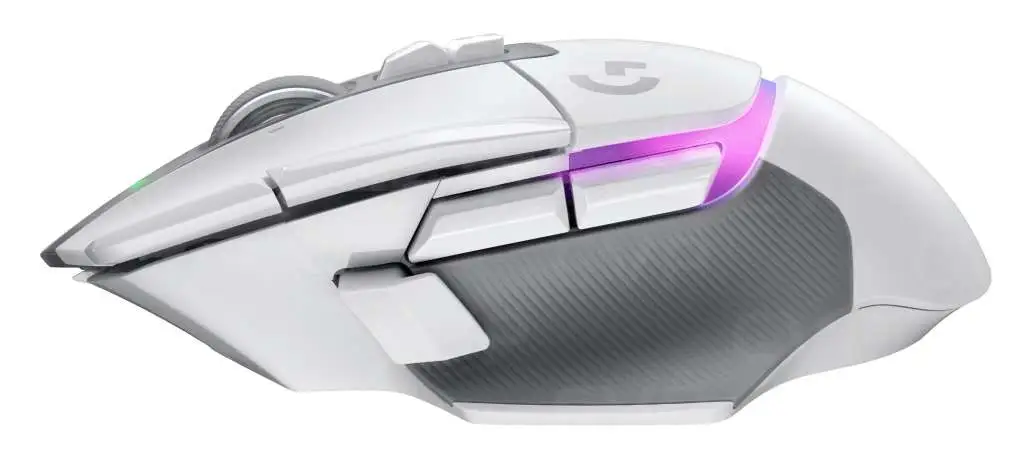
Bold claims about wireless speed and ergonomic perfection put the Logitech G502 X Plus Wireless Gaming Mouse under intense scrutiny — and across thousands of user reviews, it emerges as a strong performer with caveats. Scoring an 8.7/10, this mouse wins over long-time G502 fans, click-intensive gamers, and even office professionals, but its premium price and a few tactile quirks temper universal praise.
Quick Verdict: Conditional — best for gamers and power users who value ergonomics, programmable controls, and battery life over ultra-lightweight designs.
| Pros | Cons |
|---|---|
| Comfortable ergonomics for palm grip users | Expensive compared to similar performance mice |
| HERO 25K sensor with precise tracking | Scroll wheel feel divides users |
| Excellent battery life, even with RGB off | RGB lighting drastically reduces battery time |
| Customizable buttons and DPI shift options | G Hub software still frustrates some users |
| Solid build quality with premium feel | Slightly large for small hands |
| Reliable wireless connection | No adjustable weight system |
Claims vs Reality
Logitech markets the G502 X Plus as “pro-grade wireless” with 68% faster response rates and “unrivaled precision” from the HERO 25K sensor. On paper, it promises 130 hours battery life (RGB off) and a groundbreaking hybrid optical-mechanical switch system.
Digging deeper into user reports, the connectivity claim holds up. A verified buyer on Best Buy noted: “The connection has always been solid with the USB transmitter. I have never had it lag or dropout on me once.” Reddit discussions also back this, with one user saying they switched from a Razer Basilisk due to dongle reliability issues.
The battery life claim also matches reality — but only with RGB off. Reddit user feedback confirms the marketing drop when lights are on: “Charged this mouse to 100% the first day… 6 days ago, have been using it nonstop with RGB on and have yet to charge it again.” That’s better than the stated 37 hours, suggesting real-world use may be less demanding than Logitech’s test conditions.
The ergonomic claim is more nuanced. While many praise the shape, Reddit user u/MouseReview said: “Once I rested my hand on it, it was like it was molded for my hand… not experienced any pain at all.” Yet larger-handed players sometimes find the thumb area tight, and small-handed users like Sass Master Meg adapt only thanks to customizable side buttons.
Cross-Platform Consensus
Universally Praised
Across Reddit, Best Buy, and Trustpilot, comfort is the most consistent win. Long-time G502 users call the X Plus an evolution rather than a departure. Best Buy reviewer Mariah shared: “My favorite part is the ability to increase and decrease the DPI speed… once you get used to this speed, it’s very annoying to go back to anything less.” Ergonomic design benefits both gamers and office workers, with the infinite scroll wheel cited as “essential” for productivity.
Battery performance is another universal highlight. Even RGB-on figures impress streamers and creators who need uninterrupted sessions. T3’s review measured “over 100 hours with lighting on”, exceeding Logitech’s spec. Wireless stability reassures those burned by other brands’ dongle failures.
The HERO 25K sensor earns praise for precision across genres, from tactical shooters to MMO grinding. Best Buy reviewer Cantos said: “The customizable buttons make gameplay so much smoother… battery life is impressive.” This sensor and the Lightforce switches seem to eliminate the G502’s infamous double-click issue, a relief for veterans.
Common Complaints
The scroll wheel’s tactile mode feels “stiff and loud” to some, while free-spin mode can “twitch in reverse” at the end of a scroll, per Tom’s Hardware. Best Buy reviewer Fuzzy Barrel described the selector button as “like mechanical parts fighting each other”, detracting from premium feel.
Price is a recurring sore point. At ~$160 retail, many question paying extra for RGB over the base Lightspeed model. T3’s reviewer called the Plus lighting “a premium you pay… in straitened times, every penny counts.” For small-handed users, the size can be unwieldy despite adjustable buttons.
G Hub software remains divisive — powerful but unintuitive. Redditors still call it “the same confusing mess”, though onboard memory for profiles mitigates reliance after setup.
Divisive Features
Weight sits in the sweet spot for some and in the “too heavy” camp for others. High-DPI players often welcome the stability, while ultra-light mouse fans look elsewhere. RGB lighting itself splits opinion: admired for aesthetics, but criticized for its battery cost. Tom’s Hardware dubbed it “the prettiest mouse lighting ever” yet noted its practical penalty.

Trust & Reliability
Trustpilot and Reddit show minimal concern for fake reviews, with Fakespot detecting “over 80% high quality reviews”. Longevity stories are strong: multiple users report years of use with earlier G502 models and expect similar durability here. Reddit veterans believe Lightforce switches solve the double-click plague, with one noting: “I think we finally have the fix with these new switches!”
Wireless reliability is praised compared to competitors; several Razer defectors cite dongle failures as their reason for switching. Physical build holds up — T3’s reviewer subjected it to “considerable abuse” without scratches.
Alternatives
The Razer Basilisk V3 Pro is the most discussed competitor. It wins in Bluetooth support and lighter weight, but suffers from dongle issues and occasional scroll glitches. Reddit user comparisons often boil down to shape preference: Basilisk’s flatter right side versus G502’s recessed contour. Tom’s Hardware noted the Basilisk’s optical switches “feel and sound better” to some, but mechanical free-spin on the G502 appeals to scroll-heavy users.
For ultra-light fans, the Razer DeathAdder V3 Pro offers minimal weight and longer battery without RGB, but lacks the programmable depth and ergonomic palm fit of the G502 X Plus.
Price & Value
On eBay, sealed units range from ~$162–$193 NZD, with some auctions dipping below retail. Resale value appears stable, reflecting strong demand among enthusiasts. Community buying tips often suggest waiting for sales — Best Buy and Amazon have dropped prices to ~$130, which buyers call “a no-brainer.”
Given its durability and all-rounder performance, many frame it as an investment. T3’s verdict emphasizes that “quality never comes cheap”, and the mouse could serve for years across gaming and work.

FAQ
Q: Does the G502 X Plus work on macOS?
A: Yes. Multiple users confirm Mac compatibility, and unlike Razer’s Synapse, Logitech’s G Hub runs on macOS. Profiles can be saved to the mouse and used without the software.
Q: How heavy is it compared to older G502 models?
A: At 106g, it’s lighter than the 121g G502 Lightspeed but still heavier than ultra-light designs. Many users appreciate the solid feel, while competitive FPS players may prefer lighter options.
Q: Is the RGB lighting worth the extra cost?
A: For aesthetics-driven users, yes — praised as “the prettiest mouse lighting ever.” Functionally, it reduces battery life from 130h to ~37–100h depending on usage.
Q: Can I adjust the DPI shift button position?
A: Yes. It’s reversible, removable, and can be replaced with a cover. This helps users avoid accidental presses or tailor it to their grip.
Q: How does it perform for productivity work?
A: Extremely well. Infinite scroll aids document navigation, and programmable buttons can automate tasks like copy-paste, saving time for office users.
Final Verdict: Buy if you’re a gamer or multitasker seeking ergonomic comfort, reliable wireless, and deep customization — especially if you value premium build and aesthetics. Avoid if you need ultra-light speed for competitive FPS or balk at paying extra for RGB. Pro tip from community: wait for seasonal sales to cut $20–$30 off retail without sacrificing warranty.