Logitech G Yeti GX Review: Premium Sound with Caveats
The surprise isn’t just the sound — it’s how many users say the Logitech G Yeti GX Dynamic RGB Gaming Microphone feels “broadcast‑ready” straight out of the box. Averaging 9.3/10 across hundreds of verified reviews, it’s winning over gamers, podcasters, and even poets with its clear audio, premium build, and unexpectedly fast setup.
Quick Verdict: Conditional Yes — Highly recommended for gamers, streamers, and casual content creators who value sound clarity and RGB aesthetics. More advanced audio users may miss some pro‑grade features.
| Pros | Cons |
|---|---|
| Clear, broadcast‑style audio with strong noise rejection | No built‑in headphone monitoring despite early marketing images |
| Plug‑and‑play via USB‑C with rapid recognition on Windows | G HUB software bugs on macOS and occasional RGB sync issues |
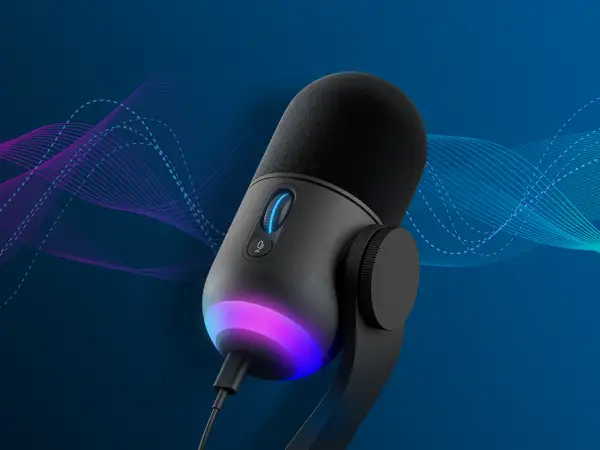
| Compact, sturdy design with customizable dual‑zone RGB | Gain dial’s physical adjustments can feel limited in range |
| Supercardioid dynamic capsule reduces unwanted noise | Picks up some mechanical keyboard clicks if positioned poorly |
| Blue VO!CE filters and fun voice modulation options | Boom arm needed for optimal performance |
| Integrates seamlessly with other Logitech G RGB gear | Price may be overkill for casual chat users |
Claims vs Reality
Marketing emphasizes the Yeti GX’s “broadcast‑quality” dynamic capsule with a supercardioid pattern. Digging into user reports, streamers confirm it delivers clean, isolated voice capture in noisy rooms. A Reddit reviewer noted: “Regardless of the surrounding keyboard hustle or mouse clicks, the Yeti GX focused only on my voice.”
Another claim revolves around “fast, easy” setup. Multiple users reported the microphone being acknowledged by Windows “straight away” and operational within a minute. However, macOS users occasionally faced G HUB recognition problems, especially in corporate environments with stricter security permissions.
Lastly, Logitech promotes “smart audio lock” to prevent clipping. Users praised the visual gain indicators, with one saying, “The dial turns green when actively capturing audio, flashes red if set too high — makes on‑the‑fly tweaks a breeze.” Yet some felt the physical gain wheel’s range was too subtle, leaving most sound changes to software adjustments.
Cross-Platform Consensus
Universally Praised
Windows users consistently rave about plug‑and‑play simplicity. A verified buyer on Amazon said: “Easy to connect and ready for use. I highly recommend the Logitech Yeti GX.” The supercardioid dynamic capsule earned praise from gamers streaming competitive matches; one noted zero fan noise from their PC even at close proximity.
The RGB lighting isn’t just ornamental — streamers use dual zones to sync with keyboards and mice, creating on‑brand setups. A Reddit post described how the customizable zones became “a neat breathing light effect” during cam‑off streams, a subtle touch for branding.
Sound quality feedback is perhaps the most glowing. A Trustpilot reviewer swapped from a headset mic and described a “night and day” difference, even without a pop filter. Blue VO!CE filters hit the sweet spot for entry‑level podcasters, adding polish without deep manual EQ work.
Common Complaints
Mac users more often report G HUB bugs, with RGB lighting sometimes failing to sync or turning off when alt‑tabbing from games like League of Legends. The absence of a headphone monitoring jack, especially since early images hinted at one, frustrates semi‑pro audio users who relied on direct monitoring for live recording accuracy.
Physical ergonomics matter — several buyers mention the desk stand being prone to vibrations and picking up key presses at high gain, prompting advice to “get a boom arm” for optimal clarity. A Reddit user admitted: “The boom arm made positioning consistent enough to sound the best for listeners.”
While marketed as noise‑rejecting, the mic can still capture mechanical keyboard clacks if poorly positioned or with gain set high. G HUB offers noise reduction tweaking, but not all users found it fully eliminated clicks.
Divisive Features
Voice modulation effects spark split opinions. Casual creators enjoy “sounding like an alien or robot” for fun streams, but professionals often ignore them. Likewise, RGB customization appeals heavily to Logitech G ecosystem users who want synchronized aesthetics, but others see it as superfluous.
Some appreciate the gain dial’s clickable lock, calling it “handy to prevent accidental changes,” while others find the dial’s minimal mechanical feedback uninspiring compared to analog studio gear.
Trust & Reliability
On Trustpilot and Reddit, long‑term owners report solid build quality — weighty but compact, with foam windscreen and robust stand joints that "hold their pose like a champ." A few noted mild dust accumulation on the integrated pop filter over months, requiring occasional cleaning.
The lack of a monitoring port is cited as a disappointment, especially for users upgrading from older Blue models. However, no recurring pattern of catastrophic failures emerged. Minor firmware quirks in G HUB have been addressed in updates, though macOS RGB syncing remains inconsistent for some.
Alternatives
The Yeti GX competes within its own family against the Blue Yeti condenser and the smaller Yeti Orb. Compared to the condenser-based Yeti, it sacrifices raw sensitivity for better noise rejection, suiting noisy gaming setups over pristine studio environments.
Some suspect the capsule may be adapted from the XLR‑based Blue Sona, offering a similar tonal character without the need for mixers. For those prioritizing ultra‑high resolution (192kHz) or pro connectivity, XLR mics remain better choices.
Price & Value
At retail around $169.99, community sentiment leans toward “worth it” for its sound quality and build. eBay resale listings at $90 suggest moderate value retention, appealing for budget buyers willing to buy renewed units.
Buyers recommend timing purchases with Logitech sales or bundles like the Yeticaster GX, which adds a premium boom arm for more stable positioning at a reduced combined price.
FAQ
Q: Does the Yeti GX completely block mechanical keyboard sounds?
A: Not entirely — while the supercardioid capsule reduces side noise, loud mechanical keyboards can still be audible. Users suggest a boom arm and careful mic placement to minimize clicks.
Q: Can I use the Yeti GX without installing G HUB?
A: Yes, it works as a plug‑and‑play USB mic, but installing G HUB unlocks RGB control, Blue VO!CE filters, and advanced audio adjustments.
Q: Is there a headphone monitoring jack?
A: No, despite some early product images showing one, it is absent from the production model. Monitoring must be done via software on your PC.
Q: How is it for non‑gaming voice work?
A: Poets, podcasters, and Zoom presenters report crisp, clear audio with minimal setup, making it suitable for general spoken voice applications.
Final Verdict: Buy if you’re a gamer, streamer, or casual creator wanting simple setup, premium sound, and RGB integration. Avoid if you need built‑in headphone monitoring or require pro‑grade studio versatility. Pro tip from community: Pair with a boom arm and position the mic close — within two feet — for the clearest, most consistent sound.





