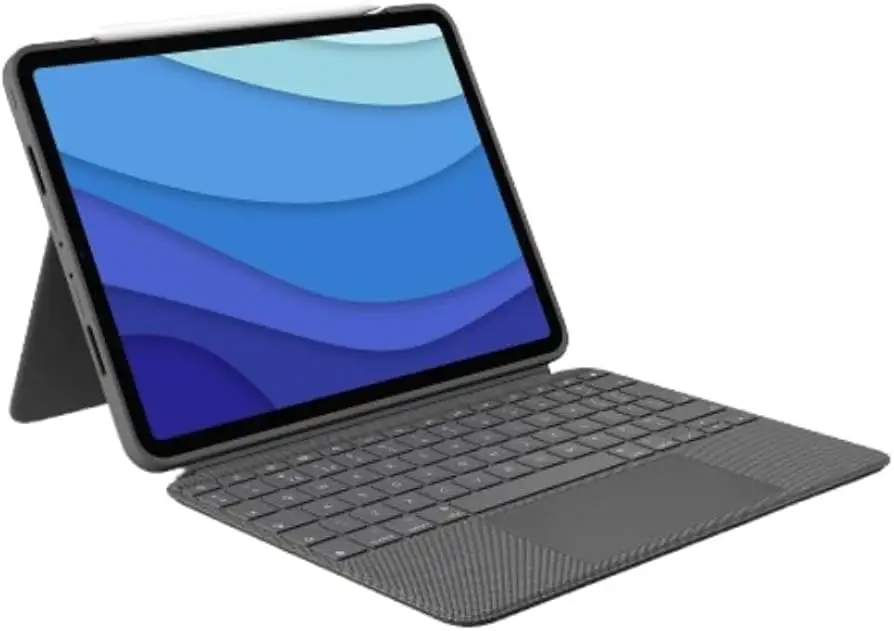
Logitech Combo Touch iPad Pro Review: Conditional Buy Verdict
Digging into user feedback, the Logitech Combo Touch Keyboard Case for iPad Pro 11-inch (Oxford Gray) stands out as a versatile tool that transforms the iPad into a near-laptop experience. Scoring 8.1/10 based on aggregated ratings, it earns praise for its detachable backlit keyboard, large precision trackpad, and robust protection, but durability concerns and ergonomic drawbacks keep it from universal acclaim.
Quick Verdict: Conditional Buy — excellent for productivity-focused iPad users who value flexibility, but less ideal for those in hot climates or seeking ultra-light setups.
| Pros | Cons |
|---|---|
| Responsive, backlit keyboard with full row of iPadOS shortcuts | Noticeable added weight reduces portability |
| Large, click-anywhere trackpad with multi-touch gestures | Rubber rim and fabric prone to peeling in hot climates |
| Detachable keyboard for quick mode changes | Kickstand footprint awkward for lap use |
| Strong front, back, and corner protection | Slippery outer material makes it harder to grip |
| Instant pairing and power via Smart Connector | Limited Apple Pencil security, can detach easily |
| Multiple modes (type, view, sketch, read) | Trackpad occasional responsiveness issues reported |
| Cheaper than Apple's Magic Keyboard | No extra USB-C port, unlike Magic Keyboard |
Claims vs Reality
Logitech markets the Combo Touch as “the thinnest and lightest yet” with “largest trackpad ever” and "premium materials." While this is accurate in comparison to older Logitech cases, users still note heft. A verified buyer on Amazon explained: “The whole set up with iPad Pro weighs about 2.5 lbs… it’s thin enough to fit in my tablet grip but definitely heavier than the Apple Magic Keyboard.” This weight becomes a factor for those carrying devices all day.
The “secure form-fit protection” claim is largely backed by experiences. Best Buy reviewers repeatedly mention drops without damage. One user shared: “My kids have dropped and stepped on it and no issues!” However, Reddit reports reveal a recurring issue: the outer rubber rim peeling away after months, particularly in hot climates. Logitech’s design withstands bumps but the material finish can degrade.
Marketing emphasizes “supports Apple Pencil charging” — technically true, but users caution that the Pencil can easily detach. As one Best Buy customer put it: “It will magnetically attach… but it is easily bumped off putting it in a backpack.” For mobile creatives, this gap between promise and reality is critical.
Cross-Platform Consensus
Universally Praised
Across Best Buy, Reddit, and Trustpilot, the keyboard’s responsiveness is a standout. The Smart Connector eliminates Bluetooth pairing delays, enabling instant use. A verified buyer noted: “No delay with the touchpad or keyboard… gestures work perfectly and the function keys are a huge plus.” Students and professionals alike benefit from the backlit keys, making low-light typing viable. The detachable design supports diverse workflows — from sketching with Apple Pencil to binge-watching without a keyboard in the way.
The trackpad earns consistent praise for its size and accuracy, rivaling laptop navigation. Reddit user feedback highlights multi-touch gestures as intuitive, letting users swipe, pinch, and scroll “just like on a MacBook.” For educators and writers, this transforms the iPad into a viable sole device.
Protection is another high point. Many users swapped from Apple’s Magic Keyboard for the Combo Touch because it shields the sides and corners. Frequent travelers mentioned peace of mind when tossing their iPad in a bag without a sleeve.
Common Complaints
Weight is the most cited drawback. While officially “lighter” than prior Logitech models, the added bulk compared to Apple’s Magic Keyboard is noticeable. Users working in cafés or planes find the kickstand’s vertical footprint problematic in tight spaces. One Best Buy reviewer lamented: “It takes up more surface space vertically… makes lap use difficult.”
Durability issues surface in Reddit threads — peeling rubber, fraying fabric edges, and speaker cover lifting after months. Hot climate users are disproportionately affected, with multiple reports of material expansion. While some defend its longevity in cooler regions, the pattern is clear for those in warmer environments.
Grip is another design flaw. The woven fabric feels premium but can be slippery. A 1-star Best Buy review described dropping the iPad twice in 3 days due to the case’s slick texture. This contradicts the “slip resistant” spec in some listings.
Divisive Features
The kickstand’s flexibility is loved and loathed in equal measure. Artists enjoy the near-flat sketch mode, but lap typers find it unstable on soft surfaces. The absence of an extra USB-C port — present in Apple’s Magic Keyboard — splits opinions. Some accept the trade-off for protection and detachable design, others see it as a missed opportunity.
Trackpad responsiveness divides feedback too. While most report flawless performance, a subset encountered occasional lag or unregistered clicks, especially during split-screen multitasking. Logitech’s firmware updates via its Control app aim to address this, but not all users see improvement.
Trust & Reliability
On Trustpilot and Reddit, long-term use reveals a mixed durability story. Some owners report cases lasting over two years “still perfect,” while others see cosmetic deterioration in under six months. The peeling rubber rim is the most consistent failure mode, often tied to heat exposure.
Logitech’s customer support earns mixed marks. Several Reddit users successfully obtained replacements for peeling cases, while others faced denial if damage was deemed user-caused. Best Buy’s return policy also blocked exchanges if drops left marks, even when design flaws contributed.
Despite these issues, functional reliability is strong. The keyboard and trackpad rarely fail electronically, and Smart Connector integration remains trouble-free over time.
Alternatives
The Apple Magic Keyboard is the most direct competitor. It offers a more compact lap-friendly design and an extra USB-C port, but at a higher price and with no side protection. Many users who prioritize protection and detachable flexibility choose the Combo Touch instead.
Zagg’s keyboard cases appear in user comparisons for similar protection, but lack the refined trackpad experience and robust iPadOS shortcut integration Logitech provides. For heavy Apple Pencil users seeking secure storage, third-party rugged cases may be preferable.
Price & Value
Current market prices show new units retailing around $199–$229, with eBay listings as low as $119.95 for older-gen compatibility. Refurbished Logitech-certified units run $169.99–$183.99 with a 1-year warranty, offering strong value for budget-conscious buyers.
Resale value holds moderately well given model-specific compatibility — older-gen cases fetch decent prices if in good cosmetic condition. Community tips suggest waiting for seasonal sales or buying refurbished to avoid paying full retail.
FAQ
Q: Does the Combo Touch work with older iPad Pro models?
A: Yes, it’s designed for multiple iPad Pro 11-inch generations (1st–4th), but each version is model-specific, so check your iPad’s model number before buying.
Q: How secure is the Apple Pencil with this case?
A: The case allows magnetic charging and attachment, but there’s no physical lock. Users report the Pencil can detach in bags, so a sleeve or separate holder is advised for travel.
Q: Can the keyboard be used wirelessly?
A: No, it relies on the iPad’s Smart Connector for power and data — there’s no Bluetooth mode. This ensures instant, lag-free operation but limits detached keyboard use.
Q: How adjustable is the kickstand?
A: It offers up to 50° of tilt, supporting typing, sketching, viewing, and reading modes. Stability is strong on hard surfaces but less so on laps or soft materials.
Q: Is the trackpad customizable?
A: Yes, gestures and scroll direction can be adjusted in iPadOS settings. Logitech’s Control app also enables firmware updates for performance tuning.
Final Verdict: Buy if you’re a student, professional, or creative who values laptop-like functionality, side protection, and flexible modes. Avoid if you work primarily on your lap in tight spaces or live in hot climates prone to material wear. Pro tip from community: opt for refurbished direct from Logitech — same warranty, lower cost, and verified functionality.