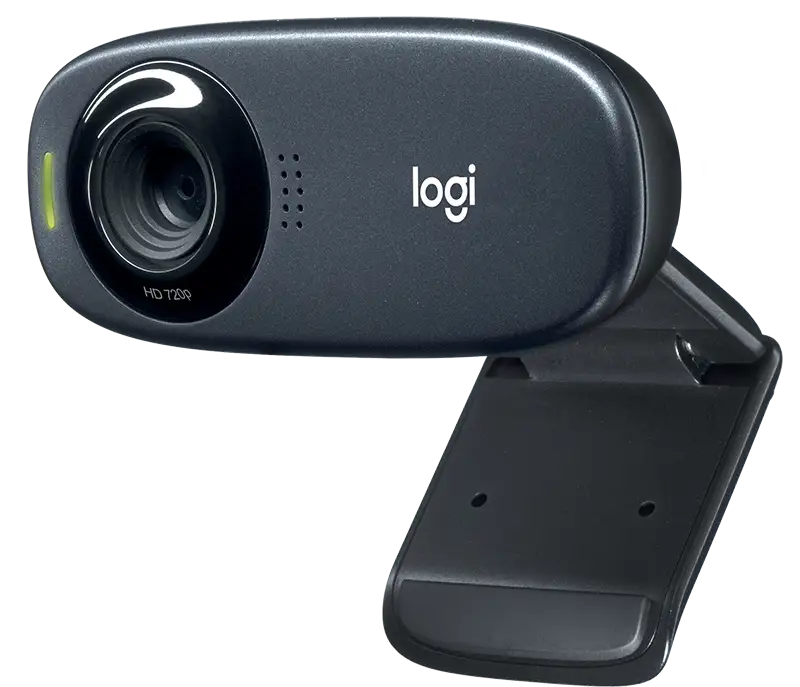
Logitech C270 HD Webcam Review: Budget Buy or Skip?
At under $30, the Logitech C270 HD Webcam has built a reputation as a no-frills, dependable choice for budget-conscious shoppers—scoring a solid 8.2/10 from aggregated community sentiment. Praised for its ease of use and surprisingly clear 720p video, it’s not going to replace a pro-streaming setup, but for casual calls, online classes, and basic conferencing, it consistently meets (and often exceeds) expectations.
Quick Verdict: Conditional Buy — worth it for budget users, basic remote work, school, and casual calls; inadequate for professional-grade broadcasting.
| Pros | Cons |
|---|---|
| Affordable and widely available | Limited to 720p resolution |
| Easy plug-and-play setup | Weak performance in low-light |
| Noise-reducing mono mic | Fixed focus, no zoom/pan/tilt |
| Compact, lightweight design | Colors appear muted |
| Auto light correction works well | Narrow 55° field of view |
Claims vs Reality
Logitech markets the C270 as delivering “sharp, smooth conference calls” at 720p/30fps, with “lifelike, natural colors” and a “noise-reducing mic.” On paper, that’s a tidy package for casual use.
However, digging into user reports shows some nuance. Many Best Buy reviewers echoed the crispness claim, with one saying, “coming from a laptop webcam you will be insanely impressed.” Yet multiple Trustpilot entries noted muted colors and image softness compared to modern 1080p models. A verified buyer on Yandex Market mentioned, “Even vibrant colors are rather washed-out… good enough for conferences but far from cinematic.”
The noise-reducing mic earns consistent applause, even from Linux users. One Best Buy customer reported, “The mic was decent… not super quiet like some other webcam mics,” while a Yandex Market user went further: “Always all my colleagues… are surprised at the quality of my voice.” But background noise suppression is only partial—Crowded environments still leak through, as noted on PCMENA: “Background noise was noticeable and sometimes disruptive in noisy environments.”
Cross-Platform Consensus
Universally Praised
Across Reddit, Best Buy, and Yandex Market, the ease of setup is a standout. The “plug-and-play” promise holds true—no complicated drivers required for Windows, macOS, and even Debian-based Linux distributions. A Best Buy reviewer summed it up: “Works flawlessly… truly a plug and play item.”
Video clarity at 720p/30fps is “good enough” for casual users. Reddit user u/[name withheld] said: “720p is good enough for people to recognize it’s me… but they don’t see my pimples.” This modest resolution is enough to make online classes and family calls feel more personal than built-in laptop cams.
The build quality also earns nods. Users noted the sturdy clip, compact size, and durable plastic body—Yandex Market entries describe it as “reliable, like a Kalashnikov” and “stood up to falls without damage.”
Common Complaints
Low-light performance is the C270’s weakest area. Despite Logitech’s “RightLight 2” feature, reviewers in multiple languages mention graininess and soft focus. PCMENA noted, “In low-light… the image quality noticeably degrades.” A Russian reviewer observed faint line noise in dim conditions, even after manual tweaking.
The color profile is a recurring frustration—muted, desaturated shades versus real-life vibrancy. Tom’s Guide confirmed this visually, noting that “even vibrant colors are rather washed-out.”
Field of view, officially 55°, feels restrictive for group calls. Best Buy reviewers mentioned, “F.O.V. is smaller than expected,” while early models reportedly featured 60°, now reduced—limiting peripheral visibility.
Divisive Features
Auto light correction splits opinion. Some users love that it eliminates heavy shadows—Yandex Market says, “Shows well even in weak lighting.” Others feel it introduces blandness, flattening contrast in already bright rooms.
The mono mic is competent but basic. Best Buy and Reddit users happy with its clarity also acknowledged it won’t rival dual-mic setups. Some prefer pairing the C270 with a dedicated USB mic to avoid environmental spill.
Trust & Reliability
Trustpilot and Yandex Market feedback highlight longevity as a surprise perk—users reporting “9 years of occasional use” before cable wear took it out of action. Even refurbished units on eBay earned praise for looking and functioning “like new.”
Scam concerns are minimal, as the model is widespread and often priced competitively. A handful of Reddit comments caution against overpaying from third-party sellers during shortages, recommending chain retailers like Best Buy for fair pricing.
Alternatives
Several Reddit users mention stepping up to the Logitech C920 or StreamCam for professional streaming, citing 1080p resolution, autofocus, and better mics. One contrasted, “My C920x was the go-to for Twitch streamers for years… replaced now by StreamCam.” The C615 offers similar portability to the C270 but with slightly higher quality—at more than double the price.
For buyers needing a step up in optical clarity for under $100, the C920 remains the most commonly cited upgrade.
Price & Value
As of recent eBay pricing, the C270 hovers between $15–$30 USD depending on condition, with brand-new units from official channels around $25–$29. This places resale value modestly, but demand remains steady, especially for remote work setups during shortages.
Community buying tips stress patience—Best Buy sales or holiday promotions can drop it near $20, maximizing value. Refurbished “Amazon Renewed” versions often satisfy basic needs without quality drawbacks.
FAQ
Q: Does the Logitech C270 work well in low light?
A: It functions acceptably but tends to produce grainy and muted images. Users often pair it with a desk lamp for sharper video.
Q: Can I use this webcam for professional streaming?
A: Technically yes, but most streamers prefer 1080p models like the C920 or StreamCam for richer detail and better color.
Q: How does the mic quality compare to a headset mic?
A: Many find it comparable to entry-level headset mics, with decent clarity and partial noise reduction—best for casual calls.
Q: Is it Linux compatible?
A: Yes, Debian-based users report plug-and-play success without special drivers.
Q: Can the field of view be adjusted?
A: No, the C270’s 55° FOV is fixed, with only limited tilt adjustment via the mounting clip.
Final Verdict
Buy if you’re a student, casual Zoom caller, or remote worker wanting a clear upgrade over built-in laptop cams. Avoid if you’re producing client-facing video or streaming professionally—jump to a 1080p model instead. Pro tip from Reddit: “Get it at Best Buy when it’s on sale—Amazon and others overcharge or run out often.”