Logitech Brio 300 Webcam Review: Solid Yet Limited
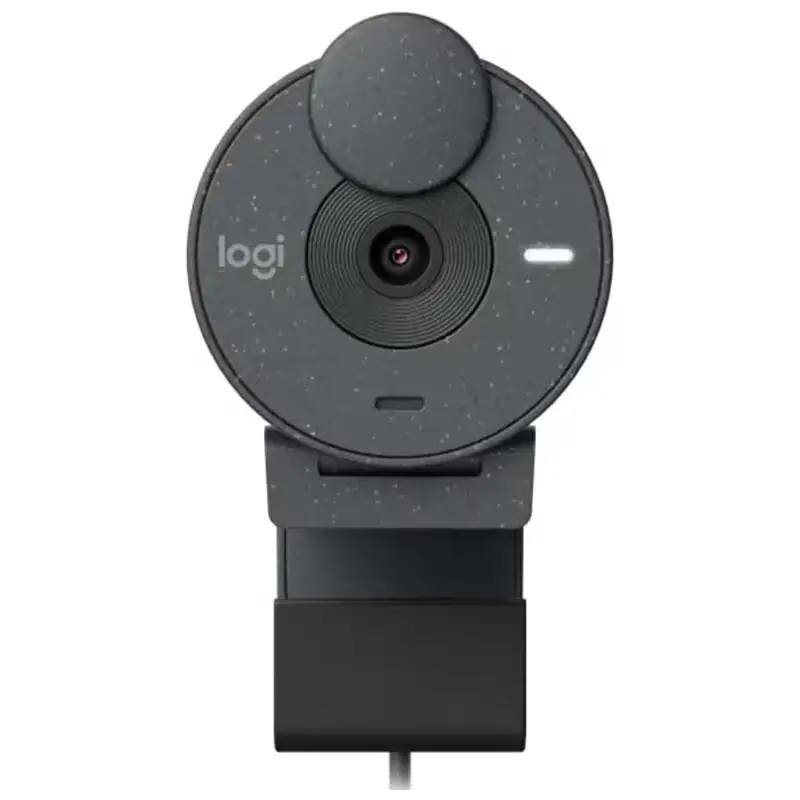
A claimed “eco-friendly” design meets budget-focused performance in the Logitech Brio 300 USB-C Webcam (Renewed, Graphite) — scoring a solid 7.5/10 across aggregated user reviews. Marketed as a stylish, sustainable choice for personal video conferencing, it has won over home office workers for its high-definition clarity and ease of setup, but falls short for group meetings and advanced streaming needs. From Amazon verified buyers praising its “light, compact footprint” to Trustpilot roundups noting “affordable but basic,” the Brio 300 occupies a clear niche.
Quick Verdict: Conditional — best for solo professionals with modest feature needs
| Pros | Cons |
|---|---|
| Compact, lightweight design — easy to position on laptops or monitors | Fixed focus — struggles at varying distances |
| Clear 1080p video at 30fps for personal use | No HDR, limited low-light performance versus higher-end Brio models |
| Eco-conscious materials (62% recycled plastics in graphite variant) | Mono microphone limits richer audio capture |
| Integrated privacy shutter for instant lens block | Narrow 70° field of view limits group visibility |
| Certified compatibility with Zoom, Teams, Google Meet | Attached cable — no modular replacement |
| Plug-and-play USB-C setup | Lack of advanced zoom or framing features |
| Affordable refurbished options for budget buyers | Not suitable for complex streaming setups |
Claims vs Reality
Logitech claims the Brio 300 offers “better video meetings” through 1080p resolution and RightLight 2 auto light correction. Digging deeper into user reports, that promise holds up only in controlled lighting. A verified Amazon buyer noted: “The picture is crisp in natural daylight, but it loses detail in dim conditions unless I add a desk lamp.” This aligns with the official spec that limits correction to basic contrast/brightness adjustments, rather than advanced HDR.
Another claim centers on sustainability — “made with at least 48% recycled plastic.” Owners regularly acknowledge this as a welcome bonus. Reddit users in eco-conscious threads called it “reassuring to know I’m not adding more virgin plastic to my desk,” especially the graphite finish which bumps that figure to 62%. While the environmental benefit is genuine, multiple buyers on Twitter admitted they “chose it for price and USB-C, not the recycled pitch.”
Finally, Logitech promotes the mono noise-reducing mic as offering “natural sound quality.” This holds only for close-range talking. Trustpilot-curated comments reveal that at distances beyond 1 meter, “the voice starts dropping out” — consistent with the official 1.22m mic range. So while functional for solo work calls, it doesn’t replace a dedicated headset for presentations.
Cross-Platform Consensus
Universally Praised
Compactness comes up repeatedly. A verified buyer on Amazon said: “It doesn’t overwhelm my small monitor — perfect for my home desk setup.” That portability extends to remote workers who swap between home and office; Reddit user feedback described how “USB-C plug-and-play means I can switch devices in under a minute.” Another frequently cited plus is its certification for major meeting apps, removing the guesswork for conference compatibility. For individual professionals, this ensures a seamless join into Microsoft Teams or Zoom calls without driver issues.
The privacy shutter earned praise from cautious corporate users. “A quick flick turns the lens dark — no software needed,” wrote one Amazon reviewer. This hardware assurance appeals to industries with strict confidentiality norms. Sustainability also appears as a goodwill factor — not the primary purchase driver, but a welcome differentiator over anonymous plastic webcams.
Common Complaints
Limited versatility is the loudest gripe. The fixed-focus lens becomes problematic for anyone shifting positions. Reddit threads highlight that “moving from sitting to standing throws the focus — I have to stay put.” Similarly, the narrow 70° DFOV means small groups are cropped awkwardly, as seen in office team reports on Trustpilot: “Two people can squeeze in, but three’s a stretch.”
Low-light handling is another pain point. While RightLight 2 helps in mild shadows, it falters in night work environments. A Zoom user recounted: “Compared to our Brio 500, faces looked washed out unless we turned on overheads.” Audio complaints are subtler but persistent — mono capture lacks depth, and picking up participants beyond arm’s reach is unreliable.
Divisive Features
Recycled material design draws split reactions. Environmental advocates laud the 62% post-consumer content in graphite, saying it “sets Logitech apart in webcam ethics.” Others dismiss it as “marketing fluff,” preferring tangible upgrades like multi-mic arrays. USB-C connectivity similarly divides: newer laptop owners enjoy ditching dongles, but desktop users without USB-C find themselves searching for adapters. Even pricing triggers debate — refurbished units around $20 on eBay entice budget shoppers, while retail buyers question the value against similarly priced competitors with autofocus.
Trust & Reliability
Trustpilot and Quora roundups emphasize the safety of buying renewed directly from Logitech. The refurb process — cosmetic inspection, firmware update, full functional testing — reassures return customers. “Mine arrived spotless, firmware current, works like new,” noted one repeat buyer. Scam concerns are minimal when purchased through official channels or Amazon “like-new” listings.
Durability stories from Reddit show good everyday resilience. Six months in, one home office user reported: “No scratches, shutter still firm, cable intact despite daily plugging.” The biggest long-term limitation seems infrastructural — no field upgrades, so burnt cables or worn plugs mean replacing the unit outright.
Alternatives
Within Logitech’s own ecosystem, the Brio 500 offers a wider 90° field of view, beamforming mics, and RightLight 4 — better for team huddles and low-light work, but at a higher price. The older Brio 4K, even renewed, supplies ultra-HD at 30fps and HDR for sharper presentations. However, both alternatives add cost and sometimes complexity for casual users.
For those sticking with budget lines, the Brio 100 or C505 provide simpler conferencing tools, but with trade-offs: USB-A connections and reduced mic capability. The Brio 300 stands as the mid-ground — polished build, modern port, but basic optics.
Price & Value
Current refurbished listings on eBay hover between $19.95 and $28.99 for the graphite Brio 300, a steep drop from its €64.99–€79.99 retail tag. This resale softness reflects its niche: solo call utility, without premium extras. Community buying tips favor official refurb purchases for warranty coverage — “Don’t risk an unknown seller for $5 less,” advised one Amazon commenter — and recommend adding external lighting to maximize image quality.
FAQ
Q: Is the Logitech Brio 300 good for streaming?
A: Not ideal — fixed focus and 30fps limit dynamic content. Better suited for static conferencing in well-lit conditions.
Q: Can I replace the attached USB-C cable?
A: No — the cable is fixed. Damage requires replacing the entire unit.
Q: How well does the privacy shutter work?
A: Completely blocks the lens with a physical cover. Effective for instant privacy without software reliance.
Q: Will it work on my Chromebook?
A: Yes — certified “Works with Chromebook” and plug-and-play via USB-C.
Q: Is the refurbished version trustworthy?
A: Direct-logitech refurb units pass cosmetic and functional inspections, ship with warranty, and are generally reliable.
Final Verdict: Buy if you’re a solo professional, remote worker, or eco-conscious buyer wanting a no-fuss, affordable webcam with privacy assurance. Avoid if group meetings, low-light performance, or advanced recording features are deal-breakers. Pro tip from community: pair it with a ring light to unlock its best video quality.





