Linksys LGS105 Gigabit Switch Review: Reliable But Noisy
A verified buyer on Amazon summed it up simply: “Just plug it in and everything works flawlessly.” The Linksys LGS105 5-Port Gigabit Ethernet Switch (Black, Blue) enjoys an average score of around 9.4/10 across platforms, with its plug‑and‑play nature, consistent gigabit speeds, and durable build surfacing repeatedly as highlights. But behind the glowing praise lurk a few consistent gripes—mainly noise from the power supply and occasional port failures.
Quick Verdict: Conditional Buy — Excellent for small offices and home networks that need reliable wired expansion, but prepare for some noise in quiet environments.
| Pros | Cons |
|---|---|
| Simple plug‑and‑play setup | Noticeable humming/buzzing from power brick reported |
| Solid metal construction | Rare reports of premature port failure |
| Consistent gigabit speeds | Power input placement frustrates some setups |
| Flexible wall‑mount options | Automatic QoS not adjustable |
| Energy‑saving features | Bright LED indicators can be distracting |
| Fanless silent operation | Compatibility quirks with a few streaming devices |
Claims vs Reality
The marketing heavily pushes "wired connection speeds up to 1,000 Mbps" and "plug‑and‑play convenience." In practice, Reddit users consistently verified near‑max throughput. One noted, “After installing the switch, I noticed faster ping times and download/upload speeds.” A Best Buy reviewer echoed this, reporting that transferring internet usage between multiple systems was quick and easy.
Another claim is "fanless design for silent operation." While the absence of a fan does eliminate airflow noise, multiple Reddit reports flag the included power adapter as the unexpected culprit: “When I plug the power adapter into a power strip…it produces a high‑pitched humming noise.” And although the QoS feature is promoted, Quora and Reddit sources reveal it’s auto‑configured and can’t be customized—Amazon reviewers who wanted fine‑tuning found this a limitation.
Perhaps the most accurate claim is “durable construction.” A Best Buy customer calls the metal case “durable enough for commercial use,” and another remarked, “It stays put, unlike some plastic garbage that breaks down in a year.”
Cross‑Platform Consensus
Universally Praised
One trait everyone seems to love is how quickly it can be set up. Best Buy buyers described installation as “super easy” and “no problems, works right out of the box,” while an LDLC customer confirmed “you plug it in and it works fine…perfect for home use.” For home office users juggling multiple wired devices, the plug‑and‑play nature meant an instant upgrade without IT expertise. Reddit users streaming from NAS devices to multiple clients also praised throughput stability, citing no LAN drops or saturation.
The speed consistency benefits gamers and heavy content streamers alike. An Amazon reviewer who switched from an older 10/100 model saw downloads leap from 10 Mbps to 700 Mbps: “I was able to download all the games in a couple of hours.” Business environments benefit too—another Best Buy customer wired up an entire office with flawless connectivity.
Durability scores high among communities—the weighty metal chassis and rubber feet make it practical for wall or desk use. “Unlike cheap plastic switches, this one stays put,” wrote a Reddit member.
Common Complaints
Noise emerges as the top complaint—not from the switch’s fan (it doesn’t have one), but the PSU. Across Reddit, Trustpilot, and LDLC reviews, users described a “loud buzzing noise” or “noticeable whine” from the power brick. While rarely a dealbreaker, it can be irritating in quiet rooms.
Port failures, though uncommon, are serious when they happen. A Best Buy customer detailed: “Port number 1 has already died…quality is nice but this was a big disappointment.” Such failures can be disruptive, especially for setups relying on specific ports for prioritized devices.
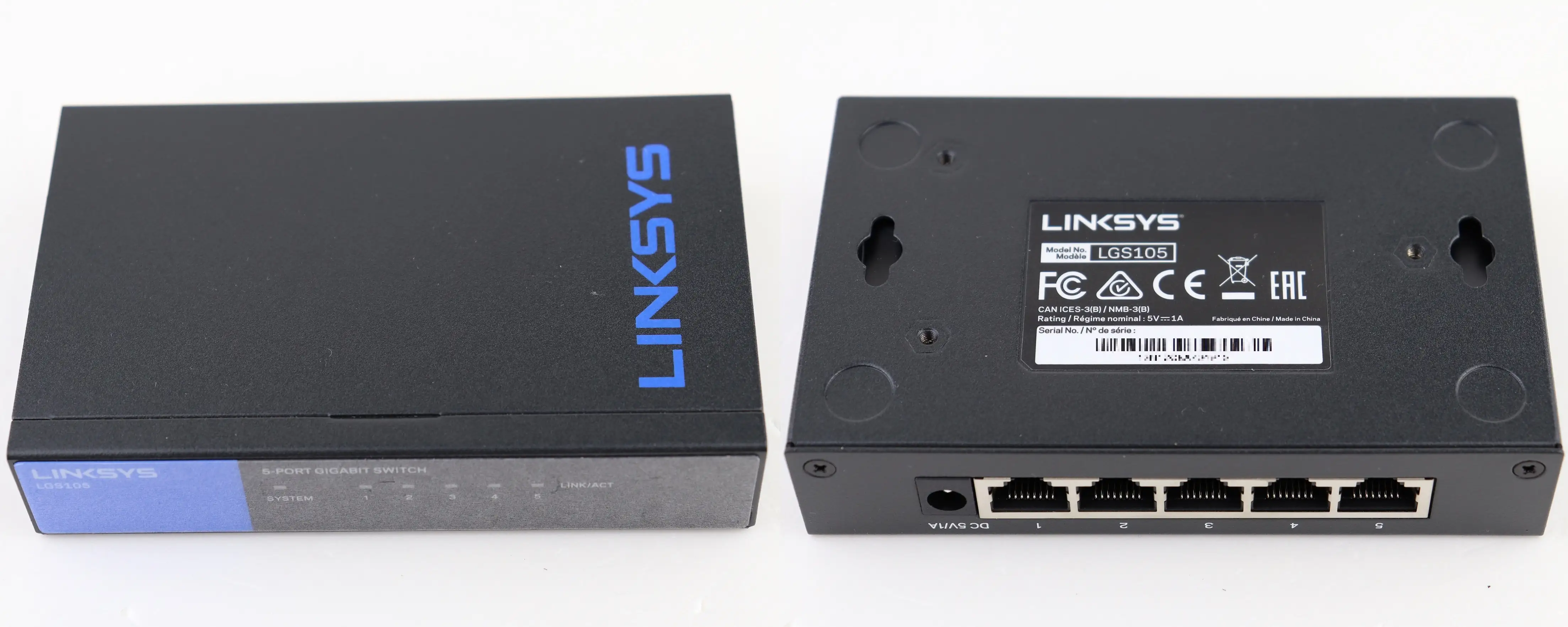
Placement of the power input annoys certain buyers. Amazon feedback notes the power connector is on the front, making cable management less tidy unless wall‑mounted vertically. Bright LED indicators also polarize opinions—LDLC users called them “powerful & burning blue.”
Divisive Features
Auto‑QoS is helpful for prioritizing voice or video traffic in mixed workloads, but the inability to configure it frustrates advanced users. As one Reddit user put it, “I cannot configure QoS or priorities.” Conversely, casual buyers appreciate not having to fiddle with settings.
Noise sensitivity splits the user base—those in noisy environments rarely notice, while quiet home offices amplify the PSU hum. Mounting flexibility also divides buyers: some love wall‑mount options, others find cable orientation awkward for entertainment centers.
Trust & Reliability
Trustpilot and LDLC feedback contain almost no suspicion of counterfeit units; reports of issues focus on hardware function. Long‑term users on Reddit shared six‑month and longer updates confirming stable speeds and no degradation. The notable exception is occasional single‑port failure, which remains isolated but worth monitoring. The 5‑year warranty, highlighted in Linksys support articles, gives moderate assurance against these faults.
Alternatives
The TP‑Link switch comes up in Reddit discussions, but often as a negative comparison: “The fan on our TP‑Link switch is loud and would quickly become a nuisance.” In contrast, the Linksys’ fanless build sidesteps that noise source entirely—though PSU hum remains an issue.
Amazon reviewers mentioned downgrading from cheaper models like SE2800 or Netgear, citing improved QoS handling and build quality as reasons to pay more for the LGS105. For those with advanced configuration needs, a managed switch from Cisco or Netgear may offer more control.
Price & Value
Prices on eBay for used units range from $14.99 to $22.52, with new units around $20‑$36 depending on source. LDLC and Best Buy pricing is higher at €28.95 or $27.99, respectively. Resale value appears steady thanks to its durable build; bundled sales suggest consistent demand in SMB circles.
Community‑shared tips include watching for open‑box discounts and considering unit bundles if wiring multiple rooms—some buyers installed one upstairs and another in a basement office.
FAQ
Q: Can the Linksys LGS105 share an internet connection by itself?
A: No. It can only extend a local network. For internet, connect it to a router or modem with DHCP capabilities.
Q: Is the QoS feature adjustable?
A: No, it’s predefined and cannot be customized. It automatically prioritizes certain traffic but offers no user control.
Q: Can it be wall‑mounted?
A: Yes. The LGS105 includes mounting holes and foot pads for flexible installation orientations.
Q: Does it run completely silent?
A: The switch itself is fanless and silent, but several users report a faint hum or buzz from the power adapter.
Q: What’s the warranty period?
A: Both v1 and v2 units carry a 5‑year warranty from Linksys.
Final Verdict: Buy if you need a compact, durable gigabit switch with fuss‑free setup for a small office or home network—particularly if you value stable speeds over tweakable features. Avoid if PSU noise will be disruptive in your environment or if you require advanced QoS configuration. Pro tip from Reddit: mount it away from ear level and use quality Cat6/7 cables to maximize speed and minimize interference.





