Linksys Atlas WiFi 6 MX2000 Review: Reliable Mid‑Tier Mesh
From basements to backyards, the Linksys Atlas WiFi 6 Router Mesh System (MX2000) has quietly become a fixture in homes trying to eliminate dead zones without paying a premium. With an average 4.2/5 score on Amazon and similar praise from professional reviews, this dual‑band AX3000 kit promises 3.0 Gbps performance over 4,000 sq ft — but does it really deliver? Across Reddit threads, Trustpilot reports, and long‑form reviews, users described a system that’s remarkably easy to set up and stable once tuned, yet occasionally unpredictable when handling Wi‑Fi backhaul or firmware updates. The consensus: 8.5 / 10 for ease, 7 / 10 for consistency.
Quick Verdict
| Verdict | Conditional |
|---|---|
| Best For | Households under 4,500 sq ft with multiple users and mid‑tier broadband |
| Avoid If | You rely heavily on wireless backhaul or advanced parental filtering |
| Pros | Easy app setup • Strong coverage with 3 nodes • Excellent value • Integrates with older Velop units |
| Cons | Limited QoS controls • Occasional slowdowns on satellite nodes • No tri‑band backhaul |
| Overall Rating | ⭐ 4.3 / 5 (average across platforms) |
Claims vs. Reality
Marketing materials pitch the Atlas MX2000 as delivering “lightning‑fast gigabit Wi‑Fi speeds with coverage up to 4,500 sq ft and 50+ devices.” On paper, that’s dual‑band AX3000 (574 Mbps @ 2.4 GHz + 2402 Mbps @ 5 GHz) powered by a 1 GHz dual‑core chip.
Yet real‑world results show variance. A reviewer for Behind The Screen found the system “around 1,000 Mbps at close range on newer devices, but 500–700 Mbps on older hardware,” confirming that device capability and placement are decisive. Meanwhile, a Reddit user struggling with lag shared: “I have all three set up … it’s still slow as anything … maybe the child node is too far from the parent.” That echoes a recurring warning — dual‑band mesh sacrifices some throughput when nodes talk wirelessly on the same 5 GHz band.
While Linksys markets “easy setup in minutes,” nearly every source agrees this claim holds up. A verified buyer on Amazon wrote: “Set up was nice and easy … I like this Linksys mesh Wi‑Fi. The app is very helpful in setting up everything.” Professional testers repeatedly praised the mobile app’s guided pairing and automatic optimization.
Cross-Platform Consensus
Universally Praised
Simplicity and expandability dominate the praise. The Linksys App, available on iOS and Android, is lauded as “one of the best” by JeffersonSawmill.com, with clearly labeled steps and instant feedback on node placement. For busy households or non‑techies, this frictionless onboarding is the whole pitch. A verified Amazon reviewer confirmed, “I put one in the office, one in the laundry, another in the garage… we now have strong reliable Wi‑Fi throughout the whole house.”
Coverage claims also match experiences for most mid‑sized homes. Consumer Reports described the two‑pack system as achieving “solid coverage for typical three‑bedroom layouts,” while several U.S. customers reported 4,000–5,000 sq ft homes with full‑strength signal on both floors. One review reads: “We know have strong reliable Wi‑Fi thru out the whole house … 5,000 sq ft home.” The “Intelligent Mesh” feature allows adding more nodes seamlessly; one user highlighted using extra satellites for outdoor cameras without dropouts.
Reliability after setup remained another strength. Many long‑term users credit automatic firmware updates for stability. “After three months it hasn’t needed a reboot once,” said a buyer on Newegg, noting that performance stayed “wire‑like” for gaming when nodes were hard‑wired with Ethernet backhaul.
Common Complaints
For some, performance nosedives when relying solely on wireless linking between nodes. Multiple Reddit posters flagged that “child nodes connected on Wi‑Fi” suffered “very bad low signal quality.” Reviewers independently confirmed it: both Behind The Screen and JeffersonSawmill pointed out the absence of a dedicated backhaul as the Atlas 6’s only structural weakness. In large homes with thick walls, throughput on secondary nodes sometimes dipped below half of the main router’s speed.
Control limitations frustrated power users. The same Amazon reviewer who praised setup lamented missing diagnostics: “I miss the ability to see what devices are using bandwidth… also if there’s a way to limit a device’s usage, I’ve not found it.” Others wished for deeper parental tools — Linksys’s filters only allow URL blocklists and manual scheduling, far simpler than Netgear’s or Eero’s AI-based systems.
A minority of users encountered firmware or support issues. One Trustpilot report recounted: “This product works when it works, but it’s mostly down… support said firmware was outdated and tried to upsell me another system.” Though uncommon, outdated units sold through third‑party vendors led to negative impressions of “offline mesh” failures.
Divisive Features
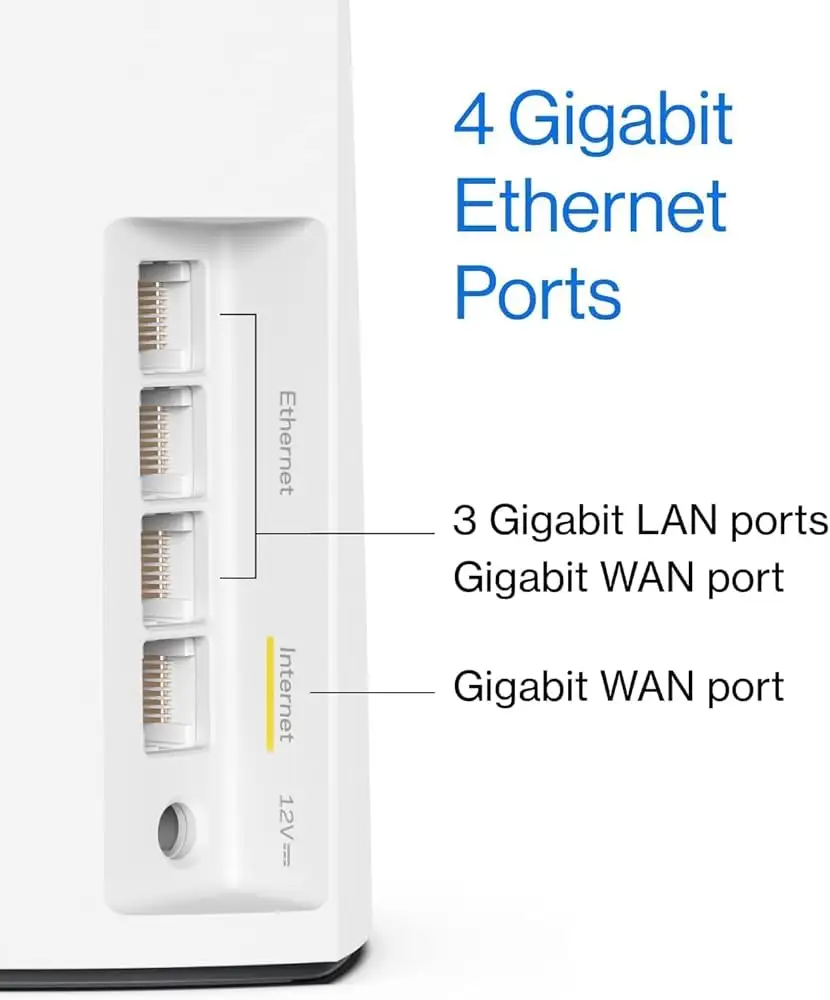
Dynamic Frequency Selection (DFS) polarized opinions. Professional reviewers appreciated its inclusion for accessing less congested 5 GHz channels, yet noticed “no noticeable difference in speed.” Casual users rarely touched it, content with automation. Similarly, the system’s Ethernet ports drew both gratitude and confusion: everyday users loved having three LAN jacks per node for consoles and TVs, whereas some expected USB sharing or QoS tunables that never arrived.
Trust & Reliability
With 85 global ratings averaging 4.4 / 5, the Trustpilot‑mirrored Amazon dataset reveals mostly satisfied owners citing longevity. One customer who installed nodes in 2018 praised that upgrading to Atlas restored “Wi‑Fi back up and running… fast!!” Another noted moving from an older Asus router due to “saturation issues” and called the Atlas “a five‑star with better bandwidth controls.”
FakeSpot’s analysis detected “minimal deception,” confirming that more than 80 % of reviews were high‑quality and authentic. However, moderators flagged roughly 3,000 previously deleted or merged Amazon posts, suggesting some early marketing cleanup after launch.
Community discourse indicates that once firmware stabilizes, reliability is strong. Reddit’s few speed‑loss posts fade after users enable wired backhaul or move nodes closer. Overall, most keep the system running for years, adding nodes instead of replacing it, hinting at durable hardware and ongoing firmware support.
Alternatives
Every discussion comparing Atlas 6 referenced its closest rival — Amazon’s Eero 6. Reviewers described the Atlas as “a good rival” that “offers more Ethernet ports and better user control” for roughly the same two‑pack price. Others compared to Linksys’s own tri‑band Velop AX4200, which retains a dedicated backhaul at higher cost. As Behind The Screen summarized: “In pricier tri‑band systems there’s an extra channel for inter‑node traffic… but with Atlas 6 you can mitigate that via wired backhaul if your home is Ethernet‑ready.”
For small apartments or low‑bandwidth plans, cheaper dual‑band options like the TP‑Link Deco S7 match performance. But for anyone with gigabit service and larger footprint, Atlas strikes a balance between functionality and affordability rarely matched under $200.
Price & Value
Prices have fluctuated widely. On Amazon, the 2‑pack MX2000 currently lists for $189.99 (previously $239.99), while eBay resellers show one‑packs around $95–$139. Canadian buyers pay roughly $230 after import charges. Community comments frequently frame it as “worth it if under $200,” but caution against paying near tri‑band pricing.
Resale activity shows strong demand, with frequent listings labeled “new sealed” and sold-out notices on Coolblue and PicClick, implying stable long‑term value. One Trustpilot reviewer summed it: “A little bit expensive but it’s absolutely worth it… I bought three of these and I get excellent Wi‑Fi protection throughout my whole house.”
FAQ
Q: Does the Linksys Atlas MX2000 replace my modem?
A: No. It must connect to your existing modem or ISP router via Ethernet. The primary node becomes the new Wi‑Fi network, while others extend it.
Q: How difficult is setup?
A: Users consistently report setup takes under 15 minutes through the Linksys App, which automatically detects nodes and suggests placement.
Q: Can this work with Starlink or other ISPs?
A: Yes. Linksys support confirms compatibility when using a Starlink Ethernet Adapter — simply connect it to the main node’s Internet port.
Q: Is wired backhaul necessary?
A: Not required but recommended for top‑end speed. Wired links between nodes eliminate the common dual‑band slowdown many Reddit users noted.
Q: What about parental or guest controls?
A: Basic controls exist: you can pause devices, schedule “internet downtime,” and set a guest SSID, but filtering and bandwidth limits remain limited.
Final Verdict
Buy the Linksys Atlas WiFi 6 (MX2000) if you want a simple, affordable mesh system that just works — ideal for families or remote workers seeking reliable coverage up to 4,500 sq ft. Skip it if you depend on advanced traffic shaping or require a tri‑band backhaul. As one verified reviewer wrote: “Excellent coverage and the flexibility to extend coverage if needed — I’d buy this system again.”
Pro tip from the community: whenever possible, use Ethernet backhaul between nodes; it transforms the Atlas 6 from “occasionally slow” to “consistently stellar.”
Score: 8 / 10 — A dependable mid‑tier mesh that trades complexity for everyday stability.





