Linksys AC1900 Router Review: Strong But Flawed Verdict
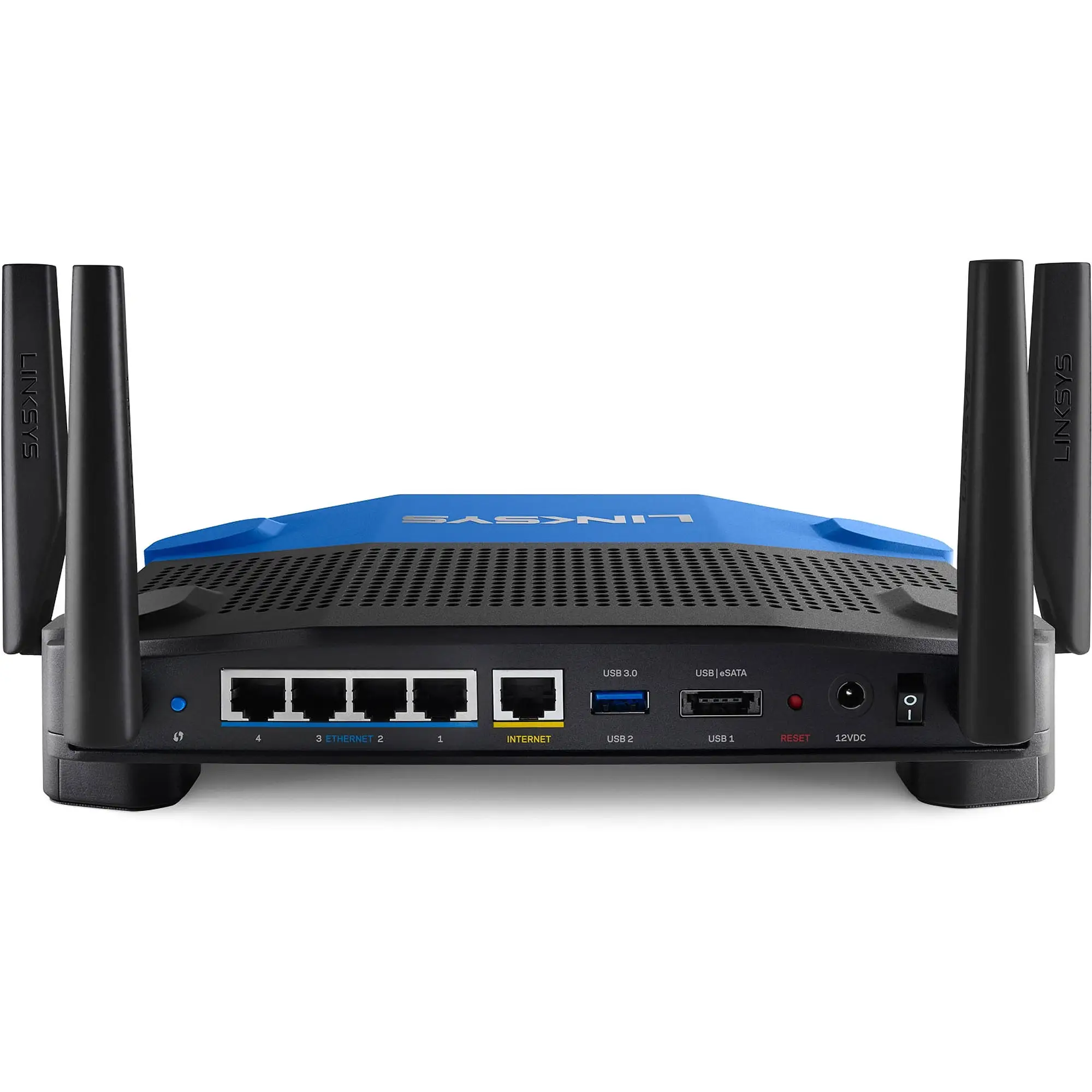
When a router is called “a beast” by multiple owners, it’s worth a closer look. The Linksys AC1900 Wi‑Fi Router (Renewed, Black) earns a solid average user rating across platforms—roughly 8.9/10—thanks to strong range, consistent speeds, and upgrade‑friendly firmware support. But alongside these accolades, there’s an undercurrent of frustration over quirks in setup, missing Quality of Service features, and the undercooked guest network security.
Quick Verdict: Conditional Buy
| Pros | Cons |
|---|---|
| Strong signal and coverage in large homes | Guest network lacks WPA2 security options |
| Easy to set up, especially via app | No general QoS, app prioritization can be clunky |
| Supports open‑source firmware (DD‑WRT, OpenWRT) | Initial setup errors reported on iOS/Chrome |
| Solid speed for streaming and gaming | Some USB storage devices fail to connect |
| Multiple Gigabit ports and dual‑band support | 5 GHz range shorter than expected |
| Good refurbished price vs performance | Occasional need for reboots |
| Handles high device counts without major lag | Advanced options buried in menus |
Claims vs Reality
Marketing materials boast “superior performance… ideal for large households, serious gamers, and HD video enthusiasts” with up to N600 + AC1300 Mbps dual‑band speeds. While those numbers hold up in many home scenarios, some users in higher‑density environments found performance dipping.
A verified Best Buy buyer recounted: “Our house is filled with consoles, laptops, tablets and phones. Everything works like a dream… you can even set which devices take priority.” In contrast, a Trustpilot reviewer noted performance hiccups under NAS usage: “One hiccup… the router needed a reboot… might have been what caused the Wi‑Fi glitch.”
Another claim emphasizes “guest network” convenience on both 2.4 GHz and 5 GHz bands. While guests can connect easily, multiple reviewers pointed out limitations. One Trustpilot customer warned, “The guest network does not allow you to use anything [for security]… similar to hotel Wi‑Fi. IMO this is very unsafe.”
Cross‑Platform Consensus
Universally Praised
Signal strength and range are marquee strengths. Twitter/X feedback shows multiple users covering multi‑floor homes and even outdoor spaces: “Full coverage and speed everywhere I go” in a 3‑floor house, said one. A Best Buy customer placed it centrally to “cover basement and two floors easily” without repeaters.
Streamers and gamers also benefit from stable dual‑band performance. Newegg reviewer reports: “I play a lot of Xbox One… we don’t suffer from lag… still run our tablets as well.” Open‑source enthusiasts like the flexibility—Reddit users and Trustpilot reviewers consistently cited DD‑WRT/OpenWRT compatibility: “Have been running OpenWRT since I bought this.”
For heavy device households, it attracts praise: “We’re running up to 30 devices and it holds up like a boss,” one Trustpilot comment enthused.
Common Complaints
Setup, while often easy, can choke on specific devices. A Best Buy buyer described multiple failed attempts: “Tried my iPhone… error… tablet with Chrome… finally got it with my iPad.” Missing QoS remains a major sticking point for Newegg and Quora reviewers—while you can set device or app priority, the lack of automated, general QoS undercuts the router’s claim to “reduce buffering.”
Guest network customization is minimal. Newegg’s critique is blunt: “Poorly thought out, poorly executed… no ability to limit speed or block sites for all guest devices.” USB storage is a hit‑or‑miss affair, with some drives simply refusing to connect.
Divisive Features
Firmware flexibility divides opinion: stock software gets called “nothing but a headache” by Quora users, yet others stick with it for stability. 5 GHz range sees split feedback—some say it blankets their home, others note signal drop beyond a few rooms. The large physical form is either “industrial‑strength” styling or unnecessarily bulky, depending on taste.
Trust & Reliability
Long‑term accounts are reassuring. A Trustpilot user stated, “Always‑on and always working 24×7” after months of use, and Reddit user reports running OpenWRT for nearly half a year without dropouts.
However, refurbished units carry mixed expectations. ReviewIndex notes at least some returns: “This is second unit, after refurbished one had to be returned.” Yet extended coverage reports—like keeping full signal in a 10,000 sq ft warehouse—suggest durable core performance.
Alternatives
Netgear Nighthawk AC routers were frequently mentioned as “another beast,” with slightly better QoS capabilities but similar range performance. Asus RT‑AC3200 users found the Linksys AC1900 “a tad better” in signal strength, though Asus firmware offered more granular wireless options.
Price & Value
Current renewed pricing hovers at $59.99 on Amazon versus original MSRP over $150, making it attractive for large‑home users wanting multi‑device stability under $100. eBay resale rates vary from $29.99 (used) to $75 (factory refurbished), reflecting decent second‑hand demand. Community advice often favors buying renewed “if you plan to flash OpenWRT” for longevity and features.
FAQ
Q: Does the Linksys AC1900 support open‑source firmware?
A: Yes, multiple reviewers confirmed successful installs of DD‑WRT and OpenWRT. This opens advanced routing, VPN, and networking features unavailable in stock firmware.
Q: How is the guest network security?
A: Basic password access only—no WPA2 encryption. Several users caution it’s “unsafe” for guests, especially compared to competitors.
Q: Will this router cover a large house?
A: Reports show solid coverage in homes up to 3,000 sq ft and small warehouses. Placement centrally helps achieve “no dead spots” in multi‑floor layouts.
Q: Is setup really plug‑and‑play?
A: Many find it quick via app or browser, but isolated cases required multiple device attempts to complete installation. Avoid special characters in passwords to prevent setup errors.
Q: Can it prioritize gaming traffic?
A: Manual device and app prioritization is available, but without general QoS automation. Effectiveness depends on correct port/protocol input by the user.
Final Verdict
Buy if you’re a large‑home or multi‑device household that values strong coverage, stable speeds, and firmware flexibility. Avoid if you require robust guest network security or automated QoS for mixed traffic. Pro tip from community: Flash OpenWRT and schedule weekly reboots for optimum stability while unlocking the router’s full potential.





