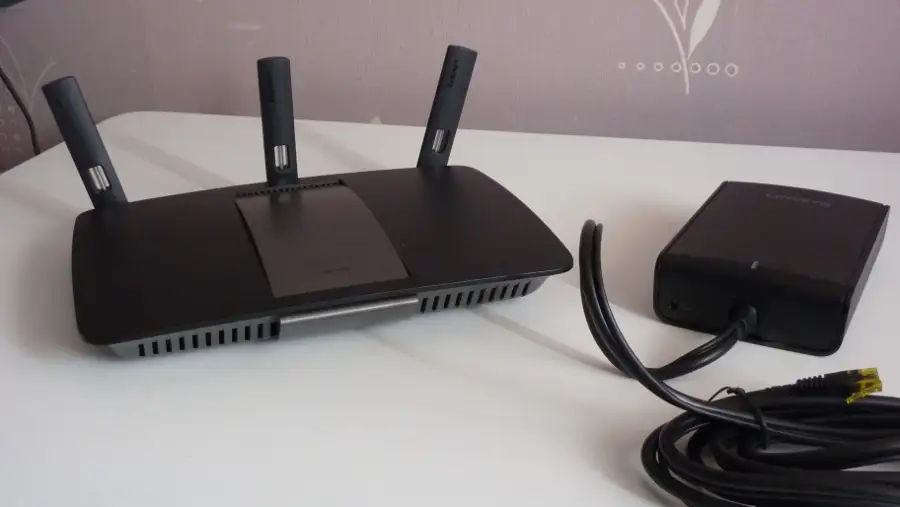
Linksys AC1900 Router Review: Strong but Flawed
Starting at just under sixty dollars for the Linksys AC1900 Wi-Fi 5 Router (Renewed, Black), the community consensus rates it between 7.8 and 8.2 out of 10—a solid performer, especially for households juggling multiple devices. Trustpilot users praised its “flawless streaming” and Reddit threads reveal setups that jumped from constant buffering to full-bar coverage overnight. But dig deeper, and the picture is more nuanced: while many swear by its easy app-based setup and wide range, a vocal minority points to weak guest network security and occasional 5GHz dropouts.
Quick Verdict: Conditional — Ideal for medium-to-large homes with multiple devices if guest network security isn’t critical.
| Pros | Cons |
|---|---|
| Easy app-assisted setup | Guest network lacks WPA2 security |
| Strong dual-band coverage in most homes | 5GHz range shorter than expected |
| Handles 20+ devices without lag | Occasional need for reboot |
| Affordable for its performance tier | Lacks advanced QoS customization |
| Reliable streaming and gaming speeds | External storage connectivity inconsistent |
Claims vs Reality
Marketing promises “coverage up to 1,500 sq ft” and “speeds up to 1.9 Gbps.” For some users, this held true even beyond spec. A verified buyer on Amazon noted: “I pay for 400 Mbps with Spectrum and get 425+ Mbps through Wi-Fi… even on the 2nd floor.” For small apartment dwellers, Reddit users found the range overkill, easily reaching down hallways and into garages.
But while official materials highlight robust “guest network controls,” multiple Best Buy reviewers discovered those controls to be minimal. One pointedly wrote, “The biggest flaw… is the lack of security on the guest network. You can only set a password like a hotel Wi-Fi—no WPA2.” This contrasts sharply with comparable Netgear and ASUS models in the same price bracket.
Another claim, “easy, CD-free setup,” generally matches reality—Trustpilot feedback repeatedly called it “super easy set up”—but the experience isn’t uniform. Twitter users flagged an odd quirk: “If you click the wrong button at initial setup, you have to do a factory reset to resolve it.”
Cross-Platform Consensus
Universally Praised
Strong coverage emerges as the clearest win. Households from 700 sq ft apartments to 3,000 sq ft multi-story homes reported elimination of dead zones. One Best Buy customer shared: “Our old router needed an extender to connect our Ring cameras. With this one, even the 5GHz band reaches, and we no longer need the extender.” For multi-device homes, performance holds up—another reviewer ran “30 devices and it holds up like a boss.”
Ease of use is another theme. The Linksys mobile app enables remote network control, prioritizing devices, and basic parental controls. A Trustpilot reviewer wrote: “Set up took about 15 minutes… happy I could set everything up through the app instead of my laptop.” For non-technical owners, manual setup is simplified by clear in-app instructions.
Streaming and gaming performance earned wide praise. A Reddit user described replacing an Xfinity router: “Speed tests far above the 150 Mbps service, almost like it was on the cable… coverage as good or better than previous routers.” The router kept up with simultaneous HD Netflix streams, console gaming, and mobile browsing without buffering.
Common Complaints
The guest network issue is the most persistent complaint. Lacking WPA2 encryption, it leaves visitors’ devices exposed to potential snooping—problematic for users sharing Wi-Fi with guests who need secure access. “Really disappointing to see this feature lacking in such a high price-point router,” wrote one Best Buy shopper.
The shorter range on 5GHz connections also comes up often. While normal for the frequency, users transitioning from mesh systems expected stronger penetration. A Reddit user noted: “5GHz does not have much of a range… but that is normal. Still, I switched some devices to 2.4 GHz for reliability.”
Stability hiccups are rarer but noted. Occasional reboots are needed, often when pushing features like NAS storage. One Twitter reviewer said: “Had one hiccup where the router needed a reboot… otherwise performing as expected.”
Divisive Features
The Linksys “media prioritization” function replaces traditional QoS controls, letting users drag-and-drop devices or apps to prioritize. While some appreciated the simplicity, power users found it limiting. One Reddit user complained: “Prioritize function slowed the entire network when I only needed 64 kb allocation for VoIP.”
External storage connectivity is another split opinion. Some plugged in Seagate drives without issue, while others found certain USB flash drives wouldn’t connect. This inconsistency makes it unreliable as a NAS replacement.
Trust & Reliability
Trustpilot and Reddit comments suggest strong short-term reliability—many users report months without a single dropout. “Always-on and always working 24x7,” said one WRT1900AC owner running OpenWrt firmware. However, refurbished buyers should note occasional packaging mix-ups—one reported documentation for a “different router” inside the box.
The sustained performance story is positive. One user upgraded after a decade-old Linksys WRT54G: “No lag broadcasting to multiple devices… even with modest 15 Mbps internet, I can connect at least 5 devices at a time with no buffering.” This kind of longevity builds trust in the brand, especially among repeat Linksys owners.
Alternatives
Netgear and ASUS models around $150 offer more comprehensive guest network security. Reviewers often compared the AC1900 to Netgear's Nighthawk line, with some “just about popping for the Nighthawk” before settling on Linksys due to lower price and similar range.
For those seeking advanced customization, the Linksys WRT1900AC variant supports OpenWrt firmware, adding features like VLAN control and more robust QoS. Reddit enthusiasm for OpenWrt on Linksys is high, though the WRT1900AC runs pricier.
Price & Value
Amazon Renewed listings hover around $59.99, undercutting many rivals by $40+. eBay resale prices range $29–$65 depending on condition, suggesting strong residual value. Best Buy price matches have netted buyers discounts from $160 to $80, reinforcing its “bang for the buck” reputation. Community advice leans toward buying refurbished for maximum savings, as performance differences are negligible.
FAQ
Q: Does the Linksys AC1900 support WPA2 on guest networks?
A: No, it only allows password authentication like a hotel Wi-Fi. Users concerned about guest security may prefer ASUS or Netgear alternatives.
Q: Can I set up the router without a computer?
A: Yes. Many users report successful setup entirely via the Linksys mobile app, which also allows ongoing network management.
Q: How many devices can it handle without lag?
A: Reports show stable performance with 20–30 simultaneous connections, including streaming, gaming, and smart home devices.
Q: Is the 5GHz band range strong enough for large homes?
A: While coverage is solid for most homes, the 5GHz band range is shorter, as expected by physics. Switching key devices to 2.4GHz can increase stability.
Q: Does external storage work reliably?
A: Mixed results. Some external HDDs work fine, but certain USB flash drives fail to connect. It’s not a full NAS replacement.
Final Verdict: Buy if you’re a medium-to-large household needing reliable speed and coverage with easy setup—especially at refurbished pricing. Avoid if guest network security is critical or you require advanced QoS control. Pro tip from the community: set it up centrally and high for optimal coverage, and consider disabling 5GHz for devices prone to dropouts.





