Linksys AC1900 Renewed Router Review: Strong Range, Mixed Security
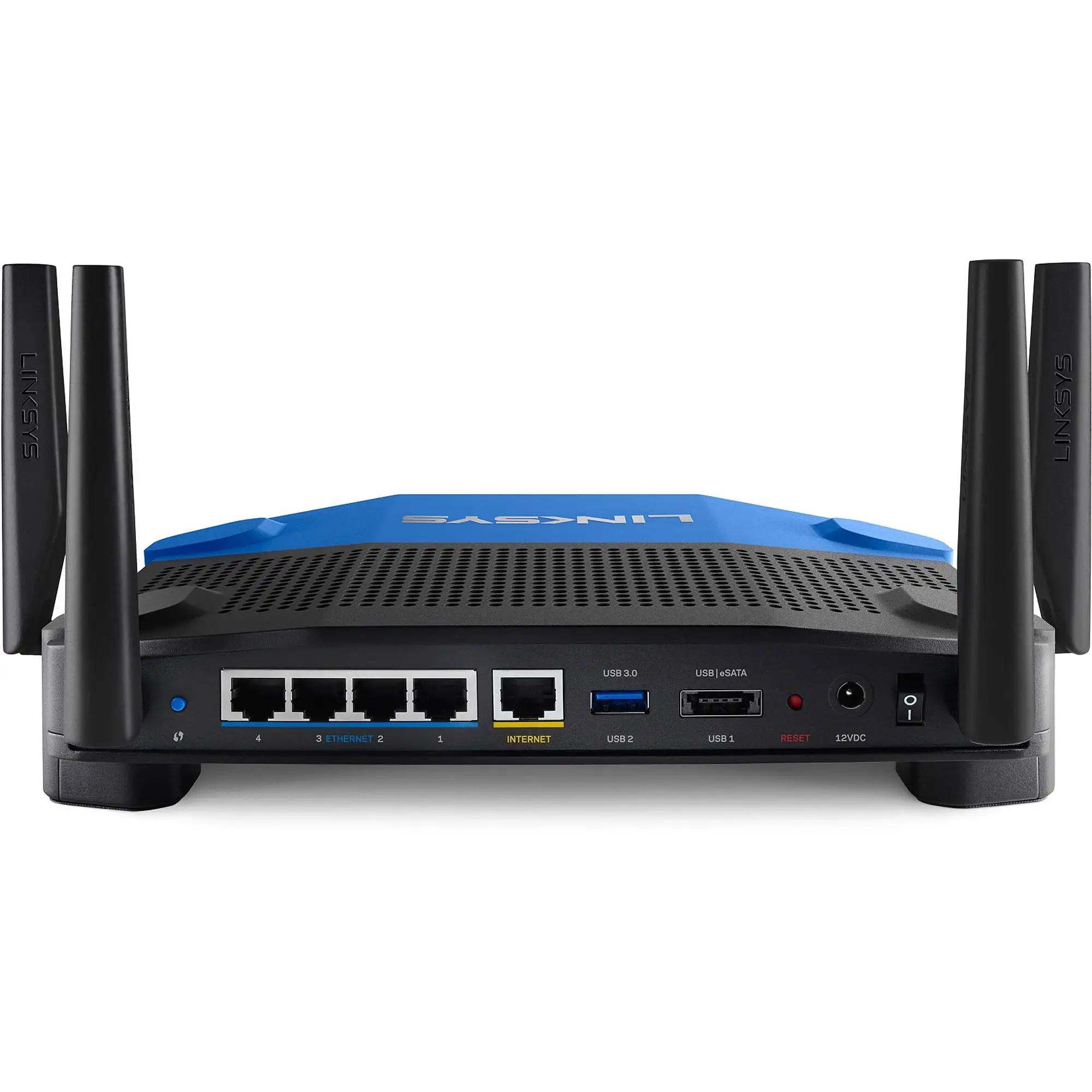
Some buyers didn’t expect a refurbished router to outperform new ones, but the Linksys AC1900 Wi-Fi 5 Router (Renewed, Black) earned consistent praise for its range, device handling, and speed. Averaging around 4.4/5 stars across platforms, this dual-band unit proved itself in households with demanding streaming and gaming needs—though quirks in guest network security and firmware options tempered enthusiasm for some users.
Quick Verdict: Conditional Buy
| Pros | Cons |
|---|---|
| Strong range and signal stability in large homes | Guest network lacks WPA2 security |
| Handles many devices without lag | Bulky physical design and large power adapter |
| Easy setup via app or web interface | Occasional need for reboots under heavy load |
| Dual-band performance supports streaming and gaming | Limited advanced wireless settings in stock firmware |
| Open-source firmware support (OpenWRT/DD-WRT) | NAS features less convenient than dedicated units |
Claims vs Reality
Marketing emphasizes this router’s “up to AC1900 Mbps” speed and wide coverage, promising strong 5GHz performance and app-driven setup. While some users saw near-ideal conditions—like the Reddit poster who said, “It exceeds my expectations showing speed tests far above my 150 GB service”—others found the manufacturer’s range claim realistic only on 2.4GHz. One Best Buy reviewer noted, “Full bars throughout the house on 2.4 GHz… 5 GHz does not have much of a range, but that is normal.”
Feature claims about NAS capability also drew mixed results. Although PCMag highlighted “killer NAS performance with USB 3.0,” Newegg reviewers pointed out its limitations: “No way to simply add the external drive to Windows Explorer… That is the primary functionality I would like.” The hardware can deliver impressive transfer speeds, but usability depends heavily on technical know-how.
The “guest network” as a secure convenience also falls short in practice. Officially, it’s a separate SSID with password protection, yet multiple Amazon and Trustpilot buyers stressed it lacks WPA2 encryption, describing it as “unsafe” compared to similarly priced Netgear or ASUS units. This gap matters for those hosting guests frequently but wanting robust protections.
Cross-Platform Consensus
Universally Praised
Signal range consistently impressed. From 700 sq ft apartments to 3,000 sq ft multi-level homes, owners reported strong coverage without extenders. A Trustpilot reviewer with a large family said, “We’re running up to 30 devices and it holds up like a boss!” This makes it attractive for tech-heavy households, gamers, and work-from-home situations.
Ease of setup emerged as another highlight. Even first-time router buyers managed installation in under 30 minutes. The companion mobile app allowed device prioritization and easy network naming, with one Best Buy customer remarking, “It took me longer to mount it to the wall than to set it up.”
Compatibility with open-source firmware was a major selling point among advanced users. A Reddit contributor commented, “OpenWRT works flawlessly, just make sure you include a scheduled reboot once a week,” underscoring how firmware flexibility enables deeper customization for networking enthusiasts.
Common Complaints
The guest network’s lack of proper encryption surfaced repeatedly. One Best Buy reviewer warned, “Only allows a password login like a hotel Wi-Fi. This is very unsafe.” For security-conscious users or small offices, this omission could be a deal-breaker.
Several noted occasional drops in 5GHz performance. A Best Buy reviewer experienced intermittent issues: “It just won’t work until you unplug the router… still appears to work with 2G.” In some cases, heavy NAS or USB storage use triggered hiccups requiring reboots.
Physical size and design were polarizing—those with limited space disliked the bulky build and large power adapter. As one user put it, “Make sure you have enough room… or at least a 12-inch extension cord.”
Divisive Features
NAS functionality drew sharply different reactions. PCMag lauded it as “performance on par with dedicated consumer NASes,” but Newegg’s crowd found the stock firmware’s options lacking, particularly around easy file browsing and integration.
QoS (Quality of Service) features generated contrasting opinions. PCMag celebrated its media prioritization cutting Netflix buffering from 26 seconds to 5, but other buyers at Newegg said, “It doesn’t have general QoS anywhere… device-specific priority only,” making it less effective for non-technical households.
Trust & Reliability
There’s no widespread scam concern, but some warranty interactions disappointed. One Best Buy buyer recounted having “a lot of difficulty getting an RMA number” when the unit failed, although Linksys eventually provided a replacement.
Long-term durability has a mixed record. Buyers using DD-WRT or OpenWRT often reported months of flawless operation, while a few needed periodic reboots to maintain top speeds. A Trustpilot reviewer summed it up: “One hiccup where the router needed a reboot… otherwise performing as expected.”
Alternatives
Competitors like the Netgear Nighthawk and ASUS RT-AC66U are mentioned in Reddit and PCMag reviews, often as close rivals with better 5GHz throughput. In PCMag’s tests, the Nighthawk hit 174 Mbps at 15 feet in 802.11ac mode, surpassing the Linksys’ 110 Mbps—but the Linksys held an edge in range stability across distances. For users expecting advanced wireless settings or robust guest network encryption, ASUS and Netgear may appeal more.
Price & Value
Renewed units typically retail around $59.99 on Amazon—well below the launch MSRP—making them attractive for buyers who understand the quirks. eBay listings show open-box prices between $30–$55, with shipping inflating totals. Community advice leans toward grabbing renewals only from reputable sellers to ensure standard warranty coverage.
FAQ
Q: Does the Linksys AC1900 handle multiple devices well?
A: Yes. Many owners report smooth performance with 20–30 devices connected, including gaming consoles, smart TVs, and smartphones, without noticeable lag.
Q: How secure is the guest network?
A: The guest network uses only password authentication, lacking WPA2 encryption. For secure guest access, consider routers from ASUS or Netgear at similar prices.
Q: Can I use OpenWRT or DD-WRT on this router?
A: Yes. It’s popular among enthusiasts for open-source firmware compatibility, allowing advanced customization and extended support.
Q: How easy is setup for non-technical users?
A: Setup is straightforward via the mobile app or web interface. Many first-time router buyers completed installation within 30 minutes.
Q: Does it offer reliable NAS functionality?
A: Transfer speeds can rival dedicated NAS devices, but integration is basic. Advanced users can unlock more with third-party firmware.
Final Verdict: Buy if you want a budget-friendly, high-range dual-band router with open-source potential for a tech-heavy home. Avoid if guest network security is critical or if you need seamless, high-throughput 5GHz performance on stock firmware. Pro tip: For best stability, schedule weekly reboots through OpenWRT or DD-WRT if you install third-party firmware.





