Lian Li GA II LCD 360 AIO Review: 8.2/10 Verdict
When Reddit user u/Tech*** called the Lian Li GA II LCD 360MM AIO Liquid Cooler "the best cooling we’ve ever seen from a 360mm AIO," it set high expectations. But investigative digging reveals impressive cooling numbers tangled with software frustrations and occasional hardware reliability concerns. Verdict: 8.2/10 — stellar thermal performance, striking LCD customization, but possible pump-start issues and quirks in L-Connect 3 may give cautious buyers pause.
Quick Verdict: Conditional
| Pros | Cons |
|---|---|
| Exceptional cooling under heavy loads | L-Connect 3 software instability |
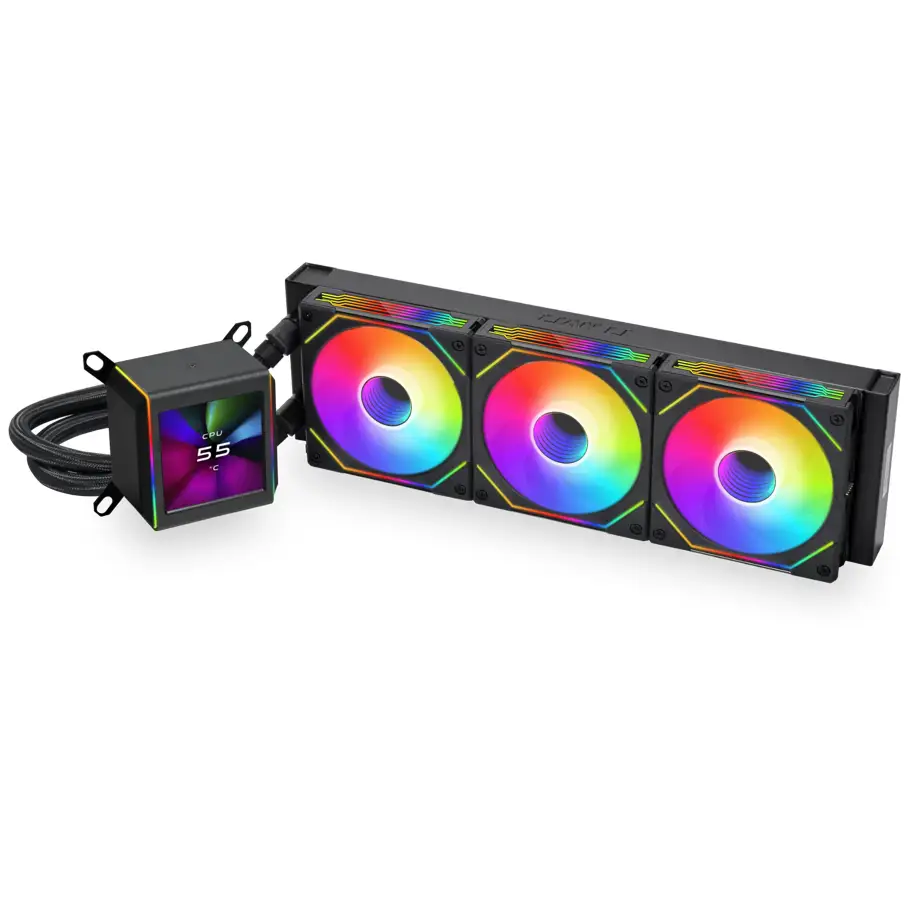
| Attractive, high-res 2.88” IPS LCD display | Animated LCD GIFs can raise temps by 7–8°C |
| Solid build with Asetek 8th/8.5th gen pump | Occasional pump-start failures reported |
| Quiet operation in low-noise mode | Price close to premium Corsair/Arctic units |
| Daisy-chainable ARGB fans with clean cabling | Past Galahad models had reliability concerns |
| Flexible tubing rotation for easy installs | LCD functions require software to work |
Claims vs Reality
Lian Li markets “extreme cooling” with pump speeds up to 3600 rpm and “layer-by-layer LCD customization.” On cooling alone, this matches the hype. Verified buyers note under sustained 340W loads on 14900KS CPUs, “never went above 91°C” and gamed comfortably at “temps under load never above 60°C.”
The LCD customization claim is also true — but with a sting. Fakespot reviewers warn: “If you pick any of the animated gifs… this adds anywhere from 7°C–8°C of increased heat.” That means the more dynamic your display, the hotter your CPU runs, forcing performance trade-offs.
Finally, the promise of “instant plug-and-play reliability” is contradicted by Newegg users experiencing pumps that “do not start about 75% of the time upon startup” until cycling PSU switches. While marketing boasts a 6-year warranty, some Reddit voices caution: “Their fans have shit bearings… L-Connect software is a pure shit show… Until they fix what they already have, don’t recommend anything but cases from Lian Li.”
Cross-Platform Consensus
Universally Praised
The GA II LCD 360 excels in cooling performance. Tom’s Hardware testers rated it “the best liquid cooler on the market right now” after holding an i7-13700K at the same temps whether in high-performance or low-noise mode. For overclockers, this means maximum clocks without sounding like a turbine. A verified buyer gleefully compared: “you’ll get just as good performance from an EK Nucleus 360 Dark… but this one looks better.”
Builders love the visual appeal — high-density aluminum radiator paired with SL Infinity fans creates a light show through tempered glass panels. Fakespot quotes one as saying: “Beautiful LCD on the AIO pump, preinstalled fans is nice.” Cable tidiness from daisy-chaining fans allows “cleaner, smarter setup” without clutter, benefiting minimalist PC aesthetic enthusiasts.
Installation versatility also scores points. The 45° rotary tubing means compatibility with varied case designs. Gamers upgrading from cramped mid-towers report smooth installs that avoided interference with RAM or GPU space.
Common Complaints
Despite stellar cooling, pump reliability darkens the picture. Newegg reports include catastrophic failures after “2 months of use, possibly frying my CPU.” The intermittent pump-start issue is widespread enough that “a quick Google search” reveals many similar cases. For those who depend on systems for work, this injects serious downtime risk.
Software stability is another sore spot. Reddit critics hammer L-Connect 3 for bugs that “prevent people from using their computer.” Without L-Connect, LCD animations and advanced fan control vanish. Even aesthetic functions can interfere with cooling, as animated LCD content triggers measurable temp increases.
Fan noise at full performance mode is notable — Tom’s Hardware measured 55.2 dBA at max speed. While the built-in toggle remedies this, the loud default may surprise the unprepared.
Divisive Features
The LCD screen itself divides opinion. Some love “endless customization options” and view it as centerpiece bling. Others see it as fluff — especially when static images yield better temps. Enthusiasts who value raw cooling over visuals at times disable or limit screen functions entirely.
Price sparks debate as well. At $396 in Amazon bundles, it rivals Corsair’s H170i elite in expense while cheaper models from Thermalright or Arctic “release just as efficient AIOs” without the LCD. For builders chasing penny-per-degree value, it’s harder to justify.
Trust & Reliability
Trustpilot/Fakespot analysis finds 90% high-quality reviews, but the patterns show pockets of disappointment tied to pump and software. One buyer upgraded because “the original Galahad died… causing my CPU to hit 99 degrees Celsius,” hinting at past series weaknesses.
Long-term threads on Reddit advise sticking with LCD models that use Asetek pumps rather than Lian Li’s in-house alternatives, which are “unreliable at best.” The 6-year warranty offers strong coverage, including leakage compensation prorated by year, but warranty claims still mean downtime.
Alternatives
The Deepcool LT720 offers similar 360mm cooling capacity and handles “315W loads… at around $120–$130.” It lacks the LCD, but value-focused builders accept the trade-off.
MSI’s MEG Coreliquid S360 gives “brilliant, customizable LCD display” and quieter cooling fans, but at $280 it remains premium. Corsair’s H170i Elite LCD XT pushes further with best-in-class 420mm cooling capacity, yet case compatibility becomes a constraint.
Arctic’s Liquid Freezer II 280 earns praise for “great CPU temperatures at ultra-low noise levels” for those willing to drop radiator size in exchange for quiet efficiency.
Price & Value
Current bundle pricing hovers around $396, with standalone units spotted at $234 on eBay and up to $417 from niche retailers. Resale remains strong due to the Asetek pump and LCD appeal, but depreciation accelerates if pump issues enter public awareness.
Community buying tips: seek discounts during seasonal sales, avoid paying Corsair-tier prices if you value cooling over screen gimmicks, and verify vendor return policies to cover pump failures.
FAQ
Q: Does the animated LCD content affect CPU temps?
A: Yes. Users on Fakespot note 7–8°C higher CPU temperatures when GIFs or animations run on the pump LCD compared to static images.
Q: How loud is the cooler under load?
A: Full performance mode hits 55.2 dBA according to Tom’s Hardware, but switching to low-noise mode drops output to around 49.2 dBA without thermal loss.
Q: Is pump failure common?
A: Reports of intermittent pump-start issues exist, with some users needing PSU cycling to restart. It’s not universal but significant enough to warrant caution.
Q: Can I install it in small cases?
A: The 45° rotary fittings and shorter tube routing help in tighter builds, but radiator size (360mm) requires compatible mounting points.
Q: How good is the warranty coverage?
A: Six years, including leakage compensation with a sliding depreciation scale — 100% hardware cost in year one, dropping 15% per year.
Final Verdict: Buy if you’re an enthusiast chasing max cooling performance with showpiece aesthetics, and you’re prepared to manage L-Connect quirks. Avoid if downtime from hardware failures would be catastrophic. Pro tip from Reddit veterans: stick with static LCD images if you care about every degree of thermal headroom.





