Lenovo USI Stylus Pen Review: Solid for Notes, Mixed for Art
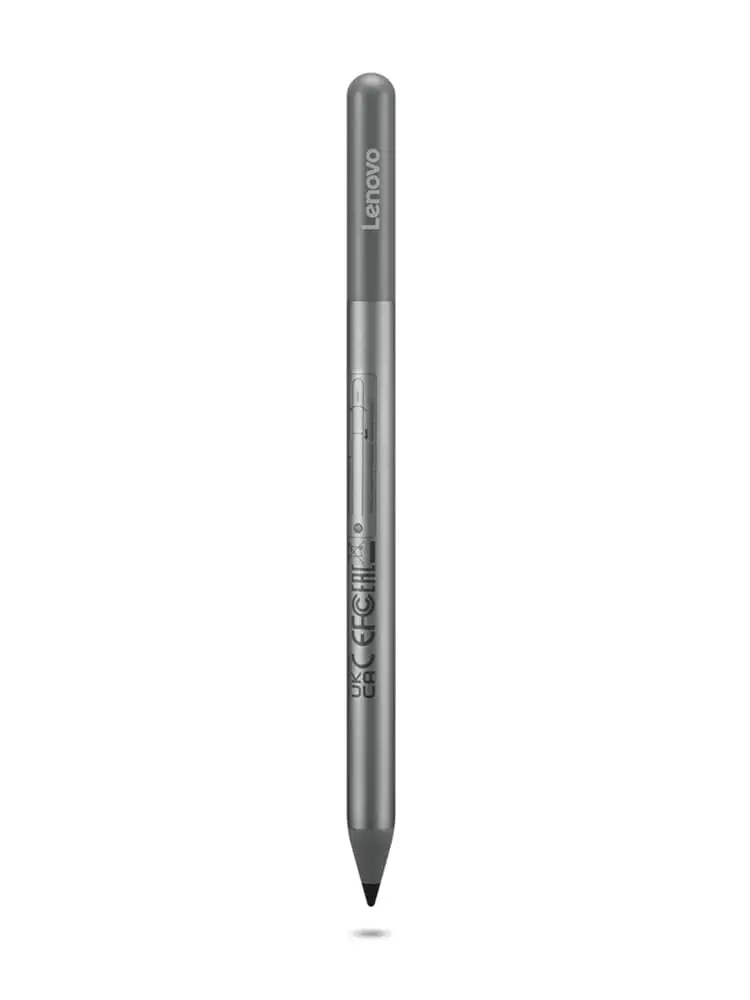
A verified buyer on Amazon summed up the sentiment for many: “Pairs instantly… perfect for navigation and occasional note-taking.” That’s the sweet spot for the Lenovo USI Stylus Pen for Chromebook, Grey, scoring a solid 8/10 in user satisfaction, but with caveats for creative professionals.
Quick Verdict: Conditional
| Pros | Cons |
|---|---|
| Smooth, paper-like writing feel | No magnetic attachment on some devices |
| Wide Chromebook compatibility | Stylus tip breaks over time for heavy artists |
| Good pressure sensitivity for notes | Latency in certain art apps |
| No pairing/Bluetooth needed | Hypersensitive nib on some units |
| Lightweight but sturdy build | Battery life complaints from some users |
| Works well in apps like Squid | Inconsistent palm rejection |
| Convenient AAAA battery | No extra tips included |
Claims vs Reality
Lenovo markets the USI Stylus Pen with bold claims: “industry-leading 4,096 levels of pressure sensitivity,” “natural writing and sketching,” and “up to 150 days battery life.”
Pressure sensitivity wins praise in note-taking scenarios. Best Buy reviewer “celindat” said: “Writing feels smooth and pretty natural, almost like pen on paper. Pressure sensitivity is solid, great for drawing or shading.” However, a Reddit user testing art apps warned that Medibang had “no pressure sensitivity detection”, while Krita handled it better but still showed glitches. This suggests the hardware is capable, but software support varies widely.
Battery longevity is a point of contention. While officially rated for 150 days (or 1 year for Pen 2 with 2 hours daily use), one Amazon reviewer complained: “The battery hardly lasts a week with intermittent use… not trying to spend 10 bucks a week on batteries.” This indicates a mismatch between marketing specs and some real-life experiences, possibly due to usage patterns or faulty units.
Palm rejection is promoted as a feature, yet Reddit feedback suggests inconsistency. Squid was “excellent… great palm rejection,” but apps like Onenote and Krita showed issues. One Amazon buyer noted hypersensitivity: “It ‘ll start marking the page before contact is made with the screen.”
Cross-Platform Consensus
Universally Praised
Across Amazon, Best Buy, and Reddit, the pen’s build quality is often mentioned. Best Buy user “shaffer 1205” described it as having a “nice size and weight,” and “celindat” found it “lightweight but sturdy, not cheap or flimsy.” This matters for students and professionals carrying it between classes or meetings — durable enough for daily bag tosses.
Compatibility earns wide approval. From Lenovo Duet 5 to Flex 5i and even Google Pixel Tablet, users report smooth integration. “Works right out of the box — no pairing or Bluetooth needed,” said “celindat,” a boon for tech-averse users wanting plug-and-play functionality.
For note-taking, the pen excels. A Reddit reviewer shared, “Squid is proof that using the pen can be a hassle-free, smooth experience,” with minimal latency and good palm rejection. School and work scenarios benefit from the instant responsiveness in supported apps.
Common Complaints
Storage is a recurring gripe. “No where to attach the stylus to the duet,” lamented Best Buy’s “pjk002.” This is echoed by Amazon reviewers frustrated that US buyers didn’t get the pen holder accessory available in the UK, forcing extra purchases or improvised storage.
Tip durability is an issue for artists. Best Buy’s “jazz” reported the tip breaking after about 4 months, a pattern that could affect heavy sketchers more than casual note-takers. Combined with the lack of spare tips, it’s a significant con for illustrators.
Latency and hypersensitivity affect creative workflows. Reddit user tests showed “Onenote had some noticeable latency,” and Medibang’s performance was “awful” with “terrible palm rejection.” These shortcomings make it less suitable for complex art projects despite good hardware specs.
Divisive Features
Battery type draws mixed reactions. AAAA batteries are rare, and while some appreciate the swap-and-go convenience, others find it inconvenient compared to rechargeables. One Amazon customer stated, “I bought rechargeable ones solely for the pen,” showing workaround adoption.
Battery life itself is polarizing — some never think about replacements for months; others burn through cells in days. This could be tied to sleep mode efficiency, officially set at 3 minutes for the first-gen pen and 10 seconds for Pen 2.
Trust & Reliability
Lenovo’s customer service response appears proactive. On Best Buy, when “jeslynluciaa” reported major pen failure with skipped writing, Lenovo asked for device model info and guided troubleshooting. However, hardware reliability does show variance — from flawless operation for months to palm rejection malfunctions out of the box.
Long-term tests are scarce, but Reddit’s community hints that software maturity might improve the experience over time: “I firmly believe the hardware is good and will be improved by software.” Yet, durability concerns over tip wear and battery life remain unresolved patterns in user reports.
Alternatives
One Amazon reviewer directly compared it to the Penoval USI pen, praising Penoval’s USB-C charging, eraser functionality, and smoother operation. This suggests that while Lenovo’s offering is competitive for basic compatibility and writing feel, other brands might better serve power users seeking minimal glitches and advanced features.
Another point of comparison is the Apple Pencil, often mentioned as an unreachable standard. Best Buy’s “jomac006” admitted: “I was hoping it would be more akin to an Apple Pencil but… it gets the job done.”
Price & Value
Pricing fluctuates widely — Lenovo’s store lists Pen 2 at $23.82 (sale), while eBay resales often range $20–50 depending on model and condition. Amazon pricing around $29–40 still positions it as affordable against premium pens.
Resale value holds modestly; listings for USI-compatible Lenovo pens stay between $20–30 unless bundled with devices. Community buyers suggest looking for bundled deals with Chromebooks to save on accessories.
FAQ
Q: Does it work with all Chromebooks?
A: No, only with models supporting the USI protocol. Check your Chromebook’s compatibility before buying. Best Buy and Reddit reviews show success with Lenovo Duet, Flex 5i, and other USI-enabled devices.
Q: Can I store it magnetically on my device?
A: Only on models with strong enough magnets, such as the Duet’s back panel. Some report it doesn’t hold at all; accessories or cases with pen loops are alternatives.
Q: Is it good for drawing?
A: For casual sketches, yes, but latency and inconsistent pressure sensitivity make it less ideal for professional illustration. Apps like Squid work well; Medibang and Krita show problems.
Q: How long does the battery last?
A: Officially up to 150 days or 1 year (Pen 2) with average use, but some users report needing new AAAA batteries within a week. Rechargeable AAAA options are available.
Q: Does it require pairing?
A: No, it works immediately on compatible devices without Bluetooth or pairing. This ease-of-use is frequently praised by non-technical users.
Final Verdict
Buy if you’re a student, note-taker, or casual sketcher wanting plug-and-play functionality across USI Chromebooks — apps like Squid make it shine. Avoid if you’re a digital artist needing zero-latency precision or heavy tip durability. Pro tip from community: pair it with AAAA rechargeables and a dedicated pen holder to bypass two of its biggest annoyances.





