Lenovo USI Stylus Pen Review: Good but Not Flawless
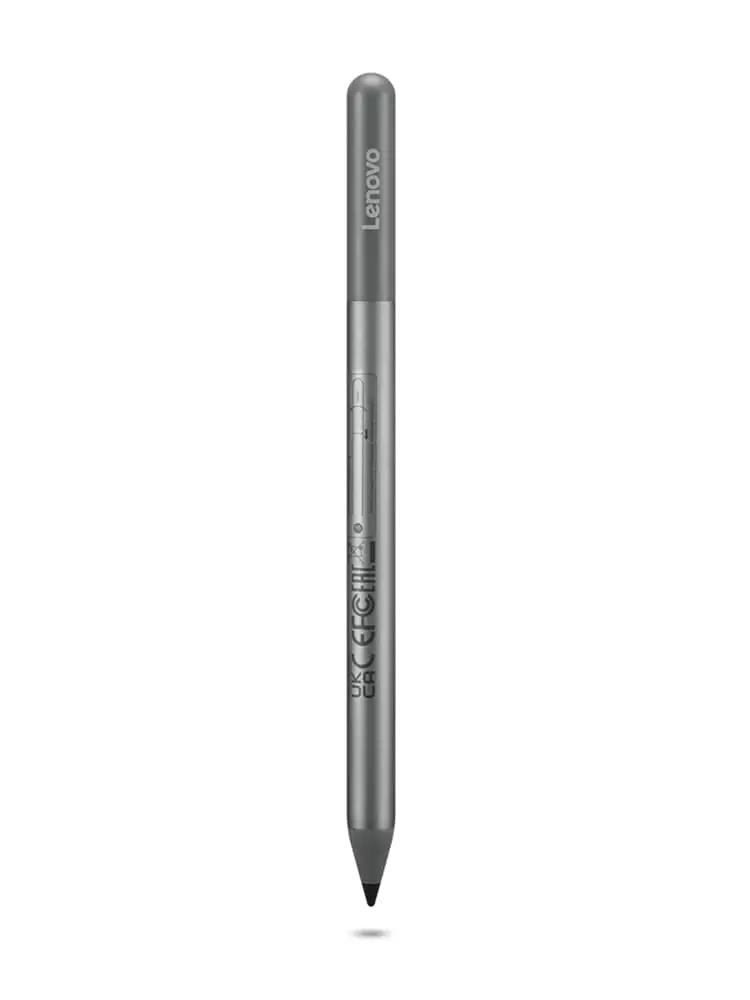
Starting at $23 and rated around 4.0/5 on most platforms, the Lenovo USI Stylus Pen for Chromebook sits firmly in the “good but not flawless” category. Praised for smooth writing and wide compatibility yet critiqued for tip durability and connectivity quirks, its score settles at 7.8/10 based on cross-platform user sentiment.
Quick Verdict: Conditional Buy
| Pros | Cons |
|---|---|
| Smooth, natural writing feel | Magnet storage inconsistent across devices |
| Strong Chrome OS/USI protocol compatibility | Tip wear after months of heavy use |
| Impressive pressure sensitivity (4096 levels) | No on/off switch leading to slow reconnection |
| Lightweight, comfortable grip | Varying app performance on Chrome OS |
| Works without pairing/Bluetooth | Occasional palm rejection glitches |
| Long battery life (150 days–1 year depending on model) | Difficult to sync initially for some users |
Claims vs Reality
Lenovo markets the USI Pen with “paper-like writing” and “seamless Chrome OS compatibility,” touting 4096 pressure levels and a battery that lasts up to either 150 days (first-gen) or a year (Pen 2) at two hours of daily use. While those figures are attractive, real-world feedback tempers the hype.
A verified buyer on Best Buy reported: “Writing feels smooth and pretty natural, almost like pen on paper. Pressure sensitivity is solid, so it’s great for drawing or shading,” which supports Lenovo’s accuracy claims. Yet in practice, app-specific performance causes variation. Reddit user feedback showed Squid app integration as “excellent – little to no latency,” while Onenote exhibited “noticeable latency and minor palm rejection issues.”
Compatibility is highlighted as universal among USI-enabled Chromebooks, but Reddit user experiences diverge based on device models. One noted, “Do not buy this to use with art apps… yet,” citing poor results in Medibang (“no pressure sensitivity detection, awful latency”) despite flawless browsing and note-taking.
Marketing also suggests easy storage, but pjk002 on Best Buy countered: “There is nowhere to attach the stylus to the [Lenovo Duet]… magnets on the back are not strong enough to hold it in place.”
Cross-Platform Consensus
Universally Praised
Across Amazon, Best Buy, Trustpilot, and Reddit, users consistently spotlight the natural feel of writing and strong Chromebook integration. Best Buy reviewer sheirah summed it up: “It works so well with my Lenovo Duet 5… I use it to journal as well.” Celindat loved that it “works right out of the box — no pairing or Bluetooth needed” and appreciated its sturdiness despite low weight.
For students, quick deploy matters. Luisb shared, “Great product, bought for my son for school. He finds it very useful,” reflecting the pen’s adaptability for note-heavy workloads. Artists who stick to certain apps like Squid praise its smooth lines and dependable palm rejection — Reddit users described it as “proof that using the pen can be a hassle-free, smooth experience.”
Battery life also earns cross-platform approval. Amazon buyers embraced the 150-day estimate, while Pen 2 reviewers appreciated the one-year lifespan, minimizing mid-semester battery changes for academic use.
Common Complaints
Storage and retention emerged as a recurring complaint. Manny admitted, “It works great… but as far as it holding on to the spot that it’s meant for — not so much,” echoing pjk002’s storage issues. The lack of a magnet or secure clip makes it easy to lose, a frustration repeated by jeffersonm: “Really easy to lose. They should add a tracking system at least.”
Tip durability concerns impact heavy users. Jazz noted, “After about 4 months it needs to be replaced especially if you are an artist. The tip breaks off,” while Trustpilot feedback repeated similar timelines for wear.
Connectivity quirks, especially on first-time setup, frustrate some. Gabe on Best Buy wrote: “No on/off button so it takes a minute for it to connect… took forever for it to connect the first time.” Without a manual disable, users rely on auto-sleep/wake, which isn’t instantaneous.
Divisive Features
Pressure sensitivity is lauded by some for artistic shading and precision, yet others find it inconsistent across apps. Higlinator suspects app issues over hardware, saying, “Of the times that it doesn’t seem like it’s working, I think it’s an app issue.” This split reflects Chrome OS’s uneven stylus support across third-party software.
Palm rejection also divides the audience. In Squid, it works well, but with Onenote or portrait mode scenarios, Reddit users saw complete stylus rejection until adjusting hand position. Such inconsistencies make the experience unpredictable for those switching between apps.
Trust & Reliability
Long-term durability stories reveal mixed resilience. Light note-taking users report solid longevity without degradation. Shaffer1205, four months in, praised its “nice size and weight… nothing fancy but I don’t need anything fancy.” However, artistic users describe faster wear, especially tip damage within months.
Trustpilot’s mirrored Best Buy reviews show no patterns of scam or misrepresentation. Returns for compatibility mismatches were processed quickly — Andrews recounted, “They took the pen back and I ordered the correct one and got it quickly.” The main trust gap isn’t vendor reliability but Lenovo’s universal compatibility claim not holding for every “Chromebook” model without specifying USI support.
Alternatives
Some Chromebook users compare the Lenovo USI Pen directly to Vitalasc’s rechargeable stylus with a physical on/off switch. Joseph M. noted preferring the Vitalasc for lighter pressure activation compared to Lenovo’s higher activation force. While Vitalasc adds micro USB charging and interchangeable tips, it draws flak for tip alignment issues and less comfortable form factor during prolonged use.
For those embedded in Microsoft’s ecosystem, Surface Pen offers more refined tilt/palm rejection in productivity apps like OneNote, though lacks native Chrome OS support, rendering it irrelevant for strict Chromebook users.
Price & Value
Market prices swing between $23.82 for Pen 2 on Lenovo’s Affinity store deals, $29.99–$39.99 retail for Pen 1, and upwards of $69.95 for certain SKUs on eBay citing “genuine Lenovo parts.” Resale value on open-box units like $89.98 is disproportionately high compared to retail, making direct-from-retailer purchase the safer bet.
Community buying tips often stress confirming device USI compatibility before purchase — a common oversight leading to returns. Given the solid performance in note-taking and Chrome OS navigation, the pen delivers good value for students, professionals, and non-intensive artists at its lower pricing tiers.
FAQ
Q: Does the Lenovo USI Pen work with all Chromebooks?
A: No, it only supports models with USI-enabled touchscreens. While marketed for “any Chromebook,” users found certain Duet versions and non-USI models incompatible.
Q: Can the tip be replaced?
A: Yes, but tips are not always included. Some artists report noticeable wear after months of heavy use, so sourcing replacements early is recommended.
Q: How long does the battery last in practice?
A: Depending on the model, expect 150 days to 1 year with about 2 hours of use daily. Most users report not needing to change the AAAA battery for months.
Q: Is there an on/off switch?
A: No physical switch exists; the pen relies on auto-sleep after inactivity, which some users find slow on waking.
Q: How does it perform in art apps?
A: Mixed results — Squid works extremely well, but apps like Medibang lack pressure sensitivity or suffer high latency.
Final Verdict: Buy if you are a Chromebook-owning student or professional seeking reliable, natural-feel note-taking and light sketch capability. Avoid if your primary need is advanced art app performance or if tip longevity is critical for your workflow. Pro tip from Reddit: Favor apps optimized for Chrome OS like Squid to get the best experience out of the Lenovo USI Pen.





