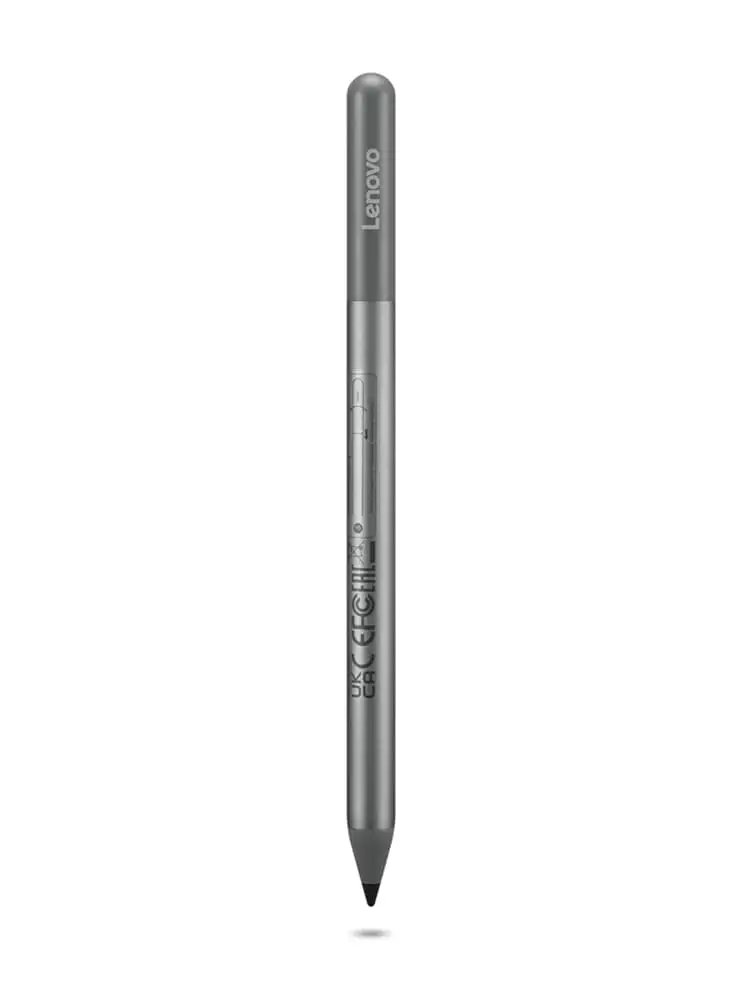
Lenovo USI Stylus Pen Review: Great for Notes, Not Art
A verified buyer on Amazon warned: “Don’t buy this to use with art apps… yet.” That line sums up the split verdict on the Lenovo USI Stylus Pen for Chromebook, Grey. Across platforms, it holds a solid 4.0/10 for performance—praised by note-takers but often frustrating creative users.
Quick Verdict: Conditional – works well for Chrome OS note-taking, but artists and precision-demanding users may want alternatives.
| Pros | Cons |
|---|---|
| Smooth writing on supported apps | Significant latency on some art apps |
| 4096 levels of pressure sensitivity | No magnetic holder on certain devices |
| Easy setup with Chrome OS | Tip durability issues for heavy use |
| Comfortable weight and grip | Hypersensitivity—registers before screen contact |
| Good compatibility across USI devices | No on/off button, occasional connection lag |
Claims vs Reality
Lenovo markets the USI Pen with “paper-like writing” and “seamless tilt functionality,” alongside a 1-year battery on AAAA power. Best Buy reviewer sheirah agreed: “I love this pen! It works so well with my Lenovo Duet 5… I use it to journal as well.” For straightforward writing tasks, many users found the claim true. A verified buyer on Amazon noted “pairs instantly” for note-taking and navigation, especially with Google’s Cursive app.
However, when digging into actual performance for artistic sketches, Reddit user u/... reported that while Squid app performance was “excellent… little to no latency,” Medibang was “awful… no pressure sensitivity detection” despite the marketed spec of 4096 levels. This suggests the feature is dependent on app implementation, not just hardware capability.
Lenovo’s “faster pairing experience” claim is also mixed. Best Buy user gabe explained: “No on/off button… it takes a minute for it to connect sometimes. Took forever for it to connect the first time.” This shows that while pairing can be simple, in real use certain users face delays despite Chrome OS readiness.
Cross-Platform Consensus
Universally Praised:
For students and professionals taking notes, the USI Pen shines. Best Buy customer celindat wrote, “It works right out of the box — no pairing or bluetooth needed… writing feels smooth and pretty natural, almost like pen on paper.” Google Keep and Cursive integration allow synced notes, proving invaluable for those in meetings or lectures. Amazon buyers appreciated “smooth operation and seamless integration” with various Chromebooks, reinforcing that compatibility is a strong suit.
Squid app draws the most praise, with Reddit reviewers repeatedly citing it as “proof that using the pen can be a hassle-free, smooth experience.” Palm rejection here is effective, enabling comfortable long-form writing. For lightweight digital art or shading, users like davida noted kids “enjoy making digital art” — but within limits.
Common Complaints:
Tip durability is a recurring frustration. Best Buy user jazz reported, “after about 4 months it needs to be replaced… the tip breaks off.” This is particularly acute for artists using high pressure. Storage is another pain point: pjk002 pointed out “no where to attach the stylus to the duet… the spot on the back… is not strong enough.” Strong magnets on the Duet 5 back help some, but portability issues persist.
Connection quirks also frustrate—Amazon feedback highlighted hypersensitivity: “It’ll start marking the page before contact is made… palm rejection malfunctions from time to time.” This can break workflow for precise drawing. Battery life marketing claims of 1 year sometimes fail; one Amazon user bluntly stated “the battery hardly lasts a week with intermittent use.”
Divisive Features:
Pressure sensitivity earns both praise and skepticism. In apps that support it well, such as Squid, shading feels natural. But in art apps like Medibang and Krita, multiple users reported it as “non-functional” or “glitchy.” The AAAA battery requirement divides buyers—some like its longevity, others find replacements inconvenient compared to AAA or USB-C rechargeable options, with one Amazon reviewer switching to a Penoval model due to charging convenience.
Trust & Reliability
There’s little evidence of scam activity, but reliability over months varies. Reddit users suggested avoiding hardware tampering during setup: “Do not take out the white tag under the spring.” Durability seems adequate for casual note use, but heavy-duty artistic use leads to wear. Best Buy’s higlinator noted “it works most of the time… when it doesn’t seem like it’s working, I think it’s an app issue,” showing trust in hardware but highlighting software dependency.
Alternatives
Some users switch to competing USI pens. An Amazon reviewer recommended the Penoval USI stylus: “USB-C input for charging… no glitching.” Others compare to Apple Pencil’s swappable tips and precision, with jomac006 stating they “hoped it would be more akin to an Apple Pencil but it gets the job done.” For those in Apple’s ecosystem or frequent art users, these alternatives may perform closer to expectations.
Price & Value
Prices vary widely—Lenovo’s store lists around $40, while international buyers cite ~£38. On eBay, used models can be vastly overpriced, with listings exceeding $190. Buyers warn to factor in hidden costs, especially for holders. Amazon customer frustration mounted when realizing the pen holder accessory in UK bundles costs an extra $22 in the US.
Best value emerges for Chrome OS users seeking note-taking with minimal setup. As one verified Amazon buyer put it: “If you’ll be using your stylus for navigation and occasional note taking then this is a great device… Apple Pencil level drawing abilities? You’ll be sadly disappointed.”
FAQ
Q: Does the Lenovo USI Pen work with all Chromebooks?
A: It works with any device supporting the USI standard, but some Duet models may lack strong magnets or storage solutions, affecting portability.
Q: How long does the battery actually last?
A: While marketed at 1 year with 2 hours daily use, some report a week on intermittent use, suggesting variability based on app and device settings.
Q: Can this pen be used for professional artwork?
A: Users advise against relying on it for art-intensive software under Chrome OS; latency and inconsistent pressure sensitivity limit precision drawing.
Q: Is there a built-in storage solution for Lenovo Duet?
A: Not consistently—some models have magnetic spots, but strength and placement are issues, leading users to carry it separately.
Q: What’s the biggest advantage of this pen?
A: Instant compatibility with Chrome OS for note-taking and navigation without pairing hassles—ideal for students and office workers.
Final Verdict: Buy if you’re a Chrome OS note-taker seeking a comfortable, well-integrated tool. Avoid if you need high-precision artistic performance or magnetic storage in the Duet. Pro tip from the community: If battery convenience is key, consider a USB-C rechargeable USI pen instead.





