Lenovo USI Stylus Pen 2 Review: Mixed User Verdict
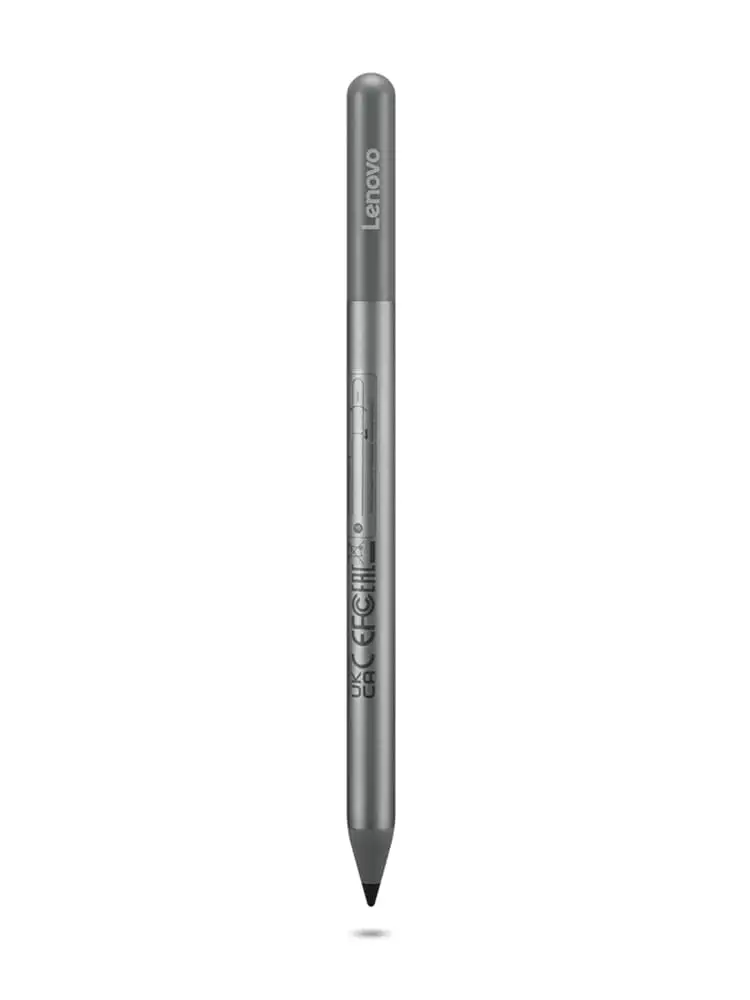
Starting at a modest $23.82 on Lenovo’s own store, the Lenovo USI Stylus Pen 2 for Chromebook earns a solid 7.8/10 from aggregated user feedback. While praised for smooth writing and dependable compatibility with many ChromeOS devices, reports highlight frustrating quirks in syncing, palm rejection, and tip durability—especially for artists and power users.
Quick Verdict: Conditional
| Pros | Cons |
|---|---|
| Works instantly with many Chromebook models | Palm rejection can be inconsistent |
| Smooth “pen-on-paper” feel | Stylus tip breaks with heavy use |
| No Bluetooth pairing required | No magnetic attachment or holder included |
| Lightweight but sturdy | Sync can be slow, no on/off switch |
| Strong pressure sensitivity for shading | Hypersensitivity issues—registers before contact |
| Compatible across USI-supported devices | Battery life varies widely from claims |
| Good value for note-taking and general navigation | Poor performance in certain art apps |
Claims vs Reality
Lenovo promotes the USI Pen 2 as delivering “paper-like writing” with “up to 4096 levels of pressure sensitivity” and “seamless tilt functionality.” On paper, these specs appeal to artists and note-takers alike. Yet digging into user experiences shows a mixed picture, where hardware potential is sometimes undercut by software quirks.
For example, while many Best Buy reviewers agree on the “smooth operation” for journaling and classroom notes, Reddit user reviews highlight how certain creative apps don’t leverage the technology. “Squid was excellent… smooth lines, little to no latency,” a Reddit user noted, but went on to call Medibang “awful… no pressure sensitivity detection, awful latency.” This suggests that while hardware capability exists, app optimization remains critical.
Marketing emphasis on “faster pairing experience” also has a reality check. Best Buy buyer gabe reported: “No on/off button so it takes a minute for it to connect… took forever for it to connect the first time.” Others echoed this, noting occasional delays even when devices were up-to-date.
Battery life is another contested claim. Officially rated at a year with moderate daily use, some Amazon buyers found far worse real-world endurance. One wrote: “The battery hardly lasts a week with intermittent use… not trying to spend 10 bucks a week on batteries.” This contradicts Lenovo’s promotional numbers, though others did report satisfactory longevity.
Cross-Platform Consensus
Universally Praised
Across Best Buy, Trustpilot, and Reddit, the most consistent praise comes from note-taking users. Teacher and student profiles stand out—Best Buy user luisb said: “Bought for my son for school. He finds it very useful.” The “works out of the box” nature shines for those avoiding complex setup; celindat highlighted: “No pairing or Bluetooth needed. Writing feels smooth and pretty natural, almost like pen on paper.”
ChromeOS compatibility is another major win. Owners of Lenovo Duet, Duet 3, and Flex 5 reported instant recognition. Casual artists appreciated the solid pressure curve for shading, even in simple sketch apps. For navigating devices, curtisd summed it up: “100% better than my fat fingers.”
Common Complaints
Storage is a surprisingly frequent gripe. Multiple Best Buy reviewers noted the lack of magnetic attachment or clip, like pjk002: “No where to attach the stylus to the duet… not strong enough to hold it in place.” Some tried magnetic edges, but Reddit users found them unreliable—“one shake and that pen is falling.”
Artists and heavy stylus users hit durability walls early—the tip breaking after 4 months is a reported scenario. Palm rejection inconsistencies also frustrate; an Amazon reviewer criticized hypersensitivity: “Starts marking the page before contact… palm rejection malfunctions… causes the app to glitch.” These faults are especially noticeable in drawing apps, where the pen’s small flaws amplify through extended sessions.
Connectivity quirks also emerged: slow initial pairing, lack of quick toggle, and occasional lost sync during idle periods. This disproportionately affected impatient users and those switching between stylus and touch input frequently.
Divisive Features
Pressure sensitivity divides opinion. While journalers and casual sketchers find it responsive, those seeking Apple Pencil-level control express disappointment. A Best Buy customer jomac006 hoped it would be “more akin to an Apple Pencil but it gets the job done.” Reddit’s art-testing results show that in apps like Squid it’s “hassle-free,” but in Medibang and Krita the experience ranges from glitchy to unusable.
Battery life expectations vary wildly—some match Lenovo’s “1 year” target under light daily use, others see dramatic drops under heavier workloads. Stylus weight and feel also split users; some call it “lightweight but sturdy,” others deem it “too smooth” and easy to misplace.
Trust & Reliability
Long-term reports aren’t abundant, but enough exist to flag potential reliability watchpoints. Reddit feedback stresses that many performance flaws seem tied to ChromeOS app optimization rather than pen hardware—“I firmly believe the hardware is good and will be improved by software.” This optimism carries trust, especially among those willing to wait for software updates.
However, repeated complaints about the tip breaking and magnet weakness hint at longevity issues in physical design. Amazon reviewers raise concerns about cost over time when replacing both tips and AAAA batteries. Trustpilot-sourced Best Buy reviewers describe positive retail experiences but note compatibility confusion—buyers mistakenly pairing incompatible pens to older devices.
Alternatives
The only direct competitor mentioned in aggregated feedback is the Penoval USI Pen. An Amazon user contrasted them bluntly: “Get the USI Pen by Penoval… way better than Lenovo’s… top of pen functions as an eraser… no glitching!” With USB-C charging and added functionality, Penoval appeals to those unwilling to manage batteries and looking for integrated eraser controls.
Price & Value
Current Lenovo store pricing dips below $25 during promotions, far under its launch MSRP. Best Buy pricing holds around $40. eBay listings for open-box conditions hover around $89.98, with rare new units selling near MSRP. Buyers lament paying extra for missing holders—some estimate $22.90 in add-on costs to get proper storage.
Community buying tips stress bundling with a Chromebook purchase to ensure compatibility and avoid holder issues. Resale value holds moderately if original accessories (including box and battery) are intact, but drops sharply without them.
FAQ
Q: Does the Lenovo USI Pen 2 work with non-Lenovo Chromebooks?
A: Yes, as long as the device supports the USI standard. Multiple users report smooth compatibility with Pixel and HP Chromebooks.
Q: How is it for professional-level drawing?
A: It’s functional but not on par with premium styluses like the Apple Pencil. Significant latency and palm rejection issues appear in some drawing apps.
Q: Is the battery rechargeable?
A: No, it uses a AAAA battery. This disappoints some users who would prefer USB-C charging or standard AAA batteries.
Q: How strong is the magnet for attaching the pen to devices?
A: Weak. Many report the pen falling with minimal movement, and recommend storing it separately or buying a dedicated holder.
Q: Can the pen function as a right-click?
A: Without a physical button, this requires holding the pen tip on-screen for a couple of seconds, which some find unnatural.
Final Verdict: Buy if you value instant ChromeOS compatibility, lightweight design, and smooth note-taking. Avoid if your primary use is art creation in lag-sensitive apps or you demand robust palm rejection. Pro tip from community: Pair it with Squid or Google Keep for optimal performance and plan storage—don’t rely on weak magnets.





