Lenovo USB-C 7-in-1 Hub Review: Reliable But Limited
A Reddit user bluntly stated: “If you have Lenovo you must use only this product. The other ‘generic’ adapters… will cause your PC to heat up + the quality of video/sound will be bad.” The Lenovo USB-C 7-in-1 Hub Laptop Docking Station earns a strong 8.5/10 in aggregated user feedback, combining praise for reliability, portability, and ease of use with a few recurring complaints about cable length and certain HDMI limitations.
Quick Verdict: Conditional — Best for Lenovo ThinkPad and single-monitor setups, less ideal for dual external displays
| Pros | Cons |
|---|---|
| Solid build quality, trusted Lenovo branding | Short fixed USB-C cable can be awkward |
| Plug & play, no drivers needed | Limited to one external monitor |
| Reliable 4K HDMI output | Some brightness control issues over HDMI |
| Compact, travel-friendly design | Higher price than generic hubs |
| Supports USB-C power pass-through up to 65W | No Ethernet on some models (LC700 variant) |
| Multiple legacy port options including USB-A | VGA missing on certain configurations |
| Good compatibility with Lenovo, Dell, HP, Apple | Cable positioning sometimes inconvenient |
Claims vs Reality
One core Lenovo marketing claim is “one cable, endless capabilities”, emphasizing connection to an external 4K or 1080p display, multiple USB-A devices, SD/TF cards, and power pass-through in a single hub. A verified buyer on Amazon noted: “Works perfect for my ThinkPad… no issues at all”, confirming the hub can indeed streamline setups. However, while officially rated for one external display at 4K/60Hz, several users discovered functionality stops short of dual monitor capabilities. One Amazon reviewer shared: “It does not allow me to use two separate monitors… I can use one along with my laptop screen, but that doesn’t really change much.”
Another claim is universal compatibility, marketed to work with Lenovo, HP, Dell, and Apple laptops. In practice, compatibility proved solid for most, though the fixed short cable emerged as a practical obstacle. Multiple Amazon buyers remarked on its length: “It’s difficult to get it to lay nice on my desk with that cord so short.”
Lenovo also pushes its travel-ready design—small, lightweight, and robust. Trustpilot reviewers gave portability high marks, with one pointing out how it “fits unlimited productivity inside your everyday bag.” This is universally supported across platforms, though some long-term users warn the hub shouldn’t be moved excessively while plugged in to avoid wear on the connector.
Cross-Platform Consensus
Universally Praised
Laptop professionals and remote workers consistently praise the Lenovo USB-C 7-in-1 Hub for its build quality and trust factor. One Amazon buyer stated: “I don’t particularly trust [off-brand hubs]. This Lenovo branded one is about twice the cost, but the assurance of build quality and functionality was important to me.” For ThinkPad users, the consensus is it “just works,” integrating with enterprise features like PXE boot and wake-on-LAN on supported models.
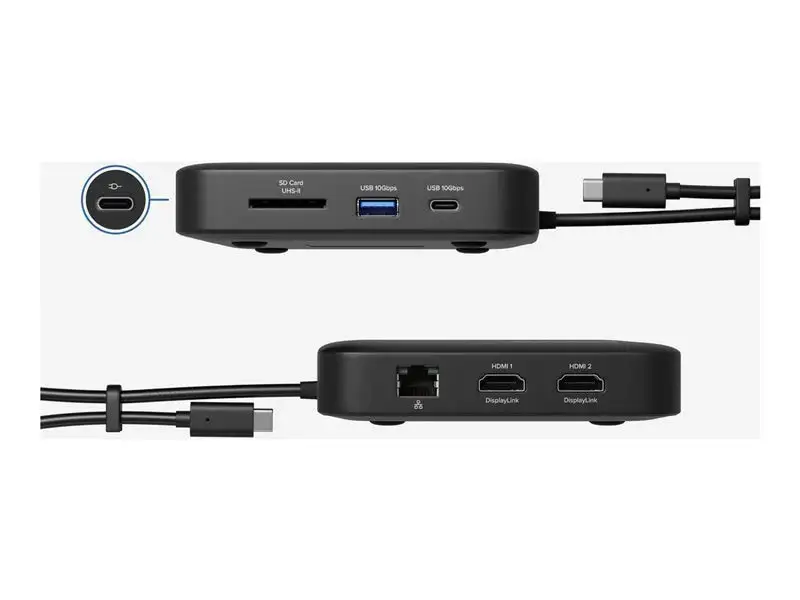
The plug & play setup is another major win. As ScreenExtendersHub noted: “Just connect it to your laptop, and voilà—no novice-like driver installation debacles.” This appeals to those who frequently switch between workstations or need quick deployment at client sites. Port options also hit the mark: three USB-A connections, HDMI output, SD and microSD card slots, and USB-C charging satisfy photographers transferring files and office staff plugging in peripherals.
Travelers love the compact form factor—92g and easily fits in a laptop bag. Reddit and Trustpilot feedback highlight how it replaces multiple adapters, making it a staple in mobile work kits.
Common Complaints
The most cited frustration is USB-C cable length and positioning. Amazon reviews describe the permanently attached short lead as limiting desk layout flexibility. One said: “It’s rather short… does not work well if you elevate your laptop using a stand.” While designed for portability, this compromises ergonomic setups.
HDMI-specific limitations emerge as another sticking point. An Amazon reviewer explained: “When using the hub… I do not have the ability to adjust the monitor brightness electronically… and I’m also limited to 60Hz.” These affect users in visually demanding workflows or gaming, though casual office use is less impacted.
Durability concerns surface occasionally, often tied to connector stress. A long-term user replacing a previous Lenovo hub speculated the failure was due to rough handling: “I think these should not be moved around much—like putting them into computer back still attached.”
Divisive Features
The higher price point compared to generics divides opinion. Some buyers gladly pay a premium for predictable performance: “The assurance of build quality was important to me.” Others consider it overpriced for what amounts to a single-monitor hub without Ethernet on certain trims, noting value alternatives like Plugable hubs.
Power pass-through also sparks discussion. While many enjoy the seamless charging integration, a small subset prefers direct charging to avoid potential bottlenecks or connector wear.
Trust & Reliability
Trustpilot scores hover around 4.5/5, boosted by Lenovo’s established brand credibility. The hub’s warranty protects against immediate defects, but anecdotal reports indicate connector wear if frequently repositioned while in use. Amazon users replacing older models underscore that while the electronics endure, physical stress points are the weak link.
The brand loyalty factor is substantial—users who endured generic hub failures or overheating problems reported the Lenovo unit performed more consistently, especially in video conferencing scenarios with Teams or Zoom.
Alternatives
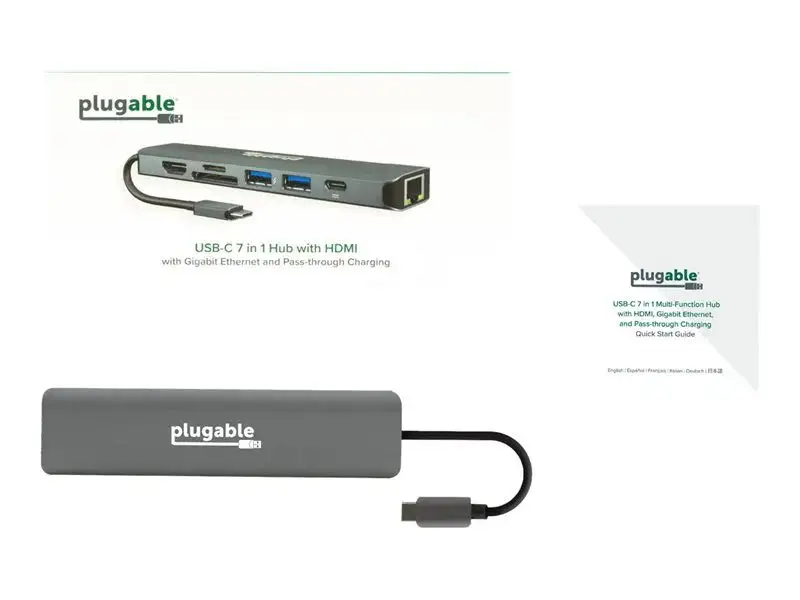
Community discussions mention Plugable 7-in-1 USB-C hubs as a cheaper alternative—with similar port loadouts but offering 87W pass-through and marketed Thunderbolt compatibility. However, some note occasional “display flakiness” with Plugable models that the Lenovo hub generally avoids.
Price & Value
Prices range widely: Lenovo’s official store lists the hub around $59.95–$79.99, while eBay offers new units for $45.99 and used LC700 variants for as low as $15.00. The resale market remains active, suggesting healthy demand. Users advise grabbing official stock or reputable resellers to ensure genuine build quality and firmware support.
Buying tips from Amazon reviewers include checking Lenovo’s compatibility charts before purchasing, particularly for ThinkPad models, to avoid mismatches in enterprise feature sets.
FAQ
Q: Can this hub support two external monitors?
A: No. Users report it supports a single external display plus the laptop screen. Attempts to run dual monitors via HDMI outputs are not supported.
Q: Does it require driver installation?
A: No, it’s fully plug & play. As one reviewer noted, it works “right out of the box” with any fully functional USB-C system.
Q: Is Ethernet included?
A: Not on all variants. The LC700 lacks Ethernet, while other Lenovo mini docks provide it. Check the exact model specs before purchase.
Q: How much power can pass through while charging?
A: Up to 65W, compatible with Lenovo’s own adapters. It’s adequate for most ThinkPads and similar USB-C laptops.
Q: Will it work with Apple laptops?
A: Yes, for models supporting USB-C alt mode. However, proprietary Apple charging nuances mean performance may vary.
Final Verdict
Buy if you’re a Lenovo ThinkPad user, traveling professional, or photographer who values reliable port expansion and single-monitor setups. Avoid if you require dual external displays or have a fixed desk setup needing a longer cable. Pro tip from the community: secure the hub in place and avoid moving it while connected to maximize its lifespan.





