Lenovo ThinkPad T14 Review: Strong Performance, Mixed Build
Lenovo’s ThinkPad T14 sits at the crossroads of high performance and serious business computing, but real-world feedback lands it at a conditional 8/10. On paper, it’s a durable, AMD-fueled productivity machine with robust security features. In practice, user experiences range from praising its speed under heavy multitasking to critiquing its build quality and Linux quirks.
Quick Verdict: Conditional Buy
| Pros | Cons |
|---|---|
| Strong performance, even with heavy multitasking | Build materials feel less sturdy than older ThinkPads |
| Excellent RAM and SSD upgradeability | Battery drain issues during sleep on Linux |
| Variety of display options, including bright OLED | Fingerprint scanner unreliable on Linux |
| Solid port selection with Ethernet, USB-A & USB-C | Speaker quality below modern MacBooks |
| Durable under MIL-STD-810H stress tests | Surface prone to absorbing moisture and grime |
| High repairability score (9.3/10 iFixit) | Scaling issues with Linux GNOME on 1080p |
| Good battery life on Windows with rapid charging | Sleep/resume inconsistencies on both Windows and Linux |
Claims vs Reality
Lenovo touts “unprecedented productivity anywhere” thanks to AMD Ryzen PRO processors. Reddit user u/[Name***] shared, “I generally have about 20 or 30+ tabs open at any given time… handles it and normal datasets in Excel with ease. 32GB RAM on this one.” Performance claims hold up for multi-tab browsing and office suites, with smooth workloads reported by heavy multitaskers.
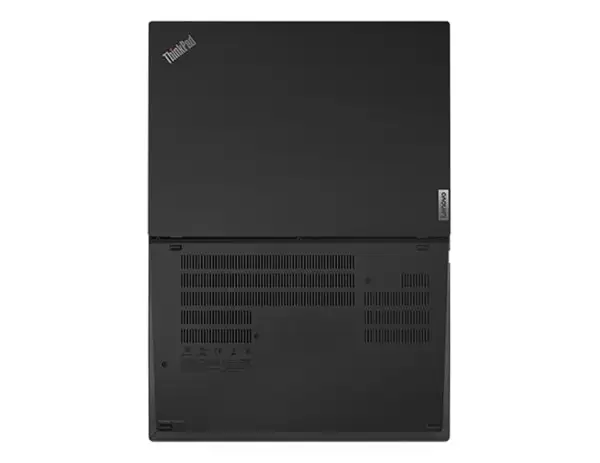
Marketing emphasizes military-grade durability and premium build. While the ThinkPad T14 passes MIL-STD-810H testing, some feel it falls short compared to past models. Reddit user [Name***] admitted: “The PC can be bent without problems, which I dislike… it feels more fragile than previous ThinkPads.” For users coming from sturdier T-series laptops like the T480, the lighter, thinner design trades some rigidity for portability.
Battery longevity is another headline claim. Trustpilot’s promotional copy promises “long battery life and rapid-charge technology.” Under Windows, light workloads keep the machine powered for most of the day. However, Hacker News reports a notable gap for Linux users—one developer said, “Battery life on Linux is ok-ish (typically 6 hours with light use), but nowhere near an M1 Mac.” Worse, enabling S3 sleep on Linux caused “battery drain like crazy… 1-2 days in a backpack and it’s dead.”
Cross-Platform Consensus
Universally Praised
A recurring highlight is the system’s hardware upgradability. Both Reddit and Hacker News threads feature users adding RAM or replacing SSDs. One AMD Ryzen 7 PRO owner on Hacker News installed 32GB RAM and swapped in a 1TB SSD, noting the ease: “You can easily add more memory… and there’s an M.2 slot for WWAN which can also be used for an SSD.” This makes the T14 appealing for developers, data analysts, and IT admins who need a machine that grows with their workload.
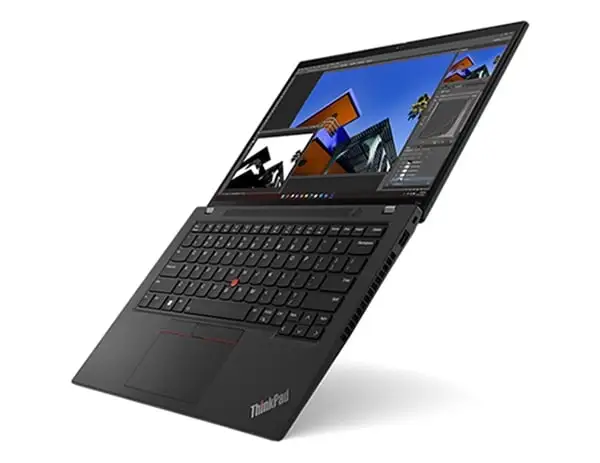
Multitasking performance wins consistent applause. Reddit users working from Google Workspace or juggling dozens of browser tabs report no slowdowns, even with demanding datasets. The ThinkPad’s port selection—a rarity with Ethernet, HDMI 2.1, USB-A, and USB-C—gets nods from professionals tired of dongle dependency.
The keyboard remains another ThinkPad stronghold. Lenovo’s updated keycaps with tactile markings aid long typing sessions, and the TrackPoint menu adds fast-access tweaks. For those in spreadsheets, coding, or support roles, these ergonomic touches translate directly into faster workflows.
Common Complaints
Build quality perceptions diverge from Lenovo’s durability claims. Reddit’s feedback is blunt: models feel more flexible than older ThinkPads, undermining confidence in rugged use. Moisture absorption, mentioned by one Reddit user, leads to “a layer of dry goo” on surfaces, especially troubling in high-humidity environments.
Audio quality pulls repeated criticism. While Dolby Audio is marketed, Hacker News users found speakers “much worse than modern MacBooks.” For designers and video editors relying on accurate sound without headphones, this is a letdown.
Linux compatibility exposes persistent pain points—sleep/resume bugs, scaling issues with GNOME on FHD panels, and fingerprint scanner faults. One Hacker News developer noted false negatives on Linux vs flawless scans on Windows.
Divisive Features
Display quality splits opinion. OLED and high-brightness WUXGA panels impress in Windows workflows, especially for media consumption. Yet in Linux, scaling quirks make 1080p optimal only with fractional zoom (125–150%), which leaves some UI elements blurry.
Battery life also divides the crowd. Windows users praise uptime and rapid-charging, while Linux adopters report just 6 hours under light loads—contradicting all-day productivity marketing.
Trust & Reliability
Trustpilot’s corporate messaging underscores strict quality control through military-grade tests and “more than 200 quality checks.” While users agree the T14 withstands typical wear, long-term confidence centers on its maintainability. Reddit veterans highlight the ThinkPad’s CRU (Customer Replaceable Units) design—battery and SSD swaps require no specialized tools.
Linux-oriented buyers face a reliability threshold. Hacker News feedback chronicles issues over a 7-month period, culminating in a return to MacBooks due to cumulative “paper cuts” in Linux stability. Windows users experience fewer persistent bugs after disabling features like Fast Boot.
Alternatives
The ThinkPad T480, an older Intel model, often comes up as a benchmark for toughness. Reddit comparisons describe the T480 as “a brick,” implying better rigidity, though the T14 outperforms it in battery and screen quality.
On the Linux front, Hacker News commenters point to the ThinkPad X13 AMD as a stable alternative for suspend/resume behavior. MacBook Pro comparisons surface repeatedly—Apple’s battery life and display quality set a high bar, though the T14’s ports and repairability give it unique appeal.
Price & Value
Amazon lists standard configurations around $692–$969, with high-tier OLED builds reaching $2,059. eBay’s market shows strong resale: used Gen 1 Ryzen 7 PRO units fetch $375–$799, while newer Gen 3 and Gen 4 models often surpass $1,000. This sustained value reflects ThinkPad loyalty and business demand.
Community tips favor buying mid-range configs and upgrading storage or memory yourself to save costs. As one Hacker News user did, starting with 16GB RAM and adding more later avoids Lenovo’s markup on pre-installed upgrades.
FAQ
Q: Is the ThinkPad T14 good for Linux?
A: It’s Lenovo-certified for Linux, but user reports highlight sleep/resume bugs, battery drain in S3 sleep, and scaling issues on certain displays. Developers may tolerate these with workarounds; casual Linux users may find it frustrating.
Q: Can the RAM and SSD be upgraded?
A: Yes. Both RAM and SSD are easily user-replaceable. Multiple owners praise the CRU-friendly design for painless upgrades without special tools.
Q: How does build quality compare to older ThinkPads?
A: Thinner and lighter than past models, but some users find it less rigid. Those upgrading from a T480 may notice more chassis flex.
Q: Is battery life really all day?
A: On Windows with light workloads, yes—especially with rapid charging. On Linux, expect closer to 6 hours. Sleep mode behavior impacts longevity.
Q: How is the audio quality?
A: Adequate for calls and basic media, but several users report it’s noticeably worse than MacBooks, making external speakers or headphones advisable.
Final Verdict: Buy if you’re a Windows-based professional who values upgradeable hardware, varied ports, and repairability. Avoid if you prioritize pristine build rigidity or require flawless Linux laptop behavior. Pro tip: Start with a base model and invest savings into your own RAM/SSD upgrades for maximum value.