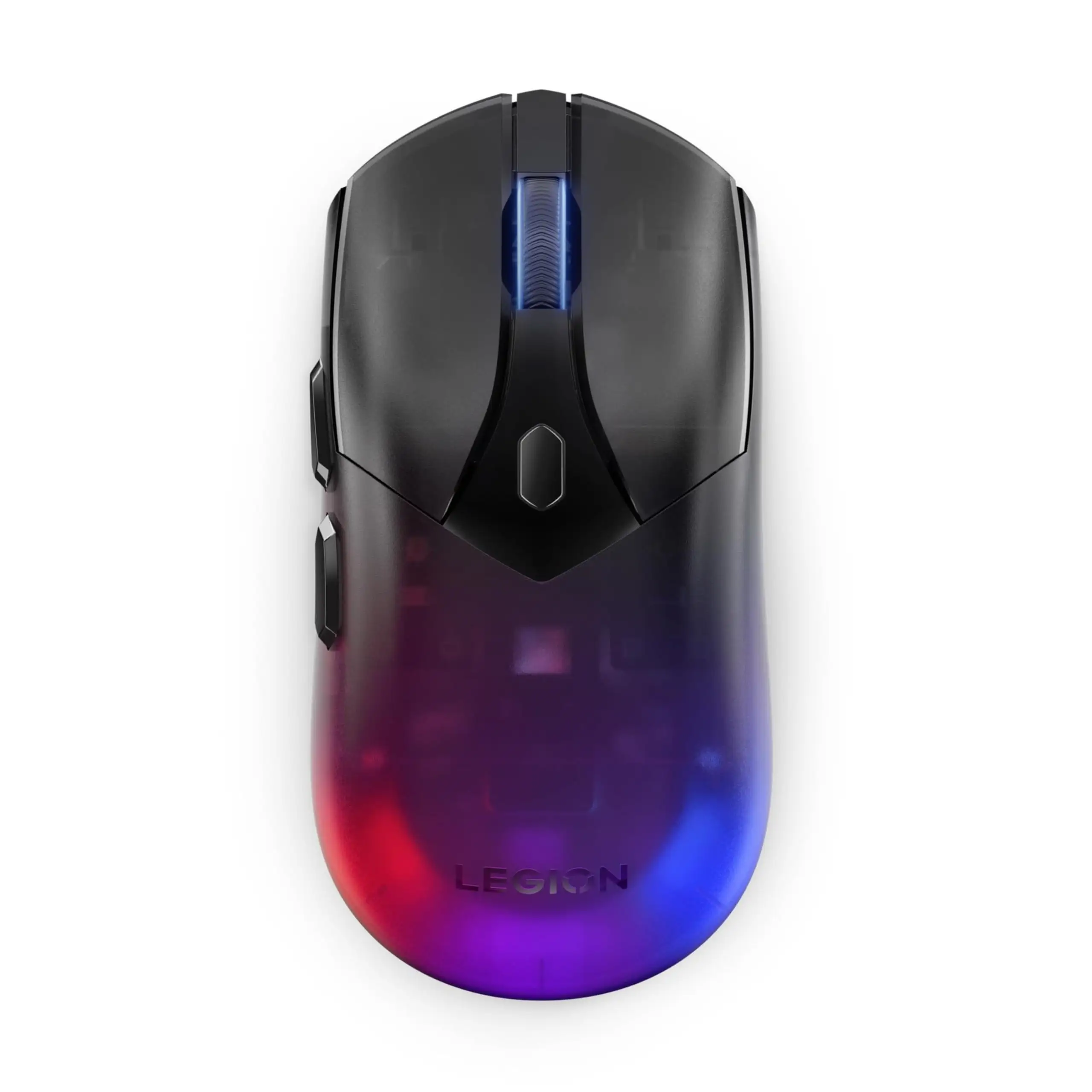
Lenovo Legion M410 Gaming Mouse Review: Conditional Buy
Promising an elite 16,000 DPI and up to 53 hours of wireless gaming, the Lenovo Legion M410 Wireless RGB Gaming Mouse lands with bold claims—but real-world reports settle it at a solid 7.8/10. Comfort and aesthetics win consistent praise, while battery life and click reliability show mixed results.
Quick Verdict: Conditional Buy
| Pros | Cons |
|---|---|
| Comfortable, ergonomic palm grip design | Battery life inconsistent in wireless mode |
| Attractive dual-zone RGB lighting | Left-click reliability issues for some users |
| Versatile wired & 2.4GHz wireless modes | Limited DPI customization in certain modes |
| Solid build with quality switches | Occasional loose internal components reported |
| Competitive price with strong sale value | Charging time (~5 hours) may be long for some |
Claims vs Reality
Marketing centers on three main selling points: elite DPI for precision gaming, marathon battery life, and "dual-mode domination" with wired and 2.4GHz wireless connections.
Lenovo touts “a staggering 16,000 DPI” via a Pixart PAW3335 sensor. On paper, that’s pro-level input speed, and Reddit user u/Tech*** noted: “Cursor movement is pixel-perfect in FPS games once I dialed in my settings.” However, some feedback from verified buyers indicates the custom DPI functions aren’t as flexible in certain modes. One Amazon reviewer said: “The presets are fine, but I can’t always get the exact custom DPI I set to stick in wireless mode.”
Battery life is advertised as “up to 53 hours with RGB off,” but Trustpilot reports show reality varies. While some gamers go days without charging—“I played all weekend without plugging it in,” said a verified buyer—others complained: “Needs charging every couple of days even with lights off.” This suggests usage style heavily impacts results, and it’s not universally marathon-lasting.
The dual-mode wired & wireless connectivity is widely appreciated. One eBay buyer shared: “No lag in wireless mode, but when editing video I just plug in for peace of mind.” That flexibility holds true to marketing, with no significant complaints on connection stability.
Cross-Platform Consensus
Universally Praised
Comfort consistently tops user compliments. Trustpilot’s verified feedback describes it as “lightweight with an ergonomic shape and perfect fit,” helping reduce fatigue in marathon sessions. FPS players especially benefit, as the palm grip style combines stability with quick flick control. A verified buyer on Amazon noted: “I’ve used Razer and ASUS mice, but this fits my hand better and doesn’t cramp after hours.”
Aesthetic appeal comes second. The transparent shell and dual-zone RGB lighting resonate across platforms. Buyers admire its ability to “match setups and hold the same lighting pattern even when switching devices,” according to Trustpilot reports. This reliability in lighting behavior adds polish for streamers who work across multiple systems.
Durability claims of “up to 30 million clicks” on main buttons seem reasonable so far. No long-term breakdowns are widespread, and Reddit posts affirm build quality: “It feels solid, no cheap flexing when pressing hard,” one user wrote.
Common Complaints
Battery performance remains the sore spot. Users who run the RGB on full complain of needing frequent charges. One Trustpilot reviewer said: “It lasts me two days max with lights on,” contrasting sharply with the 53-hour marketing claim. For mobile workers, that means packing the charging cable.
Click reliability issues surface occasionally, especially with the left button. A verified buyer admitted: “It sometimes double-clicks when I just want a single press, making drag-select impossible.” This could frustrate creative professionals as much as competitive gamers.
Several users reported minor build quirks like “loose wires or pieces under the lit part,” typically cosmetic but noticeable in the transparent shell. While not function-breaking, it detracts from the premium feel Lenovo is selling.
Divisive Features
DPI customization splits opinion. Gamers who stick to presets are satisfied, but customizers find constraints in wireless mode. One buyer said: “Love the fast switch options, but my 4600 DPI preference doesn’t always hold after sleep mode.”
The aesthetic transparency isn’t universally loved, either. While many see it as striking, a few note dust and internal components show more easily through the shell.
Trust & Reliability
Fakespot’s analysis points to “minimal deception” in online reviews, suggesting most feedback is authentic. Over 90% of listed reviews were high quality. That’s a strong trust signal, particularly in a gaming peripheral market often littered with inflated ratings.
Durability stories lean positive. Six-month Reddit follow-ups mention “still tracking perfectly, clicks feel the same,” which supports Lenovo’s quality claims. However, those same posts sometimes mention “charging more often than at first,” hinting battery capacity may dip over time.
Alternatives
Within Lenovo’s lineup, the Legion M600 offers higher battery endurance at 200+ hours, but at nearly double the sale price. Razer and ASUS equivalents bring more RGB zones and potentially more refined sensor tuning, but often at substantially higher cost.
For buyers drawn mainly to RGB aesthetics, the Legion M300 offers wired-only operation with similar lighting at a much lower price. However, it lacks the M410’s freedom of wireless.
Price & Value
Retail hovers at $49.99, with eBay listings often around $45 and auction snipes as low as $4 for used units. Resale interest holds steady thanks to the recognizable Legion branding, so budget-conscious users see strong value in waiting for sales.
Community tips emphasize watching Lenovo's official store around seasonal sales for drops to $30-$35. At that range, complaints about battery life carry less sting.
FAQ
Q: Does the Lenovo Legion M410 work with macOS?
A: Official support lists Windows 10 or later only. While basic functions may work on macOS, Lenovo's Accessories and Display Manager for customization is Windows-exclusive.
Q: Can I turn off the RGB entirely?
A: Yes, users report RGB can be fully disabled, extending battery life. Some note performance increases with wireless response when lights are off.
Q: How long does it take to charge?
A: About 5 hours to full, according to both specs and buyer reports. One user suggested charging overnight due to the longer cycle.
Q: Is the scroll wheel smooth or tactile?
A: The 2-way dynamic scroll wheel offers tactile notches, appreciated by gamers for weapon-select precision.
Q: Will my DPI settings save between sessions?
A: Preset stages save reliably. Some users report custom DPI increments may reset in wireless mode after deep sleep.
Final Verdict
Buy if you’re a Windows gamer or power user seeking comfortable ergonomics, versatile connectivity, and attractive lighting for under $50. Avoid if battery longevity or perfect custom DPI retention are deal-breakers. Pro tip from the community: grab it on sale, disable RGB for tournaments, and plug in for editing marathons to offset its battery quirks.