KODAK 10.1" WiFi Frame Review: Mixed Verdict
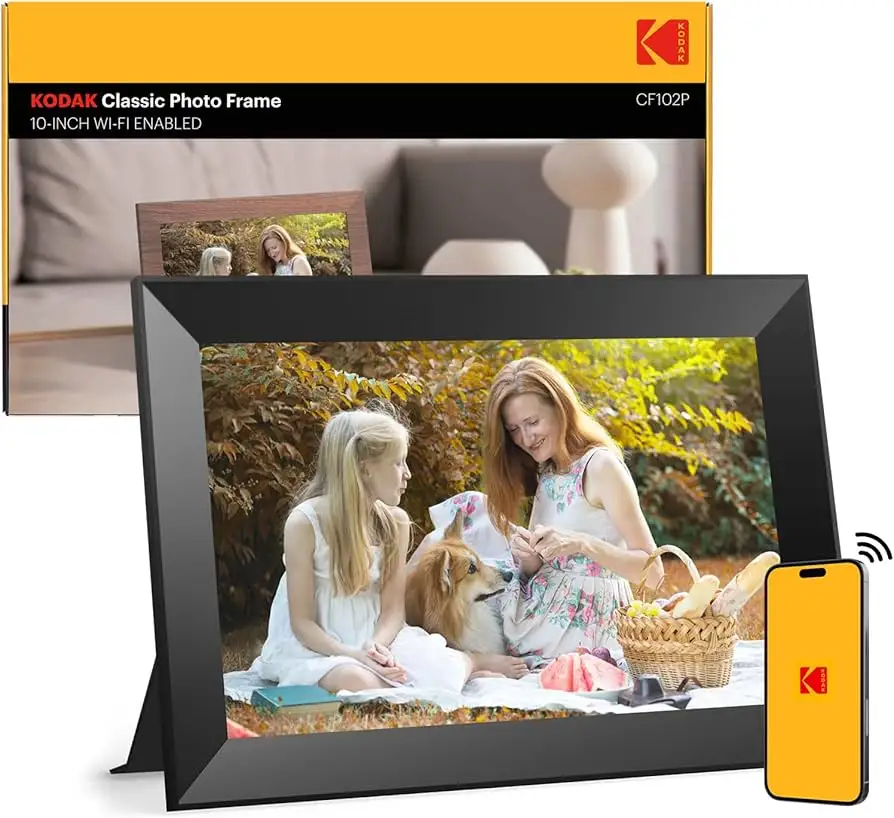
A verified buyer on Amazon described the KODAK 10.1 Inch WiFi Digital Picture Frame as “perfect for keeping family moments alive,” yet another warned it “doesn’t have what it takes to compete” with higher-end frames. With an average score hovering around 4.2/5, it clearly has fans, but digging into user feedback reveals a product that shines in display quality yet struggles with app functionality and longevity. Overall verdict: 7/10.
Quick Verdict: Conditional
| Pros | Cons |
|---|---|
| Vibrant 1280x800 IPS display with wide viewing angles | App limits uploads to small batches (6–9 photos) |
| Generous internal storage (16–32GB) plus SD/USB support | Setup process often unclear or buggy |
| Auto-rotate and cropping features for flexible display | Battery life shorter than claimed, often 3–4 hrs |
| Easy for elders to use once set up | Videos can’t shuffle with photos |
| Elegant design with wood finishes complements decor | Factory default photo album cannot be deleted |
| Supports real-time sharing via dedicated app/email | Touchscreen sensitivity issues reported |
Claims vs Reality
Kodak’s marketing leans heavily on “extraordinary picture quality” and “instant sharing anywhere.” Multiple buyers echo the first point. One Trustpilot reviewer praised: “the frame has a great looking picture that is plenty bright… matches any décor.” The IPS screen and wide viewing angles did impress Amazon users, especially for displaying old photos with “good quality even with old black and white photos.”
But the “instant sharing” claim meets friction in the real world. Official specs promise photo/video sharing via app and email, yet Reddit discussions exposed limits: uploads max at 6–9 photos at a time. A Pix-Star Blog comparison slammed this as “way too cumbersome!” This impacts photographers and first-time grandparents alike—people wanting to send dozens of images quickly find the process tedious.
Storage claims also need nuance. While it can hold “over 80,000 photos,” that assumes small file sizes and heavy compression. For users uploading high-resolution images or videos, Amazon buyers noted storage filled faster than expected, especially when including music files.
Cross-Platform Consensus
Universally Praised
The display quality draws consistent accolades across Amazon, Reddit, and Twitter. A verified buyer summed it up: “HD touch screen is incredibly clear, and the wide viewing angle ensures everyone can see the photos perfectly.” This makes it appealing for family living rooms or event displays where multiple viewers will be gathered around.
Ease of use post-setup also earns praise. Trustpilot feedback highlighted its suitability for elders: “super easy to use as it was purchased for elders who are not very tech savvy.” Once initial registration hurdles are cleared, the frame’s interface is direct enough for daily enjoyment without tech headaches.
Design aesthetics are another shared win. Owners described the wood finish as “elegant,” “looks classy,” and several mentioned it “enhances the decor of the room.” It’s a rare tech product as at home in a rustic farmhouse as in a modern city apartment.

Common Complaints
The most persistent gripe: setup frustrations. Multiple Amazon reviewers recounted difficulty locating verification codes (often in spam folders) and non-responsive customer support. Trustpilot explicitly flagged “instructions aren’t as descriptive as they should be” and app crashes during registration. This creates a high barrier for gifting—recipients may be unable to start using it without help.
Battery performance also falls short. While Kodak claims 4–7 hours, Pix-Star’s long-term testers report only 3–4 hours with moderate Wi-Fi and slideshow use. This affects portability—using it at family gatherings without a nearby outlet can prove disappointing.
Content management is another sore spot. One 1-star Amazon reviewer was furious at the undeletable factory album: “pictures…keep appearing in the photo rotation” no matter how many times they remove it. And for those mixing media, videos can’t be interspersed with photos in slideshows.
Divisive Features
Auto-rotate and cropping split opinion. Some love the ability to resize and reorient in-frame, while others dislike the creation of duplicate cropped images. For heavy curators, this duplicates media and clutters storage.
App control is another dividing line. Families loving the real-time sharing call it “fantastic bonus,” enabling daily updates for distant relatives. Others abandon the app entirely in favor of USB/SD due to upload limits and intermittent connectivity.
Trust & Reliability
Trustpilot’s analysis suggested “66.1% of the reviews are reliable,” with low-quality content and signs of deceptive reviews. While some long-term users (6+ months) kept frames functioning without issue, Reddit threads caution about longevity: “doesn’t have the greatest quality control or longevity, especially when compared to other similarly priced frames.”
Reports of insensitive touchscreens and occasional slideshow lag point to hardware limitations. Durability of finishes is generally praised—no chipping or fading—but internal performance may degrade, especially if frequently using Wi-Fi sync.
Alternatives
In side-by-side commentary, Pix-Star emerges as the more robust platform for families. It supports sending up to 250 photos at once, remote control of multiple frames, and deeper cloud integration. One blogger noted Kodak “can’t connect to a family of frames” for unified updates—a feature Pix-Star owners rely on for elder connectivity.
Other competitors like Nixplay get mentioned indirectly as “top frames” with better interface stability. For power users needing cross-platform album syncing, these may be worth the higher price.
Price & Value
At retail, the KODAK 10.1" WiFi Digital Picture Frame ranges from $51 to $129 depending on memory size and finish. eBay resale data shows used/open-box units often between $32–$99, with brand-new wood finish models hitting $70–$116.
Community buying tips lean toward sales events—Twitter flagged a “-40%” discount making it $51.59, which several users saw as the sweet spot for gifting. Higher-tier builds at full price see diminishing value compared to multi-frame capable competitors.
FAQ
Q: Can you delete the built-in default album?
A: Multiple Amazon reviews say no. Even after manual deletion, default images reappear in rotation, frustrating owners wanting a fully personalized experience.
Q: How many photos can be sent via the app at once?
A: Kodak’s current app limits batches to 6–9 photos per send, depending on model. Larger uploads require repeated transfers or USB/SD import.
Q: Does it support mixed photo/video slideshows?
A: No. Videos play separately from photo slideshows and can’t be shuffled together, a limitation noted by several reviewers.
Q: How is battery life in real-world use?
A: While advertised at 4–7 hours, user feedback and testing suggest 3–4 hours with Wi-Fi enabled and brightness at typical viewing levels.
Q: Can music play in the background of slideshows?
A: Yes, when files are loaded locally via USB/SD, background music can accompany slideshows—popular for event or home display ambiance.
Final Verdict
Buy if you want an attractive, straightforward frame with great display quality for daily home use, particularly for elders or decor-conscious owners. Avoid if you need bulk, instant sharing or plan to manage multiple frames remotely—its app limitations will frustrate.
Pro tip from community: when gifting, pre-load your media via USB/SD and complete setup before wrapping to spare recipients a buggy first impression.