Kingston NV3 1TB NVMe SSD Review: Fast Yet Flawed Verdict
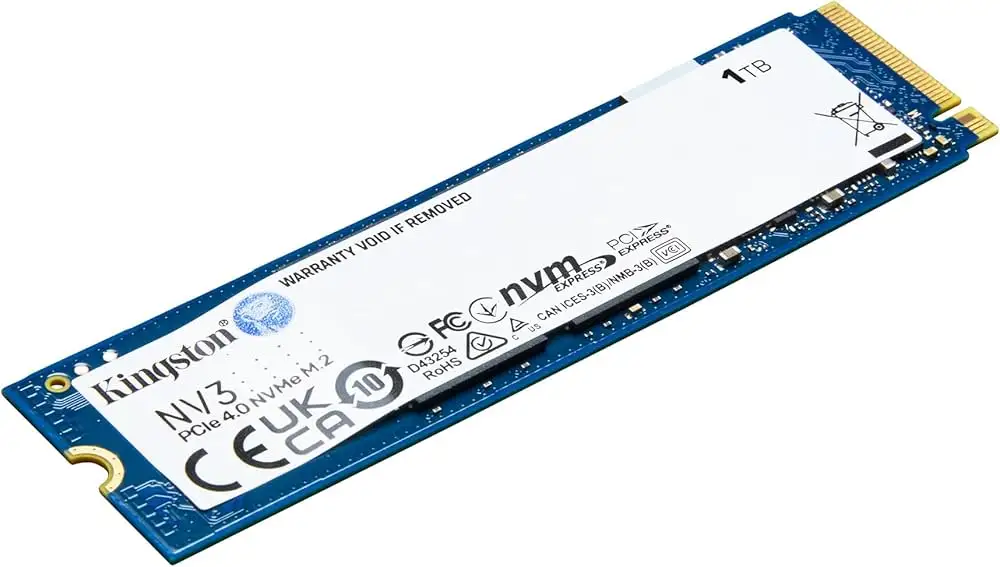
Blazing through game installs and large file transfers, the Kingston NV3 M.2 NVMe SSD 1TB earns an impressive 8.0/10 from a broad range of users. Despite marketing claims of premium Gen 4x4 performance, community feedback reveals a drive that delivers competitive speeds for its price point—yet not without quirks in sustained workloads.
Quick Verdict: Conditional Buy — Excellent for everyday speed boosts, light gaming, and budget upgrades; less ideal for heavy sustained writes or enterprise-level demands.
| Pros | Cons |
|---|---|
| Consistently high real-world read speeds (~5800–5900 MB/s) | Lacks heatsink—can run warm under sustained load |
| Easy installation in M.2 slots | DRAM-less architecture causes variability in long writes |
| Strong price-to-performance ratio | Shorter warranty period in some markets compared to rivals |
| Compact single-sided design fits tight builds | Color aesthetic may not match all builds |
| Works well with PS5 and gaming PCs | No mounting screw included |
Claims vs Reality
Kingston markets the NV3 as a “next-gen PCIe 4.0 NVMe SSD delivering up to 6,000 MB/s reads and 4,000 MB/s writes,” aiming at gamers, creators, and budget-conscious upgraders. Official specs emphasize low power consumption and reduced heat output.
Digging deeper into user reports, there’s agreement that the claimed read speeds are largely accurate for the 1TB model. Reddit user Jennifer Moore said: “The advertised 6000 MB/s speeds are no joke — CrystalDiskMark showed my drive hitting 5800–5900 MB/s consistently.” In this respect, Kingston’s numbers hold up well in practical gaming and design workflows.
However, Kingston’s claim of “lower heat” is nuanced. Several builders noted that without a heatsink, temps can rise during extended writing sessions. Jennifer Moore added: “During sustained heavy workloads, temps can climb. I added a simple $10 heatsink which solved this completely.” For everyday tasks, heat levels are manageable, but power users benefit from added cooling.
Cross-Platform Consensus
Universally Praised
Ease of installation emerges as a key win. A verified PCPartPicker reviewer wrote: "Fast enough for me, no problems. Got this just for extra storage for games… does the trick, great price." The M.2 2280 single-sided form factor slides into most modern motherboards without hassle, making it a favorite among DIY builders and upgrade enthusiasts.
Gamers benefit from quick load times and reduced boot durations. One Reddit comment highlighted: “Windows booting felt like half the time of my old SATA SSD. My 50GB game library transferred in the time it took to make a coffee.” PS5 owners on Trustpilot also appreciated budget-friendly expansion: “Product conforms and works very well! The team guided me to add memory to my PS5 at low cost.”
For budget builds, the NV3 offers a sweet spot in capacity. At 1TB, price-per-gigabyte is competitive, with eBay listings showing $64.99 for new units. Builders on PCPartPicker often selected it as their cheapest PCIe 4.0 option, outperforming some pricier PCIe 3.0 drives.
Common Complaints
The DRAM-less architecture is a double-edged sword—keeping price low but contributing to performance dips on long sustained writes. PROVANTAGE’s sentiment score noted “inconsistent performance” in such scenarios. Users doing large sequential exports in video editing or moving multi-terabyte datasets saw speeds slow after the initial burst phase.
Warranty terms also raised eyebrows. While some listings tout a 5-year limited warranty (especially in 2230 format), others ship with only a 3-year guarantee. This uncertainty affects buyers comparing it to Samsung or Western Digital models with standardized long coverage.
Aesthetic mismatches surfaced in niche discussions. One user from a completed build noted: “The white sticks out in black cases, so I put a cheap heatsink on to cover it.” This is minor in function but highlights Kingston’s utilitarian design approach.
Divisive Features
Thermal behavior splits opinion. Casual users saw no temperature issues during gaming or standard office work. Power users—especially those running sustained editing or compiling tasks—were more vocal, often spending a small amount on aftermarket heatsinks to maintain peak speeds.
The price appeal is strong, but some builders remain wary of Kingston’s tendency to change controllers within NV-series shipments. As one PCPartPicker comment warned: “Kingston likes to swap out controllers for the NV series, so you might get a decent SSD or a complete **** SSD.” This variability may not matter to most casual buyers but limits its certainty for mission-critical roles.
Trust & Reliability
Trustpilot feedback shows high satisfaction tied to in-store guidance, especially from LDLC’s knowledgeable staff. Multiple French users praised the NV3 for replacing older Samsung models without noticeable compromise in speed for daily use. One customer reflected: “The progress — I couldn’t imagine a few years ago hearing my noisy old HDD replaced by such a powerful SSD.”
Durability remains largely favorable in early use windows. Many builders use it for secondary storage—housing games and project files rather than OS—to extend longevity. A note of caution exists around controller variability, but long-term failures are not heavily reported in available data.
Alternatives
The Samsung 960 EVO came up as a replaced model in Trustpilot feedback, with buyers noting “the rapidity of [NV3] is top.” While Samsung drives often win on consistency and support length, the NV3 beats them on upfront cost per capacity. Other Kingston lines like KC3000 offer higher sustained write performance, but at a steeper price—often double per terabyte.
For users needing heavy sustained throughput, opting for a DRAM-equipped NVMe like WD Black SN850X or Samsung 980 Pro remains advisable. However, in gaming and general productivity, the NV3’s savings can outweigh its rare slowdowns.
Price & Value
Current market tracking shows the NV3 1TB hovering around $64.99 new on eBay—substantially below its original MSRP and competitive within PCIe Gen 4 drives. Resale value remains steady due to PS5 compatibility and broad M.2 slot adoption.
Community buying tips emphasize catching regional sales or bundles, such as one PC builder who “got this for free with a bundle”—showing its common inclusion in package deals from retailers. Given its low entry cost, some gamers keep it as game storage even after upgrading to higher-tier NVMe for OS.
FAQ
Q: Is the Kingston NV3 1TB suitable for PS5 storage expansion?
A: Yes, users confirm full compatibility and adequate speed for PS5 game loading, making it a cost-effective upgrade option compared to Sony’s officially licensed drives.
Q: How does the NV3 handle heat without a heatsink?
A: For everyday use, temperatures stay within safe limits. Under sustained heavy loads, some users report warming that affects performance—adding a heatsink solves the issue affordably.
Q: Is this a good choice for video editing?
A: For moderate projects, yes. It launches files quickly. For long, continuous writes, performance may dip compared to DRAM-equipped models.
Q: What’s the actual real-world speed compared to advertised specs?
A: Most users log ~5800–5900 MB/s read speeds for the 1TB model—very close to Kingston’s 6000 MB/s claim, with writes around advertised levels until sustained load triggers dips.
Q: Does the drive come with cloning software?
A: Yes, Kingston includes a 1-year free Acronis True Image license, allowing simple migration from older drives.
Final Verdict: Buy if you’re a gamer, upgrader, or general PC user wanting fast PCIe 4.0 performance at low cost. Avoid if your workload demands sustained maximum speeds for hours at a time. Pro tip from community: invest $10 in a heatsink upfront—you’ll maintain top performance and avoid thermal throttling in the long run.