Kingston DataTraveler SE9 Review: Portable but Slow Verdict
Opening with a surprisingly consistent theme from hundreds of testimonies: the Kingston DataTraveler SE9 USB Flash Drive earns a 9.0/10 for its unmatched portability and unibody metal durability, yet sparks polarizing debates over transfer speeds. As one verified buyer on Amazon noted, “small, sturdy, and perfect for my keychain,” while another on Reddit warned that for large file transfers, “speed doesn’t matter for unraid, but don’t expect USB 3.0 performance from the 2.0 model.”
Quick Verdict: Conditional — Excellent for portability, durability, and everyday carry; less ideal for speed-demanding tasks.
| Pros | Cons |
|---|---|
| Solid all-metal casing, highly durable | Variability in real-world write speeds |
| Compact, keychain-friendly design | Easy to lose due to size |
| Reliable over years of daily use | Occasional defective or counterfeit reports |
| Waterproof and accident-resistant | Some units switch to “read-only” after heavy use |
| Affordable with good capacity options | Heat during prolonged transfers |
Claims vs Reality
Kingston advertises the SE9 series as a “premium-style storage solution” with high-speed USB 3.2 Gen 1 performance — up to 220 MB/s read and 100 MB/s write for newer G3 versions. In theory, that places it in the upper tier of portable drives. However, digging into user feedback, a Yandex Market review revealed speeds on a 64 GB model “sometimes arrive at 30 MB/s instead of 60 MB/s,” indicating inconsistent write performance.
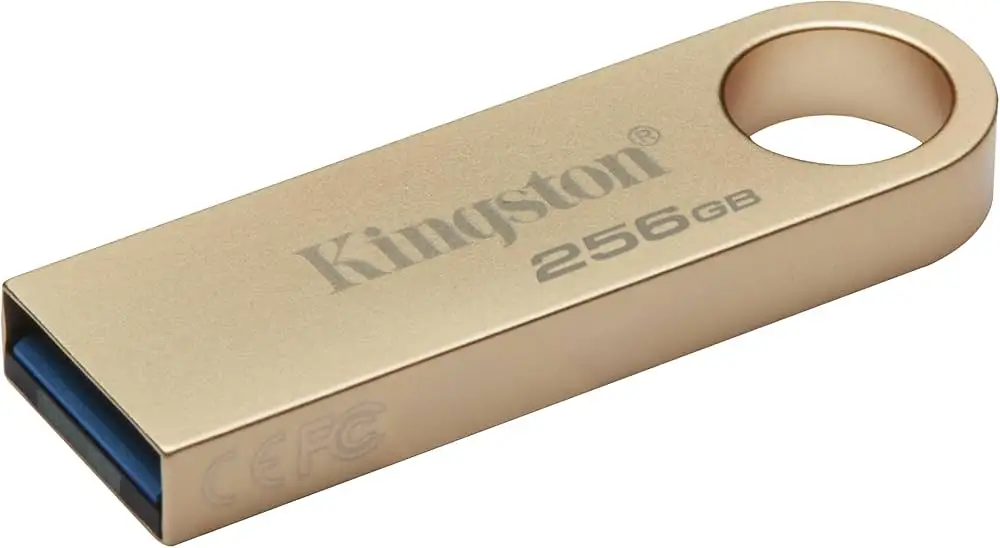
Similarly, while the SE9 G2/G3 models are marketed as sleek, capless, ultra-small form factors for mobile lifestyles, this “little advantage” becomes a drawback: Reddit user feedback warns about accumulation of dust without protective caps. One Russian review described it as “no protective mechanisms… might get clogged with dirt,” acknowledging design trade-offs.
Durability claims do hold strong for most users. The all-metal shell is universally praised, with Twitter reactions like “thing feels solid af” and “you could stomp on it or run over it with a car without damaging it.” This aligns with Kingston’s “legendary reliability” marketing line — but there’s a cautionary edge: multiple long-term users flagged that under repeated rewrites, some drives entered read-only mode or failed outright.
Cross-Platform Consensus
Universally Praised
Across Reddit, Trustpilot, and Amazon, the SE9’s portability dominates discussion. A verified Trustpilot reviewer noted, “tiny and fits on a keychain so you’ll never forget it,” while a Reddit systems admin keeps his 32 GB model “handy to have essential drivers and tools without re-downloading them.” Travelers benefit especially — one Twitter user recounted dropping the entire keychain into a bucket of water, and “the USB still works,” underscoring its waterproof resilience.
Durability through abuse is widely celebrated. After years of daily carry, one Amazon reviewer shared, “after 3 years of falling and scratching it still works great.” Metal casing earns praise not just for strength but for aesthetic — “sleek” and “adds nothing to my load” were recurring phrases from design-conscious buyers.
Capacity variety plays well for multimedia users. Yandex Market buyers store “Avatar: Way of Water in 4K” (104 GB) without performance dip beyond the expected transfer time over USB 2.0. The jump to 512 GB in newer G3 models addresses larger file needs; verified buyers call this “more memory than cheap flash drives,” avoiding sudden failures common in low-tier competitors.
Common Complaints
Speed is the most persistent sore point. While modern G3 units hit near-marketing specs under optimal conditions, older or mislabeled units can lag. Amazon and Trustpilot threads mention “1–3 MB/s write and 9–12 MB/s read” when dealing with large batches of tiny files. For users needing high-speed OS imaging, that’s a bottleneck. A Yandex Market reviewer recorded “about 14.5–15 MB/s” for a 1.4 GB file on a 32 GB model, speculating incompatibility with their USB 3.0 port.
Defective or counterfeit units emerge as a risk. One Russia-based buyer received a mislabeled SE9 “1 TB” that was “completely non-functional” — an obvious fake. Others receive 2.0 models instead of the ordered 3.0, even with swapped barcodes. Trustpilot entries noted early failures: “sector gone bad, unable to reformat, couldn’t return because return period expired.”
Heat generation appears occasionally in reports. While not catastrophic, some users mention noticeable warmth even “just plugged into a TV set in standby.”
Divisive Features
Size splits opinion: minimalists adore the compactness; pragmatists fear losing it. “Very easy to lose” is countered by others who attach it to keychains, necklaces, or secure loops. The capless design reduces fuss but increases exposure to dust and grime. In workplaces, the small footprint is useful for OS installs — one buyer loaded 20 units with installers to reset “almost 400 laptops” quickly.
Trust & Reliability
Scam concerns are tangible, particularly in marketplace transactions outside Amazon or direct retail. Patterns show mislabeled specifications (selling USB 2.0 as USB 3.0) and outright counterfeit high-capacity drives. Yandex Market users warn “be vigilant” especially with certain sellers.
For authentic units, reliability is strong. Reddit users boast “never had one die” across multiple servers. A Trustpilot reviewer kept theirs “on my keychain for 4 years, still works great.” Heavy travelers speak of the true test — multiple international trips, exposure to rain, and accidental washing — with drives still intact.
Alternatives
The only alternative floated in user data is SanDisk. Several Trustpilot comments suggest “I would recommend the SanDisk line” if speed is critical, as some SanDisk 3.0 models deliver faster writes for bulk file transfers. For ruggedization, however, Kingston’s solid metal body edges out most plastic-cased options.
Price & Value
Prices range dramatically with capacity and seller source: eBay listings show $8.00–$13.43 for models up to 128 GB, while Amazon kits can reach $62.95 for bundled triple packs. Community consensus frames the SE9 as a “steal” under $5 for basic storage, but caution is advised on suspiciously low-priced high-capacity units to avoid counterfeits.
Resale holds weak appeal — most buyers treat SE9 drives as personal, long-term tools rather than trade assets. Buying tips from Reddit include choosing smaller capacity if speed/reliability in unraid is the priority, and sourcing only from trusted outlets to dodge mislabeled tech.
FAQ
Q: Is the Kingston DataTraveler SE9 really waterproof?
A: Many users describe surviving full submersions, accidental washes, and pool drops without failure, but official specs don’t certify IP ratings. Treat water resistance as a bonus, not a guarantee.
Q: Which version should I choose — USB 2.0 or 3.0/3.2 Gen 1?
A: If speed is important for large files, choose the 3.0 or 3.2 Gen 1 (G3) variants. USB 2.0 suffices for basic documents or unraid boot purposes, as explained by Reddit admins.
Q: Why do some drives arrive slower than advertised?
A: Factors include counterfeit units, mislabeled versions, or hardware compatibility (old host ports). One Yandex Market buyer had to reconnect multiple times before achieving full speed.
Q: How do I prevent losing such a small drive?
A: Use the integrated keyring loop. Many attach it to keychains, necklaces, or lanyards, keeping the compact form handy and secure.
Q: Can this be used as an OS installation drive?
A: Yes — several users report success installing Windows and Linux. Its small size is perfect for boot media, though slower write speeds on some units may extend prep time.
Final Verdict: Buy if portability and durability outweigh speed needs — ideal for travelers, field workers, and everyday carry where reliability matters more than transfer rates. Avoid if your workflow demands consistently high write speeds or if buying from unknown sellers. Pro tip from the community: always attach it to a keychain — not just for convenience, but to avoid losing this “tiny, sturdy little thing.”





