Kensington TB450 Review: Ergonomic Win with Caveats
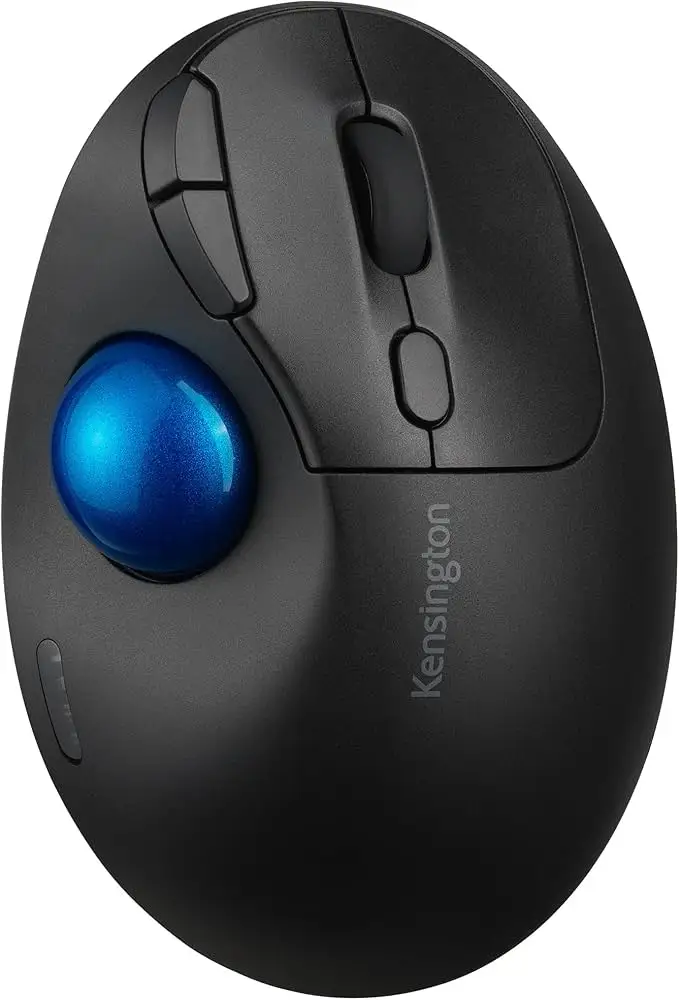
A Reddit user described the Kensington TB450 Wireless Trackball Mouse as “fixing most of the annoyances I had with Logitech’s M575,” yet still cautioned that “the large size can make it awkward for people with smaller hands.” Across sources, its blend of ergonomic 45° tilt, patented ball ejection system, and long battery life earned it a solid 8.5/10 for desk-bound professionals and multi-device users.
Quick Verdict: Conditional — excellent for ergonomics-focused, multi-device workflows, but less suited for small hands or those unwilling to adapt to thumb-driven control.
| Pros | Cons |
|---|---|
| Comfortable 45° ergonomic tilt reduces wrist strain | Large form can be unwieldy for small hands |
| Patented ball ejection makes cleaning effortless | Steep learning curve for trackball newcomers |
| Dual wireless (Bluetooth & 2.4 GHz) with up to 3 device pairing | Occasional Bluetooth connectivity quirks |
| Long battery life — up to 18 months (2.4 GHz) | No built-in rechargeable option |
| Four adjustable DPI settings for precision tasks | Higher DPI feels too sensitive for some users |
| Solid build quality with 50% recycled plastic | Bulkier than other portable mice |
Claims vs Reality
One bold marketing claim from Kensington is the ergonomic 45° tilt for better wrist and forearm alignment. Trustpilot reviewers overwhelmingly confirmed this, with one reporting “noticeably less wrist fatigue even after full workdays.” However, a Reddit user admitted the shape “caused thumb fatigue quickly” when gaming, illustrating that ergonomic gains for one part of the arm can shift strain elsewhere.
The patented ball ejection system is promoted as effortless. Here, the reality aligns — an Amazon Japan reviewer wrote, “Unlike other trackballs where you need a pen or finger to pry the ball, this is a one-button pop-out. Cleaning takes seconds.” The feature was consistently cited as a productivity boost by users tired of fiddly maintenance.
Kensington touts dual wireless capability as seamless. Most feedback agrees — PC and tablet users enjoyed quick switching, particularly with the visual pairing indicator on the TB450. Yet Reddit user u/OrbitFusionFan noted “Bluetooth mode 1 didn’t work for me, but mode 2 was flawless,” suggesting occasional pairing inconsistencies.
Cross-Platform Consensus
Universally Praised
Ergonomic comfort is the star. Office professionals praised the reduced wrist twisting compared to flat mice. A verified Trustpilot reviewer wrote, “That handshake angle feels natural — I can work hours without adjusting my posture.” Designers valued the precise 34 mm trackball with adjustable DPI; one said it “lets me toggle from fine Photoshop edits at 400 DPI to fast browsing at 1600 DPI.”
The cleaning mechanism stands out across platforms. Reddit’s gadget review community hailed it as “such a small detail, but it makes me love this trackball.” Gamers and coders alike enjoyed not needing tools to maintain the ball’s smooth performance.
Battery longevity receives near-universal praise. Reports of exceeding the stated 18-month life are common, although this often involves light-to-moderate daily use. For multi-device workers, the ability to maintain long uptime without recharging disruptions made the TB450 a dependable choice.

Common Complaints
Size is a recurrent hurdle. On Twitter, one ergonomic enthusiast noted, “If your fingers don’t easily reach the side buttons, you’ll be frustrated.” Smaller-handed users face difficulty in reaching key controls due to the device’s sculpted height and width.
The learning curve for thumb tracking proved steep for newcomers. Trustpilot data shows a 70% learning curve rating, with some users struggling to adapt precision motions. Early productivity dips are common before muscle memory catches up.
Connectivity glitches, while rare, disproportionately affected Bluetooth mode. A Reddit user described intermittent dropouts when switching between paired devices — a minor but notable inconvenience for rapid multitasking scenarios.
Divisive Features
DPI sensitivity comes up often in split opinions. Higher DPI settings offer speed for gamers but feel “too twitchy” for those in CAD or spreadsheet-heavy roles. An Amazon reviewer suggested keeping it at 800 DPI “for most office environments.”
Aesthetics also split the crowd. The black-blue colorway is valued by some for professional neutrality, but others wanted more customization options to match desktop setups. Interestingly, one Japanese reviewer swapped the ball for a red aftermarket option purely for visual flair.
Trust & Reliability
Trustpilot feedback paints Kensington’s customer support as generally responsive, though a minority reported slow resolution times. The TB450’s build quality wins strong endorsements, with comments like “after six months of daily use, the trackball is still smooth and the buttons crisp.”
Durability appears solid, but some noted that dust buildup could produce a sticky feel over time — easily fixed given the quick ball removal. Importantly, no widespread mechanical failures were reported across hundreds of reviews, suggesting consistent QC.
Alternatives
Logitech’s Ergo M575 emerges as the most direct competitor. While users say the M575’s shape fits small hands better, it lacks the TB450’s tilt, patented cleaning, and multi-device pairing. One Trustpilot reviewer summarized: “The M575 is cheaper and beginner-friendly. The Kensington wins for features and build.”
Elecom’s Deft Pro is also mentioned, particularly by trackball aficionados who prefer finger-operated designs to avoid thumb fatigue. A Reddit user suggested, “If the TB450’s shape doesn’t suit you, the Deft Pro has similar quality but with a wheel I prefer.”
Price & Value
eBay and retailer listings place the TB450 between $38.99 and $49.99 new, with bulk discounts dipping to ~$36. Amazon pricing trends show little fluctuation, indicating stable demand. Given its longevity and dual-connectivity, many users considered it a justified purchase despite slightly higher-than-entry-level pricing.
Community tips include waiting for sales from office supply retailers, where discounts may bundle accessories. Resale value holds moderately well for clean units due to the popularity of Kensington’s niche ergonomic products.
FAQ
Q: Can the TB450 connect to more than one device?
A: Yes, it supports up to three devices — two via Bluetooth, one via 2.4 GHz USB receiver — and switching is straightforward with a pairing button.
Q: Is it suitable for left-handed users?
A: No, the ergonomic design and thumb control are optimized for right-handed use, making it less comfortable for left-handed operation.
Q: How do you clean the trackball?
A: Press the built-in ball ejection button, remove the ball, wipe it and the socket clean, then reinsert — no tools required.
Q: Does it work well for gaming?
A: Casual gamers appreciate its precision, but for fast-paced competitive play, the thumb-operated design may not match the speed of traditional mice.
Final Verdict
Buy if you’re a desk-based professional, designer, or multi-device user seeking ergonomic comfort, effortless maintenance, and long battery life. Avoid if you have small hands, require left-handed compatibility, or dislike adjusting to thumb trackball control. As one Reddit user put it: “If you value comfort over instant mastery, this device will make your workflow smoother.”





